Openrefine: The Trim trailing and leading whitespace option for json/xml files does not work
Describe the bug
When you create a new json/xml project which has trailing whitespace in some elements, clicking the checkbox to eliminate them does not actually work.
To Reproduce
Steps to reproduce the behavior:
- Create a json project that has leading/trailing whitespace in some elements
- Click on
Trim leading & trailing whitespace from stringscheckbox
Current Results
Nothing happens, the whitespace remains.
Expected behavior
The whitespace should be removed when the checkbox is clicked
Screenshots

As seen here, there is leading whitespace in the first row, column name, body and email
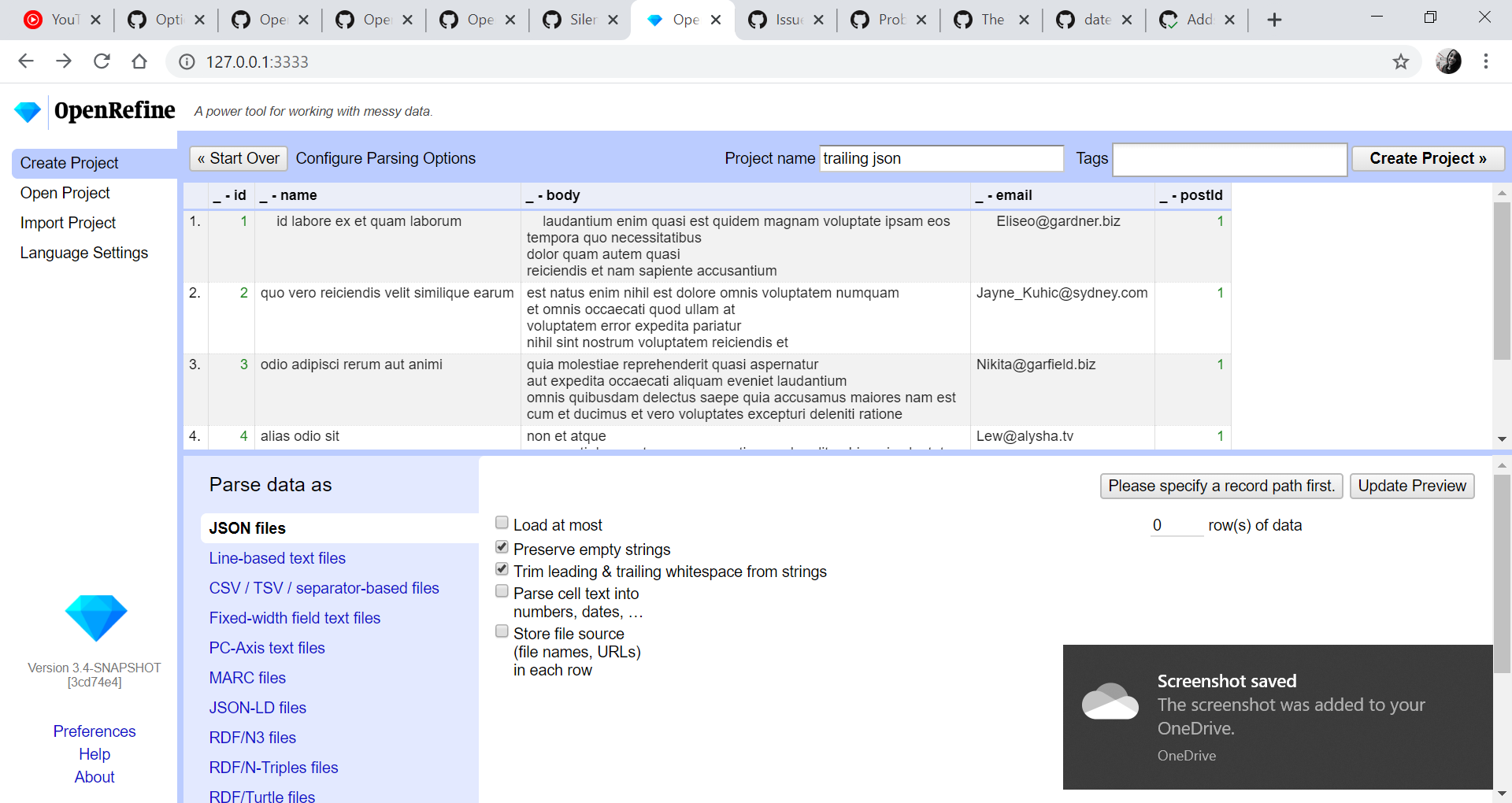
Trim leading & trailing whitespace from strings checkbox is clicked but still the whitespace remains.
Desktop:
- OS: Windows 10
- Browser Version: Google Chrome Version 80.0.3987.132
- openjdk version "11.0.6"
OpenRefine:
- Version OpenRefine 3.3
 lisa761
All 2 comments
Historically, importer options are supposed to perform those options upon Create Project, and some of them also work during Update Preview.
However, my personal preference has always been that the Update Preview should apply all the options a user selects onto those preview rows (100 rows, but limited to 1000 nodes by our code for Json importer) and then apply to all rows once the user clicks Create Project.
A case could be made where Update Preview is necessary to click on or not.
On some importers, I can see some options are nice to have immediate feedback on (as you identified here) and others its better to wait until the user clicks Update Preview?
It probably needs much more investigation into my thoughts above. :-) And maybe looking at old commit subject lines to make sure my history recollection is correct. Things certainly have changed over the last 10 years. :-)
 thadguidry
on 13 Mar 2020
thadguidry
on 13 Mar 2020
This seems to have also helped to resolve #1095 ?
I just tested it against that issue and it seems perfect. But perhaps a bit of auto detection of seeing those leading & trailing whitespaces in the imported file and automatically checking the new option for Trim leading & trailing whitespace from strings could be an improvement to close out #1095 ?
thadguidry
on 16 Mar 2020
Related issues
 ettorerizza
·
36Comments
ettorerizza
·
36Comments
 yaeln
·
33Comments
yaeln
·
33Comments
 wetneb
·
26Comments
wetneb
·
26Comments
 wentianq
·
50Comments
wentianq
·
50Comments
 Yuutakasan
·
27Comments
Yuutakasan
·
27Comments