Openrazer: razer blackwidow te chroma v2
ANY DRIVER? deamon can not detected the keyboard
 d11pl3
All 8 comments
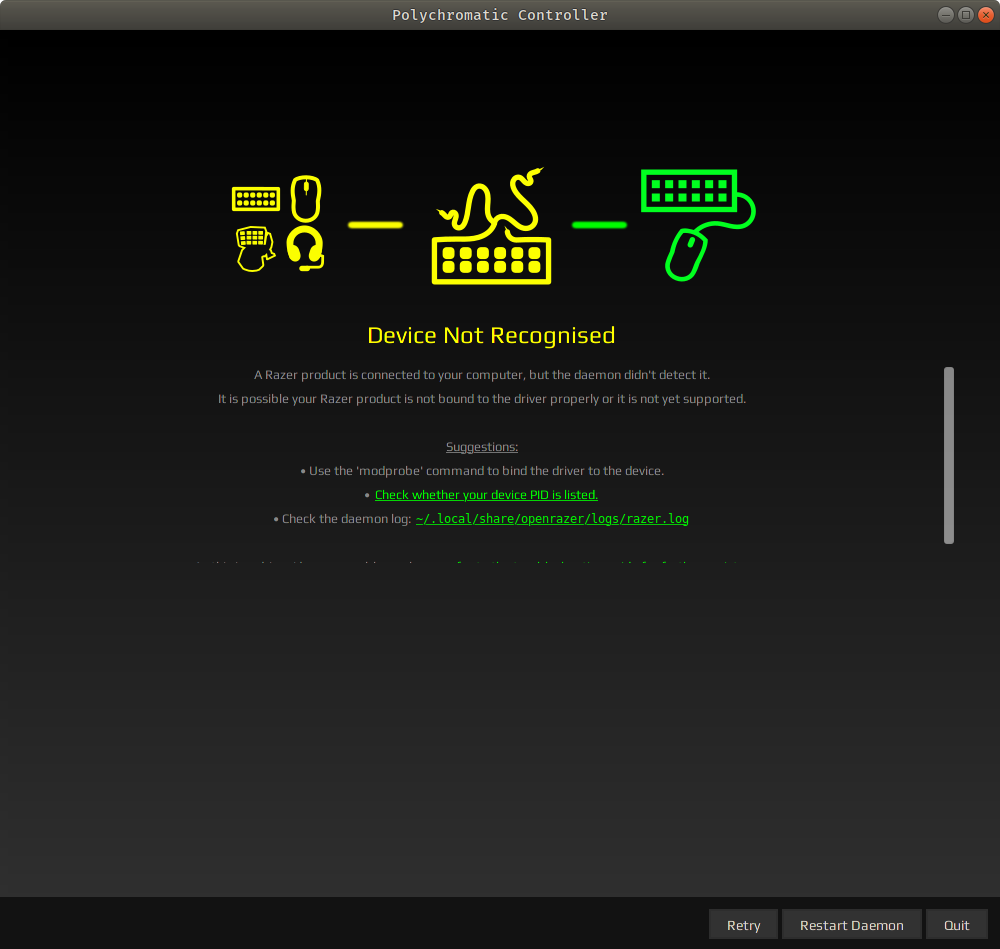
thats the error
d11pl3
on 2 Nov 2018
~$ lsusb -d 1532: -v
Bus 001 Device 007: ID 1532:0209 Razer USA, Ltd
Couldn't open device, some information will be missing
Device Descriptor:
bLength 18
bDescriptorType 1
bcdUSB 2.00
bDeviceClass 0 (Defined at Interface level)
bDeviceSubClass 0
bDeviceProtocol 0
bMaxPacketSize0 64
idVendor 0x1532 Razer USA, Ltd
idProduct 0x0209
bcdDevice 2.00
iManufacturer 1
iProduct 2
iSerial 0
bNumConfigurations 1
Configuration Descriptor:
bLength 9
bDescriptorType 2
wTotalLength 84
bNumInterfaces 3
bConfigurationValue 1
iConfiguration 0
bmAttributes 0xa0
(Bus Powered)
Remote Wakeup
MaxPower 500mA
Interface Descriptor:
bLength 9
bDescriptorType 4
bInterfaceNumber 0
bAlternateSetting 0
bNumEndpoints 1
bInterfaceClass 3 Human Interface Device
bInterfaceSubClass 1 Boot Interface Subclass
bInterfaceProtocol 1 Keyboard
iInterface 0
HID Device Descriptor:
bLength 9
bDescriptorType 33
bcdHID 1.11
bCountryCode 0 Not supported
bNumDescriptors 1
bDescriptorType 34 Report
wDescriptorLength 61
Report Descriptors:
* UNAVAILABLE *
Endpoint Descriptor:
bLength 7
bDescriptorType 5
bEndpointAddress 0x81 EP 1 IN
bmAttributes 3
Transfer Type Interrupt
Synch Type None
Usage Type Data
wMaxPacketSize 0x0008 1x 8 bytes
bInterval 1
Interface Descriptor:
bLength 9
bDescriptorType 4
bInterfaceNumber 1
bAlternateSetting 0
bNumEndpoints 1
bInterfaceClass 3 Human Interface Device
bInterfaceSubClass 0 No Subclass
bInterfaceProtocol 1 Keyboard
iInterface 0
HID Device Descriptor:
bLength 9
bDescriptorType 33
bcdHID 1.11
bCountryCode 0 Not supported
bNumDescriptors 1
bDescriptorType 34 Report
wDescriptorLength 159
Report Descriptors:
* UNAVAILABLE *
Endpoint Descriptor:
bLength 7
bDescriptorType 5
bEndpointAddress 0x82 EP 2 IN
bmAttributes 3
Transfer Type Interrupt
Synch Type None
Usage Type Data
wMaxPacketSize 0x0010 1x 16 bytes
bInterval 1
Interface Descriptor:
bLength 9
bDescriptorType 4
bInterfaceNumber 2
bAlternateSetting 0
bNumEndpoints 1
bInterfaceClass 3 Human Interface Device
bInterfaceSubClass 0 No Subclass
bInterfaceProtocol 2 Mouse
iInterface 0
HID Device Descriptor:
bLength 9
bDescriptorType 33
bcdHID 1.11
bCountryCode 0 Not supported
bNumDescriptors 1
bDescriptorType 34 Report
wDescriptorLength 94
Report Descriptors:
* UNAVAILABLE *
Endpoint Descriptor:
bLength 7
bDescriptorType 5
bEndpointAddress 0x83 EP 3 IN
bmAttributes 3
Transfer Type Interrupt
Synch Type None
Usage Type Data
wMaxPacketSize 0x0008 1x 8 bytes
bInterval 1
~$ ls -lah /dev/input/by-id/
total 0
drwxr-xr-x 2 root root 200 Kas 2 17:59 .
drwxr-xr-x 4 root root 580 Kas 2 17:59 ..
lrwxrwxrwx 1 root root 10 Kas 2 17:59 usb-Logitech_USB_Receiver-event-if01 -> ../event11
lrwxrwxrwx 1 root root 10 Kas 2 17:59 usb-Logitech_USB_Receiver-event-mouse -> ../event10
lrwxrwxrwx 1 root root 9 Kas 2 17:59 usb-Logitech_USB_Receiver-mouse -> ../mouse2
lrwxrwxrwx 1 root root 10 Kas 2 17:57 usb-M160715z0960_EasyCamera-event-if00 -> ../event13
lrwxrwxrwx 1 root root 9 Kas 2 17:59 usb-Razer_Razer_BlackWidow_Tournament_Edition_Chroma-event-kbd -> ../event7
lrwxrwxrwx 1 root root 9 Kas 2 17:59 usb-Razer_Razer_BlackWidow_Tournament_Edition_Chroma-if01-event-kbd -> ../event8
lrwxrwxrwx 1 root root 9 Kas 2 17:59 usb-Razer_Razer_BlackWidow_Tournament_Edition_Chroma-if02-event-mouse -> ../event9
lrwxrwxrwx 1 root root 9 Kas 2 17:59 usb-Razer_Razer_BlackWidow_Tournament_Edition_Chroma-if02-mouse -> ../mouse1
d11pl3
on 2 Nov 2018
Please run the following commands and paste the output here
sudo dkms install openrazer-driver/2.4.0
sudo modprobe razerkbd
 z3ntu
on 2 Nov 2018
z3ntu
on 2 Nov 2018
Please run the following commands and paste the output here
sudo dkms install openrazer-driver/2.4.0
sudo modprobe razerkbd
i got these messages
$ sudo dkms install openrazer-driver/2.4.0
Module openrazer-driver/2.4.0 already installed on kernel 4.15.0-38-generic/x86_64
$ sudo modprobe razerkbd
modprobe: ERROR: could not insert 'razerkbd': Required key not available
d11pl3
on 2 Nov 2018
Turn off Secure Boot in your BIOS or sign your DKMS modules (use your google-fu if you want to do that)
z3ntu
on 2 Nov 2018
thanks for ur interest i ll try
d11pl3
on 2 Nov 2018
Turn off Secure Boot in your BIOS or sign your DKMS modules (use your google-fu if you want to do that)
thank you so much it worked .Now i can use razer Polychromatic Control!!!
d11pl3
on 2 Nov 2018
For anyone with this issue, I managed to sign the DKMS module using this guide https://computerlinguist.org/make-dkms-sign-kernel-modules-for-secure-boot-on-ubuntu-1604.html
 pablopunk
on 23 Nov 2018
pablopunk
on 23 Nov 2018
Related issues
 CalcProgrammer1
·
7Comments
CalcProgrammer1
·
7Comments
 Saksol
·
4Comments
Saksol
·
4Comments
 keponk
·
3Comments
keponk
·
3Comments
 ddavini
·
6Comments
ddavini
·
6Comments
 SheenBR
·
4Comments
SheenBR
·
4Comments
Most helpful comment
Turn off Secure Boot in your BIOS or sign your DKMS modules (use your google-fu if you want to do that)