Openpose: macOS - protobuf compilation errors
Steps to reproduce
- Clone repo
bash 3rdparty/osx/install_deps.shmkdir buildcd buildcmake-gui(configure and generate with the non default settings below)sudo makeinside thebuilddirectory fails due to protobuf errors.
Type of Issue
- Compilation/installation error
Your System Configuration
- macOS High Sierra 10.13.4
- MacBook Pro (Retina, 13-inch, Early 2015)
- Processor: 2.7 GHz Intel Core i5
- RAM: 16 GB 1867 MHz DDR3
Non-default settings
GPU_MODE=CPU_ONLYandWITH_EIGEN=BUILD
Using commit c8e3879
Description
Compilation fails on mac with numerous errors in the protobuf lib:
In file included from /usr/local/include/google/protobuf/wire_format_lite_inl.h:43:
/usr/local/include/google/protobuf/message_lite.h:117:3: error: unknown type name 'constexpr'
  constexpr const T& get() const { return reinterpret_cast<const T&>(union_); }
  ^
/usr/local/include/google/protobuf/message_lite.h:117:13: error: expected member name or ';' after declaration specifiers
  constexpr const T& get() const { return reinterpret_cast<const T&>(union_); }
  ~~~~~~~~~ ^
/usr/local/include/google/protobuf/message_lite.h:110:11: error: use of undeclared identifier 'union_'
    new (&union_) T();
          ^
/usr/local/include/google/protobuf/message_lite.h:114:5: error: use of undeclared identifier 'get_mutable'
    get_mutable()->~T();
    ^
/usr/local/include/google/protobuf/message_lite.h:131:48: error: found '<::' after a template name which forms the digraph '<:'
      (aka '[') and a ':', did you mean '< ::'?
In file included from /usr/local/include/google/protobuf/wire_format_lite_inl.h:44:
/usr/local/include/google/protobuf/repeated_field.h:123:39: error: expected ';' at end of declaration list
  RepeatedField(RepeatedField&& other) noexcept;
                                      ^
/usr/local/include/google/protobuf/repeated_field.h:124:50: error: expected ';' at end of declaration list
  RepeatedField& operator=(RepeatedField&& other) noexcept;
                                                 ^
/usr/local/include/google/protobuf/repeated_field.h:778:45: error: expected ';' at end of declaration list
  RepeatedPtrField(RepeatedPtrField&& other) noexcept;
                                            ^
/usr/local/include/google/protobuf/repeated_field.h:779:56: error: expected ';' at end of declaration list
  RepeatedPtrField& operator=(RepeatedPtrField&& other) noexcept;
                                                       ^
/usr/local/include/google/protobuf/repeated_field.h:1090:68: error: expected ';' at end of declaration
inline RepeatedField<Element>::RepeatedField(RepeatedField&& other) noexcept
                                                                   ^
/usr/local/include/google/protobuf/repeated_field.h:1090:69: error: unknown type name 'noexcept'
inline RepeatedField<Element>::RepeatedField(RepeatedField&& other) noexcept
                                                                    ^
/usr/local/include/google/protobuf/repeated_field.h:1091:5: error: expected unqualified-id
    : RepeatedField() {
    ^
/usr/local/include/google/protobuf/repeated_field.h:1103:27: error: expected ';' at end of declaration
    RepeatedField&& other) noexcept {
                          ^
/usr/local/include/google/protobuf/repeated_field.h:1103:28: error: C++ requires a type specifier for all declarations
    RepeatedField&& other) noexcept {
                           ^
/usr/local/include/google/protobuf/repeated_field.h:1103:36: error: expected ';' after top level declarator
    RepeatedField&& other) noexcept {
                                   ^
/usr/local/include/google/protobuf/repeated_field.h:1928:30: error: expected ';' at end of declaration
    RepeatedPtrField&& other) noexcept
                             ^
/usr/local/include/google/protobuf/repeated_field.h:1928:31: error: unknown type name 'noexcept'
    RepeatedPtrField&& other) noexcept
                              ^
/usr/local/include/google/protobuf/repeated_field.h:1929:5: error: expected unqualified-id
    : RepeatedPtrField() {
    ^
fatal error: too many errors emitted, stopping now [-ferror-limit=]
 codyrushing
All 29 comments
I have just tried to recompile the latest code and it seems to work fine on OSX 10.10. I have not been able to test it on the latest OSX version as I do not have it.
This looks like C++ 11 not being enabled, and the error seems to be from the caffe compilation. Are you able to help me check out the latest caffe and see if you can compile it on your machine
 soulslicer
on 26 Jun 2018
soulslicer
on 26 Jun 2018
@soulslicer I believe it installed the latest caffe during cmake, but I could be wrong. What do you need from me to help troubleshoot?
codyrushing
on 26 Jun 2018
Are you able to paste your entire cmake and build output from a clean build to pastebin thanks. Don't use your own 3rd party libs, let OpenPose select or build it
soulslicer
on 26 Jun 2018
What are the correct steps to run this: I cloned it in my virtual environment then cd openpose
mkdir build
cd build
cmake-gui
It gives error
P.S. i am running it in MAC
 Eyshika
on 26 Jun 2018
Eyshika
on 26 Jun 2018
I cannot help anyone if they are unable to provide a pastebin of their output. As stated, I have the opportunity to test it only on OSX 10.10 and Prior. Hence, without knowing the full error message I can't help
soulslicer
on 26 Jun 2018
These are my steps:
$ git clone "https://github.com/CMU-Perceptual-Computing-Lab/openpose.git"
Cloning into 'openpose'...
remote: Counting objects: 14986, done.
remote: Compressing objects: 100% (5/5), done.
remote: Total 14986 (delta 1), reused 1 (delta 1), pack-reused 14980
Receiving objects: 100% (14986/14986), 79.00 MiB | 1.24 MiB/s, done.
Resolving deltas: 100% (11286/11286), done.
$cd openpose
$mkdir build
$cd build
$cmake ..
-- The C compiler identification is AppleClang 9.1.0.9020039
-- The CXX compiler identification is AppleClang 9.1.0.9020039
-- Check for working C compiler: /Applications/Xcode.app/Contents/Developer/Toolchains/XcodeDefault.xctoolchain/usr/bin/cc
-- Check for working C compiler: /Applications/Xcode.app/Contents/Developer/Toolchains/XcodeDefault.xctoolchain/usr/bin/cc -- works
-- Detecting C compiler ABI info
-- Detecting C compiler ABI info - done
-- Detecting C compile features
-- Detecting C compile features - done
-- Check for working CXX compiler: /Applications/Xcode.app/Contents/Developer/Toolchains/XcodeDefault.xctoolchain/usr/bin/c++
-- Check for working CXX compiler: /Applications/Xcode.app/Contents/Developer/Toolchains/XcodeDefault.xctoolchain/usr/bin/c++ -- works
-- Detecting CXX compiler ABI info
-- Detecting CXX compiler ABI info - done
-- Detecting CXX compile features
-- Detecting CXX compile features - done
CUDA_TOOLKIT_ROOT_DIR not found or specified
-- Could NOT find CUDA (missing: CUDA_TOOLKIT_ROOT_DIR CUDA_NVCC_EXECUTABLE CUDA_INCLUDE_DIRS CUDA_CUDART_LIBRARY)
-- Building with CUDA.
-- Looking for pthread.h
-- Looking for pthread.h - found
-- Looking for pthread_create
-- Looking for pthread_create - found
-- Found Threads: TRUE
CUDA_TOOLKIT_ROOT_DIR not found or specified
-- Could NOT find CUDA (missing: CUDA_TOOLKIT_ROOT_DIR CUDA_NVCC_EXECUTABLE CUDA_INCLUDE_DIRS CUDA_CUDART_LIBRARY)
-- cuDNN not found
-- Could NOT find GFlags (missing: GFLAGS_INCLUDE_DIR GFLAGS_LIBRARY)
-- Could NOT find Glog (missing: GLOG_INCLUDE_DIR GLOG_LIBRARY)
-- CUDA not found.
ubuntu_version="$(lsb_release -r)"
sudo apt-get update && sudo apt-get install wget -y --no-install-recommends
if [[ $ubuntu_version == "14." ]]; then
wget -c "https://developer.nvidia.com/compute/cuda/8.0/Prod2/local_installers/cuda-repo-ubuntu1404-8-0-local-ga2_8.0.61-1_amd64-deb"
sudo dpkg --install cuda-repo-ubuntu1404-8-0-local-ga2_8.0.61-1_amd64-deb
elif [[ $ubuntu_version == "16." ]]; then
wget -c "https://developer.nvidia.com/compute/cuda/8.0/Prod2/local_installers/cuda-repo-ubuntu1604-8-0-local-ga2_8.0.61-1_amd64-deb"
sudo dpkg --install cuda-repo-ubuntu1604-8-0-local-ga2_8.0.61-1_amd64-deb
fi
sudo apt-get update
sudo apt-get install cuda
CMake Error at CMakeLists.txt:385 (message):
Install CUDA using the above commands.
-- Configuring incomplete, errors occurred!
See also "/Users/eyshika.agarwal/openpose/build/CMakeFiles/CMakeOutput.log".
P.S. I am running in MAC OS High Sierra
Eyshika
on 26 Jun 2018
@codyrushing Could you try installing Caffe from its official website, and then simply disable BUILD_CAFFE in OpenPose CMake? (So OpenPose will ask you for the path where you have your Caffe). Thanks
 gineshidalgo99
on 26 Jun 2018
gineshidalgo99
on 26 Jun 2018
@Eyshika Hi, you are using CUDA, which is not supported for Mac at the moment. This proves you have not read the instructions. Please, download and use the latest OpenPose version and try again (I have set CPU_ONLY as default value), but do read the doc/installation.md instructions for the specific details for Mac. Thanks.
gineshidalgo99
on 26 Jun 2018
While configuring I got red boxes for
Caffe_INCLUDE_DIRS : Caffe_Include_DIRS-NOTFOUND
Caffe_Libs: Caffe_Libs-NOTFOUND
Opencv_DIR: usr/local/share/OPENCV
GFLAGS_INCLUDE/DIR: /usr/local/include
GFLAGS_LIBRARY: /usr/local/lib/libgflags.dylib
GLog_library: /usr/local/lib/libgflags.dylib
Could NOT find OpenMP_C (missing: OpenMP_C_FLAGS OpenMP_C_LIB_NAMES)
Could NOT find OpenMP_CXX (missing: OpenMP_CXX_FLAGS OpenMP_CXX_LIB_NAMES)
Could NOT find OpenMP (missing: OpenMP_C_FOUND OpenMP_CXX_FOUND)
What are the reasons behind it ?
Eyshika
on 27 Jun 2018
FOR MAC should generator be xcode ?
Eyshika
on 27 Jun 2018
@codyrushing
Are you using protobuf ver. 3.6.0?
Please try using protobuf ver. 3.5.1.
 takaya1219
on 27 Jun 2018
takaya1219
on 27 Jun 2018
@soulslicer installing Caffe separately and setting BUILD_CAFFE to false in the cmake config seems to have done the trick 😄. Here are the steps I used to fix my build:
- Remove the
buildfolder brew uninstall caffeto remove the version of Caffe previously installed via cmake.brew install caffeto install Caffe separatelymkdir build; cd buildcmake-gui- Make the following adjustments to the cmake config:
BUILD_CAFFEset to falseGPU_MODEset toCPU_ONLY(as recommended for MacOS)Caffe_INCLUDE_DIRSset to/usr/local/include/caffeCaffe_LIBSset to/usr/local/lib/libcaffe.dylib

@takaya1219 I tried downgrading protobuf to v3.5.1 before implementing the above changes, and that did not fix the build for me.
codyrushing
on 27 Jun 2018
@codyrushing THanks for the feed-back! I'll add it to the Mac instructions!
gineshidalgo99
on 27 Jun 2018
@codyrushing Not sure I understand. Were you attempting to link to an older version of Caffe yourself? Also, does the openpose provided caffe (Latest master branch) compile on OSX 10.13? I've seen that you have installed Caffe via brew which will usually work, but I'm curious to know if the latest master caffe can compile on OSX 10.13
soulslicer
on 27 Jun 2018
@codyrushing Which generator did you use for Mac ?
Also after configuring were you able to do "make -jnproc " since I was getting error in this but may be because of caffe installed by openpose itself
Eyshika
on 27 Jun 2018
@soulslicer I was not trying to link an older version of Caffe, it was installed via the cmake generation step for openpose. Compiling after the cmake is what failed for me. I'm not sure if it was Caffe specifically that failed to compile, but for some reason installing it separately worked
codyrushing
on 28 Jun 2018
@Eyshika I used cmake as the docs recommend. I installed cmake-gui via homebrew
codyrushing
on 28 Jun 2018
Thanx @codyrushing . one last question , are you able to run any demos using the command provided in Intruction (for webcam/video/audio). I am trying to run but it fails. I have explained it here : https://github.com/CMU-Perceptual-Computing-Lab/openpose/issues/684 . Please let me know how you ran the examples in the issue
Eyshika
on 28 Jun 2018
@Eyshika were you able to run "make -jnproc "? I get the error - 'caffe/blob.hpp' file not found
 torshimizu
on 28 Jun 2018
torshimizu
on 28 Jun 2018
@torshimizu : yes I also had that problem in starting, but then I removed cuda which I had installed separately and also caffe and then reinstalled caffe only and ran whole thing again . Also i used make -j8 so it worked
Eyshika
on 28 Jun 2018
@codyrushing Thank you so much! After 1 week I finally got openpose working!!!
 SreehariRamMohan
on 8 Sep 2018
SreehariRamMohan
on 8 Sep 2018
Hi all,
I had these exact same issues, I ended up having to build protobuf 3.5.x from source following these instructions.
I checked out the branch "3.5.x" on the official repo.
 lkwatson
on 16 Sep 2018
lkwatson
on 16 Sep 2018
@lkwatson
I just got a New Mac last week. It looks like Protobuf was updated to 3.6.1 on brew 3 months ago, breaking everything in Caffe.
The fix is very simple:
https://github.com/BVLC/caffe/issues/6359#issuecomment-396893193
All you need to do is add one line to Caffe. I will see what I can do about this to merge it in
For now please apply the following commands:
#Go to Openpose directory
brew install wget
cd 3rdparty/caffe
wget https://github.com/CMU-Perceptual-Computing-Lab/openpose/files/2637748/patch.txt
git apply patch.txt
@soulslicer
Yea I figured it was probably a caffe problem. Wow, what a simple fix. Thanks!
lkwatson
on 3 Dec 2018
Hello,
I'm not seeing the following parameters in my CMake GUI:
Caffe_INCLUDE_DIRS
Caffe_LIBS
I only see this:
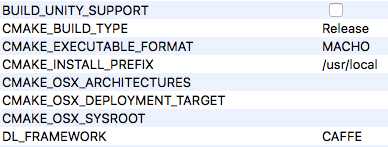
Does anybody know why this might be?
Thanks.
 johnlinnane
on 4 Jul 2019
johnlinnane
on 4 Jul 2019
@codyrushing I followed your advice to build Caffe separately and tick the configuration. But I got this error in the cmake GUI. Do you know what might be the problem?
GCC detected, adding compile flags
Building CPU Only.
Found gflags  (include: /usr/local/include, library: /usr/local/lib/libgflags.dylib)
Found glog    (include: /usr/local/include, library: /usr/local/lib/libglog.dylib)
Could NOT find OpenMP_C (missing: OpenMP_C_FLAGS OpenMP_C_LIB_NAMES)
Could NOT find OpenMP_CXX (missing: OpenMP_CXX_FLAGS OpenMP_CXX_LIB_NAMES)
Could NOT find OpenMP (missing: OpenMP_C_FOUND OpenMP_CXX_FOUND)
CMake Error at CMakeLists.txt:839 (message):
  Caffe not found.  Either turn on the BUILD_CAFFE option or specify the path
  of Caffe includes

          and libs using -DCaffe_INCLUDE_DIRS and -DCaffe_LIBS.


Configuring incomplete, errors occurred!
See also "/Users/Terry/Documents/openpose/openpose-master/build/CMakeFiles/CMakeOutput.log".
See also "/Users/Terry/Documents/openpose/openpose-master/build/CMakeFiles/CMakeError.log".
 sealpuppy
on 8 May 2020
sealpuppy
on 8 May 2020
I have the same issue, please help!! Do you resolved it??
 bgonzlez
on 12 May 2020
bgonzlez
on 12 May 2020
Nope. Sorry.
sealpuppy
on 13 May 2020
I am having same issue here.
Caffe not found. Either turn on the BUILD_CAFFE option or specify the path
of Caffe includes
and libs using -DCaffe_INCLUDE_DIRS and -DCaffe_LIBS.
 pxgao
on 25 May 2020
pxgao
on 25 May 2020
Related issues
 iremozkal
·
3Comments
iremozkal
·
3Comments
 shiangyoung
·
5Comments
shiangyoung
·
5Comments
 RuWang15
·
4Comments
RuWang15
·
4Comments
 jerry7767
·
3Comments
jerry7767
·
3Comments
 ran2207
·
3Comments
ran2207
·
3Comments
Most helpful comment
@soulslicer installing Caffe separately and setting
BUILD_CAFFEto false in the cmake config seems to have done the trick 😄. Here are the steps I used to fix my build:buildfolderbrew uninstall caffeto remove the version of Caffe previously installed via cmake.brew install caffeto install Caffe separatelymkdir build; cd buildcmake-guiBUILD_CAFFEset to falseGPU_MODEset toCPU_ONLY(as recommended for MacOS)Caffe_INCLUDE_DIRSset to/usr/local/include/caffeCaffe_LIBSset to/usr/local/lib/libcaffe.dylib@takaya1219 I tried downgrading protobuf to v3.5.1 before implementing the above changes, and that did not fix the build for me.