Openmvg: Blender Addon for importing OpenMVG SfM reconstruction results
Hi Pierre,
I am working on a Blender Addon (https://github.com/SBCV/Blender-Addon-Photogrammetry-Importer) that allows you to import different photogrammetry data formats into Blender. The latest version supports now OpenMVG JSON files.
I can imagine that this tool could be useful for other OpenMVG JSON files users as well. It offers for example a nice way to visualize the reconstruction results (including cameras and image planes).
One can use Blender's camera animation tool to render the reconstruction. The camera animation in Blender offers many useful options to define the camera motion. You can define for example the camera path in 3D and add looking constraints for the camera.
Furthermore, you can load different models (with different file formats) into Blender at the same time. So you can for example render a point cloud and the corresponding mesh at the same time (e.g. to highlight differences).
I used it for example to compare reconstruction results of virtual data with the corresponding virtual environment.
For Blender users:
You can use OpenMVG instead of Blender's camera tracking tool to reconstruct the scene. Which is way more comfortable, since Blender's camera tracking requires a lot of user interaction to compute reasonable results.
Just wanted to inform you about that. Maybe you want to add a reference to the documentation.
Feel free to close this issue.
Cheers
Sebastian
 SBCV
SBCV
All 8 comments
Thank you @SBCV.
This is a great contribution?
Would you be ok to share a tiny demo here (some screenshot for the community).
- Does Blender is having a spherical camera model (if it is the case we could map Spherical SfM reconstruction in Blender...)?
 pmoulon
on 14 Aug 2019
pmoulon
on 14 Aug 2019
@SBCV I made you a PR to make the import more robust to Views that have missing intrinsic or pose data (images that cannot be localized at the reconstruction stage).
pmoulon
on 16 Aug 2019
Sorry for the late reply.
Here is a screenshot of the visualization of a reconstruction of the sceaux castle in Blender 2.8.
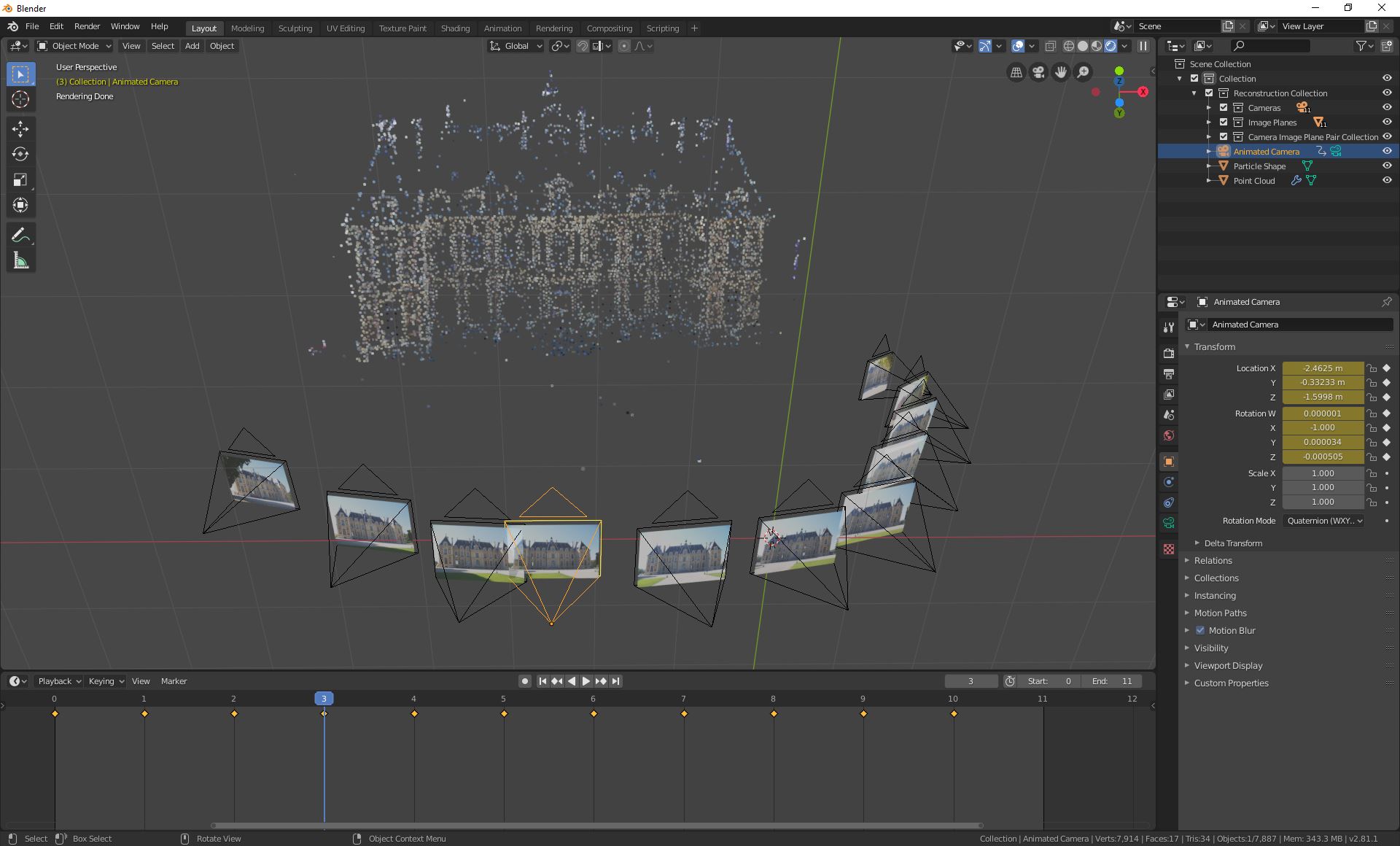
It is possible to add an image plane for each reconstructed camera pose. The point cloud is represented with an particle system. Also the addon allows to compute a camera animation (see image below).

Concerning the spherical camera model, I am not exactly sure what you are looking for. Also, I have no experience with such camera models in Blender.
There are a few options though (See image below).

And it is possible to render cameras with radial distortion.
https://docs.blender.org/manual/en/dev/compositing/types/distort/lens_distortion.html
I hope this gives a short overview of the addon and answers your questions (at least partially?)
SBCV
on 16 Aug 2019
Yes the equirectangular camera model would be the one corresponding to the 360 camera model of OpenMVG.
Great to know that Blender proposes this by!
- Let me know how we could work on adding support for those cameras.
I have some dataset and instruction there https://github.com/openMVG/Image_datasets/tree/master/360_dataset
PS: See also the PR I made regarding making the importer more robust.
pmoulon
on 16 Aug 2019
I'll have a look tomorrow.
The PR is already merged :) Thank you for the contribution!
SBCV
on 16 Aug 2019
Can you share an example file?
SBCV
on 18 Aug 2019
Here you go 360_sfm_data.zip, you have two sfm_data.json that correspond to https://github.com/openMVG/Image_datasets/tree/master/360_dataset
Thank you for your help.
I think we just have to create the instance of the equirectangular camera if we detect a spherical camera in the JSON file (see polymorphic_name spherical)
"intrinsics": [
        {
            "key": 0,
            "value": {
                "polymorphic_id": 2147483649,
                "polymorphic_name": "spherical",
                "ptr_wrapper": {
                    "id": 2147483660,
                    "data": {
                        "value0": {
                            "width": 5376,
                            "height": 2688
                        }
                    }
                }
            }
        }
    ]
Thank you for sharing the dataset! I've added support for spherical cameras in the last commit.
When importing the cameras and the point cloud, make sure that the "Add background image for each camera" option is enabled. Then, select one of the imported cameras and press ctrl+0 (on the numpad) in order to view the point cloud from the perspective of the spherical camera. Alternatively, you can render the result.
I hope this is the functionality you are looking for?
One small caveat: Viewing the points with a spherical camera causes (obviously) distortion of the points, since the addon represents the point cloud with a particle system. To reduce this effect make sure you adjust the size of the particles. Here is short explanation.
SBCV
on 24 Aug 2019
Related issues
 yuancaimaiyi
·
4Comments
yuancaimaiyi
·
4Comments
 yonelay11
·
5Comments
yonelay11
·
5Comments
 treyfortmuller
·
5Comments
treyfortmuller
·
5Comments
 jpwhitney
·
5Comments
jpwhitney
·
5Comments
 autosquid
·
4Comments
autosquid
·
4Comments