Openfoodnetwork: Product pictures are not showing up for France
Description
Product pictures have disappear since the last release.
Steps to Reproduce
- Go to any shops on OFF https://www.openfoodfrance.org/shops#/
Animated Gif/Screenshot

Severity
bug-s1: a critical feature is broken: checkout, payments, signup, login
Your Environment
- Version used: v2.9.10
- Browser name and version: All
- Operating System and version (desktop or mobile): both
Possible Fix
 RachL
RachL
All 12 comments
This is looking good! Thanks @Matt-Yorkley 👍
RachL
on 28 May 2020
@Matt-Yorkley can you add a few details here, what was the problem and how ti was solved?
I am curious about what are the specific S3 settings we have in FR.
 luisramos0
on 28 May 2020
luisramos0
on 28 May 2020
Okay, so the issue here was related to S3 image settings and only affected France. All other instances with S3 seem to use this setting for the path:
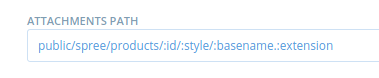
Whereas France was using this setting:

:rails_root is a placeholder here which expands the full path on the filesytem, which in this case has recently changed from being in /current to a symlink in a different location.
The "path" given here is basically a virtual path that Amazon uses to identify/name images. So the generated URLs on our side were not pointing to the correct place in the bucket, but to a different path that included a per-release timestamp.
I manually adjusted the setting and changed the :rails_root prefix to /home/openfoodnetwork/apps/current and the image paths were all fixed.
Note: if we want to change this setting to be in line with other instances we would have to migrate/rename all images in the French S3 bucket first.
 Matt-Yorkley
on 29 May 2020
Matt-Yorkley
on 29 May 2020
thanks for explaining Matt! This info may be useful in the future as well.
luisramos0
on 29 May 2020
Exactly same issues in Brazil! I did this and works well.
 rafaelbbrazdmc
on 17 Jun 2020
rafaelbbrazdmc
on 17 Jun 2020
I'm reopening this one. Pictures are down again :'(
RachL
on 28 Jun 2020
I see the values in live FR are again the values Matt comment above says are incorrect for France.
I changed the values but still no luck.
The error message is something like "All access restricted to that object"..
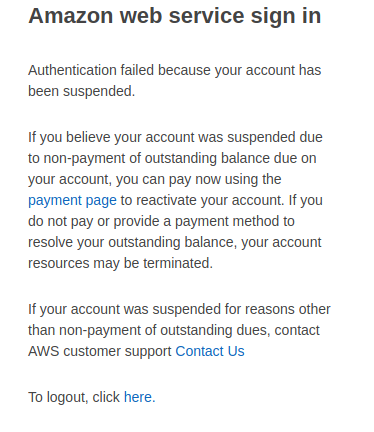
I tried to login on AWS FR and I see this:
luisramos0
on 28 Jun 2020
So the "All access to this object has been disabled" message is potentially a billing issue?
Matt-Yorkley
on 28 Jun 2020
yes, 7usd to be paid...
Apart from that needed "fix" (pay the bill) I wonder why the settings were back to not start with :rails_root...
luisramos0
on 28 Jun 2020
I think I may have changed the wrong values, Matt's comment was about "Attachments PATH" while I changed "attachments URL" and "attachments default URL". I reverted my changes now, this may need to be verified after the aws account is unlocked.
luisramos0
on 28 Jun 2020
@luisramos0 @Matt-Yorkley thanks! It appeared the credit card for this account expired in February. I don't understand why we didn't get any emails :( anyway I've paid now. But I guess it will take some time to be reactivated.
RachL
on 28 Jun 2020
Ok images are back! I'm closing. Thank you everyone!
RachL
on 29 Jun 2020
Related issues
 filipefurtad0
·
3Comments
filipefurtad0
·
3Comments
 sauloperez
·
3Comments
filipefurtad0
·
3Comments
sauloperez
·
3Comments
filipefurtad0
·
3Comments
 shen-sat
·
3Comments
shen-sat
·
3Comments
 andrewpbrett
·
3Comments
andrewpbrett
·
3Comments