Openfoodnetwork: Silent Checkout Failures
Description
We are experiencing silent checkout failures that we cannot explain.
This issue is a place to discuss and explore... as we don't have a huge amount of information yet.
We know that many card errors from Stripe are not creating error messages visible to the users.
We also suspect that there might be a rare race condition when someone checks out with a sold out item in the cart. This is unconfirmed so probably outside the scope of this specific issue, but something to bear in mind when reporting such things.
Expected Behaviour
If checkout fails the user should be notified and this should be recorded in Bugsnag
Actual Behaviour
There are times when the checkout fails silently.
Steps to Reproduce
This section was added by @luisramos0
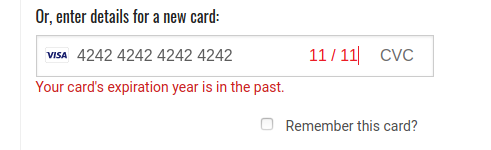
One example we can reproduce (although not exactly a bug because the user is shown an error message next to the card number).
- Go to checkout
- Pay with Stripe
- Insert an invalid card number or a past expiry date
- Verify there is an error message displayed below the input field
- Press "Place order now"
- Watch the spinning "Processing payment..." for 10secs
- No flash error shown on top of the page
There is a way to see the error message in this case:
Same as above but on step 6, instead of watching, click anywhere on the page while the "processing payment..." is there and see the flash error being displayed.
Severity
bug-s2: a non-critical feature is broken, no workaround
Your Environment
- Version used: Reported in UK, FR, 2.8
- Browser name and version:
- Operating System and version (desktop or mobile):
Possible Fix
 lin-d-hop
All 12 comments
Related PRs in progress: #5076, #5060
Related issues / discussions: #5003
 Matt-Yorkley
on 26 Mar 2020
Matt-Yorkley
on 26 Mar 2020
Another report of a silent failed checkout with a card user in the UK.
lin-d-hop
on 26 Mar 2020
 lin-d-hop
on 26 Mar 2020
lin-d-hop
on 26 Mar 2020
lin-d-hop
on 26 Mar 2020
lin-d-hop
on 26 Mar 2020
@luisramos0 You are spot on with the steps to reproduce. From a user:
_I now realise I had reversed some numbers in my credit card number - oops. It is worth knowing that there was nothing coming up on the page to alert me of an error, and it said "Processing my payment" so I thought all was in order. It was only when I attempted it for a third time that I realised what I had done._
Can we make this S2 about relaying all error messages from Stripe?
lin-d-hop
on 27 Mar 2020
5076 is not the fix to this. we need to investigate why RailsFlashLoader.loadFlash is not working in stripe_elements
 luisramos0
on 27 Mar 2020
luisramos0
on 27 Mar 2020
I am going to try to fix this between now and tomorrow morning.
luisramos0
on 30 Mar 2020
I think I might have a report of this in Aus with perhaps a couple of twists / new information. Putting here rather than creating a new issue but can separate if people think it's differetn
New user - Flock Stock & Basil have set up a shop. They had first oc today and took 4 orders - but had two other 'orders' from excited friends testing that never showed up. Not in orders or with email confirmations etc.
The twist - cash / direct debit payment method - no stripe involved
When I go to look at their 'incomplete' orders I can see a couple from logged in users - or at least that have user email, so I think that means that they've made it to checkout. They also say 'Balance Due' which suggests that the payment method might have been recorded? and this one also has Address marked in red (suggesting problem?)

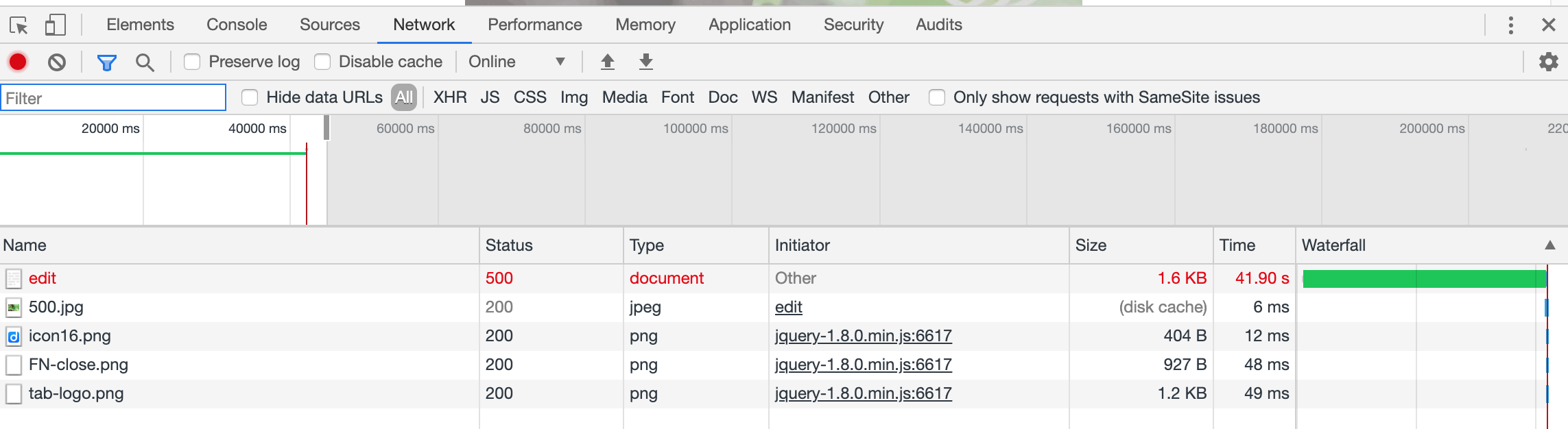
But when I try to open up this order to have a closer look I get a snail. same on any other incomplete orders
info in dev tools means nothing to me
I am seeking more info from these two failed customers about what happened, but they really thought they had ordered. This is scary - I see people turning up at farmers markets being mad mad mad . .
 kirstenalarsen
on 31 Mar 2020
kirstenalarsen
on 31 Mar 2020
might the PR you have done @Matt-Yorkley also make sense re. the case I've described above?
kirstenalarsen
on 31 Mar 2020
The scope of this issue is very specific Kirsten, and PR #5076 will fix it.
In some cases, like rejected cards from stripe, users are not seeing the error message and they are left in the checkout page. They can retry. Some confused users may think that the order was placed.
I dont think your problem is this one because your error is a server side one (I know this because the order is left in the address state).
BUT PR #5076 will also add an user error message to further server side errors on checkout. I think the one you describe can be one of these, after #5076 the user will get to see an error message.
Also, I think there will be bugsnag errors (server side ones) for both the user checkout and your order edit errors. We need to look for them.
luisramos0
on 31 Mar 2020
I cannot find a bugsnag error for the checkout, which confirms my theory that PR #5076 will fix the problem: I mean the part of showing the error message to the user. Maybe it is something the user can fix on the checkout form. But maybe it is not so I am adding a bugsnag error for these situationss as well as part of #5076
I found the server side one:
https://app.bugsnag.com/yaycode/openfoodnetwork/errors/5e7c2499183e6e0018839df6?filters[event.since][0][type]=eq&filters[event.since][0][value]=30d&filters[error.status][0][type]=eq&filters[error.status][0][value]=open
This order has no shipment because the order (and the user itself) have no bill_address or ship_address. I dont know how that was possible as the fields are mandatory on the checkout form. This needs a separate issue.
Summary:
- I think 5076 was already improving the situation for your report Kirsten, after 5076 user will see an error message
- I am improving 5076 by adding a bugsnag alert in these situations so that next time we have a bugsnag alert for these situations (server side error while saving order details)
- But anyway, I think you should create a separate bug report for your situation because here we are only improving the situation in terms of showing errors to the user and logging stuff, not fixing the actual underlying problem
luisramos0
on 31 Mar 2020
new issue for the customer case I described above - vague because I can't replicate - S3 until we find it's happening a lot https://github.com/openfoodfoundation/openfoodnetwork/issues/5126
kirstenalarsen
on 2 Apr 2020
Related issues
 andrewpbrett
·
3Comments
andrewpbrett
·
3Comments
 sstead
·
4Comments
sstead
·
4Comments
 shen-sat
·
3Comments
shen-sat
·
3Comments
 myriamboure
·
3Comments
myriamboure
·
3Comments
 kristinalim
·
3Comments
kristinalim
·
3Comments