Openfoodnetwork: Update Stripe API for all instances using Stripe
Description
As part of the SCA changes we need to update the version of the API we are using within Stripe. Every instance that uses Stripe has their own Stripe Connect account so this will need to be done manually for every instance.
Questions:
Is the new API backwards compatible? Can we update before we make the changes? Or will this be part of the roll out process for the changes?
Acceptance Criteria & Tests
Known instances with a Stripe Connect account linked to OFN:
AU
UK
FR
CA
Please add others if I have missing them.
BE?
This issue will be resolved when all instances have been updated.
Testing:
If this change is made before a roll out of SCA changes then we will need to run tests on the Stripe implementation after updating:
- Take Stripe payments from back office
- Take payments at checkout
- Save card at checkout
- Save card from user Accounts page
- Subscriptions with Stripe payment
 lin-d-hop
All 28 comments
From what I read I think we should upgrade the API version even if it's not backwards compatible. The adaptations needed wont be very big and we will most probably need to do them anyway.
In FR for example, this is what I see when I try to upgrade:
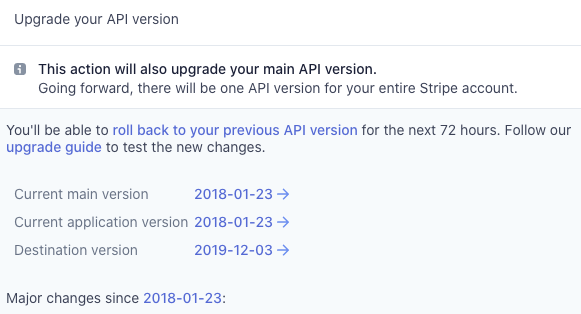
So, my plan here is to setup my stripe instance account, test stripe payments with the latest api version and then test FR staging with the latest API version.
It's also a good opportunity for me to become familiar with all the stripe workflows in the app.
 luisramos0
on 6 Jan 2020
luisramos0
on 6 Jan 2020
Does this cover #1726? Duplicate?
 sigmundpetersen
on 6 Jan 2020
sigmundpetersen
on 6 Jan 2020
yes, duplicate. closed it and kept this one :+1:
luisramos0
on 6 Jan 2020
ok, today I made my own stripe setup with two accounts, one for an instance and one for a hub.
I tested all the 5 scenarios above before and after upgrading to the latest api version 2019-12-03 and all looks good to me.
I will move this to test ready and ask a tester to do the same tests in staging.
You need to go to
https://dashboard.stripe.com/test/developers
and press the upgrade button.
I did this first in the instance/connect account and then on the hubs account and tests worked well with only the instance upgraded and also with both accounts upgraded.
Make sure you test the 5 tests scenarios above.
luisramos0
on 6 Jan 2020
I see one challenge here, you cant upgrade only the test mode, you need to upgrade the full account, SO, to test in staging we need a connect account separate from the live account (my setup). The current FR setup (where staging is connecting to the test mode of the live account) wont work. Unless we upgrade directly the prod account and test it in staging. This is a possibility because if the staging test fails there's a rollback button....
luisramos0
on 6 Jan 2020
@luisramos0 is there a staging where the main account is not linked to a prod account? I believe that Katuma, FR, AU and UK are linked to the instance account. So how to proceed ? I'm a bit afraid of the rollback option... I wonder what happens to the order that were made during the process.
Or is it something that we test during the night?
 RachL
on 13 Jan 2020
RachL
on 13 Jan 2020
I dont know of any account outside the prod ones. I have created my own account.
if there is a problem, the orders will fail and the users will find a workaround or contact support. I am pretty confident that we will be fine and everything will just work. But we never know...
luisramos0
on 13 Jan 2020
@luisramos0 UK staging has had some issue with the stripe setup. So testers don't used it for testing stripe currently. How do you feel about plugging your test account to UK staging? This would be then a first (safe) test.
I ran this by @lin-d-hop and she is ok with it :+1:
RachL
on 15 Jan 2020
ok, done, uk staging is working with my stripe test account.
luisramos0
on 16 Jan 2020
@luisramos0 do you confirm that I can now test those cases on UK staging ?
Take Stripe payments from back office
Take payments at checkout
Save card at checkout
Save card from user Accounts page
Subscriptions with Stripe payment
After that we can do the upgrade in prod, correct?
What's the exact process for prod? You mentioned:
I did this first in the instance/connect account and then on the hubs account
That means that there is a task that needs to be done per hub as well?
RachL
on 16 Jan 2020
yes, I connected the instance to my stripe account. now you need to connect the hub to your stripe test account so that you can use it and see the payments in stripe.
my account (which is now staging uk instance account) is already upgraded.
you can 1. test your account on the previous version of the api, then 2. upgrade and then 3. test again.
the first test is the most important as we will validate we can upgrade the instance stripe account without upgrading the hub stripe accounts.
in step 3 you validate that it also works with both accounts on the latest api version.
yes, hubs stripe accounts will also have to be upgraded, but I guess it's less important as long as the instance account is on the latest and it works if the hub version is not the latest.
to upgrade you need to go to the stripe dashboard, (enable test mode if you are testing not in prod), go to developers and click "upgrade".
https://www.paidmembershipspro.com/its-important-to-upgrade-your-stripe-api-when-updates-are-available/
luisramos0
on 16 Jan 2020
Testing Notes....
Use case - I did not update the API with my enterprise Stripe account
Taking a Payment from the Backoffice
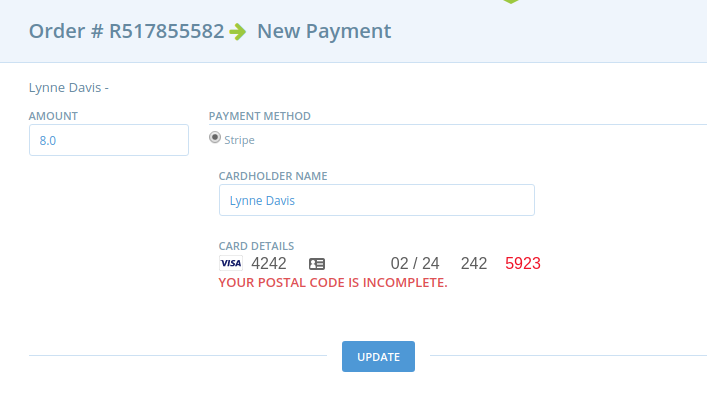
The UI asks me for a post code when I try to make a payment in non-UK format - requires number only. UK production allows for a UK postcode here. Might this be related to the country of your account @luisramos0?
Staging:
lin-d-hop
on 21 Jan 2020
Use case - I did not update the API with my enterprise Stripe account (continued)
[x] Take payments at checkout
[x] Save card at checkout
[x] Save card from user Accounts page and use it to take payments
[x] Subscriptions with Stripe payment
lin-d-hop
on 21 Jan 2020
Use case - I updated my API to the most recent.
[x] Take payment from the backoffice
Same issue as above. Probably related to the Country of the Stripe Connect account.[x] Take payments at checkout
[x] Save card at checkout
[x] Save card from user Accounts page and use it to take payments
[x] Subscriptions with Stripe payment
lin-d-hop
on 21 Jan 2020
@luisramos0 Could you feedback on your interpretation of the postcode issue outlined above?
If you agree that is related to the country of the Stripe account you created then I'm happy for the switch.
lin-d-hop
on 21 Jan 2020
hehe I believe that this page is one of the first I've tested in OFN :) https://github.com/openfoodfoundation/openfoodnetwork/pull/2420#issuecomment-416215422 😁
So this is why I remember having created this: https://github.com/openfoodfoundation/openfoodnetwork/issues/2605
I'm just putting it here in case removing the post code could be an option here :)
RachL
on 21 Jan 2020
@lin-d-hop are you saying the postcode is not showing in uk? I didnt know that.
Although I dont think it will be related to this change, I think we should clarify this before we proceed.
"Ready to Go" here means we are ready to do this in production :-) who's first?
luisramos0
on 22 Jan 2020
I moved to test ready as there are still a few things we need to do. Let's close this only when it is done in all production instances, ok?
luisramos0
on 22 Jan 2020
Ok team. The plan here is that each of us #instance_managers need to update our production Stripe API versions.
To do this log into your instance Stripe Connect account and go to Developers tab. From there you will see at the top API Version and a button Upgrade Available. Please upgrade to the latest version. When you have done this check your box below.... :-D
[x] AU
[x] UK
[x] FR
[x] CA
[x] BE
lin-d-hop
on 4 Feb 2020
So after I clicked upgrade - it says version 2019-12-03, but the red button now gives the option to roll back to 2018-02-06 - is that right?
 tschumilas
on 5 Feb 2020
tschumilas
on 5 Feb 2020
That sounds right, yes. I just did the same for Australia.
 mkllnk
on 6 Feb 2020
mkllnk
on 6 Feb 2020
So Katuma does not have a Stripe account, but BE does. I'm on it to get it updated and then we can close the issue.
RachL
on 12 Feb 2020
I think that right for Belgium now. thanks for the teamwork! ;-)
 TheoGallez
on 13 Feb 2020
TheoGallez
on 13 Feb 2020
I think we can close this issue now, feel free to reopen if that's not the case.
RachL
on 14 Feb 2020
@luisramos0 @lin-d-hop did we took a decision about the postal code issue? I ran into this during release testing. Actually there is one problem: if you ran into the error message, you need to refresh/start all over the payment steps in order to enter a postal code that is accepted.
Can we prioritize https://github.com/openfoodfoundation/openfoodnetwork/issues/2605 as part of the Stripe SCA work? Or is it something we can label good-first-issue?
RachL
on 4 May 2020
I am not sure about past decisions about it.
Does the post code field appears in all instances? I had the impression it was only showing in some locations? Maybe I am totally wrong.
Why did you comment here and not on 2605? maybe I am missing something.
luisramos0
on 4 May 2020
@luisramos0 I'm commenting here because we discussed it here. 2605 is about removal, but maybe we want to keep it for some locations?
RachL
on 5 May 2020
ah, sorry, I didnt see the discussion above, just the issue title :see_no_evil:
-- maybe we want to keep it for some locations?
I have no clue what's the answer to that question, needs some product investigation.
luisramos0
on 5 May 2020
Related issues
 myriamboure
·
3Comments
myriamboure
·
3Comments
 sauloperez
·
3Comments
sauloperez
·
3Comments
 kirstenalarsen
·
3Comments
kirstenalarsen
·
3Comments
 sstead
·
4Comments
sstead
·
4Comments
 filipefurtad0
·
3Comments
filipefurtad0
·
3Comments