Openfoodnetwork: Items ordered missing in orders & showing as '0' quantity in reports
Description
Items ordered by customers do not show up in orders or invoices, and show up as '0' quantity in reports.
Expected Behavior
A customer should be able to add/delete items from an open cart, and quantity ordered should show in their invoice, on orders, and in backend reports
Actual Behaviour
Last 2 order cycles for this hub, multiple cases each time: A buyer says they tried to order an item. They received no 'limited stock' errors. But I'm getting inconsistent reports from them as to what happened. Some say 'there was something odd, I couldn't get it to take my order'. Others say everything seemed fine at checkout. Others report they put this item into their cart and then removed it because they didn't want it, and it removed fine. So - buyer behaviour is not yet clear.
Their order confirmation and the invoice do NOT show the item in question - and on the backend reports, the variant is listed - but shows '0' quantity.
Its not yet clear to me if stock was reduced.
This doesn't seem to be associated with only limited stock items (so not likely competition for limited stock I don't think.)
It happened with one of my own supplied products in this last OC. Spearmint shows up on my pack sheet as '0' quantity. When I contacted the buyer, she said, yes she ordered it and the order didn't seem to 'stick'.
The hub reports that when the try to edit this order, and add in the item for the buyer on the backend, they are unable to do so. They get a message that says, "missing product fields with red borders contain errors". They are sure the item is available in the OC and has stock, but they can't seem to add it.
As a supplier - I can think of nothing unusual about my item - spearmint. The only possible thing is that it was at one time listed as 'on demand', and later I changed it and used stock 'on hand'.
I'm still gathering reports from the suppliers and buyers affected by this - and will try to reproduce. But for now - wanted to log this. Suggestions of what exactly to test - appreciated.
Steps to Reproduce
1.
2.
3.
4.
Animated Gif/Screenshot
Context
Severity
Your Environment
- Version used:
- Browser name and version:
- Operating System and version (desktop or mobile):
- OFN Platform instance where you discovered the bug, and which version of the software they are using.
Possible Fix
 tschumilas
All 25 comments
nice, thanks for reporting!
I think it's S1. I don't think we deploy v2 in any other instance before sorting this one out.
Would be good to know what exactly happened when "the order didn't seem to 'stick'."
and also would be good to see a screenshot of the message "missing product fields with red borders contain errors". In what page was this?
anyway, my investigation would go into the product.
Are there other orders of these products that look normal?
What's special about this product?
 luisramos0
on 9 Jul 2019
luisramos0
on 9 Jul 2019
OK - good. Just finishing my flower order for today and will be here to test for a couple of hours.
tschumilas
on 9 Jul 2019
I have not yet replicated this - but here is more info I've discovered. In the last OC there were 3 orders that had missing variants. The variants were supplied from 4 different producers - I see nothing wrong with them, and indeed these same variants appear normally in other orders in the order cycle. Plus, the buyers - who are all rather non-specific - say that the cart didn't save properly. One says the little 'wheel' just kept turning. I haven't been able to replicate cart problems in this hub. (The hub is: The Local Flower Collective)
The Orders and Fulfillment reports show the missing variant with quantity = 0 (This was the only way we originally knew there was an issue and checked with the buyers) And - I think this same problem happened in the previous order cycle (so after v2) - but we didn't recognize it. This time we saw the variant quantities = 0 when we generated the producer pack sheets and this was a flag.
Below I've attached an excel sheet with details of the 3 problematic orders, the variants and their suppliers.
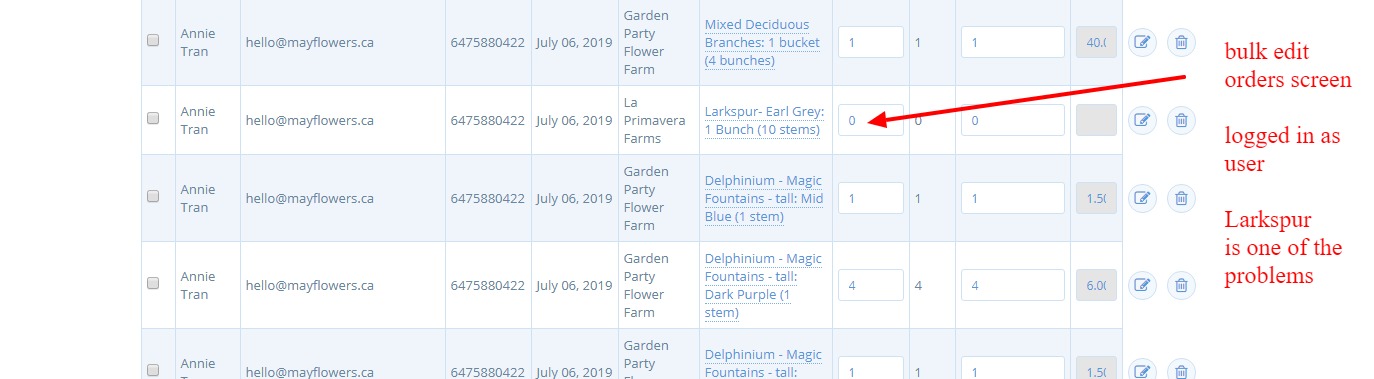
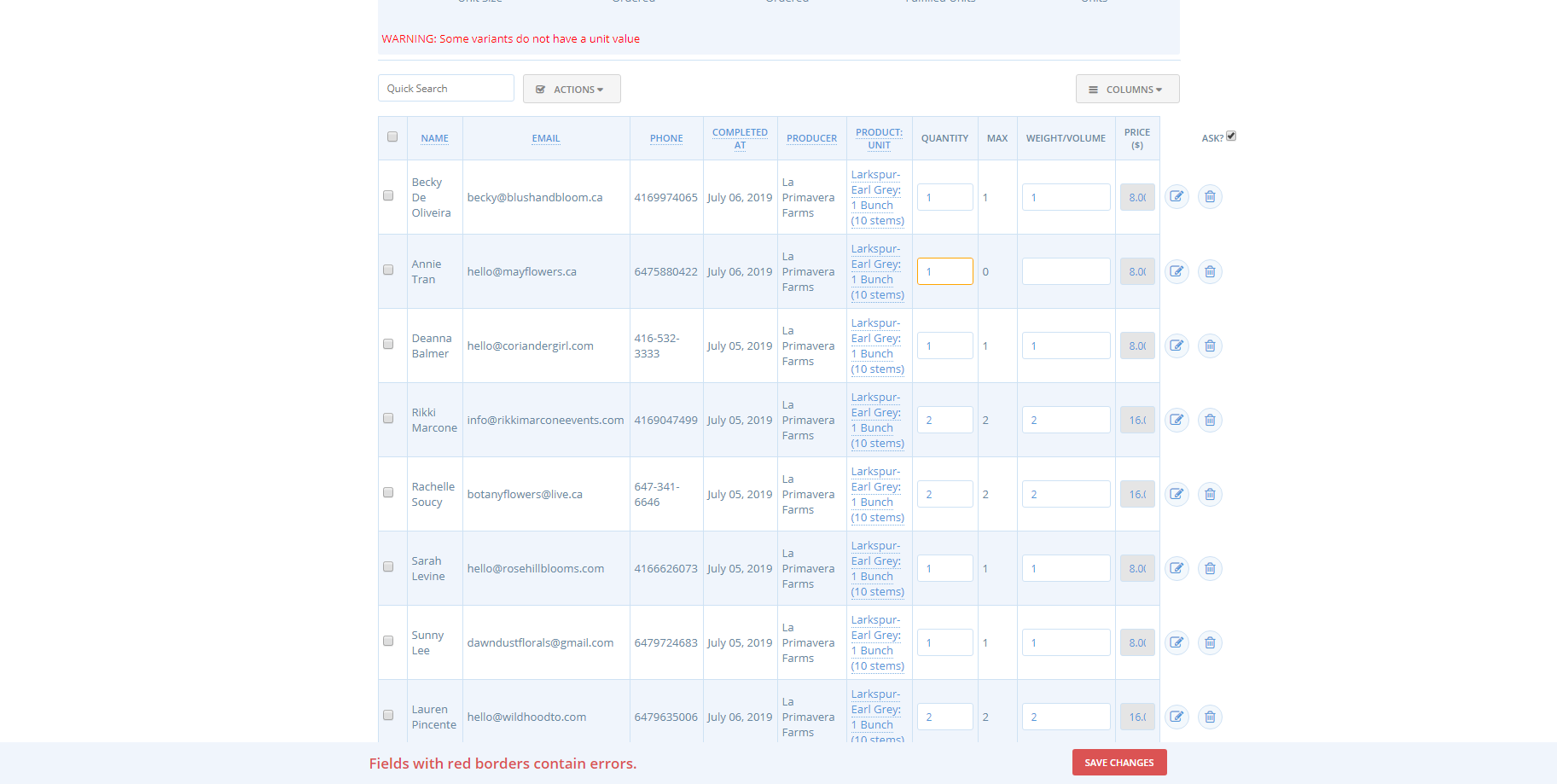
On the backend - the orders screen and the invoices simply do not show the missing products. But the bulk order management screen (below), with user login, shows these variants with '0' quantity. When the hub tries to edit the item and add more quantity we get errors and can't save: 'some variants do not have a unit value', 'fields with red borders contain errors'. (below) (Note - I was able to add in the missing variant using the orders menu as admin - but can't seem to open the bulk orders mangement menu as admin - I'll open a different issue for that)
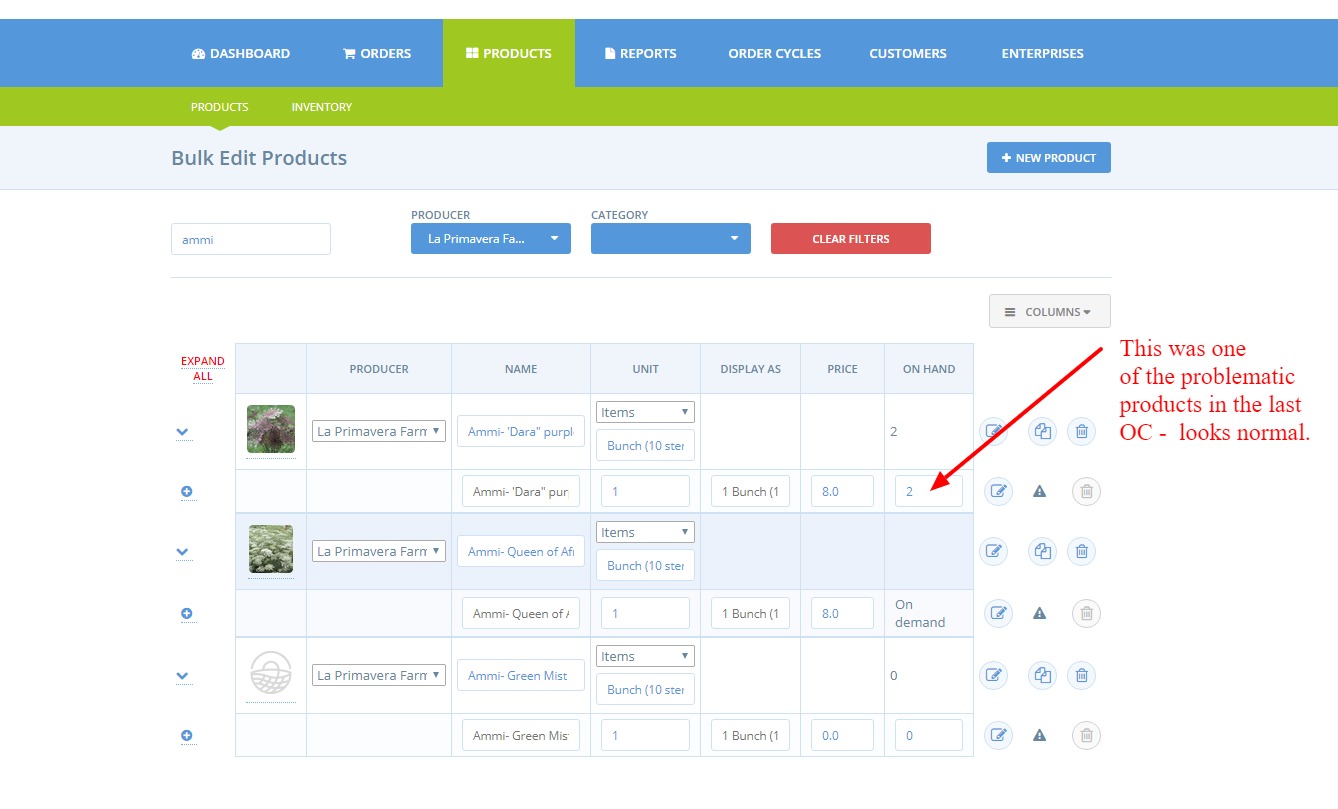
I checked the product lists for these problem variants - see nothing wrong. My own item was 'on demand' but all the others had stock on hand. This shop is using supplier's product lists, no inventory.
I also tried to see when these orders were placed - were they in competition? But I couldn't really tell because the order dates in the Orders and Distributors report are incorrect. I searched for the date range for this OC, and these ARE the correct orders placed, but it tells me some were placed in June. But they were all placed July 5,6,7. So I can't tell when these problem orders were placed. (I'll do another issue for this report problem) BUT - from the order numbers, it seems like these 3 problematic orders were not sequentially placed.
for reference if anyone wants to try -- on OFN can, this is The Local Flower Collective hub. Order cycle opened July 5 and closed July 8. The hub will still be working on invoices Wednesday, and we'll open a new order cycle Thursday. maybe it will happen again and we'll get more info. But if there is any sense of what to tell the buyers in this hub, I'd appreciate it. At least we know what to watch for now.
list of problematic orders and variants.xlsx
tschumilas
on 10 Jul 2019
nice, thanks @tschumilas for all the details!
"When the hub tries to edit the item..." - that is interesting. the manager is using the bulk order management page, what about the single order edit page?
luisramos0
on 10 Jul 2019
I just tried on one of these problem orders and yes, a user can ADD one of the problematic variants from the single order edit page. So that's interesting - doesn't seem to be an issue with the variant.
(I think the hub went right to the bulk order mgmt pages because they can't delete variants on the single order edit page now. They can only add variants and make adjustments on the single edit page. They often need to both add and delete variants or quantities on orders, so they go right to the bulk edit page now where they can do that. BUT the don't like that because they then have to go back to the single order edit page to remove fees if necessary (adjustments) Flipping between these 2 pages to edit orders seems odd - is this expected behaviour or should I do an issue for this?)
tschumilas
on 10 Jul 2019
the issue you are describing is: "hub managers should be able to delete line items from orders in the order edit page", right? I dont know if it is in v1, if it is in v1, it's a bug, otherwise a feature request, it's most probably a small thing that can go directly to an issue in github imo.
luisramos0
on 10 Jul 2019
In Canada's logs I'm mostly seeing lots of errors related to orders and line_items, with the message: NoMethodError (undefined method 'order' for nil:NilClass), originating from both POST "/cart/populate" and PUT "/cart" queries.
I think they should be fixed by a PR that's in the next release.
 Matt-Yorkley
on 10 Jul 2019
Matt-Yorkley
on 10 Jul 2019
thanks for the info! This could be related...
 sauloperez
on 10 Jul 2019
sauloperez
on 10 Jul 2019
I've been digging through the data you shared in the spreadsheet @tschumilas and I couldn't find any clue. I only managed to spot one of those variants listed with Amount = 0 in Order and Fulfillments report. So with the following criteria
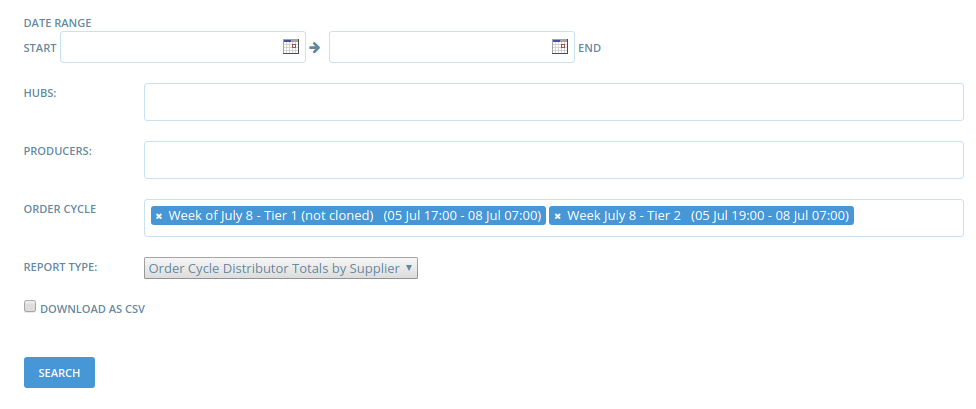
I got

I'll have to dig deeper but I couldn't find variants without unit value, because this seems to be at least one of the issues we're facing. Were all the orders included in these two OCs I list in the first screenshot @tschumilas ?
sauloperez
on 10 Jul 2019
Some more insights. I tried to answer two questions:
a) Why does the "by supplier" orders and fulfillments report shows amount = 0?
b) Why does Bulk Order management show "WARNING: Some variants do not have a unit value"? Does it have any impact on orders?
a
That column is basically computed as line_items.sum(&:quantity), so I set out to find which line items have quantity 0 between July the 5th and 7th with the following query (I couldn't generate the report any longer because a deleted product blows it up :man_facepalming: ):
SELECT spree_line_items.*, spree_orders.completed_at, spree_variants.display_name, enterprises.name AS supplier, spree_products.name, spree_stock_items.*
  FROM spree_line_items
 INNER
  JOIN spree_orders
    ON spree_orders.id              = spree_line_items.order_id
 INNER
  JOIN spree_variants
    ON spree_variants.id            = spree_line_items.variant_id
 INNER
  JOIN spree_products
    ON spree_products.id            = spree_variants.product_id
 INNER
  JOIN enterprises
    ON enterprises.id               = spree_products.supplier_id
 INNER
  JOIN spree_stock_items
    ON spree_stock_items.variant_id = spree_variants.id
 WHERE quantity                     = 0
   AND completed_at                 > '2019-07-04';
I got some of the variants @tschumilas mentioned:
-[ RECORD 1 ]-------+---------------------------
id                  | 6585
order_id            | 20497
variant_id          | 7079
quantity            | 0
price               | 8.00
created_at          | 2019-07-06 00:27:26.310938
updated_at          | 2019-07-06 00:39:15.949898
max_quantity        |
currency            | CAD
distribution_fee    |
final_weight_volume | 0.00
cost_price          |
tax_category_id     | 1
completed_at        | 2019-07-06 02:30:06.617342
display_name        |
supplier            | La Primavera Farms
name                | Ammi- 'Dara" purple
id                  | 3473
stock_location_id   | 1
variant_id          | 7079
count_on_hand       | 6
created_at          | 2019-06-13 15:06:41.966773
updated_at          | 2019-07-11 11:55:36.655296
backorderable       |
[ RECORD 2 ]-------+---------------------------
id                  | 6591
order_id            | 20497
variant_id          | 7047
quantity            | 0
price               | 35.00
created_at          | 2019-07-06 00:30:05.790976
updated_at          | 2019-07-06 00:43:17.17477
max_quantity        |
currency            | CAD
distribution_fee    |
final_weight_volume | 0.00
cost_price          |
tax_category_id     | 1
completed_at        | 2019-07-06 02:30:06.617342
display_name        | Foliage, short cut
supplier            | Mount Wolfe Branch Supply
name                | Honeysuckle
id                  | 5149
stock_location_id   | 1
variant_id          | 7047
count_on_hand       | 6
created_at          | 2019-06-13 15:06:48.1972
updated_at          | 2019-06-21 00:48:39.292173
backorderable       |
-[ RECORD 3 ]-------+---------------------------
id                  | 6599
order_id            | 20497
variant_id          | 6929
quantity            | 0
price               | 18.00
created_at          | 2019-07-06 00:32:48.173534
updated_at          | 2019-07-06 00:45:32.293088
max_quantity        |
currency            | CAD
distribution_fee    |
final_weight_volume | 0.00
cost_price          |
tax_category_id     | 1
completed_at        | 2019-07-06 02:30:06.617342
display_name        |
supplier            | Palatine Fruit and Roses
name                | Roses - Happy Piano
id                  | 3405
stock_location_id   | 1
variant_id          | 6929
count_on_hand       | 4
created_at          | 2019-06-13 15:06:41.698493
updated_at          | 2019-07-05 21:17:39.594029
backorderable       |
I can't draw any conclusion from these results. The next thing I'd try to answer is:
- how can a user end up with a 0 line item quantity from the UI
- Moreover, does it make any sense even at db schema level? should we forbid it?
b
Said warning is set from https://github.com/openfoodfoundation/openfoodnetwork/blob/cdd36eeefc973f453f98c56beafc09c527c72e83/app/views/spree/admin/orders/bulk_management.html.haml#L91-L93. Which is computed in https://github.com/openfoodfoundation/openfoodnetwork/blob/cdd36eeefc973f453f98c56beafc09c527c72e83/app/models/spree/line_item_decorator.rb#L163-L168 I didn't go any further and it's not clear to me yet what might be the problem of not having a unit_value.
Questions we need to answer next:
- What can go wrong without
unit_value? should we forbid to be null at db level? - Is there any relationship between
unit_valueand line items with quantity = 0?
Do you something else I don't @luisramos0 @Matt-Yorkley @mkllnk @kristinalim ? Does someone want to pair on it?
sauloperez
on 11 Jul 2019
I wouldnt worry about point B, I think ZERO line_item.quantity is breaking final_weight_volume calculation, that's it. we should not allow line_item.quantity to be zero., line_items with quantity zero should be deleted from the order.
the question is really point A: how can a user end up with a 0 line item quantity from the UI
luisramos0
on 11 Jul 2019
I tried on the admin order edit page to make quantity zero in a line_item but it gets correctly removed from the order.
luisramos0
on 11 Jul 2019
Agreed. Now I see, the warning is a consequence of quantity being 0 in https://github.com/openfoodfoundation/openfoodnetwork/blob/master/app/models/spree/line_item_decorator.rb#L167
Then, the point is to know what these users did to end up with line_item.quantity 0 @tschumilas . Until we know how this can be achieved we can only forbid it at DB level, meaning that next time, the checkout will fail.
sauloperez
on 11 Jul 2019
So one reason you might not be able to find them @sauloperez is because we (the hub manager and me) are adding in the missing variants manually (this is an active hub - so we need the items reflected on the orders and in the reports as quickly as possible) So if you looked after I fixed the orders, the reports will look fine.
This hub has order cycles opening now - until Monday am. So - I have asked all the buyers (there is a defined group of wholesale buyers - this isn't a public hub) to let me know if they experience anything unusual in the ordering/checkout process. I'll be watching the backend to see any '0' quantities as soon as they are ordered and will follow up with the shopper about their experience to try to narrow down what is causing this.
I've also asked the hub manager to let me fix all the orders this week. So that way - I can download the reports and screenshots before I do any fixes, so we have the history.
Let me know if you think there is anything else I should be monitoring or communicating.
Thanks to all of you for helping me try to figure this one out. I still have not been able to replicate it.
(This is also a group of buyers who are not very accustomed to on-line ordering - so it could be anything really. BUT - its odd that it is spread across several different buyers - not just one person.)
tschumilas
on 11 Jul 2019
We are a few hours into the next OC, and so far 2 buyers purchased items that yield a '0' quantity in reports, and these items do not show on thier confirmation, nor in reports. I just talked with one of these buyers about her UI. She said everything seemed fine until she went to edit her cart. If she tried to delete an item or add quantity, she got the slug, and had to go back to the shopfront and enter again. She couldn't remember if she edited the item in question (that didn't show up in the reports).
Is it possible this is a problem associated with cart editing. Hypothesis: users who place orders without editing their cart (just go right to checkout) have no issues. But when a user edits the cart - maybe there is something they do that results in this '0' quantity in reports, eventhough they think they ordered.
I've just started to do some testing along these lines - and am having some really wonky cart editing behaviour - with on demand and with on hand items. Can't delete anything - takes me to the slug. Other issues too. Are cart editing problems identified in another issue? I haven't unpacked it yet - should I open a differnet issue re: cart editing problems, or should we keep pursuing that as a possible cause of the '0' quantity problem?
tschumilas
on 12 Jul 2019
@tschumilas That cart editing problem could be the cause of the zero quantity issue.
For the devs, there are Bugsnag issues that could be related. The most important one has been mentioned by @Matt-Yorkley already:
app/models/spree/calculator_decorator.rb:12:in `line_items_for': undefined method `order' for nil:NilClass (NoMethodError)
    from app/models/calculator/flat_percent_per_item.rb:23:in `compute'
    from bundler/gems/spree-46d6f8f5fd43/core/lib/spree/core/calculated_adjustments.rb:59:in `compute_amount'
    from bundler/gems/spree-46d6f8f5fd43/core/lib/spree/core/calculated_adjustments.rb:52:in `update_adjustment'
    from bundler/gems/spree-46d6f8f5fd43/core/app/models/spree/adjustment.rb:90:in `update!'
    from bundler/gems/spree-46d6f8f5fd43/core/app/models/spree/order_updater.rb:124:in `block in update_adjustments'
    from gems/activerecord-3.2.22.5/lib/active_record/associations/collection_proxy.rb:91:in `each'
    from gems/activerecord-3.2.22.5/lib/active_record/associations/collection_proxy.rb:91:in `method_missing'
    from bundler/gems/spree-46d6f8f5fd43/core/app/models/spree/order_updater.rb:124:in `update_adjustments'
    from bundler/gems/spree-46d6f8f5fd43/core/app/models/spree/order_updater.rb:24:in `update'
    from bundler/gems/spree-46d6f8f5fd43/core/app/models/spree/order.rb:232:in `update!'
    from bundler/gems/spree-46d6f8f5fd43/core/app/models/spree/adjustment.rb:109:in `update_adjustable'
Maybe related (knock-on effects):
gems/bugsnag-6.11.1/lib/bugsnag/report.rb:192:in `new': Phantom Fees (RuntimeError)
    from gems/bugsnag-6.11.1/lib/bugsnag/report.rb:192:in `block in generate_exception_list'
    from gems/bugsnag-6.11.1/lib/bugsnag/report.rb:188:in `map'
    from gems/bugsnag-6.11.1/lib/bugsnag/report.rb:188:in `generate_exception_list'
    from gems/bugsnag-6.11.1/lib/bugsnag/report.rb:50:in `initialize'
    from gems/bugsnag-6.11.1/lib/bugsnag.rb:70:in `new'
    from gems/bugsnag-6.11.1/lib/bugsnag.rb:70:in `notify'
    from app/controllers/checkout_controller.rb:120:in `check_order_for_phantom_fees'
    from app/controllers/checkout_controller.rb:29:in `update'
gems/bugsnag-6.11.1/lib/bugsnag/report.rb:192:in `new': VariantsStockLevels.call with variants in the request that are not in the order (RuntimeError)
    from gems/bugsnag-6.11.1/lib/bugsnag/report.rb:192:in `block in generate_exception_list'
    from gems/bugsnag-6.11.1/lib/bugsnag/report.rb:188:in `map'
    from gems/bugsnag-6.11.1/lib/bugsnag/report.rb:188:in `generate_exception_list'
    from gems/bugsnag-6.11.1/lib/bugsnag/report.rb:50:in `initialize'
    from gems/bugsnag-6.11.1/lib/bugsnag.rb:70:in `new'
    from gems/bugsnag-6.11.1/lib/bugsnag.rb:70:in `notify'
    from app/services/variants_stock_levels.rb:27:in `notify_bugsnag'
    from app/services/variants_stock_levels.rb:18:in `call'
    from app/controllers/cart_controller.rb:24:in `block in populate'
    from app/models/spree/adjustment_decorator.rb:49:in `without_callbacks'
    from app/controllers/cart_controller.rb:11:in `populate'
 mkllnk
on 12 Jul 2019
mkllnk
on 12 Jul 2019
I checked @Matt-Yorkley's assumption that the calculator error is fixed in the new release. And yes, it is.
So I just deployed v2.2.0 to the Canadian server. @tschumilas Let us know if this problem still happens with orders after now (Friday, 1am Montreal time).
mkllnk
on 12 Jul 2019
ah, nice one guys. We are saying that maybe this bug is duplicate of #3969, that would be nice :+1:
luisramos0
on 12 Jul 2019
Great news! I :heart: having devs in all timezones :tada: . We agreed to put it in testing meanwhile as it is "on hold".
sauloperez
on 12 Jul 2019
@luisramos0 about:
the issue you are describing is: "hub managers should be able to delete line items from orders in the order edit page", right? I dont know if it is in v1, if it is in v1, it's a bug, otherwise a feature request, it's most probably a small thing that can go directly to an issue in github imo.
I've tested v1 vs v2 and yes, in v1 you can do it, but not in v2 anymore. I'm opening an issue.
 RachL
on 15 Jul 2019
RachL
on 15 Jul 2019
This issue is resolved, right? @tschumilas
mkllnk
on 16 Jul 2019
We just completed an OC for the hub that reported this problem - and no '0' quantities showed up. Given we were thinking it was related to cart editing issues, I had asked buyers (its a defined group) to not edit their carts - but to just add/delete quantities in the shopfront. So - I just want to understand where we are at with this now - we think it was related to cart editing - right? Is that fix in the works as well? (Sorry - I just sometimes can't follow what is being pushed through when). So - the '0' quantity thing isn't happening - I assume because buyers were not editing their carts.
tschumilas
on 24 Jul 2019
@tschumilas We also deployed a code fix for this problem. Even if people are editing carts, it should not happen again.
mkllnk
on 24 Jul 2019
Perfect, thanks so much. Do I close this issue (since I opened it) then? or does it need a dev to do that?
tschumilas
on 24 Jul 2019
@tschumilas you can close it yourself and also reopen it if you see later that it is still not fixed. I'm closing so it is done but feel free to reopen if you need ;)
RachL
on 24 Jul 2019
Related issues
RachL
·
3Comments
luisramos0
·
3Comments
 shen-sat
·
3Comments
sauloperez
·
3Comments
shen-sat
·
3Comments
sauloperez
·
3Comments
 kirstenalarsen
·
3Comments
kirstenalarsen
·
3Comments