Openfoodnetwork: When ownership of enterprise is transferred, permissions of old account are maintained with new owner
Description
Hub manage creates the profile of a producer, and then transfer the ownership of that profile to the producer (main manager becomes email of producer).
But then the producer when consulting his reports has access to the whole list of what was ordered for all producers... he shouldn't, he should only see the orders for his own producer enterprise !
Expected Behavior
A producer selling to/through a hub can only see the orders concerning his/her own enterprise.
Actual Behaviour
When the producer profile was first owned by the hub manager, then transferred to the producer, the producer selling to/through the hub can see all the orders of all the order producers.
Steps to Reproduce
- With user A, create a hub and 2 producers. Make some orders to have data with products from the two producers.
- User A transfer ownership of producer 1 to user B.
- Login with user B and check order reports: user B will see reports with orders concerning producer 1 and 2. This is a bug, user B should only see orders concerning producer 1.
- Add user C as a manager of producer 1. Login with user C, you will only see the products for producer 1, which is what is expected.
Animated Gif/Screenshot
1- "Hub demo open food france" owner "[email protected]" has created the producer "La belle ferme".
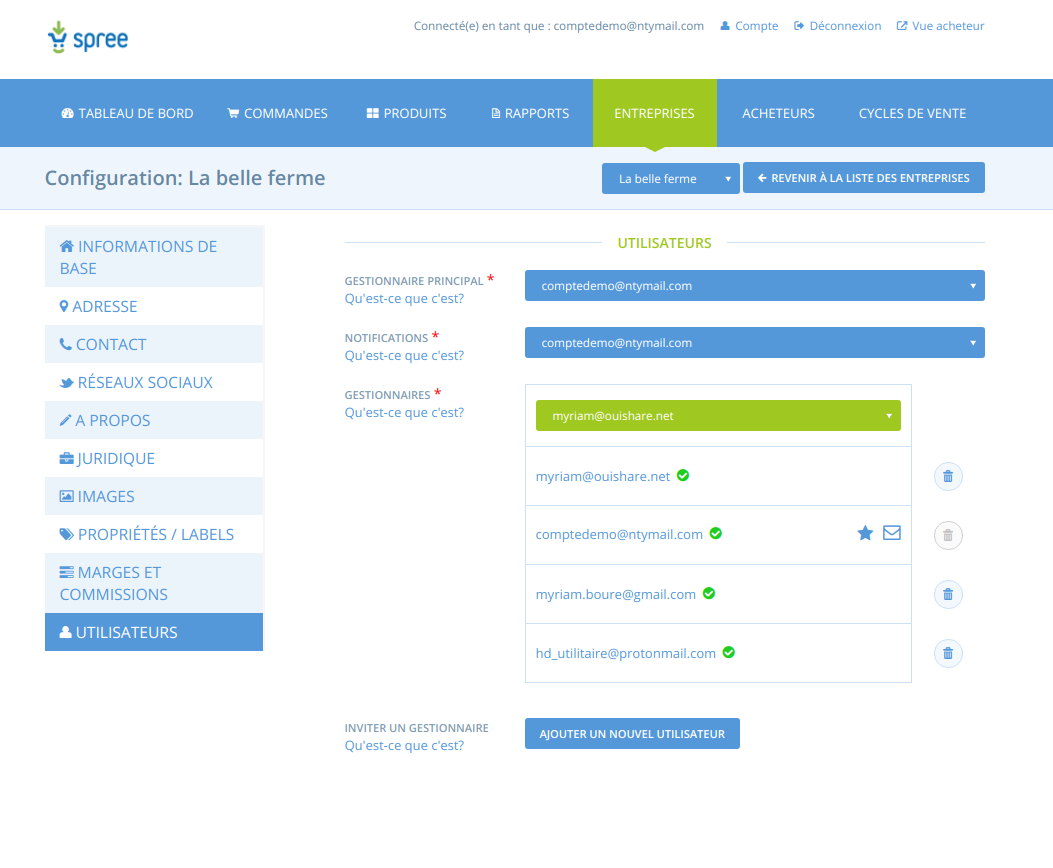
2- She transfers the ownership of "La belle ferme" to "[email protected]"
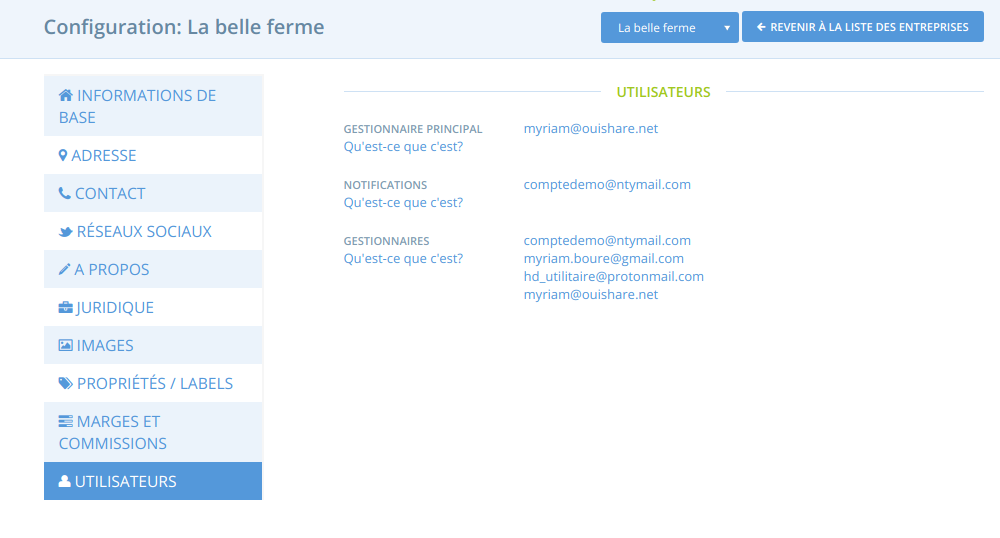
3- Then "[email protected]" logs in and check reports, see what she sees
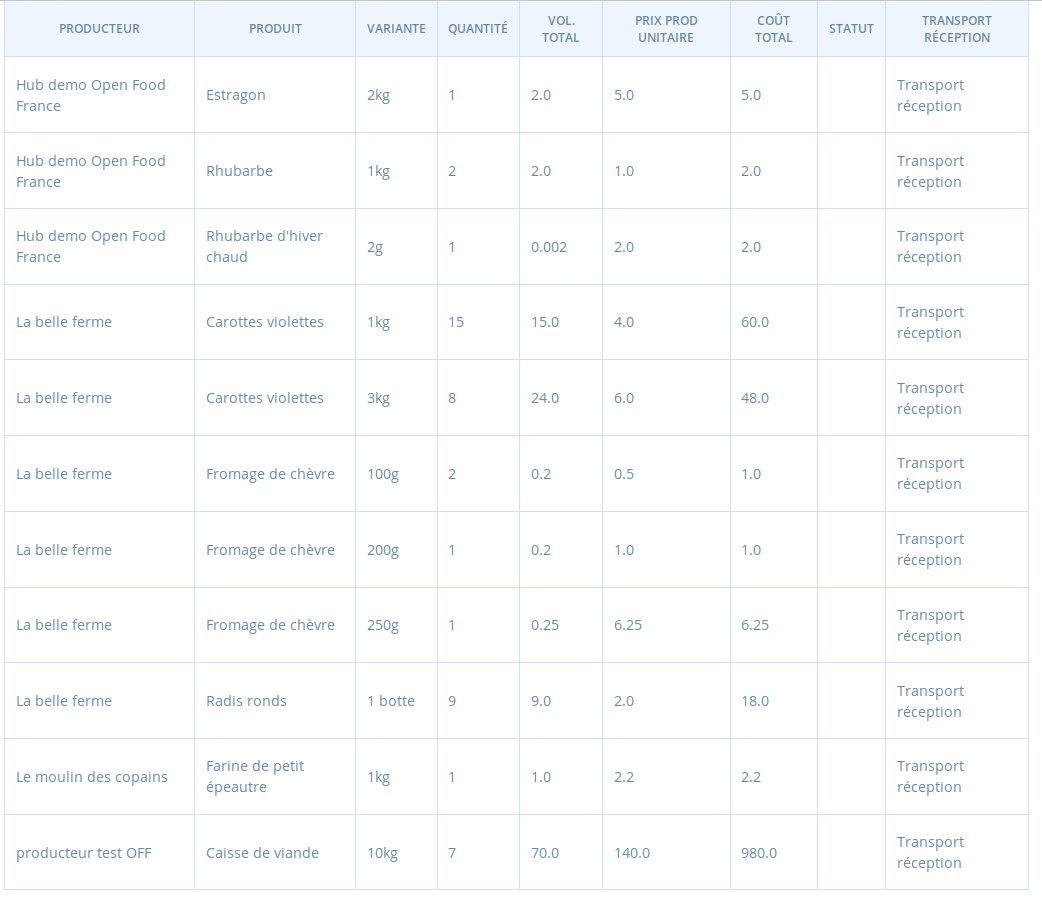
She sees orders for various producers.
4- But "[email protected]" is not manager of the other enterprises, for instance, "Le moulin des copains"
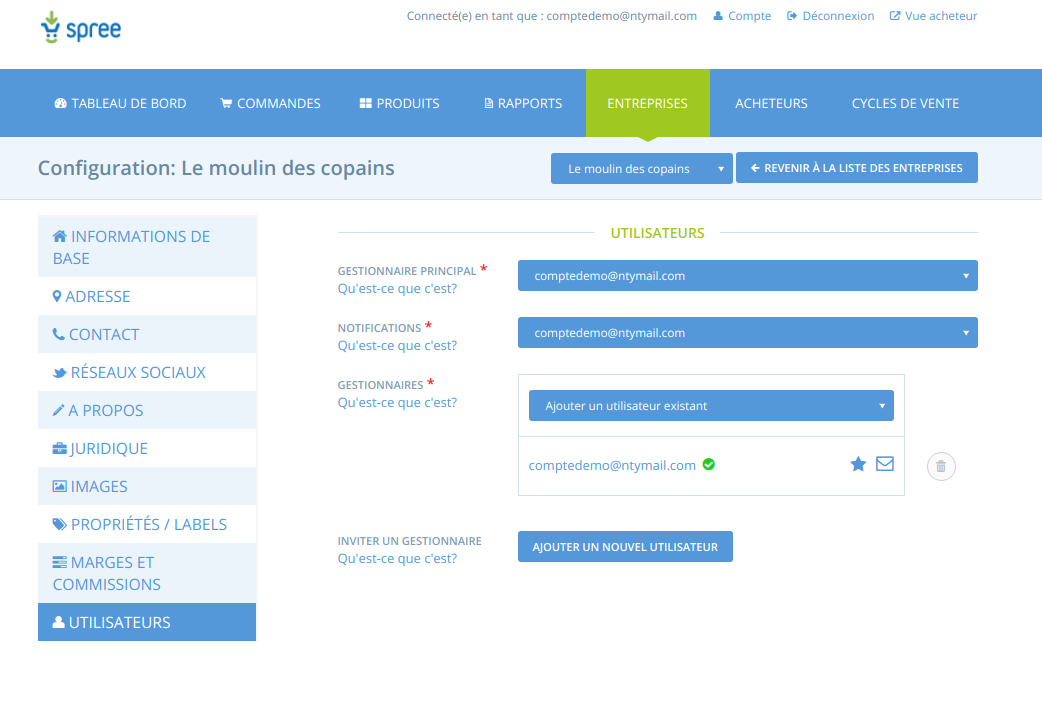
Still she sees the orders for Moulin des copains in the report.
Context
Reported by a supplier supplying a pretty big hub.
Severity
I am tempted to put s2 as it is pretty annoying for the trust people have in the platform. @RachL you have been communicating with the user, shall we check with him and Sabine (the hub manager) ?
Your Environment
- Version used: v1.28
- Browser name and version: Chrome and Firefox
- Operating System and version (desktop or mobile): Ubuntu 1.18
- OFN Platform instance where you discovered the bug, and which version of the software they are using : French
Possible Fix
Remove old privilege if owner is changed, don't transfer them to new owner.
 myriamboure
All 18 comments
@myriamboure in this case, they are not alarmed by it, but I'm wondering if in other case, it can cause a real problem. I wouldn't even use the word "annoying". It can be really bad: we have sales info from other people showing up where they are not supposed to 👀 So my vote would be s2... even s1 no? I mean.... what kind of workaround can we suggest?
 RachL
on 13 Mar 2019
RachL
on 13 Mar 2019
are you showing FR live data?
I looked at the DB and "[email protected]" has access to 21 enterprises and on top of that you have to put the permissions all those 21 enterprises get from other enterprises through enterprise permissions (I think "moulin de coupains" is in that category through "Hub demo Open Food France").
I think this is an S2 if a bug, but it looks like it's just permissions in the system the user is not aware of.
Can you please report a specific case in a specific environment so I can check the DB and explain?
 luisramos0
on 13 Mar 2019
luisramos0
on 13 Mar 2019
@luisramos0 I will slack you the real case
RachL
on 13 Mar 2019
after looking and testing with the real user scenario, we cant see the extra data in the report, even if we make ourselves the owner of the enterprise.
@RachL and I agreed to ask the user if the error is still there and also test this in staging.
luisramos0
on 13 Mar 2019
@myriamboure @luisramos0 I tried in Katuma staging, but wasn't able to reproduce. I am missing something. Those are the steps I did:
- Created a new hub called "Central hub"
- Created 2 producers (Producer 1 and Producer 2) from the hub admin and with the hub email address => then enterprise permissions were created automatically (Producer 1/2 => Central Hub)
- Created 2 products (one for each producer: Rhubarb and pasta) and open an OC with them
- Then I transfered ownership of Producer 1 to a new user
- I made 2 orders, one for each producer
- Connected as producer 1, I could only see one order in the report (the one concerning producer 1, which is correct)
- Then I transfered ownership of Producer 2 to a new user
- Logged in. But only saw the order for producer 2.
RachL
on 13 Mar 2019
Regarding what @luisramos0 said, I agree:
I think this is an S2 if a bug, but it looks like it's just permissions in the system the user is not aware of
When a new enterprise is created, there are some enterprise permissions with other enterprises that the owner owns that are automatically added: (Below, "hub" = sells "any")
- Creating any enterprise - Grants all hubs that the current owner owns "add to order cycle" permission.
- Creating primary producer - Grants all hubs that the current owner owns "create variant overrides" permission.
- Creating a new hub - Each primary producer that the current owner owns grants this new hub permissions "add to order cycle" and "create variant overrides".
This behaviour is in Enterprise#relate_to_owners_enterprises.
Aside from this, I wonder if having edited the "Sells" and "Primary Producer" settings of enterprises is also related...
@myriamboure For quicker resolution of this particular occurrence, you might want to review permissions for this producer and update where it doesn't make sense.
 kristinalim
on 13 Mar 2019
kristinalim
on 13 Mar 2019
@RachL I think what you are missing in your step is to make orders BEFORE your transfer the ownership ! It seems to be the difference between your steps and my steps. Can you check with "huilerie" (the real user) if the data he sees are from previous orders, before the ownership was transferred ? OR maybe if there are orders before ownership is transferred something happens in permissions and they are badly associated, the access is not removed in this specific case.
@kristinalim regarding permission for the specific producer @RachL has checked all permissions I think... @RachL can you try with my case if you manage to reproduce ?
myriamboure
on 21 Mar 2019
I think when I did my test, as the change of ownership happened during an open OC where orders were already made, the system got confused somehow about restricting the permission...
myriamboure
on 21 Mar 2019
Yes @kristinalim all permissions for the producer were remove by the hub when they transferred ownership.
@myriamboure went back on katuma staging and did the following:
- Created a new hub called "Central hub 2 "
- Created 2 producers (Producer 3 and Producer 4) from the hub admin and with the hub email address 3. Created 2 products (one for each producer: Rice and Yogurt) and open an OC with them.
- Bought the 2 products with guest account
- Then I transferred ownership of Producer 3 to a new user
- Connected as producer 3, I could only see one order in the report (the one concerning producer 3, which is correct)
- Then I transferred ownership of Producer 4 to a new user
- Logged in. But only saw the order for producer 2...
RachL
on 21 Mar 2019
Ok but then how comes in my test I can reproduce, what did I do differently ? What is the difference between our situations ?
Could it be, like there are some permission issues with sharing of shipping method, that because my user [email protected] is a manager of another enterprise that share shipping method with owner of hub demo open food france ? Let me try on the same example to transfer again the ownership to a brand new user. Bingo !
With the brand new user as owner he doesn't see the orders for the other producers.
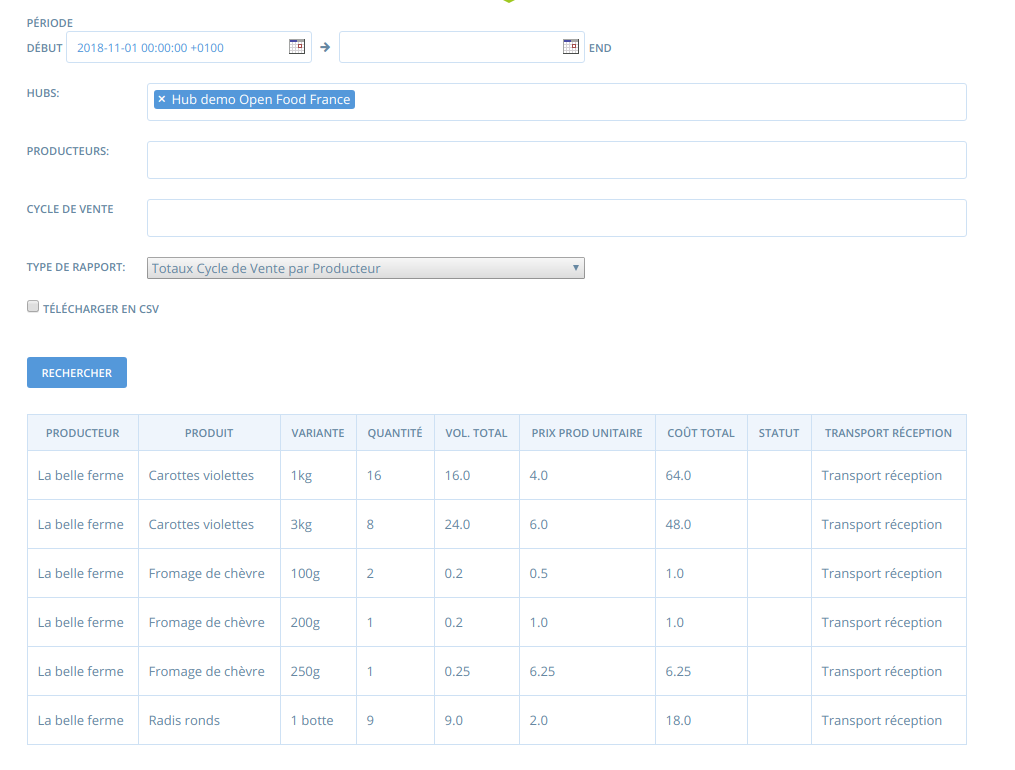
SO the problem is linked to some specificies around the user account.
My guess is some sort of confusion of the same type we have with shipping method : if user A creates shipping method for Enterprise A et is also manager of Enterprise B, the other managers of Enterprise B can see and update those shipping method. Can it be that similar type of confusion in permissions occur in that case ?
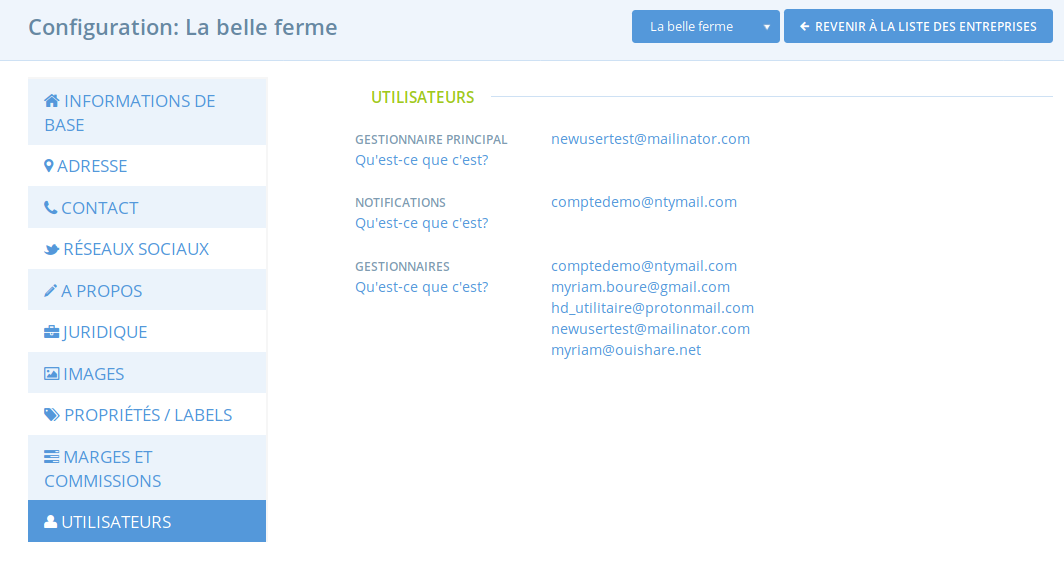
I don't see what else could be, in my case, see the managers of "Le moulin des copains", there is only "comptedmo@ntymail" so how could "[email protected]" see the orders from moulin des copains if she is not a manager of the hub where orders were made ?
@luisramos0 @kristinalim maybe that will ring a bell... @RachL we can try some tests to explore that direction but I'm not sure how to test.
myriamboure
on 22 Mar 2019
I see in the profile of the concerned producer that the hub manager is a manager as this profile as well. @RachL I would test to remove her as a manager (after letting her know) from both notification and manager and see then if "huilerie" still sees the other enterprises. That would give us a clue...
myriamboure
on 22 Mar 2019
--- how could "[email protected]" see the orders from moulin des copains if she is not a manager of the hub where orders were made ?
@myriamboure It's through enterprise permissions of "Hub demo Open Food France"
luisramos0
on 22 Mar 2019
Ok, mea culpa @luisramos0 , oups, sometimes I miss easy stuff when searching complex stuff :-o
Ok so I feel a bit embarrased :disappointed:
We just discussed with @RachL and agreed she would change the owner credential to connect on her name, see, and try to remove other managers to see if things change. Anyway, we keep on investigating... :-(
myriamboure
on 22 Mar 2019
@luisramos0 @myriamboure I have now access to his account. Indeed when I go to the first report "Orders And Distributors" I can see all orders, not only his. Customers details are hidden so I'm wondering if we documented somewhere how this report works and to whom it is supposed to be dedicated?
RachL
on 25 Mar 2019
@RachL do you mean you can see orders from other enterprises? can you share exact details (can be slack) so I can check again the DB?
luisramos0
on 25 Mar 2019
@luisramos0 yes I'm sending you the details on slack.
RachL
on 26 Mar 2019
ok, the question is why is the producer seeing orders from the hub and with hidden customer data in report "Orders and Distributors".
First, a note, the word complicated appears only once in the OFN code base and it's in a comment just above the SQL query for this report 👀 :-D
the comment is actually very very helpful, so I am pasting it here:
# Any orders placed through hubs that my producers have granted P-OC, and which contain my their products
# This is pretty complicated but it's looking for order where at least one of my producers has granted
# P-OC to the distributor AND the order contains products of at least one of THE SAME producers
Basically, this report lists orders that include my products. and that's why customer details are hidden. Makes sense, right?
luisramos0
on 26 Mar 2019
@luisramos0 thank you very much, this is good to know! It's a bit weird that we went to the trouble of hiding customer details as the customer did buy some of the producer products. And with order ID you can find the name easily. But that is another debate :) I'm closing this and I will answer him.
RachL
on 26 Mar 2019
Related issues
 kirstenalarsen
·
3Comments
kirstenalarsen
·
3Comments
 filipefurtad0
·
3Comments
filipefurtad0
·
3Comments
 sstead
·
4Comments
sstead
·
4Comments
 andrewpbrett
·
3Comments
RachL
·
3Comments
andrewpbrett
·
3Comments
RachL
·
3Comments