Openfoodnetwork: "New Product" is broken on alpha.katuma.org
In the product management page, clicking "new product" doesn't move page: 500 internal server error can be seen in devtools|network.
Description
It's impossible to create a product in katuma live.
I can see this with my user and then I also replicated it in a demo to a couple of farmers with their account: in alpha.katuma.org.
I tried it in both uk and fr live with my account, and it seems to be working there.
I cant access katuma live server for some reason, so I cant really see what's going on.
Expected Behavior
It's possible to create a new product.
Actual Behavior
Not possible to create product. Browser remains on product list page.
Steps to Reproduce
Go to https://alpha.katuma.org/admin/products
click "new product"
Nothing happens.
Context
Create products to demo OFN.
It's blocking the onboarding of a couple of CSAs in Portugal.
Severity
bug-s2 - probably S1 if in a more busy instance
Your Environment
- Version used: I am not katuma has the latest version
- Browser name and version: chrome latest
- Operating System and version (desktop or mobile): macos and windows
Possible Fix
no clue.
 luisramos0
All 16 comments
Findings so far:
- I was able to create my first product successfully.
- But any subsequent clicks to "New Products" gives me HTTP 500 (not seen in the browser, only in Developer Tools).
- I am still able to access this URL directly: https://alpha.katuma.org/admin/products/new
 kristinalim
on 3 Dec 2018
kristinalim
on 3 Dec 2018
This works intermittently.
I'll investigate further when I have access to the server.
kristinalim
on 3 Dec 2018
There is evidence that the server occasionally runs out of memory:
$ head log/skylight.log
# Logfile created on 2018-11-29 15:03:34 +0000 by logger.rb/44203
[SKYLIGHT] [1.6.1] Unable to start Instrumenter; msg=authentication token required; class=Skylight::ConfigError
[SKYLIGHT] [1.6.1] Unable to start Instrumenter; msg=Cannot allocate memory - stat -f -L -c %T /home/openfoodnetwork/apps/openfoodnetwork/current/tmp 2>&1; class=Errno::ENOMEM
[SKYLIGHT] [1.6.1] Unable to start Instrumenter; msg=Cannot allocate memory - stat -f -L -c %T /home/openfoodnetwork/apps/openfoodnetwork/current/tmp 2>&1; class=Errno::ENOMEM
[SKYLIGHT] [1.6.1] Unable to start Instrumenter; msg=Cannot allocate memory - stat -f -L -c %T /home/openfoodnetwork/apps/openfoodnetwork/current/tmp 2>&1; class=Errno::ENOMEM
[SKYLIGHT] [1.6.1] Unable to start Instrumenter; msg=Cannot allocate memory - stat -f -L -c %T /home/openfoodnetwork/apps/openfoodnetwork/current/tmp 2>&1; class=Errno::ENOMEM
[SKYLIGHT] [1.6.1] Unable to start Instrumenter; msg=Cannot allocate memory - stat -f -L -c %T /home/openfoodnetwork/apps/openfoodnetwork/current/tmp 2>&1; class=Errno::ENOMEM
[SKYLIGHT] [1.6.1] Unable to start Instrumenter; msg=Cannot allocate memory - stat -f -L -c %T /home/openfoodnetwork/apps/openfoodnetwork/current/tmp 2>&1; class=Errno::ENOMEM
[SKYLIGHT] [1.6.1] Unable to start Instrumenter; msg=Cannot allocate memory - stat -f -L -c %T /home/openfoodnetwork/apps/openfoodnetwork/current/tmp 2>&1; class=Errno::ENOMEM
[SKYLIGHT] [1.6.1] Unable to start Instrumenter; msg=Cannot allocate memory - stat -f -L -c %T /home/openfoodnetwork/apps/openfoodnetwork/current/tmp 2>&1; class=Errno::ENOMEM
Running top shows there is no swap file, and that there's little available memory at time of run which could be fully used up by a memory-intensive request or task. Running out of memory could cause the intermittent failure.

Unfortunately, log/production.log doesn't give enough information to prove this. There are no further details, and Bugsnag is not configured.
If correct, this might affect not only admin/products#new but other actions as well.
Next steps, @sauloperez:
- Can we add more memory to the server?
- Set up a swap partition or swap file. Question: Is the alpha.katuma.org fully configured to be live-ready upon reboot, or are there commands that need to be run? @sauloperez I can handle setting up a swap file, but I prefer using a swap partition which will need VPS management permissions. You can handle this especially if going for the latter.
- Set up Bugsnag for the instance, so we can confirm that this is the cause if it happens again. Is there an existing account, and the server is just not configured?
kristinalim
on 3 Dec 2018
Good idea to access the URL directly @kristinalim
On many retries, I have managed to see the page load, but mostly errors out. It's the same for clicking the button or accessing the URL directly.
Yeah, there are no errors in the log files.
action 3. I believe it's done already, I pinged you on the slack channel where the alerts are going (I dont think we have alerts related to this problem).
I agree with the actions 1 and 2.
Thanks @kristinalim
luisramos0
on 3 Dec 2018
alpha.katuma.org doesn't have a config/initializers/bugsnag.rb, nor any other file which has Bugsnag credentials.
@sauloperez The Bugsnag errors labelled "production" Katuma in the #devops-notification Slack channel seem to be from another server. Could you check, or send me the Bugsnag API key for alpha so I can configure?
kristinalim
on 3 Dec 2018
That must be the last provisiong that broke it. We do have bugsnag API key. That's why I noticed this error in the first place as well as others.
Regarding actions, we plan to work on 1 throughout December by buying a new machine. I haven't put too much thought on 2 but sounds like a good temporal solution. I'll make use of https://github.com/openfoodfoundation/ofn-install/blob/47679a2703ef68e39c1fc8eed457c4faa4d423c0/inventory/host_vars/_example.com/config.yml#L20.
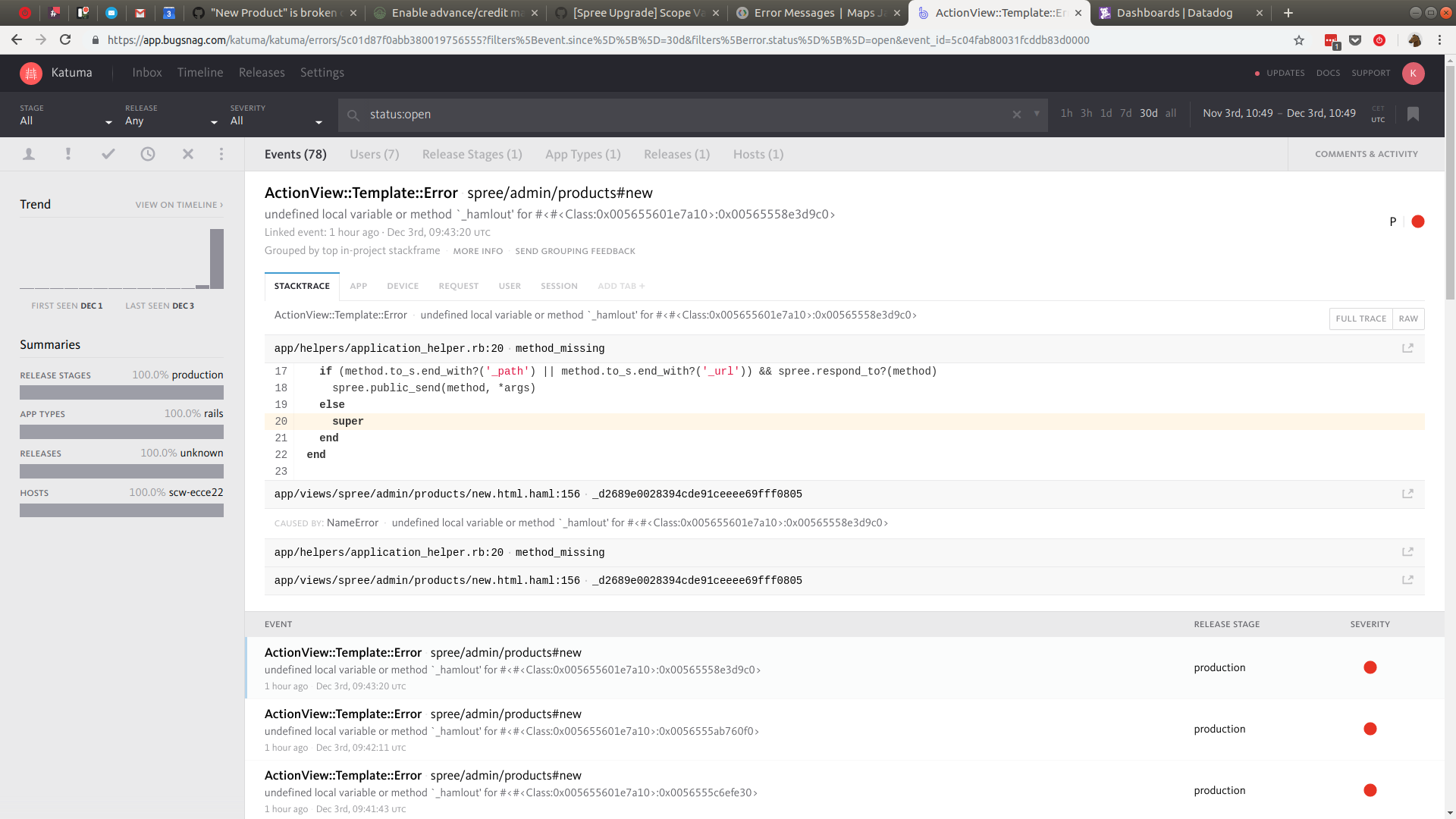
The issue I spotted on Bugsnag doesn't seem to be related to memory though but they may be different issues. See below
 sauloperez
on 3 Dec 2018
sauloperez
on 3 Dec 2018
Indeed, I see config/initializers/bugsnag.rb in /home/openfoodnetwork/apps/openfoodnetwork/releases-old/2018-11-29-145929, so it could be because of the provisioning that bugsnag.rb isn't there anymore. action_mailer.rb is missing too. Might be good to provision again?
kristinalim
on 3 Dec 2018
I investigated a bit that error with hamlout.
https://groups.google.com/d/msg/haml/RS3F3GXBNQA/FVko0Y8FjYwJ
where it says it could be related to using haml in helpers where it's not available.
I also checked the closely related PR #3055 and confirmed this PR was not included in the last release.
luisramos0
on 3 Dec 2018
wait, but this PR is part of the release: #3053
From the PR context, the error message and the article above I can go for a hypothesis: it looks like there's some ERB being generated by some helper method and that is not playing well with the new HAML view #hypothesis
luisramos0
on 3 Dec 2018
Meanwhile, I provisioned again providing 1G swap file and now I'm deploying a manually patched v1.23.0 to overcome the broken data migration. Things should be stable by now.
EDIT the situation with this machine is a bit embarrassing :sweat_smile:

that's while precompile assets
sauloperez
on 3 Dec 2018
@luisramos0 But if that's the case, I think the action would consistently fail?
kristinalim
on 3 Dec 2018
yes @kristinalim.
I dont know, I just wanted to provide context: this part of the app was changed and the hamlout error could be related to that.
luisramos0
on 3 Dec 2018
It can't be #3053 because Katuma was running on v1.22.0. I tried deploying v1.23.0 but it failed due to https://github.com/openfoodfoundation/openfoodnetwork/pull/3126. Now the deploy just finished so we'll see if it changes.
sauloperez
on 3 Dec 2018
I dont think that's correct Pau. I checked git log this morning and I saw 1.23.0
luisramos0
on 3 Dec 2018
Ok, then it's ofn-install behavior. The migration failed but the code didn't roll back. I wasn't a problem in this case but if the code being deployed depends on a migration in the same release we have a problem.
Then your hypothesis could be true.
sauloperez
on 3 Dec 2018
with the new swap and new deployment I can't replicate this issue!
thanks guys!
I think we can ignore the hamlout error and consider this a memory problem on the server.
I'll keep an eye on this and re-open if happens again.
luisramos0
on 3 Dec 2018
Related issues
sauloperez
·
3Comments
 sstead
·
4Comments
kristinalim
·
3Comments
luisramos0
·
3Comments
sstead
·
4Comments
kristinalim
·
3Comments
luisramos0
·
3Comments
 lin-d-hop
·
3Comments
lin-d-hop
·
3Comments
Most helpful comment
with the new swap and new deployment I can't replicate this issue!
thanks guys!
I think we can ignore the hamlout error and consider this a memory problem on the server.
I'll keep an eye on this and re-open if happens again.