Openfoodnetwork: Order Dates are incorrect for some orders in Orders page
Description
A number of UK users are reporting that the Order page is not showing the correct order dates for a number of orders. This is causing orders to be completely missed by some users as a number of users use the date functionality to search for orders.
Some orders are displaying with order dates that are before the order cycle has actually opened.
Expected Behavior
The Order date in Orders page should reflect the date the order was completed.
Actual Behavior
Dates are showing with dates previous to the date the user actually placed the order. Often this date appears to be a date before the Order Cycle actually opened. It appears that searching by Order Cycle is working correctly but searching by date is not showing the correct dates.
Steps to Reproduce
On UK Prod this has affected 2 enterprises - Cultivate (last 2 order cycles) and Black Mountain
- Use BOM to select orders by dates that reflect an order cycle
- Then remove the dates and select by order cycle instead
- Notice the difference in the order list, and in particular that the dates on some orders are not reflective of the dates that the order cycle was actually open.
Animated Gif/Screenshot
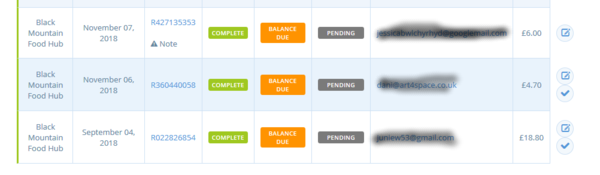
This is an image showing some orders for an order cycle that actually opened on Nov 7th. The orders displayed are correct for the order cycle, but the dates are displaying incorrectly.
Severity
- Version used: 1.20
Possible Fix
spree_order holds 3 dates for an order. In the past I have seen issues arise when the wrong date is referenced. Might not be relevant but I thought I'd mention all the same.
 lin-d-hop
All 16 comments
 lin-d-hop
on 14 Nov 2018
lin-d-hop
on 14 Nov 2018
You can jump the numbers and start reading at "hypothesis" below.
Some db data:
- order R022826854 (the one on the screenshot)
- created at 2018-09-04 06:55:31.324326
- updated_at 2018-11-13 15:39:36.053588
- completed_at 2018-11-13 15:39:32.229254
- order cycle name "2018 Nov 16 Friday"
- order cycle opens at 2018-11-07 12:00:00
- order cycle closes at 2018-11-13 23:59:00
- order cycle created_at 2018-10-24 07:49:41.38947
- order cycle updated_at 2018-10-24 08:02:26.899891
So, order.created_at < order_cycle.create_at, doesn't make sense.
Some stats on uk prod:
- number of orders where order.completed_at < oc.created_at = ZERO
- number of orders where order.updated_at < oc.created_at = ZERO
- number of orders where order.created_at < oc.created_at = 2239
- number of distributors in these 2239 orders = 72
- BUT 10% of the total orders in live UK have this "problem" in created_at and it doesn't look like a new problem, there are orders with this problem since 2014.
I have an hypothesis, it's a bug in the design of the cart feature.
When you add any item to the cart (click the plus button on shops page), OFN creates an order in the DB to hold that line_item and variant. The order stays there. Abandoned cart is an order in the system. When the user gets back to OFN a month later, the abandoned cart/order is still there in the database. If the user cleans up the cart (or cart is emptied by system, I am not sure we do this) and adds a new item from a new order cycle to the cart, the order will still be the old order created on the last visit a month ago. When the order is completed only updated_at and completed_at will be changed. Created_at remains the original one...
Possible solution: maybe we can ignore this cart problem all together just by using the complete_at date in this BOM page? Anyone sees any issues with replacing created_at with completed_at in this page?
 luisramos0
on 14 Nov 2018
luisramos0
on 14 Nov 2018
@luisramos0 You are completely right that order objects are used as carts. So the created_at property is not really useful on an order. completed_at is the time we actually care about.
And I also think I remember that cart orders are emptied automatically if they are invalid. Replacing them would probably be a better idea.
 mkllnk
on 15 Nov 2018
mkllnk
on 15 Nov 2018
I 100% agree that the correct date is completed_at. In the Zapier integration work I have done this is the date the accurately reflects when the order was placed. Updated_at and created_at lead to confusing results.
Regarding the cart issue, users have long requested that it be possible for a cart to be saved on a session. We did work on it in the past and it was blocked by some deeper level cart issues, which we chose to ignore until after spree-upgrade. I'd be hesitant to implement any fix that makes restoring carts more difficult in the future.
lin-d-hop
on 15 Nov 2018
Sharing another two issues which seem to be due to the same bug.
Order is not correctly sorted in orders page
An order placed in the current OC, shows up at the bottom of the list together with orders of the previous OC.
Order placed and with email confirmation not listed in current OC
User places an order in the current OC on Nov 12th but in backoffice is shown as created on Oct 28th. This skipped the filters the manager uses.

Order in backoffice

Order invoice
openfoodnetwork=> select number, state, created_at, completed_at from spree_orders where number = 'R210083162';
-[ RECORD 1 ]+---------------------------
number       | R210083162
state        | complete
created_at   | 2018-10-29 17:55:13.931508
completed_at | 2018-11-12 15:29:51.646805
Actual data in production
 sauloperez
on 15 Nov 2018
sauloperez
on 15 Nov 2018
Amazing @sauloperez, such a basic bug!
thanks @lin-d-hop I agree.
Seems we all agree we will change the BOM to use completed_at and not created_at. Right?
luisramos0
on 15 Nov 2018
Looks like the normal orders management page also uses created_at. Do we want to change it as well?
luisramos0
on 15 Nov 2018
Yes, I'd change both. The issue I got reported affects that page.
sauloperez
on 15 Nov 2018
@lin-d-hop does the bug actually affect the page below?
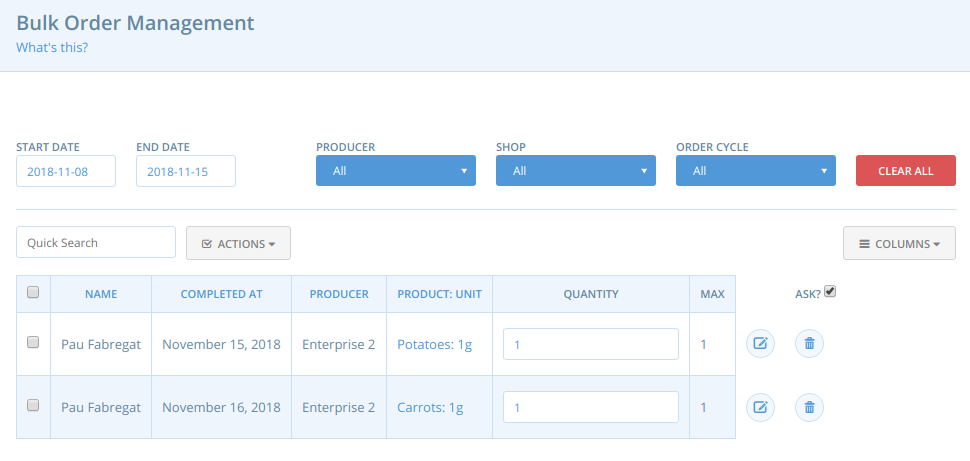
I noticed you mention BOM in the description but the page in the screenshot is the orders list. It turns out BOM is already using completed_at.
sauloperez
on 15 Nov 2018
Thanks Pau. User said it was BOM, but that was the same user that posted the screenshot so they are likely confused. Then I was confused. And now we're all confused.
Treat it as just orders page. I'll update desc.
lin-d-hop
on 15 Nov 2018
Is it possible to do a search for orders.created_at to check that we really do mean created_at where it is used?
I suspect this also has happened in other places, and have no idea why people haven't raised this before now.... :-/
lin-d-hop
on 15 Nov 2018
Let me check
EDIT thanks for the heads-up. I missed the created_at filters we currently have. Apart from that, I don't see it used, at least without nasty metaprogramming.
sauloperez
on 15 Nov 2018
I tested uk live and BOM has this bug. Maybe uk live doesnt have the latest version.
luisramos0
on 15 Nov 2018
Umm I'm not sure we have introduced completed_at in BOM in the last two releases (according to @lin-d-hop UK has 1.20). I'll take a look. If that was the case, BOM in UK must be failing due to something else we haven't foreseen.
Can you please provide an animated GIF?
sauloperez
on 16 Nov 2018
I don't see any error related to BOM in v1.20.0
On my machine with v1.20.0
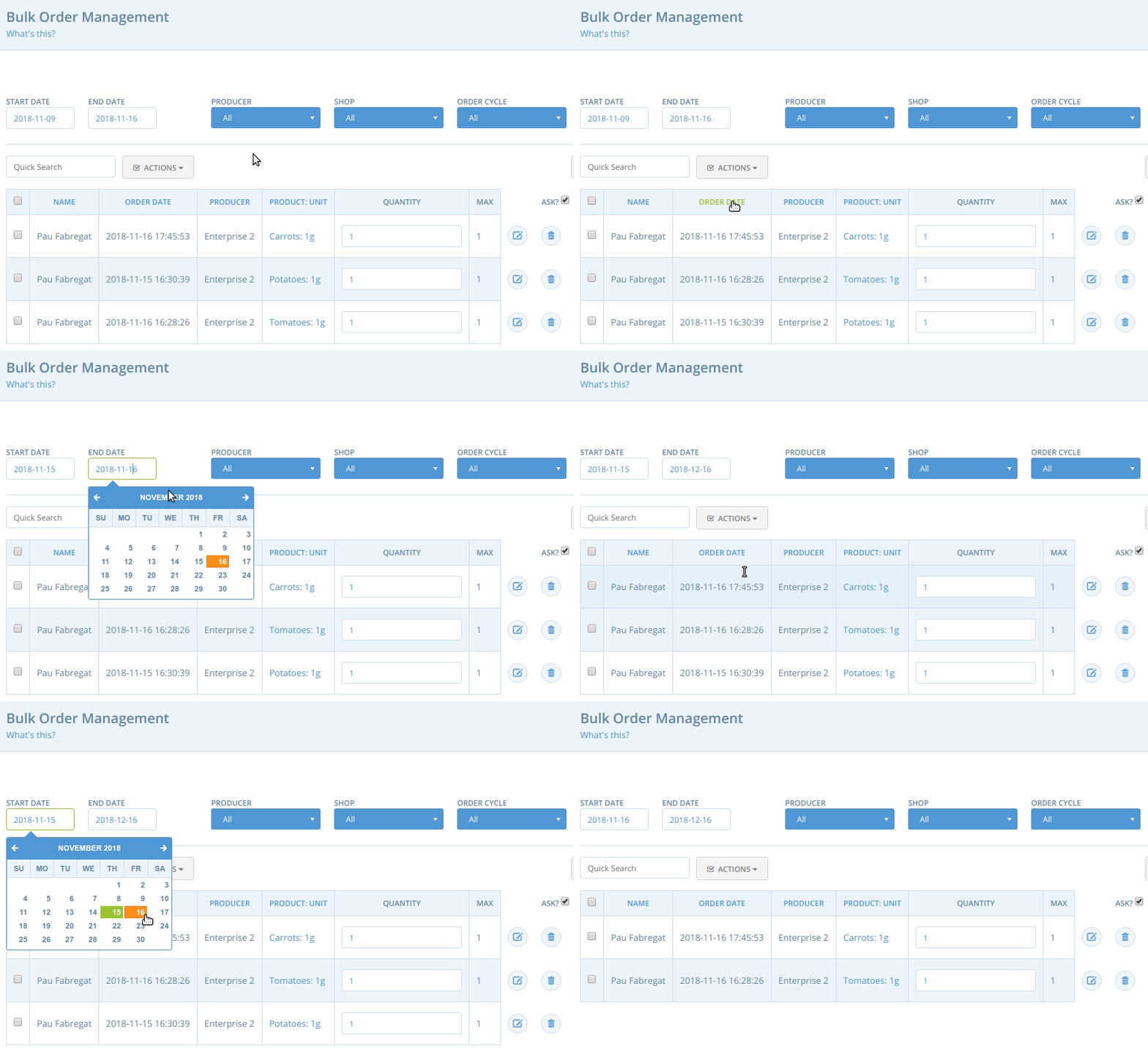
The actual dates of these orders
irb(main):004:0> Spree::Order.select([:created_at, :completed_at]).where(id: [2, 3, 4])
  Spree::Order Load (0.5ms)  SELECT created_at, completed_at FROM "spree_orders" WHERE "spree_orders"."id" IN (2, 3, 4)
=> [#<Spree::Order created_at: "2018-09-16 16:58:14", completed_at: "2018-11-15 15:30:39">, #<Spree::Order created_at: "2018-11-16 16:44:53", completed_at: "2018-11-16 16:45:53">, #<Spree::Order created_at: "2018-11-16 15:27:36", completed_at: "2018-11-16 15:28:26">]
I double checked BOM in uk live now and BOM dates look ok. I cant find a broken case. Must have been me mixing up the dates... let's ignore and say this bug is in the orders page only.
luisramos0
on 16 Nov 2018
Related issues
 myriamboure
·
3Comments
myriamboure
·
3Comments
 filipefurtad0
·
3Comments
luisramos0
·
3Comments
filipefurtad0
·
3Comments
luisramos0
·
3Comments
 shen-sat
·
3Comments
shen-sat
·
3Comments
 RachL
·
3Comments
RachL
·
3Comments