Openfoodnetwork: [Spree Upgrade][Admin/Orders/Create] Fix Create Order in Admin - line items blank (1 broken test)
Fix the line_items blank error in order creation:
1)
    As an administrator
    I want to manage orders
 creating an order with distributor and order cycle
     Failure/Error: expect(page).not_to have_selector '#errorExplanation'
       expected not to find visible css "#errorExplanation", found 1 match: "1 error prohibited this record from being saved: There were problems with the following fields: Line items <span class=\"translation_missing\" title=\"translation missing: en.spree.errors.messages.blank\">Blank</span>"
     # ./spec/features/admin/orders_spec.rb:72:in `block (2 levels) in <top (required)>'
     # /Users/luisramos/.rvm/gems/ruby-2.1.5@openfoodnetwork/gems/rspec-retry-0.6.1/lib/rspec/retry.rb:123:in `block in run'
     # /Users/luisramos/.rvm/gems/ruby-2.1.5@openfoodnetwork/gems/rspec-retry-0.6.1/lib/rspec/retry.rb:110:in `loop'
     # /Users/luisramos/.rvm/gems/ruby-2.1.5@openfoodnetwork/gems/rspec-retry-0.6.1/lib/rspec/retry.rb:110:in `run'
     # /Users/luisramos/.rvm/gems/ruby-2.1.5@openfoodnetwork/gems/rspec-retry-0.6.1/lib/rspec_ext/rspec_ext.rb:12:in `run_with_retry'
     # /Users/luisramos/.rvm/gems/ruby-2.1.5@openfoodnetwork/gems/rspec-retry-0.6.1/lib/rspec/retry.rb:37:in `block (2 levels) in setup'
 luisramos0
All 9 comments
I dont understand why this "line items cant be blank" is showing up in 2-0-stable. The code looks exactly the same as in step-6a and in master/step-6a the error is not showing up when a new order is created (after selecting distributor and OC.
https://github.com/openfoodfoundation/spree/blob/step-6a/backend/app/controllers/spree/admin/orders_controller.rb#L69
luisramos0
on 22 Nov 2018
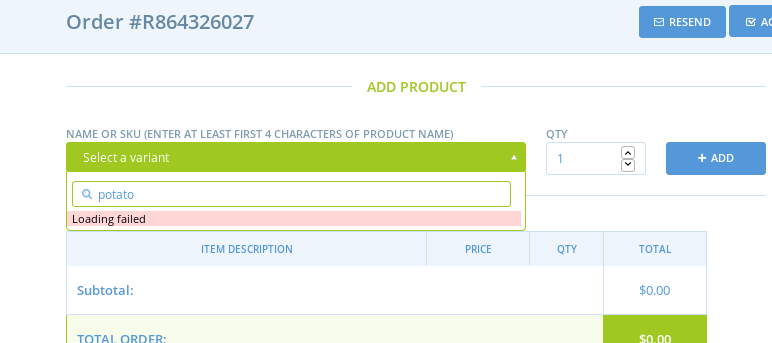
Have you tried booting the app and doing it manually? I see this error message in the dropdown:
 Matt-Yorkley
on 22 Nov 2018
Matt-Yorkley
on 22 Nov 2018
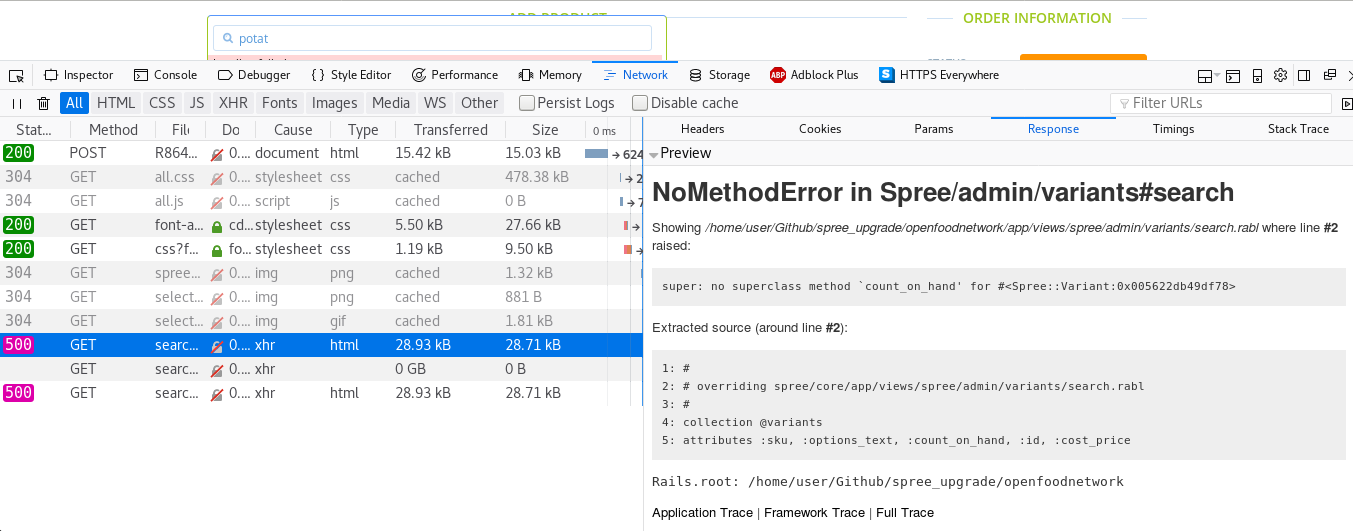
Console says this:
Matt-Yorkley
on 22 Nov 2018
yes, I tried manually on both v1 and v2. I also added some debug messages but I dont understand why in v1 althought order.errors is not empty, the _error_messages.haml doesn't get displayed...
I dont think you are on v2, that page looks way too good :-)
luisramos0
on 22 Nov 2018
I was on the wrong branch! :see_no_evil:
Matt-Yorkley
on 22 Nov 2018
👍
luisramos0
on 23 Nov 2018
the missing translation for the error message can be easily fixed with:
--- a/config/locales/en.yml
+++ b/config/locales/en.yml
@@ -2659,6 +2659,9 @@ See the %{link} to find out more about %{sitename}'s features and to start using
my_account: "My account"
date: "Date"
time: "Time"
+ errors:
+ messages:
+ blank: "can't be blank"
layouts:
admin:
header:
The missing translation is added already. This issue is about spec ./spec/features/admin/orders_spec.rb:48. While the reported error is in line 72, there is now one in line 74:
1)
As an administrator
I want to manage orders
creating an order with distributor and order cycle
Failure/Error: targetted_select2_search @product.name, from: '#add_variant_id', dropdown_css: '.select2-drop'
Capybara::Poltergeist::JavascriptError:
One or more errors were raised in the Javascript code on the page. If you don't care about these errors, you can ignore them by setting js_errors: false in your Poltergeist configuration (see documentation for details).
No translation found for on_hand. Does it exist within spree/admin/shared/_translations.html.erb?
No translation found for on_hand. Does it exist within spree/admin/shared/_translations.html.erb?
at http://127.0.0.1:41832/assets/admin/all.js:76886
# ./spec/features/admin/orders_spec.rb:74:in `block (2 levels) in <top (required)>'
I'm treating this now as the task to fix that spec.
 mkllnk
on 7 Dec 2018
mkllnk
on 7 Dec 2018
An explanation of this error:
When you create or modify an order, you can add variants. You select a variant by searching for it. Search results are displayed in a little box and the variant is displayed with some basic data like SKU and stock level.
- The user enters
potatointo the search field. - A JSON request is sent to the server.
- The resulting variants are rendered as JSON in
app/views/spree/admin/variants/search.rabl. This used to be replacing a Spree view, but the original has been deleted. Spree is using the API instead (fa2889a42ccfd6faa50150fc213655451d340f0f). Unheared of! - The JSON is rendered as HTML in
app/views/spree/admin/variants/_autocomplete.js.erbwhich overrides Spree'sbackend/app/views/spree/admin/variants/_autocomplete.js.erb. - The Javascript function
t 'on_hand'is called. - But instead of our translate function, it uses Spree's translate function defined in
core/app/assets/javascripts/admin/handlebar_extensions.js. - The translations are looked up in
backend/app/views/spree/admin/shared/_translations.html.erbwhich doesn't know about translatingon_hand.
The easiest fix is to use Rails' t method instead of Spree's t function:
diff --git a/app/views/spree/admin/variants/_autocomplete.js.erb b/app/views/spree/admin/variants/_autocomplete.js.erb
index ccd93d63f..91283e773 100644
--- a/app/views/spree/admin/variants/_autocomplete.js.erb
+++ b/app/views/spree/admin/variants/_autocomplete.js.erb
@@ -16,7 +16,7 @@
       </ul>
       <ul class='variant-data'>
         <li class='variant-sku'><strong>{{t 'sku'}}:</strong> {{variant.sku}}</li>
-        <li class='variant-on_hand'><strong>{{t 'on_hand'}}:</strong> {{variant.count_on_hand}}</li>
+        <li class='variant-on_hand'><strong><%= t 'on_hand' %>:</strong> {{variant.count_on_hand}}</li>
       </ul>

       {{#if variant.option_values}}
Alternatively, we can Angularise that variant search using the API and then use our Angular filter t to translate the label. But that is something we can do later. I will fix the translate call for now. I tested that it's translated correctly when switching languages.
mkllnk
on 7 Dec 2018
Related issues
 andrewpbrett
·
3Comments
andrewpbrett
·
3Comments
 shen-sat
·
3Comments
shen-sat
·
3Comments
shen-sat
·
3Comments
shen-sat
·
3Comments
 sauloperez
·
3Comments
sauloperez
·
3Comments
 HugsDaniel
·
3Comments
HugsDaniel
·
3Comments
Most helpful comment
An explanation of this error:
When you create or modify an order, you can add variants. You select a variant by searching for it. Search results are displayed in a little box and the variant is displayed with some basic data like SKU and stock level.
potatointo the search field.app/views/spree/admin/variants/search.rabl. This used to be replacing a Spree view, but the original has been deleted. Spree is using the API instead (fa2889a42ccfd6faa50150fc213655451d340f0f). Unheared of!app/views/spree/admin/variants/_autocomplete.js.erbwhich overrides Spree'sbackend/app/views/spree/admin/variants/_autocomplete.js.erb.t 'on_hand'is called.core/app/assets/javascripts/admin/handlebar_extensions.js.backend/app/views/spree/admin/shared/_translations.html.erbwhich doesn't know about translatingon_hand.The easiest fix is to use Rails'
tmethod instead of Spree'stfunction:Alternatively, we can Angularise that variant search using the API and then use our Angular filter
tto translate the label. But that is something we can do later. I will fix the translate call for now. I tested that it's translated correctly when switching languages.