Openfoodnetwork: Impossible to duplicate a product with image
This has now been reported by 2 hub users in France and seems pretty annoying.
Description
The "duplicate product" button is not working. Click on it but nothing happens.
Steps to Reproduce
- Go to "product"
- On any product, click on the icon "duplicate"
Animated Gif/Screenshot

Context
Reported by 2 French users, takes a long time to recreate products one by one and can't use duplicate feature. Tested on both Firefox and Chrome but users, verified by me I can reproduce the bug.
Severity
S3 - You can create it manually, or now use product import feature.
Your Environment
- Version used: v1.18 on French instance (not sure which version it is in Canada) so it's not linked to the last v1.19 release.
- Browser name and version: Firefox Quantum 62.0
- Operating System and version (desktop or mobile): Ubuntu 18.04.1 LTS
 myriamboure
All 46 comments

myriamboure
on 20 Sep 2018
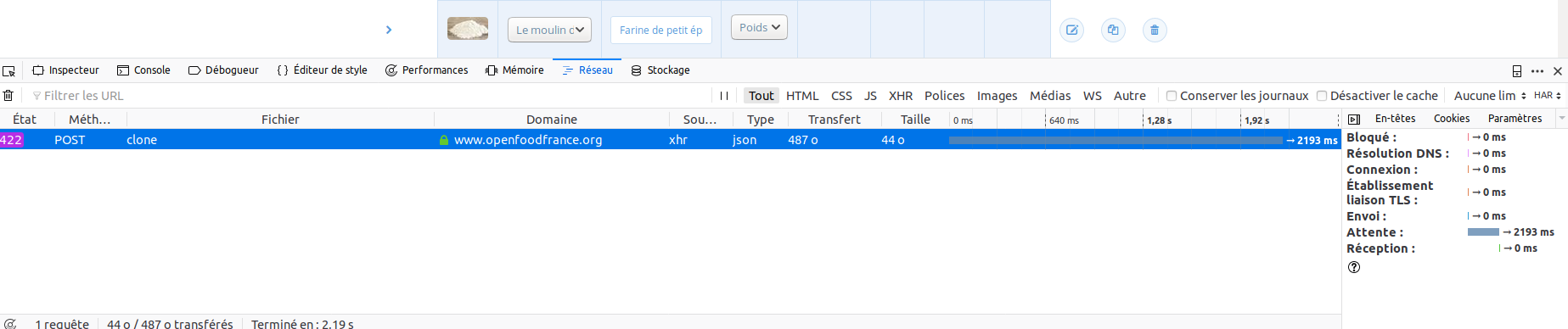
hey @myriam "chez moi ça marche". For me it works on French production. Lousy UX though as you don't see it is loading the duplicated product... but it works :) You can see I did two copy of liqueur (yes I do choose my product wisely) for the producer "producteur test OFF"
 RachL
on 20 Sep 2018
RachL
on 20 Sep 2018
@RacheL strangely when the first user reported that I tested and it worked. Then second I retested and It didn't. With both super admin and hub manager... I will do some other test but there is definitely a bug here somewhere.
myriamboure
on 20 Sep 2018
I might have found the bug:
- if I am the owner of the producer enterprise behind the product, I can duplicate a product.
- if I am not the owner, but just a manager of the producer enterprise behind the product, I can't.
Wether or not I am a super-admin, as a super admin if I'm not the owner of the producer enterprise I can't duplicate the product. So it seems an issue related to enterprise permission.
Is it easy to fix for a newby then?
myriamboure
on 21 Sep 2018
I'm still not sure but we can try. It's not like fixing a missing translation.
 sauloperez
on 24 Sep 2018
sauloperez
on 24 Sep 2018
I found the same scenario as @myriamboure. I would have to need access to the french server logs to be able to go further in there. Can we do this ?
 HugsDaniel
on 4 Oct 2018
HugsDaniel
on 4 Oct 2018
Yes @HugsDaniel please open a PR on ofn-install similar to what @kristinalim did here https://github.com/openfoodfoundation/ofn-install/pull/247 and then we get the right people to review and accept it
 sigmundpetersen
on 4 Oct 2018
sigmundpetersen
on 4 Oct 2018
I think either @luisramos0 or @pacodelaluna can add you on the French server @HugsDaniel
myriamboure
on 4 Oct 2018
I only have access to staging.
 luisramos0
on 4 Oct 2018
luisramos0
on 4 Oct 2018
Hey @HugsDaniel is this one moving forward? We have so many users complaining and the workaround is recreating all the products one by one which is ... time consuming, not a good start with the OFN :-( If you still have access issues all Ha and Ri devs now have access to French prod.
myriamboure
on 22 Oct 2018
My finding so far is that I can duplicate products without image, but not with image. And the 422 error is related to Image:
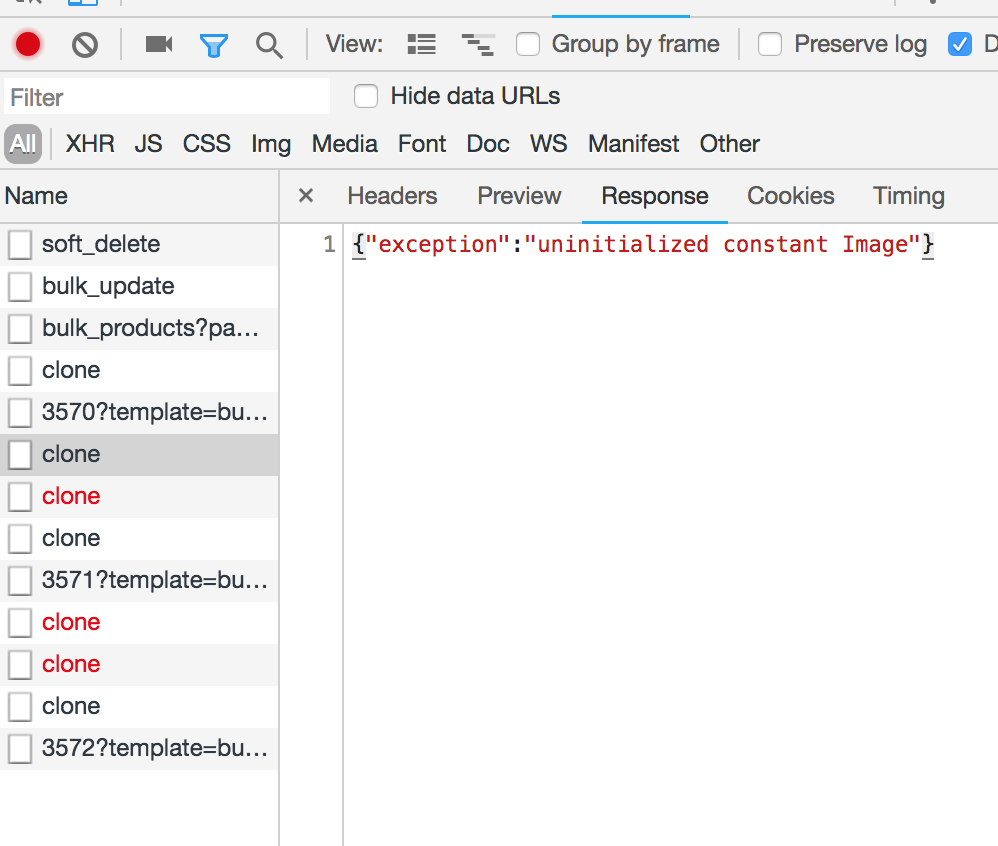
this was seen in FR live with La belle farm
luisramos0
on 26 Oct 2018
Product "Panier de legumes" in "La belle farm" is one with image and not clonable.
I removed it's image and voilá, it's now clonable.
I re-added the image to the product and it's not clonable anymore.
So, this one is related to the product image.
Looks like a AWS S3 issue as the logs say:
[AWS S3 404 0.089393 0 retries] head_object(:bucket_name=>"ofn-prod",:key=>"home/openfoodnetwork/apps/openfoodnetwork/current/public/spree/products//original/panier.jpeg") AWS::S3::Errors::NoSuchKey No Such Key
someone needs to sort out the aws s3 key. I am not sure where that is done.
luisramos0
on 26 Oct 2018
@pacodelaluna I think you are the AWS S3 account and key manager if I'm not wrong, can you have a look? Or maybe @Matt-Yorkley has access? Thank you so much @luisramos0 !
myriamboure
on 27 Oct 2018
All Sys Admin have access to the configuration for Ansible deployment, the secrets.yml file is in the folder of the ofn-admin user.
The keys are properly set as you won't see any images otherwise, and won't be able to upload any content.
 pacodelaluna
on 27 Oct 2018
pacodelaluna
on 27 Oct 2018
I am not saying that there is not an issue related to S3, but maybe it is something between configuration and code.
pacodelaluna
on 27 Oct 2018
Hey, yeah, sorry, I was too fast. The error "NoSuchKey" doesnt mean the s3 config key is missing. It means the object key is missing from S3, it means the image is not in S3. Some problem with the upload or download. Needs further investigation.
luisramos0
on 27 Oct 2018
@luisramos0 I have succeeded in reproducing the error, I couldn't go deeper but it seems to be related to the ProductDuplicator lib.
My guess is that this lib is loosing the context bringing S3 Configuration. I guess it is something low level, so it could be related to Spree Upgrade, not sure, but I would investigate this side. Or maybe the S3 config is not set up somewhere but I couldn't find where.
I have to go now but I will try to go deeper tonight.
pacodelaluna
on 27 Oct 2018
ah, it's so important to try to replicate issues in "lower" environments. I just realized I can replicate this locally. It's as simple as products with images are not clonable.
I dont see how it can be related to spree upgrade.
Some problem related to this:
https://github.com/openfoodfoundation/spree/blob/step-6a/core/lib/spree/core/product_duplicator.rb#L47
luisramos0
on 27 Oct 2018
There was a pr (can't find it now) not too long ago from @kristinalim that enabled removing product images. That is the only thing I can think of that has changed recently in relation to product images that might have introduced the problem. Kristina could you point to where that is so @luisramos0 and @pacodelaluna can check?
 kirstenalarsen
on 29 Oct 2018
kirstenalarsen
on 29 Oct 2018
@kirstenalarsen @kristinalim I would be glad to check this out, couldn't find the PR by myself, can you show me that?
pacodelaluna
on 30 Oct 2018
@pacodelaluna I think what @kirstenalarsen was thinking about is https://github.com/openfoodfoundation/openfoodnetwork/pull/2512 but it's not about product images, it's about promo and banner images... am I right Kirsten? Then not sure we have more clue that what we have above, but if you would like to work on it @pacodelaluna you are more than welcome ! I see @HugsDaniel is assigned as he was supposed to work on it but apprently didn't get the chance to move forward, so please go ahead and you can pair on solving the issue if needs be :-)
myriamboure
on 30 Oct 2018
I have a access to the server now so I can move forward @myriamboure :)
HugsDaniel
on 31 Oct 2018
There was a PR on Spree to add configs for removing the duplication of images when cloning a product : https://github.com/spree/spree/pull/4711/files
Apparently it has been merged into 2-0-stable. Should we implement this kind of behavior in step-6a as a temporary fix ?
HugsDaniel
on 31 Oct 2018
Adding something like
module Spree
  class ProductDuplicator
    attr_accessor :product

    @@clone_images_default = true
    mattr_accessor :clone_images_default

    def initialize(product, include_images = @@clone_images_default)
      @product = product
      @include_images = include_images
    end
...

    def duplicate_master
      ...
      master.dup.tap do |new_master|
        ...
        new_master.images = master.images.map { |image| duplicate_image image } if @include_images
        ...
      end
    end
And then if our config files have :
Spree::ProductDuplicator.clone_images_default = false
That's monkey patching ++ but it can be done quickly and give us time to solve the issue.
HugsDaniel
on 31 Oct 2018
The PR in spree you mention is a new feature we dont need (optional image cloning). I'd not do it.
We need to fix the current feature (cloning the image) which is not working. Maybe this spree PR will help us understand why the current feature is broken?
luisramos0
on 31 Oct 2018
I get an NameError: uninitialized constant Image from original_product.duplicate in products_controller_decorator#clone. It's definitely coming from products_controller_decorator.rb:47.
In Spree, core/lib/spree/core/product_duplicator.rb:40 returns [nil], which seems to indicate that the duplicate_image method is the same file doesn't work properly.
I ran the tests for product_duplicator in Spree step-6a and it passes, so the problem must come from OFN.
HugsDaniel
on 31 Oct 2018
The last lines from the backtrace, does it mean it's an active_support issue ?

HugsDaniel
on 31 Oct 2018
It seems that when duplicating the product with "dup", the class given to the product is simply "Image" and not "Spree::Image", so when saving it fails with a "uninitialized constant Image".
By adding
has_many :images, :as => :viewable, :order => :position, :dependent => :destroy, :class_name => "Spree::Image"
in variant_decorator.rb, the class name is ok but I have another error.
When active_record is saving the image as an attribute of the new object, the value given to the method is nil. That I don't understand, but I'll keep going. Maybe a problem with activerecord version ?
HugsDaniel
on 31 Oct 2018
Okaaaay so I think I got it ! @myriamboure PR coming soon :)
HugsDaniel
on 13 Nov 2018
Yeppppa ! Thanks @HugsDaniel looking forward to testing and merging ;-)
myriamboure
on 14 Nov 2018
What happened to testing?

luisramos0
on 15 Nov 2018
@myriamboure I did a quick test on French production (Hub demo, trying to duplicate the apples) and either it's slow and as there is no loading I don't know if it is happening or not? Either it does not work. But then again, maybe it's a deployment pb, not necessary to the PR. Can you check as well?
RachL
on 29 Nov 2018
It's broken in FR prod for test apples and test avocats.
this is the error in the server:
Started POST "/api/products/3842/clone" for 89.155.192.75 at 2018-11-29 14:38:47 +0100
[paperclip] copying /home/openfoodnetwork/apps/openfoodnetwork/current/public/spree/products/1967/original/918YNa3bAaL._SL1500_.jpg to local file /tmp/9f85f20d4f3ade6bb45dac6739ac146520181129-1257-ea8yrb.jpg
[AWS S3 200 0.916696 0 retries] get_object(:bucket_name=>"ofn-prod",:key=>"home/openfoodnetwork/apps/openfoodnetwork/current/public/spree/products/1967/original/918YNa3bAaL._SL1500_.jpg")

[AWS S3 404 0.088676 0 retries] head_object(:bucket_name=>"ofn-prod",:key=>"home/openfoodnetwork/apps/openfoodnetwork/current/public/spree/products//original/918YNa3bAaL._SL1500_.jpg") AWS::S3::Errors::NoSuchKey No Such Key

[AWS S3 404 0.089525 0 retries] head_object(:bucket_name=>"ofn-prod",:key=>"home/openfoodnetwork/apps/openfoodnetwork/current/public/spree/products//mini/918YNa3bAaL._SL1500_.jpg") AWS::S3::Errors::NoSuchKey No Such Key

[AWS S3 404 0.086615 0 retries] head_object(:bucket_name=>"ofn-prod",:key=>"home/openfoodnetwork/apps/openfoodnetwork/current/public/spree/products//small/918YNa3bAaL._SL1500_.jpg") AWS::S3::Errors::NoSuchKey No Such Key

[AWS S3 404 0.088278 0 retries] head_object(:bucket_name=>"ofn-prod",:key=>"home/openfoodnetwork/apps/openfoodnetwork/current/public/spree/products//product/918YNa3bAaL._SL1500_.jpg") AWS::S3::Errors::NoSuchKey No Such Key

[AWS S3 404 0.0874 0 retries] head_object(:bucket_name=>"ofn-prod",:key=>"home/openfoodnetwork/apps/openfoodnetwork/current/public/spree/products//large/918YNa3bAaL._SL1500_.jpg") AWS::S3::Errors::NoSuchKey No Such Key
Looks like the product id is missing from the url:
products//original
luisramos0
on 29 Nov 2018
@RachL do you know if the problem exists in any other instance ?
HugsDaniel
on 30 Nov 2018
I tried in au prod with latest release. similar error:
Started POST "/api/products/8178/clone" for 89.155.192.75 at 2018-11-30 11:34:07 +0000
[paperclip] copying public/images/spree/products/5700/original/giphy_(2).gif to local file /tmp/82cc6aa40c0612f3f93d3f89be3fa2d520181130-7299-a1irrr.gif
  Rendered text template (0.0ms)
[AWS S3 200 4.557688 0 retries] get_object(:bucket_name=>"ofn_production",:key=>"public/images/spree/products/5700/original/giphy_(2).gif")

[AWS S3 404 0.211058 0 retries] head_object(:bucket_name=>"ofn_production",:key=>"public/images/spree/products//original/giphy_(2).gif") AWS::S3::Errors::NoSuchKey No Such Key

[AWS S3 404 0.211832 0 retries] head_object(:bucket_name=>"ofn_production",:key=>"public/images/spree/products//mini/giphy_(2).jpg") AWS::S3::Errors::NoSuchKey No Such Key

[AWS S3 404 0.210654 0 retries] head_object(:bucket_name=>"ofn_production",:key=>"public/images/spree/products//small/giphy_(2).jpg") AWS::S3::Errors::NoSuchKey No Such Key

[AWS S3 404 0.209609 0 retries] head_object(:bucket_name=>"ofn_production",:key=>"public/images/spree/products//product/giphy_(2).gif") AWS::S3::Errors::NoSuchKey No Such Key

[AWS S3 404 0.210447 0 retries] head_object(:bucket_name=>"ofn_production",:key=>"public/images/spree/products//large/giphy_(2).jpg") AWS::S3::Errors::NoSuchKey No Such Key

Command :: identify -format '%wx%h,%[exif:orientation]' '/tmp/82cc6aa40c0612f3f93d3f89be3fa2d520181130-7299-a1irrr.gif[0]' 2>/dev/null
Command :: convert -auto-orient '/tmp/82cc6aa40c0612f3f93d3f89be3fa2d520181130-7299-a1irrr.gif[0]' -auto-orient -resize "x48" -crop "48x48+18+0" +repage -strip -auto-orient '/tmp/82cc6aa40c0612f3f93d3f89be3fa2d520181130-7299-a1irrr20181130-7299-ksd2z1.jpg'
Command :: file -b --mime '/tmp/82cc6aa40c0612f3f93d3f89be3fa2d520181130-7299-a1irrr20181130-7299-ksd2z1.jpg'
Command :: identify -format '%wx%h,%[exif:orientation]' '/tmp/82cc6aa40c0612f3f93d3f89be3fa2d520181130-7299-a1irrr.gif[0]' 2>/dev/null
Command :: convert -auto-orient '/tmp/82cc6aa40c0612f3f93d3f89be3fa2d520181130-7299-a1irrr.gif[0]' -auto-orient -resize "x112" -crop "112x112+44+0" +repage -strip -auto-orient '/tmp/82cc6aa40c0612f3f93d3f89be3fa2d520181130-7299-a1irrr20181130-7299-1b52rsy.jpg'
Command :: file -b --mime '/tmp/82cc6aa40c0612f3f93d3f89be3fa2d520181130-7299-a1irrr20181130-7299-1b52rsy.jpg'
Command :: identify -format '%wx%h,%[exif:orientation]' '/tmp/82cc6aa40c0612f3f93d3f89be3fa2d520181130-7299-a1irrr.gif[0]' 2>/dev/null
Command :: identify -format %m '/tmp/82cc6aa40c0612f3f93d3f89be3fa2d520181130-7299-a1irrr.gif[0]'
Command :: identify -format %m '/tmp/82cc6aa40c0612f3f93d3f89be3fa2d520181130-7299-a1irrr.gif[0]'
Command :: identify -format %m '/tmp/82cc6aa40c0612f3f93d3f89be3fa2d520181130-7299-a1irrr.gif[0]'
Command :: convert -auto-orient '/tmp/82cc6aa40c0612f3f93d3f89be3fa2d520181130-7299-a1irrr.gif' -coalesce -auto-orient -resize "240x240>" -layers "optimize" -strip -auto-orient '/tmp/82cc6aa40c0612f3f93d3f89be3fa2d520181130-7299-a1irrr20181130-7299-61ai5'
Command :: file -b --mime '/tmp/82cc6aa40c0612f3f93d3f89be3fa2d520181130-7299-a1irrr20181130-7299-61ai5'
Command :: identify -format '%wx%h,%[exif:orientation]' '/tmp/82cc6aa40c0612f3f93d3f89be3fa2d520181130-7299-a1irrr.gif[0]' 2>/dev/null
Command :: convert -auto-orient '/tmp/82cc6aa40c0612f3f93d3f89be3fa2d520181130-7299-a1irrr.gif[0]' -auto-orient -resize "600x600>" -strip -auto-orient '/tmp/82cc6aa40c0612f3f93d3f89be3fa2d520181130-7299-a1irrr20181130-7299-dc9n07.jpg'
Command :: file -b --mime '/tmp/82cc6aa40c0612f3f93d3f89be3fa2d520181130-7299-a1irrr20181130-7299-dc9n07.jpg'
Command :: identify -format '%wx%h,%[exif:orientation]' '/tmp/82cc6aa40c0612f3f93d3f89be3fa2d520181130-7299-a1irrr.gif[0]' 2>/dev/null
  Rendered text template (0.1ms)
Hey @luisramos0 @HugsDaniel @RachL @myriamboure this is a problem for one of our users in Australia too. So the sooner we get it fixed the happier the entire world will be 😄
But the question I have is, does @HugsDaniel have the brain space to be working on it right now, given all the other issues/PRs that have his face on them?? I feel like this one (so sadly) needs to be put back to the Dev Ready column (noooooo!) because it's been 2 weeks since there's been any activity...
toomanythingsinthepipe
toottoot
 daniellemoorhead
on 14 Dec 2018
daniellemoorhead
on 14 Dec 2018
I worked on it last week and a bit this week, but still have no clue why it's only broken in French and Aus prod. I'd need some help on this one if someone have time. @luisramos0 @sauloperez @mkllnk @Matt-Yorkley ?
HugsDaniel
on 14 Dec 2018
I just read through this whole thread again and I'm wondering if we need to separate this issue:
- @myriamboure reported a problem when the user is not the producer of the product.
- @luisramos0 reported a problem when a product has an image.
Are these two separate issues?
@HugsDaniel Australian production is still giving this error:
{"exception":"uninitialized constant Image"}
The server is running 1052d982550f0b7ac601b399f032291383ddad26 which includes your Spree fix. Do we still need to declare Spree::Image? That wasn't included in your last pull request.
 mkllnk
on 18 Dec 2018
mkllnk
on 18 Dec 2018
@mkllnk I had already split the issue yes. Here is the ownership switch problem :
https://github.com/openfoodfoundation/openfoodnetwork/issues/2925
So this one is just about duplicating the product.
myriamboure
on 18 Dec 2018
Hey there ! No one is assigned now to that bug, it seems @HugsDaniel unassigned himself, which is ok but if it has been prioritized (which is the case) we then need someone else to work on it... I'll send a reminder on the bug channel.
myriamboure
on 7 Jan 2019
@myriamboure Can you point me to a server and a product where you see this issue?
I tried several things:
- Clone product with image locally. :heavy_check_mark:
- Clone product with image on Aus staging. :heavy_check_mark:
- Clone product with image on Aus staging after configuring S3 storage. :heavy_check_mark:
- Clone a product without image on French production. :heavy_check_mark:
- Clone a product with image on French production. :heavy_check_mark:
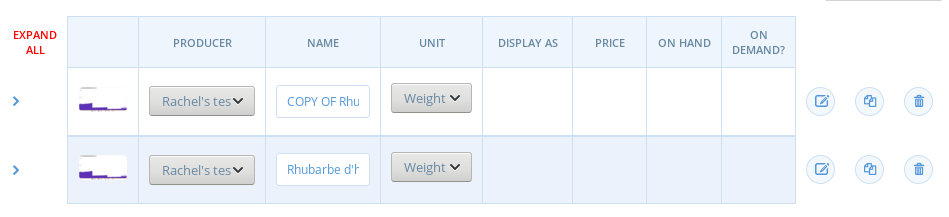
@luisramos0 said it was broken on French production for test apples, but I just cloned one it's fine. Can anyone re-produce this error?
mkllnk
on 9 Jan 2019
I tried to reproduce this too. Currently, wondering if this is related to the S3 bucket policy, like for the following warning where some instances are getting HTTP 404:
[AWS S3 404 0.211058 0 retries] head_object(:bucket_name=>"ofn_production",:key=>"public/images/spree/products//original/giphy_(2).gif") AWS::S3::Errors::NoSuchKey No Such Key
-- maybe some instances are getting an HTTP 403 which possibly interrupts Product#duplicate?
If this still happens on some instances, it might be worth checking the bucket policy or other bucket settings. @mkllnk Do you have access to the S3 management for AU production?
 kristinalim
on 9 Jan 2019
kristinalim
on 9 Jan 2019
I just retested on French production with a non admin account, it does duplicate the product but without the image

Interestingly I logged out and logged in as an admin and the images have appeared !
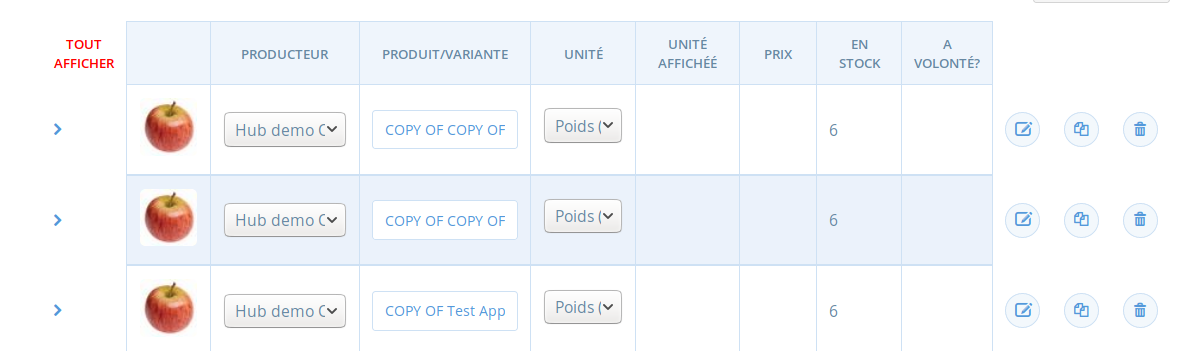
I try again to duplicate as an admin, it took 30 sec to appear so maybe that's why we thought it was broken, and as the image doesn't appear straight away (you have to refresh the page) it's confusing, we think it is broken.
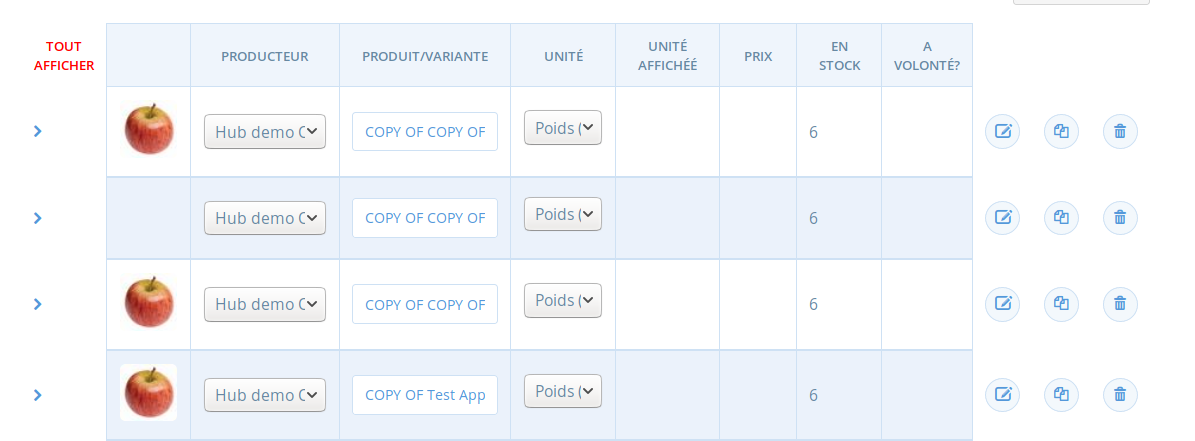
After page refresh:

So I think we can close that issue and open a new one for the new issue which is just an "instant display of the image when product is duplicate". Will do it now and we can discuss there. It's a bit less prioritary though, we can write it in the user guide for now, even if not very nice on ux, confusing for users...
Do you think it's related to S3 bucket policy ? Or related to our code then ? @kristinalim @mkllnk ?
myriamboure
on 9 Jan 2019
@myriamboure Ah. If the new product is duplicated and the image appears eventually, then it's not related to the S3 bucket policy... This can be tackled in #3298 then.
:thinking: If duplication fails intermittently again after now, we can explore the possibility that this is a timeout issue... When using S3, duplicating a product with images can take a lot longer than if there are no images. OFN communicates with the S3 server for each image one by one.
kristinalim
on 9 Jan 2019
I confirm it was not working on FR prod but it's now working... I dont know why/what changed...
luisramos0
on 9 Jan 2019
I like to explore the things @kristinalim points out if this happens again. S3 might be a source of entropy here.
sauloperez
on 9 Jan 2019
Related issues
RachL
·
3Comments
 andrewpbrett
·
3Comments
sauloperez
·
3Comments
HugsDaniel
·
3Comments
myriamboure
·
3Comments
andrewpbrett
·
3Comments
sauloperez
·
3Comments
HugsDaniel
·
3Comments
myriamboure
·
3Comments
Most helpful comment
Okaaaay so I think I got it ! @myriamboure PR coming soon :)