Openfoodnetwork: [Cookies] Investigate and list cookies used by OFN
Description
Before implementing the cookie feature we need to understand:
- which are the cookies used by the OFN application and what each of those cookies does. (New Relic for all? Google Analytics for some instances who decided to use it? Others?)
- we also need to understand what other cookies that might be used by local instances and their attached information website (as it looks like the same website for users so they need to accept cookies for both websites as if it was only one I guess... see OFN Uk website - TBD in inception session)
- for each of those cookies we need to know if we could desactivate them if user want, or if they are core for the basic delivery of our service (our app cannot work without them). For instance google analytics trackerscould be deactivated for a user upon request I guess, but maybe not newrelic.
This might be useful and a good soucre of inspiration: https://appear.in/information/tos/cookie-policy/ and
https://appearin.helpscoutdocs.com/article/192-cookie-list
 myriamboure
All 14 comments
Do we use cookies in checkout or any other OFN part?
 enricostano
on 2 May 2018
enricostano
on 2 May 2018
@mkllnk @oeoeaio @lin-d-hop do you have any idea about which cookies we use? Can someone who knows about that can start a list? (maybe in the wiki, could be a good place to list that I guess?)
myriamboure
on 2 May 2018
I see a __stripe_mid for instance (and we don't use Stripe in Katuma instance...)
enricostano
on 2 May 2018
I'm doing a real world test to see which cookies are actually set. I start Firefox with a new empty profile:
PROFILEDIR=`mktemp -p /tmp -d tmp-fx-profile.XXXXXX.d`
firefox -profile $PROFILEDIR -no-remote -new-instance
The default already visits a Mozilla page and Google which set cookies. So I delete them before the test.
- Visit https://openfoodnetwork.org.au/

- Our code sets a session cookie to know if the user is logged in or has a cart.
- The
__utmxcookies are set by Google Analytics.
- Visiting a shop doesn't add any more cookies.
- Going to the checkout sets Stripe cookies even though the shop is not using Stripe.
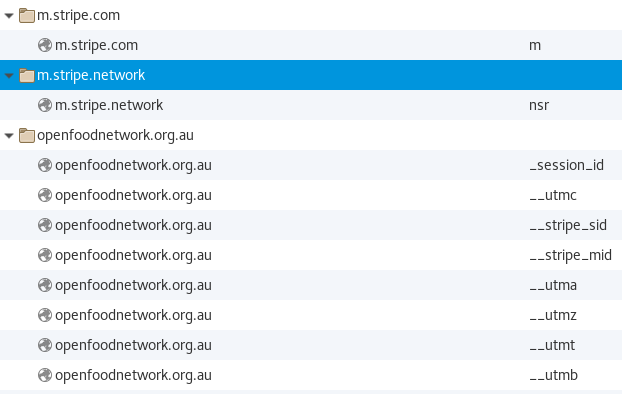
- Going to the maps page sets a cookie from Open Street Map.

- Logging in doesn't set any new cookies.
- Logging in using "Remember me" sets one more cookie.

I can't think of any other action that could set more cookies. So I guess that's it. @oeoeaio Any other idea?
The session cookie is essential for shopping and logging in. It would be cool to only start a session when necessary, but I'm not sure how difficult that is. I'm also not sure if the Stripe and Google Analytics cookies are not set when these services are not configured. We should check that and ensure that they are not set. We can't deactivate the maps feature at the moment.
We have some links to other pages. For example the footer can link to Twitter, a Newsletter or whatever. These pages set their own cookies and that's beyond our scope. But since a user doesn't know which links go to an external site, we should mention that in a cookie policy and think of marking external links.
@myriamboure Should I go ahead and investigate the deactivation of Stripe and Google Analytics?
 mkllnk
on 6 Jun 2018
mkllnk
on 6 Jun 2018
Awesome @mkllnk !
Ok so if I sum up, we have:
- Two cookies that are essential to delivering the service: the session cookie and the open street map cookie. I understand the session cookie manage cart things. But why is the open street map cookie activated? So that we can explain why it is impossible to deactivate it (if it is).
- One is activated only if the user click on "remember me" > can a user deactivate it later if she changes her mind? I think we would need to add a checkbox "forget me" that appears when this cookie is active. Or enable to deactivate that cookie (which would then forget the user) in this cookie future cookie panel. Would that sound possible?
- One is probably activated only if the instance has connected google analytics > to check 1- if that happens only if instance connected analytics (I guess yes) 2- and if instance has activated analytics, how to deactivate it for a specific user if the user want to desable that cookie through the future cookie panel.
- One is essential to delivering the service IF instance has allowed it AND if the shop is using stripe BUT if the shop isn't, today is always activated > to check: 1- what we could do is tell in our cookie policy that this cookie only activates ifi the shop uses stripe as a payment method and as it is necessecary for the delivery of the service can't be deactivated. So check if that is possible to only activate that cookie depending on the shop the user is on. 2- If that's too complicated, we could say this cookie is optional but if the user deactivate it she may not be able to shop in some shopfronts. In that case we need a UX about what happens if a user who has deactivatd the cookie tries to shop using a stripe payment method in a shop (we need a pop-in telling he needs to allow that cookie).
Agree that external pages cookies are not in scope, we can precise it in our data policy.
Is that all clear @mkllnk ?
myriamboure
on 7 Jun 2018
I can't think of anything that would add any additional cookies.
The stripe elements script is loaded in the darkswarm layout. This is based on their recommendation to include their script on all pages on the site as it helps them to detect fraudulent transactions. I guess they build a picture of which of our pages usually interact with their API and then flag anything unusual. So it is my understanding that setting the Stripe cookie has a broader function than simply the provision of a payment method to a user. Removing it could affect the security of the service itself. See: https://stripe.com/docs/radar#requirements for a piece of example text that we can add to our privacy policy.
Is the aim here to minimise the quantity of cookies that are set, or simply to document the cookies that we currently use to enable our site to function? What are our obligations in terms of providing a user interface that allows the destruction of certain cookies?
 oeoeaio
on 7 Jun 2018
oeoeaio
on 7 Jun 2018
@oeoeaio the aim is not to minimise the quantity of cookies but to:
- inform users if they are tracked through cookies and for what purpose so that they know what their data are used for
- and for each one which is not strictly necessary for the delivery of the service, we legally have to let the user choose if they accept that tracker or not (google analytics for instance, stripe could be as well as for a user who doesn't pay anything online it would definitely not appear as necessary to be tracked by stripe... that's why I proposed different options for stripe also as I didn't know the tech things behind it). We legally have to provide a user interface to allow deactivation of those cookies basically.
Interestingly appear.in for instance has put stripe as third-party persistent cookie that cannot be deactivated so maybe we can just do the same: https://appearin.helpscoutdocs.com/article/192-cookie-list. You will see in this list that lots of those cookies can be deactivated by "opting out" (their ux is not good though).
Here https://www.cnil.fr/professionnel if you click on "gestion des cookies" (up right) you will see as well... with a better ux.
myriamboure
on 8 Jun 2018
I compiled a task list for all my findings. Doing all these tasks would be ideal, but it's also a lot of work. So I would suggest to prioritise and then start at the top of the list until we feel that the result is satisfying and we don't want to spend more time on it.
Session
A session cookie is required for all shopping functionality, but we don't really need it just to view the homepage. A possible task:
- [ ] Only create a session if the user adds to the cart or logs in.
Remember me
The cookie remember_spree_user_token is valid for 12 days and automatically deleted after that. I didn't see any action deleting it before the end of the 12 days.
- [ ] Delete the cookie when user logs out. Check if newer Spree versions do that already. API documentation: https://www.rubydoc.info/github/plataformatec/devise/master/Devise/Models/Rememberable
Once that task is done, logging out is an action we can mention in the cookie policy to delete the cookie.
Open Street Maps
This cookie is set by openstreetmaps.org and used to prevent abuse of their service. We don't have any control over it. I found a nice cookie policy explaining its use: https://www.streetcheck.co.uk/about/cookies. And I see three possible ways to not set that cookie:
- [ ] Offer opt out of maps functionality. For those users, we don't load any maps unless they opt in again.
- [ ] Set up a caching proxy (nginx) for the tiles server that doesn't set a cookie.
- [ ] Set up our own tile server to be used by OFN instances, not serving cookies. https://switch2osm.org/serving-tiles/building-a-tile-server-from-packages/
The first option is more like a workaround, but requires only code changes. The second option would solve the problem by not serving cookies. It could just be a configuration file for nginx and a URL change in our maps code. If this works as I think it does, it would be my preferred option. The third option goes a step further and increases our infrastructure complexity by adding another server, but it would mean that the instances don't need to worry about it, only the global admin team.
Google Analytics
I visited our staging server https://staging1.openfood.com.au/ and didn't see any Google Analytics (GA) cookies. So I think if the instance doesn't use GA, the cookies are not set. :+1:
I saw a few pages referring to https://tools.google.com/dlpage/gaoptout to opt out of Google Analytics (GA), but it requires the user to install a plugin. Most users who don't want to be tracked by Google, probably don't trust Google enough to run their code on their own computer. Better to recommend something like Privacy Badger.
But we could also have the user decide:
- [ ] Offer opt out of Google Analytics and don't load the code for those customers.
- [ ] Replace Google Analytics with Piwik which doesn't transfer data to a third party. Opt out could still be useful.
Stripe
The Stripe documentation says:
If you don’t collect enough information from your customers, it can reduce the effectiveness of fraud detection. Conversely, if you collect too much information, it can negatively impact the checkout experience and result in a lower conversion rate.
So they are aware of negative impacts of too much tracking and see it up to the shop to find a balance.
Including Stripe.js on every page is a recommended best practice, but not a requirement. Possible tasks:
- [ ] Load Stripe.js only on shop and checkout related pages. Don't track people just visiting the homepage, exploring the map or viewing our privacy policy.
- [ ] Load Stripe.js only when items are in the cart and the shop has the option to pay with Stripe.
- [ ] Give users the option to opt out of Stripe. That payment method is not available for this user unless they opt in again (or we live with the higher fraud risk, could be up to the shop to decide on this).
General note on opt-out
For optional cookies, we can either offer opt-in or opt-out. Offering opt-out has the problem that we need to remember that a user opted out. For guest users, we would need to save this information in a cookie (how ironic). So the only way to honour cookie-adverse customers is to use opt-in. The downside of opt-in are messages popping up asking for permission. For example:
We would like to gather statistics about the usage of our site using Google Analytics. Would you like to support us and participate? [Yes] / [No and remember to not ask me again]
But we have only the choice to always show that message until people agree or store their choice to disagree in another cookie. We could reduce the annoyance by showing that message only on certain pages. For example showing the analytics question on the home page and asking for Stripe when people add to the cart.
mkllnk
on 8 Jun 2018
@mkllnk thank you for that detail answer!
Here is a first draft of what could be our cookie policy based on all the foundings here, and some decisions I propose to the community be legally compliant and do as less as possible as a first step: https://docs.google.com/document/d/1jujU9CV4gJEo70rJ5x2W8zDYjp0Opz3TGTAMyZMLl9w/edit?usp=sharing
(needs some rewritting, really first draft)
Answers to your suggestions @mkllnk :
- Session > I propose we just explain in our cookie policy that this is an essential cookie, and don't change anything
- Remember me > I'm happy with your solution, let's do that (1 issue to create in the epic)
- Open Street Map > I propose to put it in our essential cookie, explain and don't do anything else.
- Google Analytics > Actually the opt-out option doesn't allow us to be compliant (https://www.cookiebot.com/en/google-analytics-gdpr/) so it would need to be an opt-in process, users by default shouldn't be tracked, and if they click on "accept all cookies" banner, then the analytics cookies can be setup. So let's be conscious that we will loose data, maybe not so many users will accept it. What is harder @mkllnk : implement that or switch to Piwik? I guess implementing the opt-in process is easier... but we want anyway to implement Piwik, and users will probably not be so resistent than for google. So shall we take that opportunity and just do it? If we don't transmit the data to any third party maybe then an opt-ou process will be enough, I need to check if we go in that direction. @sauloperez what do you think? My opinion is: if Spree Upgrade is our priority we should the quickest and just keep google analytics for now and add the opt-in process. Then we'll do Piwik when we decide to prioritize it.
- Stripe > As there are security matters here I suggest also to include it in our essential cookies, but explain a bit better. Especially there are 4 cookies, it would be good to understand what they do, and be able to tell for each one. Stripe is not very explicit on their website...
- As you suggest Maikel let's use a cookie to remember the unsubscribe option for google analytics, which is the only option we are going to offer then I suspect (only for intances who use google analytics). I know it sounds paradoxal, but the problem is not the much the number of cookies, but the self data governance of users. This cookie will be in essential cookie so can't really be deactivated.
So to sum up I would propose the following stories in the epic:
- [ ] implement default non Google Analytics tracking for users until cookie has been accepted (opt-in)
- [ ] implement a new cookie to store that choice to remember it for all further connexion (this shouldn't be asked again to user, but user can later one go on cookie policy page and change his mind, so users can maybe accept and then later on decide they don't want to be tracked anymore by Google Analytics, so the cookie should be permanent until a new choice is made)
- [ ] implement delete "remember me" cookie when user logs out
- [ ] @mkllnk to answer in more details what the Stripe cookies are used for (see attached document) and review if I didn't write anything stupid in the cookie policy document (base of future cookie policy and set up page I guess)
- [ ] finish UX and agree on it for cookie consent workflow (first consent and further modifications)
@NickWeir63 @lin-d-hop as you have connected the wordpress as if it was the same website, do you use analytics for your wordpress as well? If yes that adds complexity... If you use analytics for wordpress as well, we need to see how users can opt-in/out for both, but as both sites are not integrated technicaly (even if they look like) I don't really see how to do that... I propose to keep that out of scope for now and only focus on the platform. You can think on your side then how you want to adapt the wordpress to be legallly compliant.
myriamboure
on 11 Jun 2018
Good work @myriamboure. I left some comments on that cookie policy document.
mkllnk
on 12 Jun 2018
I'm wondering if we won't miss one cookie here @mkllnk as when a shopfront is embedded in an external website, if I have a tracker blocker on that website I can't see the content of the shopfront (appears as everlasting loading) when I "trust site" and allow trackers then the shopfront load normally. Is it us putting some cookie on users computer when they use a website which has embedded a shopfront? Or something else?
Ok I'll review the UX and open all the stories.
myriamboure
on 13 Jun 2018
We also need a story to enabe instances to enable/disable cookie banner. (note to self)
myriamboure
on 13 Jun 2018
I'm wondering if we won't miss one cookie here @mkllnk as when a shopfront is embedded in an external website, if I have a tracker blocker on that website I can't see the content of the shopfront
Good point, Myriam. I just checked the code and we are not setting a cookie for embedded shop fronts. It is a different security measure of your browser to block all frames of untrusted sites.
mkllnk
on 14 Jun 2018
Ok so I'm closing this for now as we can consider this spike as done, let's switch to the epic now :-)
myriamboure
on 14 Jun 2018
Related issues
 lin-d-hop
·
3Comments
lin-d-hop
·
3Comments
 filipefurtad0
·
3Comments
filipefurtad0
·
3Comments
 kristinalim
·
3Comments
kristinalim
·
3Comments
 HugsDaniel
·
3Comments
HugsDaniel
·
3Comments
 luisramos0
·
3Comments
luisramos0
·
3Comments
Most helpful comment
I'm doing a real world test to see which cookies are actually set. I start Firefox with a new empty profile:
The default already visits a Mozilla page and Google which set cookies. So I delete them before the test.
__utmxcookies are set by Google Analytics.I can't think of any other action that could set more cookies. So I guess that's it. @oeoeaio Any other idea?
The session cookie is essential for shopping and logging in. It would be cool to only start a session when necessary, but I'm not sure how difficult that is. I'm also not sure if the Stripe and Google Analytics cookies are not set when these services are not configured. We should check that and ensure that they are not set. We can't deactivate the maps feature at the moment.
We have some links to other pages. For example the footer can link to Twitter, a Newsletter or whatever. These pages set their own cookies and that's beyond our scope. But since a user doesn't know which links go to an external site, we should mention that in a cookie policy and think of marking external links.
@myriamboure Should I go ahead and investigate the deactivation of Stripe and Google Analytics?