Openfoodnetwork: Confusing UX on Delete Properties
Update by Myriam 21.05.2018 to clarify what needs to be done.
Description
While editing the product, there is an option to view 'PRODUCT PROPERTIES' This then shows any properties that have been assigned to the product. To delete a property you MUST click on the bin icon to the right of the product. Clicking the 'x' beside the property name does not result in a permanent removal of the property.
Expected Behavior
This page would be much more clear and consistent with the rest of OFN if we simply stop the X appearing next to the property name. (See image, there is no X)
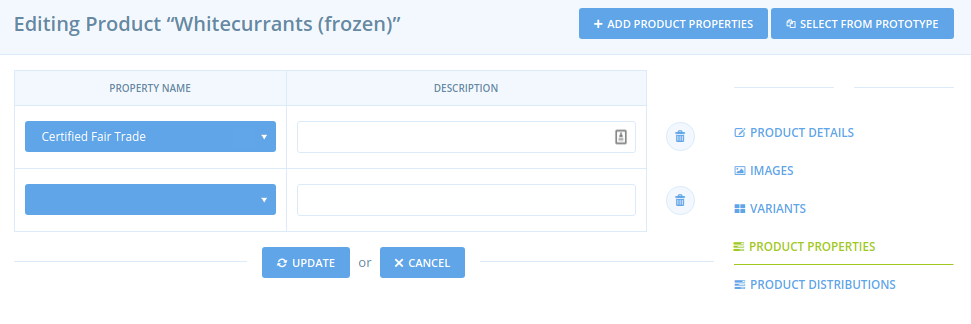
The extra click for 'Update' is still obviously a UX sub-optimality however the user is warned before leaving the page if they haven't clicked save which is a big improvement to the current situation.
Actual Behavior
See image, there is a confusing X
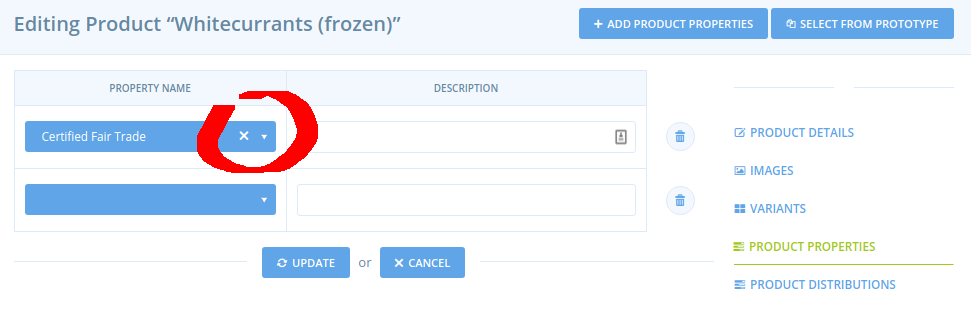
Steps to Reproduce
- Go to "products", select one product and click "edit" then go to tab "product properties"
- Try deleting a property using the X and/or the bin
Context
Was reported by uk user https://community.openfoodnetwork.org.uk/t/deleting-product-properties/194
Severity
S4
Your Environment
PC, Retested on French production, Chrome
Possible Fix
Remove the "X" on property label
 Matt-Yorkley
All 16 comments

 sineadfenton
on 10 Aug 2017
sineadfenton
on 10 Aug 2017
In support of the suggestion :)
 sigmundpetersen
on 4 Sep 2017
sigmundpetersen
on 4 Sep 2017
Ok I cleaned up this issue, it is ready to be picked. Maybe @rtrunkhill you would be up for that new issue now that you start to see how OFN works ;-) ?
 myriamboure
on 21 May 2018
myriamboure
on 21 May 2018
I was going to try to help out @rtrunkhill with this dropdwon issue, but in UK production and my latest local version of master this page seems to be broken, so I'm not sure how to help. Maybe that's another issue!

Matt-Yorkley
on 31 May 2018
For reference @rtrunkhill as per your quest for the missing views, this page is originally generated by the Spree gem, but we have some overrides for these views using Deface. The files in question can be found in the /app/overrides/spree/admin/product_properties/ folder.
Matt-Yorkley
on 31 May 2018
I think @Matt-Yorkley you are connected as an admin that's why you see what you see and the properties are not proposed to you ;-) Connect as a regular user.
myriamboure
on 31 May 2018
I still get this:
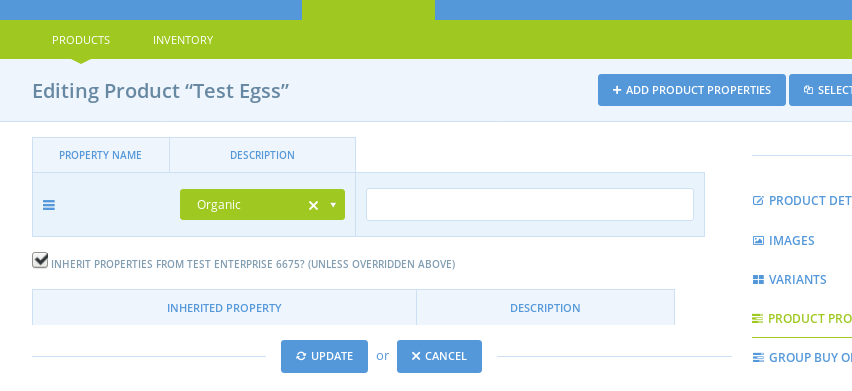
...which doesn't look right. The delete buttons are missing and the table headings are misaligned.
Matt-Yorkley
on 31 May 2018
Also, whenever I try to save using the update button I get bounced out of admin to the home page. My console shows a 302 redirect happens just before going to the home page, because the browser is incorrectly being sent to /products/product-name (which doesn't exist) instead of /admin/products/product-name after saving... :frowning_face:
@myriamboure can you do a quick check to see if you get the same on OFN France? I'll open a separate issue for this if so.
Matt-Yorkley
on 31 May 2018
@Matt-Yorkley you need to "update" with one property, then the page recharges and you see the "delete" button appearing :-) You are right that "description" is misaligned, would be great to fix at the same time if possible. I don't have the same issue of getting taken out to home page though.
https://www.useloom.com/share/57e5c8acc60e4adeabc78646f3dad264
myriamboure
on 31 May 2018
I restarted my local rails server and now I can't replicate that issue either :see_no_evil: Maybe it's ok.
Matt-Yorkley
on 1 Jun 2018
I don't understand your last comment @Matt-Yorkley I can replicate the error, if I click on the small x on the property label I have the impression it is deleted but when I save it is not, it reappears... what do you mean by "maybe it is ok"?
myriamboure
on 1 Jun 2018
Sorry, I meant the second bug I encountered yesterday where it redirected to the home page after saving. It's not doing that now.
Matt-Yorkley
on 1 Jun 2018
can i take a look at it?
 anushreddy
on 21 Jun 2019
anushreddy
on 21 Jun 2019
Feel free to take a look and ask questions on Slack, Anush :-)
 lin-d-hop
on 21 Jun 2019
lin-d-hop
on 21 Jun 2019
Anyone tackling this one at the moment ?
 HugsDaniel
on 22 Aug 2019
HugsDaniel
on 22 Aug 2019
No I think you can go ahead @HugsDaniel 👍
sigmundpetersen
on 22 Aug 2019
Related issues
 kristinalim
·
3Comments
kristinalim
·
3Comments
 shen-sat
·
3Comments
shen-sat
·
3Comments
 andrewpbrett
·
3Comments
lin-d-hop
·
3Comments
andrewpbrett
·
3Comments
lin-d-hop
·
3Comments
 sauloperez
·
3Comments
sauloperez
·
3Comments
Most helpful comment
In support of the suggestion :)