Openbci_gui: GUI Drawing Error on Lower Resolution Screens
Problem
Cursor is pointing above the area of where it is rendered
Expected
Rendered cursor and active area are in alignment
Operating System and Version
macOS
GUI Version
5.0.1
Running standalone app
Both processing and downloaded build
Type of OpenBCI Board
None. Loading files.
Are you using a WiFi Shield?
No
Console Log
No errors in log
 espinoj
All 15 comments
Please provide screenshots or link to a video recording. Renders fine on many Mac, Windows, and Linux systems.
Also, without a Console Log there is no record of what buttons were pressed or how the GUI was configured.
 retiutut
on 23 Oct 2020
retiutut
on 23 Oct 2020
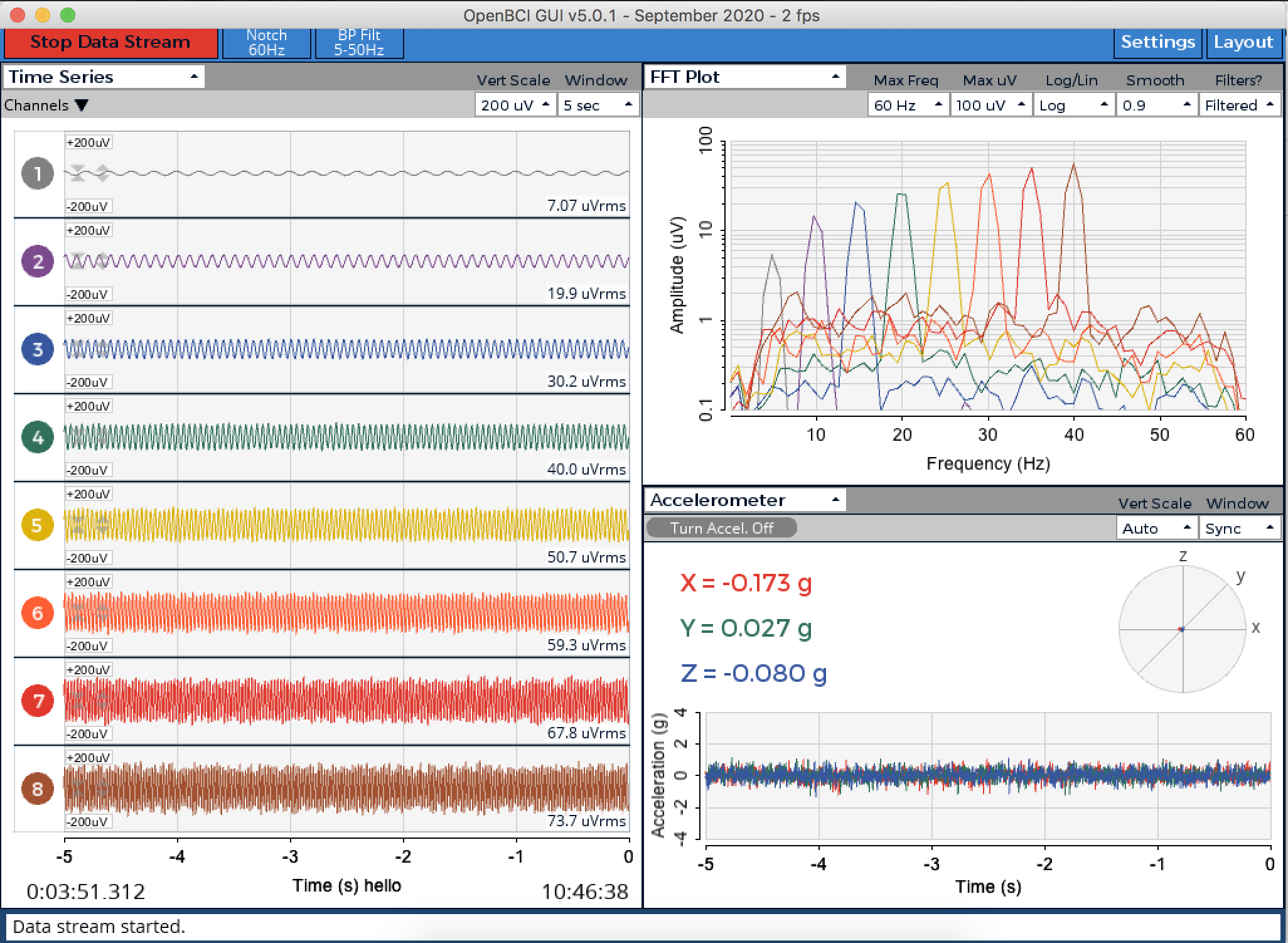
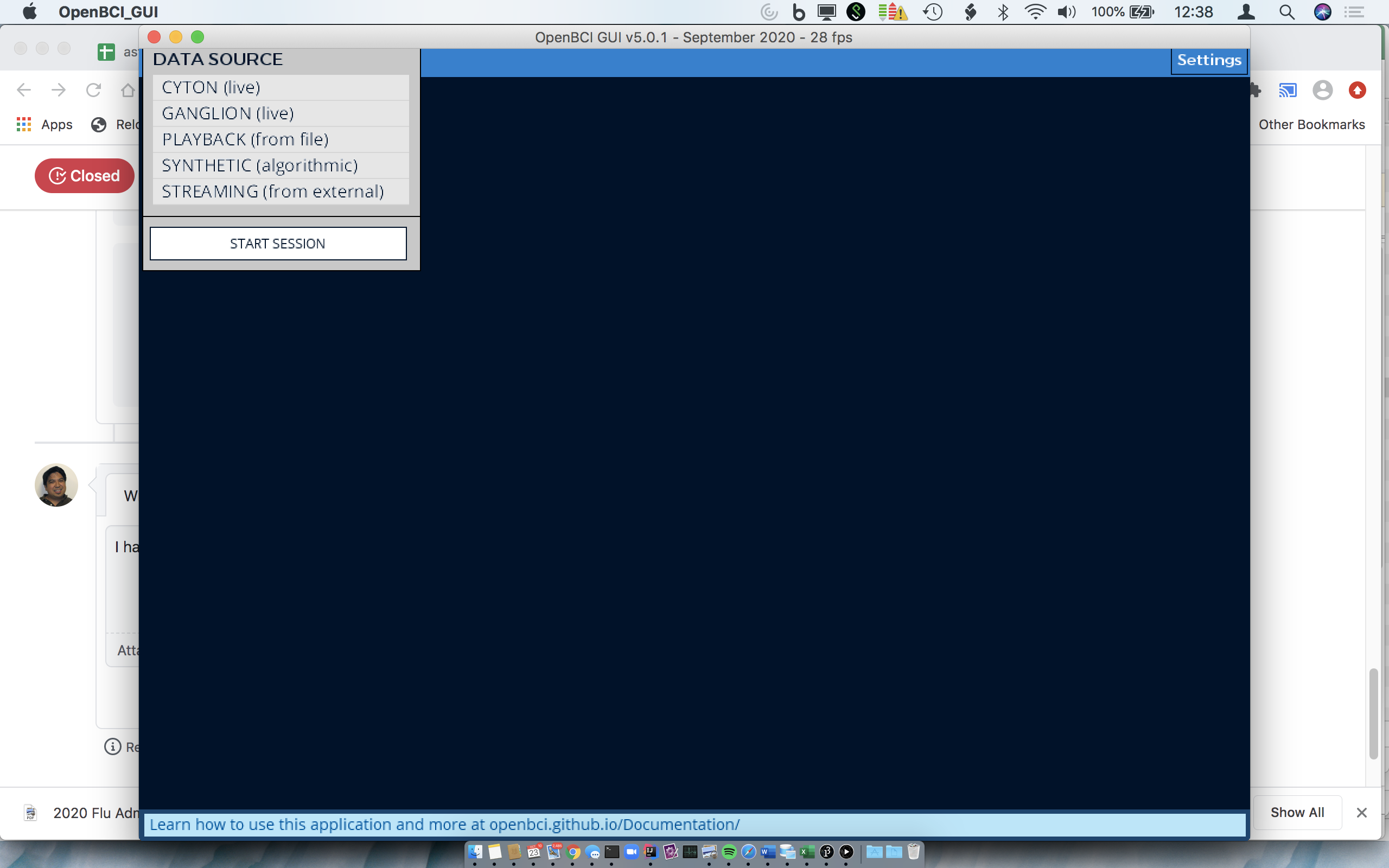
I figured out the conditions under which this occurs. On low resolution screens, the upper dark blue menu bar is not rendered (maybe under the window bar) and the cursor is off calibration in the vertical direction. The workaround is to increase screen resolution.
espinoj
on 23 Oct 2020
Still no console log to confirm details....
retiutut
on 23 Oct 2020
Please see the copied log:
Console Log Started at Local Time: 2020-10-23_11-36-31
Screen Resolution: 1440 X 900
Welcome to the Processing-based OpenBCI GUI!
For more information, please visit: https://openbci.github.io/Documentation/docs/06Software/01-OpenBCISoftware/GUIDocs
OpenBCI_GUI::Setup: GUI v5 Sample Data exists in Documents folder.
TopNav: Internet Connection Successful
Local Version: v5.0.1, Latest Version: v5.0.1
GUI is up to date!
ControlP5 2.2.6 infos, comments, questions at http://www.sojamo.de/libraries/controlP5
CP: Playback History Size = 1
OpenBCI_GUI::Setup: Setup is complete!
sourceList: click!
[DEFAULT]: Attempting to Start Session...
initButtonPressed: Calling initSystem() after next draw()
OpenBCI_GUI: Start session. Calling initSystem().


=================================================
||             INITIALIZING SYSTEM             ||
=================================================

Channel count set to 8
InitSettings: Saving Default Settings to file!
SessionSettings: 3 active widgets saved!
[SUCCESS]: Session started!
[DEFAULT]: Data stream started.
OpenBCI_GUI: openNewLogFile: opened ODF output file: /Users/jue/Documents/OpenBCI_GUI/Recordings/OpenBCISession_2020-10-23_11-36-40/OpenBCI-RAW-2020-10-23_11-36-52.txt
Brainflow start streaming
[DEFAULT]: Data stream stopped.
Brainflow stop streaming
ConsoleLog: Copying console log to clipboard!
On low resolution screens,
But the GUI has not been resized and in this example has loaded with the default size.
//set window size
int win_x = 1024;  //window width
int win_y = 768; //window height
    // If 1366x768, set GUI to 976x549 to fix #378 regarding some laptop resolutions
    // Later changed to 976x742 so users can access full control panel
    if (displayWidth == 1366 && displayHeight == 768) {
        win_x = 976;
        win_y = 742;
    }
    size(win_x, win_y, P2D);
I have my screen resolution set to 1280x800 and yes I have not resized the screen when the dark blue area is inaccessible.
espinoj
on 23 Oct 2020
Operating System and Version
macOS
But you leave out Mac OS X version? This is why there is an issue form. Excluding all of this information is making it very difficult to help.
retiutut
on 23 Oct 2020
Screen Resolution: 1440 X 900
I have my screen resolution set to 1280x800 and yes I have not resized the screen when the dark blue area is inaccessible.
? Gui says otherwise.
retiutut
on 23 Oct 2020
Sorry that was console after I changed resolution as a workaround. Was tricky figuring out where the console button was but here is the paste:
Console Log Started at Local Time: 2020-10-23_12-43-44
Screen Resolution: 1280 X 800
Welcome to the Processing-based OpenBCI GUI!
For more information, please visit: https://openbci.github.io/Documentation/docs/06Software/01-OpenBCISoftware/GUIDocs
OpenBCI_GUI::Setup: GUI v5 Sample Data exists in Documents folder.
TopNav: Internet Connection Successful
Local Version: v5.0.1, Latest Version: v5.0.1
GUI is up to date!
ControlP5 2.2.6 infos, comments, questions at http://www.sojamo.de/libraries/controlP5
CP: Playback History Size = 1
OpenBCI_GUI::Setup: Setup is complete!
ConsoleLog: Copying console log to clipboard!
Mac 10.13.6 High Sierra
MacBook Pro (13-inch, 2017, Four Thunderbolt 3 Ports)
3.5 GHz Intel Core i7
16 GB 2133 MHz LPDDR3
espinoj
on 23 Oct 2020
Try letting this Mac run on the default screen resolution.
retiutut
on 23 Oct 2020
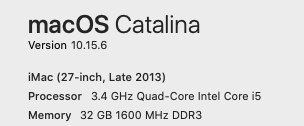
Also, you really should update your Mac OS. Your computer is 4 years newer than mine, but 2 major versions behind.
retiutut
on 23 Oct 2020
Replicated on MacBook Air by changing screen resolution to 1280x800
retiutut
on 29 Oct 2020
@espinoj Thank you for providing all necessary details to help determine the root cause of this issue. It looks like when I remove the minimum GUI size constraints, it works just fine. So, this can be fixed soon and I have upgraded this to high-priority bug fix. Development branch is currently on v5.0.2-alpha.4, and I would like to resolve this issue and merge a fix in the next week or so.
retiutut
on 29 Oct 2020
I believe I have the same issue on Windows 10. The mouse pointer has to be significantly below whatever option it's trying to select.
Could have more to do with screen resolution than the OS. Looks like you guys may have figured that out, but just wanted to make sure you know it's not OS-specific.
 hack-r
on 2 Nov 2020
hack-r
on 2 Nov 2020
The GUI will no longer impose minimum dimensions of the app, but will still wait every ~500ms to resize the drawing area to hopefully avoid crashes.
This seems to be the best fix for everyone, and it somewhat mirrors the behavior of VS Code. This should allow users on lower resolution screens to run the GUI without drawing errors. Tested on an older MacBook Air with lowered resolution to 1024x640.
Here is a screenshot:

Might move the Issues button under the Help....
retiutut
on 6 Nov 2020
Related issues
retiutut
·
6Comments
 jps2000
·
5Comments
jps2000
·
5Comments
 wellton
·
6Comments
jps2000
·
3Comments
wellton
·
6Comments
jps2000
·
3Comments
 Otemo
·
7Comments
Otemo
·
7Comments