Openbci_gui: Add support to prevent long recordings
Problem
Playback or handling long recordings is a problem due to file size. However, sleep studies require long recording and it is laborious and erroneous to start and stop recordings every 20-30 minutes.
Expected
There could be a recording scheduler to start a new file every xx minutes
in the Pick Transfer Protocol box there is the DATA LOG FILE section where a file name can be entered. There may be added a line Log time limit (no, 10, 20, 40, 60 minutes)
Data logging should end after this time and restarted asap with a new file name.
This prevents from getting too long recordings and makes the system more robust for data loss.
Consider also to start / stop data logging with a separate button.
Use case is to start data stream. Then you check impedance, electrodes, signals etc.
Now data logging is already running unnecessarily.
After everything is ready data logging should start - or not(yet)! whatever the user likes
Operating System and Version
W
GUI Version
all
Running standalone app
downloaded app
Type of OpenBCI Board
Cyton/Cyton+Daisy/Ganglion
Are you using a WiFi Shield?
No
 jps2000
All 12 comments
@jps2000 Thank you for making this issue! It is on the to-do list!
 retiutut
on 26 Mar 2019
retiutut
on 26 Mar 2019
@jps2000 Check out https://github.com/OpenBCI/OpenBCI_GUI/issues/483 ! This should work!
retiutut
on 14 Apr 2019
https://openbci.com/index.php/forum/#/discussion/1668/unable-to-convert-large-files-from-sd-card-out-of-memory-error
Hi,
I don't know if you resolved your problem to convert and/or play long EEG recording like sleep recording (8 hours) and manage file up to 800Mo.In fact i succeed (after several failed attempts) by increasing the memory allocated in processing 3: you find it in file/preferences.
I increase the amount of Mo until it works and I can now say that to play a 12hours EEG recording (one channel; 250Hz) you have to set it at : 16 384MB !!!!!but it works now !!!! this soft is really great ! (at least on a dell workstation with 16Go RAM !!)
Xav
retiutut
on 28 Apr 2019
Thank you
But still: splitting long events into digestable pieces is a good one. It also prevents inherently (huge) data loss.
jps2000
on 30 May 2019

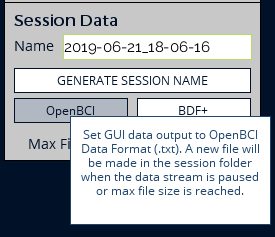
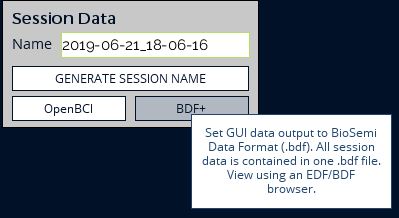
retiutut
on 22 Jun 2019
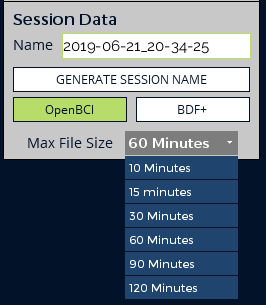
retiutut
on 22 Jun 2019
Looks great
thank you.
Small comments: call it Max file duration or length instead of size
length:
infinite, 5, 15, 30, 60,120 as length
just to get it right:
after time over a new recording is started and ends again after preset minutes.
jps2000
on 22 Jun 2019
I'm not going to put a "No Limit" or "Infinite" option, as this defeats the point of this fix.
I can change the options to 5,15,30,60,90,120. Default option will be 60 minutes, so an 8-9 hour recording will make 8-9 files.
retiutut
on 22 Jun 2019
I've changed my mind. Let's do:
5, 15, 30, 60, 120, No Limit
In that order, still default to 60 minutes.
retiutut
on 22 Jun 2019
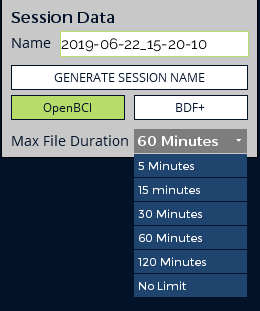
retiutut
on 22 Jun 2019
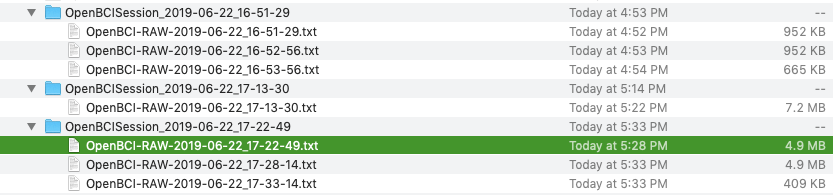
Super excited to share this next picture!!! Zero data loss using nanoTime()!!! Files set to 1 min max length produce files of exact same size.

retiutut
on 22 Jun 2019
Done 🔥 🔥 🔥
retiutut
on 23 Jun 2019
Related issues
jps2000
·
6Comments
 stellarpower
·
8Comments
jps2000
·
3Comments
jps2000
·
8Comments
stellarpower
·
8Comments
jps2000
·
3Comments
jps2000
·
8Comments
 lopezvaa
·
9Comments
lopezvaa
·
9Comments