Openbci_gui: GUI impedance buttons fail on Mac standalone 4.0.3, work with standalone 3.3.2
Problem
See description and video here,
https://openbci.com/forum/index.php?p=/discussion/1961/impedance-measuring-issue-with-openbci-gui-4-0-3-standalone-osx
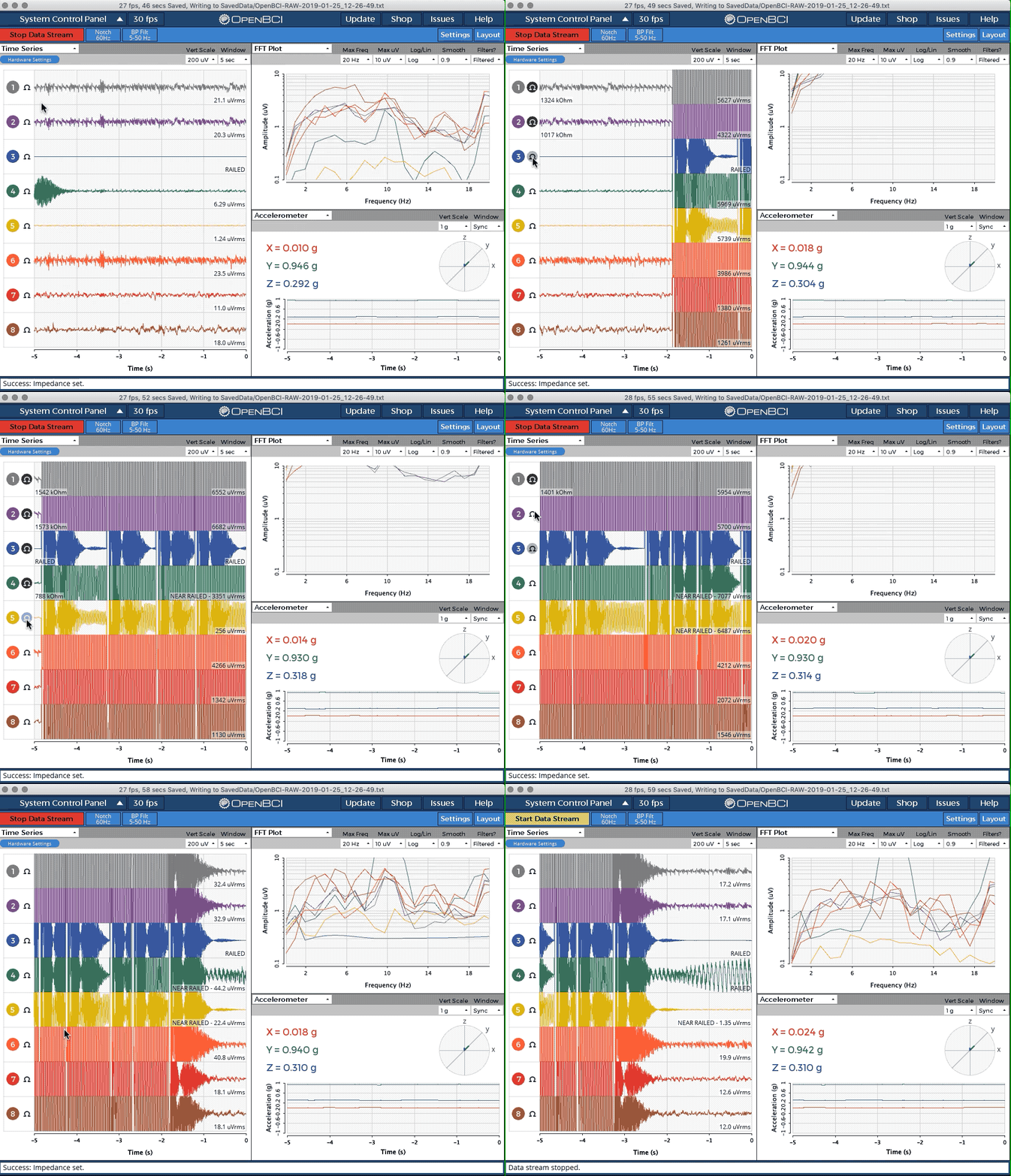
In short, pressing the ohm button on 4.0.3 standalone, results in some temporary numbers shown for impedance, but those quickly ramp down until ZERO ohms is shown. And does not vary from zero after that. Works fine in 3.3.2.
Expected
Same behavior as 3.3.2
Operating System and Version
macOS
GUI Version
4.0.3 fails, 3.3.2 works
Running standalone app
Standalone
Type of OpenBCI Board
Cyton
Are you using a WiFi Shield?
No
 wjcroft
All 17 comments
The video is incredibly helpful!!! Might look into this later.
 retiutut
on 24 Jan 2019
retiutut
on 24 Jan 2019
@retiutut
let me know if you need anything else from me - thanks! k
 krisztian-hofstadter-tedor
on 25 Jan 2019
krisztian-hofstadter-tedor
on 25 Jan 2019
today I installed Mojave on a partition and tried reading impedance with version Jan 2019 and Nov 2018 of the standalone. I tried with 1) the Apple Driver, 2) the recent FTDI and the earlier version of the FTDI suggested in the documentation: https://www.ftdichip.com/Drivers/VCP.htm
I tried the FTDI buffer size fix as well (http://docs.openbci.com/Tutorials/10-Mac_FTDI_Driver_Fix) but still the same issue.
The June 2018 version reads of the impedance still.
I shall try the Processing SDK next and try another computer as well.
thanks, k
krisztian-hofstadter-tedor
on 25 Jan 2019
@krisztian-hofstadter-tedor I'm using Mojave on my primary Mac I use to edit GUI code.
retiutut
on 25 Jan 2019
I don't see any problems with the code that calculates the impedance. As seen in DataProcessing.Pde:
  //compute the electrode impedance. Do it in a very simple way [rms to amplitude, then uVolt to Volt, then Volt/Amp to Ohm]
  for (int Ichan=0; Ichan < nchan; Ichan++) {
    // Calculate the impedance
    float impedance = (sqrt(2.0)*dataProcessing.data_std_uV[Ichan]*1.0e-6) / cyton.get_leadOffDrive_amps();
    // Subtract the 2.2kOhm resistor
    impedance -= cyton.get_series_resistor();
    // Verify the impedance is not less than 0
    if (impedance < 0) {
      // Incase impedance some how dipped below 2.2kOhm
      impedance = 0;
    }
    // Store to the global variable
    data_elec_imp_ohm[Ichan] = impedance;
  }
So, maybe one of the inputs are not within normal limits and produces the false reading.
retiutut
on 25 Jan 2019
many thanks Richard.
which FTDI driver do you use?
also, when you say 'I use to edit GUI code', do you mean you run you have the OpenBCI_GUI running in the Processing app instead of running the standalone app?
thanks! k
krisztian-hofstadter-tedor
on 25 Jan 2019
I use FTDI 2.3, which supports OS X 10.9 and up.
I typically edit and run the GUI using Processing or Atom. The standalone app is packaged using Processing.
retiutut
on 25 Jan 2019
thank you.
did you do the 'fixing FTDI InBufferSize' tweak explained in the docs in you Mojave?
'http://docs.openbci.com/Tutorials/10-Mac_FTDI_Driver_Fix'
didn't know you can run OpenBCI in Atom - I'll ingestive.
thanks, k
krisztian-hofstadter-tedor
on 25 Jan 2019
I'm not sure about the FTDI fix, and I may still be using 2.2.18....
But I think I may have found the problem:
- GUI possibly not sending valid command to Cyton to check Impedance values
In BoardCyton.pde, writeImpedanceSettings() changed from GUI v3 to GUI v4. This function is called when the Impedance Toggle is pressed for all channels on Cyton
@andrewjaykeller is there possibly a mismatch between the Hub and the GUI related to this issue?
retiutut
on 25 Jan 2019
thanks Richard. this is good news.
next time your USB dongle is in your computer, could you please check your FTDI (in Mojave)?
kextstat | grep FTDI
in terminal what I use for this.
then I could know for sure - many thanks!
krisztian-hofstadter-tedor
on 25 Jan 2019
kextstat | grep FTDI
in terminal what I use for this.
Thanks!
com.FTDI.driver.FTDIUSBSerialDriver (2.4.2)
retiutut
on 25 Jan 2019
In BoardCyton.pde, writeImpedanceSettings() changed from GUI v3 to GUI v4. This function is called when the Impedance Toggle is pressed for all channels on Cyton
@daniellasry @andrewjaykeller There is a success case in processImpedance() in InterfaceHub.pde that never prints to console: output("Success: Impedance " + action + "."); I'm not sure the error code cases are being called either.
When toggling Impedance with Cyton, I'm not sure the GUI is receiving a response code from the Hub.
retiutut
on 25 Jan 2019
@krisztian-hofstadter-tedor
Got it!!! 🔥 🔥 🔥
retiutut
on 25 Jan 2019
@daniellasry @krisztian-hofstadter-tedor @wjcroft
https://github.com/OpenBCI/OpenBCI_Hub/pull/76
https://github.com/OpenBCI/OpenBCI_GUI/pull/429
Version pushed to 4.0.4
retiutut
on 25 Jan 2019
thanks Richard, I'll try asap!
krisztian-hofstadter-tedor
on 25 Jan 2019
Hey @krisztian-hofstadter-tedor , I just posted a new release of the GUI: v4.0.4. It includes Richard's fix. Please give it a try, and let us know if it's behaving as you expect. Thanks!
 daniellasry
on 27 Jan 2019
daniellasry
on 27 Jan 2019
thanks @daniellasry and @retiutut, working again :)
https://youtu.be/XHSBRGN8os4
krisztian-hofstadter-tedor
on 31 Jan 2019
Related issues
 jacobgmartin
·
7Comments
jacobgmartin
·
7Comments
 jps2000
·
6Comments
jps2000
·
6Comments
jps2000
·
6Comments
jps2000
·
6Comments
 Otemo
·
3Comments
Otemo
·
3Comments
 rakansha
·
5Comments
rakansha
·
5Comments
Most helpful comment
thanks @daniellasry and @retiutut, working again :)
https://youtu.be/XHSBRGN8os4