Openbci_gui: Keyboard Shortcuts don't work
Problem
Keyboard Shortcuts don't work.
The "spacebar" seems to work fine but does not react to the other keys.
Expected
ex. I can activate or deactivate channels using key board
https://docs.openbci.com/OpenBCI%20Software/01-OpenBCI_GUI
Operating System and Version
Windows 10
GUI Version
v4.1.2-beta.1
OpenBCIHub v2.0.8
Running standalone app
Rrunning from Processing 3
Type of OpenBCI Board
Both Cyton and Ganglion
Are you using a WiFi Shield?
No
 Otemo
Otemo
All 3 comments
@Otemo Thanks for making this issue so we can discuss this recent change in the GUI!
We are working to make the GUI more accessible for all users. To prevent some new users from accidentally changing board settings, we have added an "Expert Mode" toggle button in the "Settings" dropdown.
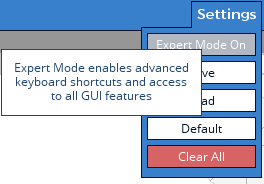
@Otemo, to fix your issue, set "Expert Mode On". This will be remembered in the GUI settings for each Data Mode.
Let me go ahead and update the Docs to reflect this change.
 retiutut
on 1 May 2019
retiutut
on 1 May 2019
I changed the settings according to your instructions. Then the keyboard shortcuts work!
I have not been aware of the nice feature of the new GUI.
Thank you for your easy-to-understand explanation.
Otemo
on 1 May 2019
The docs have been updated! Closing this issue.
https://github.com/OpenBCI/Docs/blob/master/OpenBCI%20Software/01-OpenBCI_GUI.md
retiutut
on 4 May 2019
Related issues
 jps2000
·
3Comments
jps2000
·
5Comments
jps2000
·
3Comments
jps2000
·
5Comments
 pirelaurent
·
5Comments
Otemo
·
7Comments
retiutut
·
6Comments
pirelaurent
·
5Comments
Otemo
·
7Comments
retiutut
·
6Comments
Most helpful comment
I changed the settings according to your instructions. Then the keyboard shortcuts work!
I have not been aware of the nice feature of the new GUI.
Thank you for your easy-to-understand explanation.