Openbci_gui: Ganglion Impedance Not working(?)
Problem
Multiple users say that they get data from Ganglion, but impedance check is not returning results. See:
https://openbci.com/forum/index.php?p=/discussion/1919/ganglion-impedance-check-not-functioning
This is not producing a Java error like issue #209. But does seem likely that the problem is in the GUI or Hub.
Expected
Impedance values to be shown.
Operating System and Version
? macOS/Windows/Linux
GUI Version
? The version is displayed on startup.
Running standalone app
Are you running the downloaded app or are you running from Processing 3
Type of OpenBCI Board
Ganglion
Are you using a WiFi Shield?
No
 wjcroft
All 29 comments
I don't see this error when running the current _master_ or _dev_ branch 4.0.3.
 retiutut
on 9 Jan 2019
retiutut
on 9 Jan 2019
Me too :-)
However I remember there is an error of 2 (Ganglion) in displayed resistance value but this may depend on the circuit. (differential or single ended). I do not know if there is a resistor network proposed how to test the impedances.
 jps2000
on 9 Jan 2019
jps2000
on 9 Jan 2019
I have confirmed the same phenomenon.
However, this phenomenon has been confirmed only when BLED 112 dongle is used.
Also, when I connect with Ganglion using CSR dongle, impedance can be measured without problems.
here is the environment of Gui, hub I use.
GUI v 4.0.4
Hub v2.0.5
 Otemo
on 3 Feb 2019
Otemo
on 3 Feb 2019
@Otemo, thanks for the details! Can you provide a screenshot also? You can take a screenshot of the GUI using lowercase 'm'.
retiutut
on 3 Feb 2019
@retiututm, thank you!
I will show you screenshots.
BLED 112 dongle
https://drive.google.com/file/d/1uWV4fuKvC4t9PBPNJfIO1gwFpkJfRYe6/view?usp=sharing
CSR 4.0 dongle
https://drive.google.com/file/d/13GzTWZ_u0DHLjUr_WrBTSI9_BazLuv_i/view?usp=sharing
Otemo
on 3 Feb 2019
https://drive.google.com/file/d/1uWV4fuKvC4t9PBPNJfIO1gwFpkJfRYe6/view?usp=sharing
@Otemo @jps2000 I have replicated the error above using GUI v4.1.0 and the BLED 112 Dongle for Windows 10 and OS X Mojave.
This is not producing a Java error like issue #209. But does seem likely that the problem is in the GUI or Hub.
@wjcroft is quite correct!
@daniellasry @produceconsumerobot This feature was working for built-in bluetooth on Mac, when I switched to using the BLED 112 Dongle, it broke. So this could possibly be a simple error in the Hub.
retiutut
on 12 Feb 2019
Same Issue here on Windows Machine
 nitinvasanth
on 15 Mar 2019
nitinvasanth
on 15 Mar 2019
Same for me
 Ordepedro
on 29 Mar 2019
Ordepedro
on 29 Mar 2019
Looking into this issue today!
retiutut
on 1 Apr 2019
For now, it looks like there is an issue in the NodeJS Ganglion driver related to BLED112.
retiutut
on 1 Apr 2019
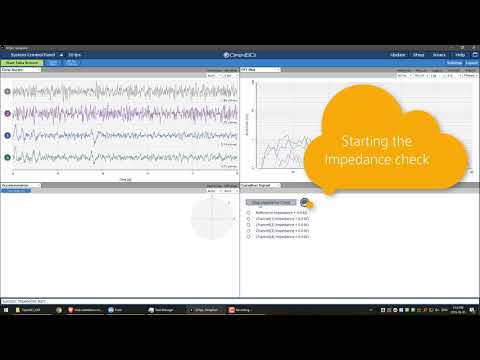
Hey guys I wanted to add to this issue with a small video capture we made. There was some discussion on the forum that a newer version of OpenBCI Hub would fix this problem. Curious if anyone has any update from my view this was fixed in February with v2.05. I ran the most recent version and as you'll see from the video below we were unable to check impedance. Does anyone have any insight? The YouTube video is shown below
 alapo
on 6 Jun 2019
alapo
on 6 Jun 2019
It seems that this problem has not been solved yet. I hope to resolve this issue as soon as possible.
Otemo
on 6 Jun 2019
For now, it looks like there is an issue in the NodeJS Ganglion driver related to BLED112.
If anyone else wants to try a fix before me or Daniel have a chance, that's likely where the issue is.
The NodeJS Ganglion driver is part of the Hub. I can prioritize this issue.
retiutut
on 6 Jun 2019
Could someone please tell me where is the documentation about the impedance check firmware?
 EFilomena
on 6 Jun 2019
EFilomena
on 6 Jun 2019
FIXED! 🔥 🔥 🔥
The BLED112 needs up to two seconds to send the ImpedanceStart() command and get a real success message.
Modified in the OpenBCI_Hub code directly using simple setTimeout:
const _processImpedanceGanglion = (msg, client) => {
  switch (msg.action) {
    case kTcpActionStart:
      setTimeout(() => {
        console.log('start impedance check');
        ganglionBLE
          .impedanceStart()
          .then(() => {
            ganglionBLE.on(
              k.OBCIEmitterImpedance,
              impedanceFunction.bind(null, client)
            );
            writeCodeToClientOfType(
              client,
              kTcpTypeImpedance,
              kTcpCodeSuccess,
              {
                action: kTcpActionStart
              }
            );
          })
          .catch(err => {
            writeCodeToClientOfType(
              client,
              kTcpTypeImpedance,
              kTcpCodeErrorImpedanceCouldNotStart,
              {
                message: err.message
              }
            );
          });
      }, 2000);
      break;
    case kTcpActionStop:
      setTimeout(() => {
        console.log('stop impedance check');
        ganglionBLE
          .impedanceStop()
          .then(() => {
            ganglionBLE.removeAllListeners(k.OBCIEmitterImpedance);
            writeCodeToClientOfType(
              client,
              kTcpTypeImpedance,
              kTcpCodeSuccess,
              {
                action: kTcpActionStop
              }
            );
          })
          .catch(err => {
            writeCodeToClientOfType(
              client,
              kTcpTypeImpedance,
              kTcpCodeErrorImpedanceCouldNotStop,
              {
                message: err.message
              }
            );
          });
      }, 2000);
      break;
  }
};
Hi retiutut, Thank you very much for your immediate solution to this issue.
Otemo
on 7 Jun 2019
Hub version pushed to 2.0.9 and a PR has been made. Closing this issue! Fix has been tested on two Macs and one Windows machine.
retiutut
on 7 Jun 2019
Hub version pushed to 2.0.9 and a PR has been made. Closing this issue! Fix has been tested on two Macs and one Windows machine.
Thanks for your help @retiutut I am not very familiar with building from source. Would you have a compiled version to share until 2.0.9 gets released? We want to get this working to run some tests before spending 10K on the larger Cython board.
As I understand it I would simply copy/paste the OpenBCI_Hub files into OpenBCI_GUI/data/OpenBCIHub directory. Correct?
If you arent able to share the files, when do you think 2.0.9 will get released?
Thanks again.
alapo
on 10 Jun 2019
That's correct! Check https://github.com/OpenBCI/OpenBCI_Hub/releases tonight or tomorrow! We will get 2.0.9 packaged and released!
retiutut
on 10 Jun 2019
I'm still not seeing impedence. Using Windows 10, BLED112, Ganglion, OpenBCI GUI beta 4.1.3, Hub 2.0.9.
One gold cup lead attached with paste, one reference lead and one ground lead (on each ear).
Video capture:
https://youtu.be/KLOC0MuslHg
 ElliotMebane
on 13 Jul 2019
ElliotMebane
on 13 Jul 2019
Happens in standalone, not happening when I run the Hub using VSCode.

retiutut
on 13 Jul 2019
Working in standalone in Mac
retiutut
on 13 Jul 2019
Working again on Windows!!!!
Fixed by doing the following:
- Test on Mac first - No problems
- Deleting my clone of the Hub repo on Windows machine
npm installandnpm install -g npmnpm run release- run the newly built Hub from the build folder
- run the GUI without auto-launching the hub
- WORKS
- place Hub in the GUI folder and try again
- WORKS
- Remake OpenBCI GUI on Windows with fresh Hub and test fresh standalone
- WORKS
- Upload fresh windows 4.1.3-beta.3 64/32bit apps to release page
- For good measure: Update the OpenBCIHub 2.0.9 windows release
Updating the windows build for 4.1.3-beta.3 now
retiutut
on 13 Jul 2019
@ElliotMebane Please try the updated 4.1.3-beta.3 release, it is uploading now. It should work for you.
https://github.com/OpenBCI/OpenBCI_GUI/releases/tag/v4.1.3-beta.3
retiutut
on 13 Jul 2019
Yes, it's working. Thanks!
ElliotMebane
on 14 Jul 2019
Hey I just uploaded the version with a signed 64bit Hub and signed 64bit GUI for Windows. I also had to make sure the 32bit windows GUI has a 32bit Hub.
retiutut
on 14 Jul 2019
I'm not sure if your comment about just uploading the new version was a response to my test.
More details: My successful test uses the Windows 64 bit: v4.1.3-beta.3 downloaded from this link a few minutes before reporting my success:
https://github.com/OpenBCI/OpenBCI_GUI/releases/download/v4.1.3-beta.3/openbcigui_v4.1.3-beta.3_windows64.zip
It was date stamped "2 days ago" but I tried anyway.
To confirm, in the GUI I go to Update and see:
Local: v4.1.3-beta.3 GitHub: v4.1.2.
I left the hub as it was before, 2.0.9.
ElliotMebane
on 14 Jul 2019
Just wanted to make sure you get a copy with the Signed Hub. I had uploaded a fix earlier without signing it. 4.1.3-beta.3 is good to go now. Let us know if you notice anything before we make a stable release!
retiutut
on 14 Jul 2019
OK. Well, I don't know if the GUI package I downloaded tonight includes the new signed Hub or if the 2.0.9 hub I am running is a result of the Hub I installed yesterday directly from the Hub repo. If you'd like me to uninstall/reinstall/test anything let me know how I can help. Otherwise, what I have is working.
ElliotMebane
on 14 Jul 2019
Related issues
jps2000
·
3Comments
jps2000
·
8Comments
 cfausn
·
3Comments
cfausn
·
3Comments
 daniellasry
·
8Comments
daniellasry
·
8Comments
 cboulay
·
8Comments
cboulay
·
8Comments
Most helpful comment
Hey guys I wanted to add to this issue with a small video capture we made. There was some discussion on the forum that a newer version of OpenBCI Hub would fix this problem. Curious if anyone has any update from my view this was fixed in February with v2.05. I ran the most recent version and as you'll see from the video below we were unable to check impedance. Does anyone have any insight? The YouTube video is shown below