Open3d: RuntimeError: [Open3D ERROR] GLFW Error: WGL: Failed to make context current: The requested transformation operation is not supported.
Describe the bug
Zooming and panning at some point crashes the visualiser.
Using the mouse wheel to zoom, then click and drag into a mesh (sometimes at tight angles/zooms) causes a crash.
I've tested this with both a pointcloud and triangle mesh.
I'm not sure if the dimensions/complexity of the mesh has anything to do with it or not.
Running in verbose mode outputs:
[Open3D DEBUG] Read geometry::TriangleMesh: 6678 triangles and 13356 vertices.
[Open3D DEBUG] GLFW init.
[Open3D DEBUG] Add geometry and update bounding box to [(-50732.6992, -51368.5000, -13202.2998) - (-28131.3008, -28069.9004, 17448.5996)]
[Open3D DEBUG] Global colormap init.
Traceback (most recent call last):
  File "o3d_viz_crash.py", line 12, in <module>
    o3d.visualization.draw_geometries([mesh])
RuntimeError: [Open3D ERROR] GLFW Error: WGL: Failed to make context current: The requested transformation operation is not supported.
[Open3D DEBUG] Global colormap destruct.
[Open3D DEBUG] GLFW destruct.
To make this easy to reproduce I've provided the script and mesh along with a short screen recording here
Notice the tight angle towards the end of the video (which ends with the crash)
To Reproduce
Steps to reproduce the behavior:
- Download the o3d_viz_crash.zip
- unzip o3d_viz_crash.zip and
cd o3d_viz_crash - run o3d_viz_crash.py
- use a mouse with a mousewheel to mouse wheel zoom and mouse wheel click to drag at tight angles (see video for example)
- observe crash
Expected behavior
Zooming in and panning should not crash the visualizer
Screenshots
See screencast in o3d_viz_crash.zip
Environment
- OS: Windows 10.0 (version 1809, build 11763.1039)
- Python version: 3.6.4 (64-bit)
- Open3D version: 0.9.0.0
- Is this remote workstation?: no
- How did you install Open3D?: pip
Please let me know if there any more info I could supply to make this easier.
Update
I may have found a culprit/workaround ?
If I use Settings > Graphics to explicitly allow Python to use the nVidia GPU the problems seems to go away, otherwise, on the Intel UHD Graphics 630 I can always easily crash the visualiser
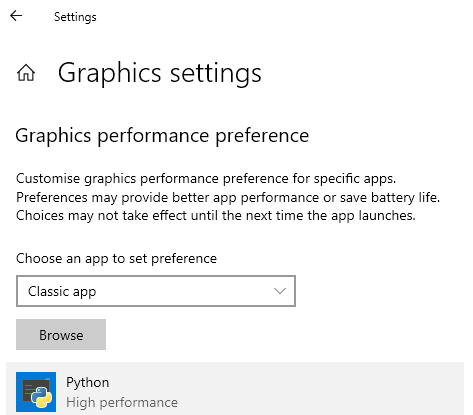
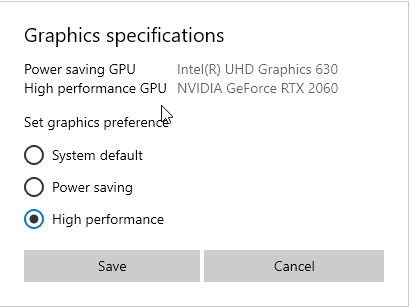
This may not be an open3d API bug, but a GLFW / GPU bug ?
Many thanks,
George
 orgicus
All 4 comments
I tried the above solution but getting the same error. I have GTX1060 6GB in my laptop and launching Open3D with Spyder.
Is there any way to check if the Open3D installed is even using the GPU?
 akshat1136
on 6 Jun 2020
akshat1136
on 6 Jun 2020
 g2ragrawal
on 6 Jun 2020
g2ragrawal
on 6 Jun 2020
I'm having the same error as the OP. I tried changing my graphics specifications to "High Performance", the error still often occurs. Are there any other solutions to this?
 otepencelik
on 1 Aug 2020
otepencelik
on 1 Aug 2020
Hi, why is this closed?
For those with laptop with only integrated Intel GPU, then we have no solution.
Kinda ironic since this wonderful library is made by Intel... :(
 aryasenna
on 14 Nov 2020
aryasenna
on 14 Nov 2020
Related issues
 marcel-bariou
·
3Comments
marcel-bariou
·
3Comments
 tonghia
·
3Comments
tonghia
·
3Comments
 Timu777
·
3Comments
Timu777
·
3Comments
 mike239x
·
3Comments
mike239x
·
3Comments
 martinakos
·
4Comments
martinakos
·
4Comments
Most helpful comment
Hi, why is this closed?
For those with laptop with only integrated Intel GPU, then we have no solution.
Kinda ironic since this wonderful library is made by Intel... :(