Open3d: Python pip install does not contain all the options
I use pip install to install the environment.
I can import open3d but I can't import all the rest (read_point_cloud, point_cloud...). can you please update the pip install process?
BTW, awesome work!!!
 shaisegev
All 18 comments
Thanks! I think @takanokage can give best answer for this.
 syncle
on 23 May 2018
syncle
on 23 May 2018
Hi @takanokage, Do you know what the problem is?
shaisegev
on 23 May 2018
I was just checking that.
The following seems to work:
from open3d import read_point_cloud
Is this the kind of scenario that was failing on your side?
 takanokage
on 23 May 2018
takanokage
on 23 May 2018
Yes

I found the problem when I tried to run the Open3D/src/Python/Tutorial/Basic/icp_registration.py
in line 18 it's trying to read the point cloud.
Thanks!
shaisegev
on 23 May 2018
Which package have you installed via pip?
I think the current correct one is:
pip install open3d-python
The open3d name however is hijacked by someone else and we are in the process trying to get it back.
 qianyizh
on 23 May 2018
qianyizh
on 23 May 2018
yep, I can confirm that there's a problem with the pip package.
I'm going to work on a fix right away.
Thanks for reporting!
takanokage
on 23 May 2018
Are you comfortable with building from source?
This is the fastest way to get a working version out to you.
On my dev branch issue_#130 this passes:
from open3d import read_point_cloud
In order to use this branch you need to checkout my branch, build from source and execute make install.
takanokage
on 23 May 2018
I uploaded a new revision to pypi.
Please try again:
pip install open3d-python
python
>>> import open3d
>>> from open3d import read_point_cloud
I tried to install open3d-python.
this is the results when I tried to import opend3 (I have tried to install it on two different machine)
on windows machine:

on Linux machine:

BTW: I have tried to install again the open-3d (the regular one and not the python version), and I'm getting the same problem as the python version.
Thanks for the help!!!
shaisegev
on 24 May 2018
Thank you for trying it out.
I have validated this on three machines before I uploaded the changes:
- win 10 python 2.7 & 3.5
- macOS 10.13 python 2.7
- Ubuntu 16.04 python 2.7 & 3.5
By validation I mean both installing from source and from PyPi.
I apologize for asking, can you provide some extra info about your systems and installed apps? Maybe that would help root-cause the problem.
Thank you!
takanokage
on 24 May 2018
windows 10 results (include validation of the installation)

I'll send you later the same print screen for Linux/macOS
shaisegev
on 24 May 2018
I am not very sure but based on the provided screenshot, open3d package was compiled with 32bit machine, while python version importing this package is 64bit.
syncle
on 24 May 2018
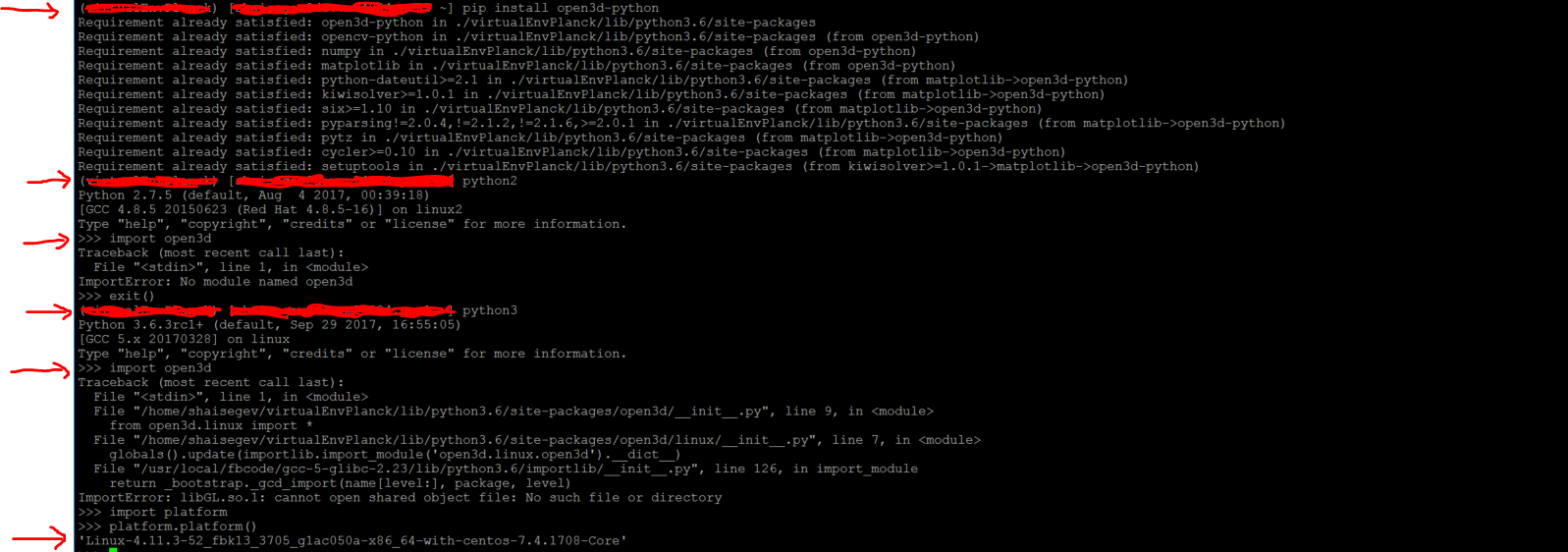
this one is for Linux
shaisegev
on 24 May 2018
The Windows and the Linux errors are different.
On Linux it doesn't seem to find OpenGL. Please double check that you have installed all Open3D dependencies. Heres the install-deps-ubuntu.sh from my branch.
On Windows @syncle could be right - maybe this is an x86 vs. x64 mismatch between the Python version on your system and the Python version I built for (x86). One way to check on your side is to install the x86 Python in parallel and either place it first in path or run:
<path_to_python.exe> -m pip install open3d-python
On my side I have installed four Python variants in parallel: x86 & x64, 2.7.12 and 3.5.2. I have built the open3d Python module for 2.7.12.x86 and 2.7.12.x64 and the output file name is identical. This makes packaging x86 and x64 variants together a little bit more tricky and may take a while.
takanokage
on 24 May 2018
130
takanokage
on 24 May 2018
Ok.
In my case I need to use the open3d on server and I can't install other things using sudo (like openGL. I can install using pip install the python version of openGL, but I have checked and it's probably not enough).
In addition my server is Linux 64bit. Usually for other librarys I'm using pip install only.
My server is "temporary" server for testing that came empty (with OS only) for my tests, and I need to install using pip all the tools that I need for my tests.
I have workaround (I can create binary file with open3d and download the binary to the server- but then I not gonna have the latest version of open3d and it's require maintenance).
Do you have version without sudo installation requirement?
Thanks!
shaisegev
on 25 May 2018
If you're building from my branch you can install without sudo.
You need to set the CMAKE_INSTALL_PREFIX cmake option:
cmake ../src -DCMAKE_INSTALL_PREFIX=~/open3d
This will configure the make install to copy the files to ~/open3d or any other path you choose.
takanokage
on 25 May 2018
This issue has been addressed and should be closed.
The request for adding 64bit Python support for Windows 10 has been registered as #377.
takanokage
on 1 Jun 2018
Related issues
 mike239x
·
3Comments
mike239x
·
3Comments
 taochenshh
·
3Comments
taochenshh
·
3Comments
 hzxie
·
4Comments
hzxie
·
4Comments
 Timu777
·
3Comments
Timu777
·
3Comments
 marcel-bariou
·
3Comments
marcel-bariou
·
3Comments
Most helpful comment
Which package have you installed via pip?
I think the current correct one is:
The open3d name however is hijacked by someone else and we are in the process trying to get it back.