Open-shell-menu: Skinning bug?
- Open-Shell: 4.4.160 released October 18th, 2020
- OS: Windows 10 Pro version 20H2 (Os build 19042.630)
My question in a nutshell: Is this issue a result of my not understanding something correctly, or is it a bug?

I am working on a skin for open-shell, and I am very familiar with skinning and modding for various programs/games. I've been doing it for years. I am also a very quick learner. I am working on reskinning the sub-menus using a bitmap sized 34wx30h. My understanding of skinning open-shell so far includes the idea that when adding a bitmap that the slices x and y are arranged in such a way that the program reads:
Submenu_bitmap_slices_X=29,1,4
Submenu_bitmap_slices_Y=4,22,4
as sectioning the bitmap into pieces consisting of:
a row 29 pixels long and 4 in height (the top left section)
a row 29 pixels long and 22 pixels in height (the middle left section)
a row 29 pixels long and 4 pixels in height (the bottom left section)
a row 1 pixel long and 4 pixels in height (the top middle section)
a row 1 pixel long and 22 pixels in height (the middle section)
a row 1 pixel long and 4 pixels in height (the bottom middle section)
a row 4 pixels long and 4 pixels in height (the top right section)
a row 4 pixels long and 22 pixels in height (the middle right section)
a row 4 pixels long and 4 pixels in height (the bottom right section)
I am enumerating this to make certain I understand correctly. If I do understand correctly, then the program is supposed to repeat the middle sections as much as necessary, yes? So far everything has worked according to my understanding, until this bitmap, the one I am using for submenus.
I had a previous bitmap I made for the sub-menus that was identical except for the y being a total of 285 pixels, and my previous x and y were:
Submenu_bitmap_slices_X=29,1,4
Submenu_bitmap_slices_Y=4,277,4
This worked as expected with no hitches, but I thought the height was overkill, and more difficult to edit in order to add icon frames in the sub-menus as I wish to add an option both for a solid icon background as seen in the following picture, and an option for framed borders for the icons (ie. an empty frame around the icons).

If I am understanding everything correctly, then why is the result I am getting the one in the first picture where the middle vertical section is not repeating properly? Is there something I missed in figuring this all out? Some arbitrary minimal height requirement for that bitmap that I have found no reference to? Or is this a bug?
Before anyone asks, no I am not running WindowBlinds, it is just installed and disabled. Yes, I based my skin off of Gray Classic, I am editing the skin files with Resourcehacker, and I am editing the transparent bmps with Pixelformer which has support for 24 bit argb bitmaps. Additionally, I am not having this issue with any other part of creating this skin so far, and I have finished creating or modifying every bitmap with no issues, except for tweaking the sub-menus bitmap to my satisfaction. So, bug?, or I'm missing something? (Sorry if this post has information overkill, I try to be as thorough as possible when describing an issue).
 kamyk2000
All 21 comments
Could you attach the skin, that would be useful to try and find the exact issue.
Edit: It looks to me like the “stretch” zone is going off of the entire bitmap. I’ll have to take a look at the bitmap to see if it matches the text.
It might also be good to make sure that the slices aren’t being overridden by another option.
 bonzibudd
on 18 Nov 2020
bonzibudd
on 18 Nov 2020
Thank you for the offer. I took note recently that you are the author of the Fluent Metro skin (a nice piece of work, btw), so your advice could be invaluable to me at this stage. :) I will sort the files out and attach them so you can look at them since you offered. The skin is a bit of a cluttered mess,. I had intended to neaten it up and add explanatory ;comments to it after finishing the bitmaps for transparency on the submenus and search box, but then the submenus bitmap gave me this issue.
It would not allow me to upload a skin7 file, so I zipped that and the troublesome bitmap together. I have also noted that resourcehacker is a bit unstable to work with. Is there something better to use for the purpose?
Edit: I want to clarify that my reason for trying to make the bitmap shorter is that I was hoping to get it the exact height of a single sub-menu row. This would make adding a hollow line box frame around the icons via bitmap much much easier since I wouldn't have to worry about any stretching distorting the alignment.
kamyk2000
on 19 Nov 2020
Hi,
I took a quick look. I applied the smaller bitmap and changed the slices, everything seemed to work fine as far as I can tell.
Something you might want to consider is that Submenu_bitmap_slices_Y is defined 5 different times, so it seems possible that you were changing the wrong option. The first reference of it, in SUB-MENU SECTION, is always overridden by one of the other options from what I can tell, and my guess is that the one you need to change is the one listed under [Solid_Menu]. If that still doesn't fix it, I'm happy to look into it some more.
Edit: I noticed that the bitmap you provided is a couple pixels taller than the original that you said was broken. Not sure if this is relevant. Best of luck
bonzibudd
on 19 Nov 2020
If you are going to use the smaller image, which bonzibudd is correct W34xH32, use something like:
Submenu_bitmap_slices_Y=4,24,4
so the pixels add up to a total of 32
 CTVCAM8
on 19 Nov 2020
CTVCAM8
on 19 Nov 2020
Oh, I forgot I modified it by a few pixels after posting this question. I wasn't able to get it to work with the slightly larger one either. I thought I had but realized I was looking at my backup of the skin. Maybe I have a buggy version of Resourcehacker? If there's something better to use, I'd love a suggestion. Resourcehacker keeps scrambling my skin, and I have to keep putting it back together from res files.
Edit: Weird, now for some reason it works today. I don't think I forgot to change the 22 to a 24, but who knows. It looks like no matter what I do it's going to stretch and misalign any attempt at creating a plain black icon border though. Guess I'll have to resort to masks or something. I don't know if it's my resourcehacker, windows 10, or open-shell causing me issues, probably one or both of the first two. I know there was something mentioned somewhere about a program besides resourcehacker... Maybe it was visualstudio? I can't remember. I guess I'll have to scan through the classic-shell forum again looking.
kamyk2000
on 19 Nov 2020
Hope I'm not butting in here, as @bonzibudd was serving you first.
Editing a skin file in the skins folder can corrupt the file sometimes.
Best to edit and save the skin file in a folder on the desktop, then copy it to the skins folder.
I'm not exactly sure what you are trying to achieve with the icon border.
It's a stretching/shrinking start menu.
The submenu can't work like WindowBlinds where an exact portion of the submenu can tile repeat itself.
You can make a wider non-stretching area on a bigger bitmap just for larger dpi.
Are you aware that the Metro skins use a different way of making icon borders?
The icon frame will adjust to the size of the icon.
CTVCAM8
on 19 Nov 2020
Not at all :)
Actually, you solved this issue for me (hopefully). I thought Resourcehacker was buggy, that Open-Shell might be buggy. that Pixelformer might be buggy... Turns out that the likely cause of all the issues was my working on it in the skins folder, because I had another bitmap get weird on me last night. Pixelformer wouldn't save it with transparency, then saved it with 100% transparency, then Resourcehacker wouldn't load it, blah, blah. As a last resort, I tried what you suggested and moved it to the desktop. Bam, everything worked properly.
Hopefully, that's the end of the weird bugs I've been encountering. If so, that one suggestion saved me from spending weeks dealing with not understanding why things kept being buggy.
Yeah, I had assumed that what Open-Shell did was repeat the middle slices as a whole like a tile, unfortunately, it appears not. What I wanted to do was have something like this as an option to put around the icons:
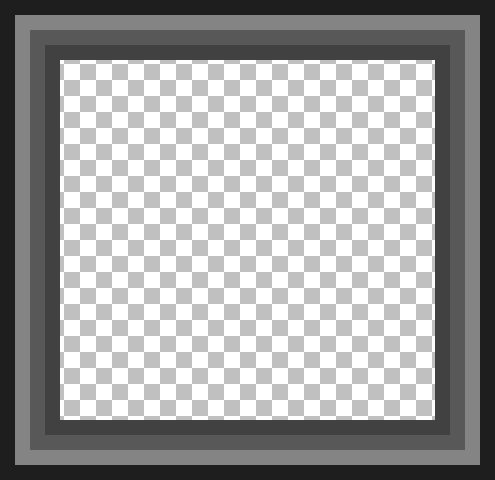
and I was trying to do it assuming the bitmap center sections repeated as a whole. Since that appears not to be the case, I am going to look into using emblems, masks, or patterns to achieve what I want. Whichever works best.
I haven't tried modding Windowblinds yet. I did make a skin in Curtains for the window frames and such (I want my aero gradients and transparency), but after that, I dove headfirst into Open-shell, because I find it to suit my needs almost exactly. I also have not tried editing a Metro skin. I was unaware there was any difference. Could you be more specific?
I do have another question for you both though. Is there somewhere active that people still talk about skinning Open-Shell? (Reddit forum for it is mostly dead). I don't assume it to be appropriate for me to use this bug report/feature request forum to ask non-bug related questions, although I suppose I could just keep replying to this post...
In any event, thank you both for helping me figure this out :)
Edit: Still having issues with Pixelformer refusing to export the alpha channel...
Edit: Crap, nope, I'm still getting issues from all 3 programs, even with a dedicated folder on the desktop... It's like Pixelformer is saving the bitmaps wrong, or Resourcehacker is importing them wrong, or Open_shell is reading them wrong. I have no explanation.
kamyk2000
on 20 Nov 2020
I will get back to you in a couple of hours with some info.
I think it's not bugs. Just need to learn the ropes around the programs.
I guess "Boot camp" is a good name for it.
CTVCAM8
on 20 Nov 2020
In my experience, the transparency will sometimes break if all of the pixels of a bitmap are the same alpha. Not sure of thats related but just thought I'd put it out there.
You might want to try an older version of Resource Hacker, there seem to be upsides and downsides of each version. The older version doesn't display alpha bitmaps correctly, but it might import them better.
bonzibudd
on 20 Nov 2020
Ok, I'm back along with some other answers that bonzibudd did not mention yet.
Maybe that submenu tile feature could happen in the future if enough people ask for it.
Or using a different way, if the "Patterns" feature was added to Open-Shell submenus, there is a very slim chance it might be able to work, by using a specific size pattern image to tile itself?
The reason why the original developer did not add Patterns to the submenu was it slowed the menu down too much, so he skipped it.
I never used WindowBlinds skinning program either as there were many thousands of themes made already to choose from.
About the icon frames on the Metro skins.
Icon frames can be used on any skin in the main menu left column or the right column or on the submenu.
Correction: Icon frames work on search and jump views, but I can't seem to get it working on the inside program's tree.
Can be opaque or transparent and just show normal view, or normal and hover views.
The issue I have is its layer is above the selector layer,
so a new program selector is underneath it and may not show very well(gets cut off from view).
If I use your image as an icon frame, and borrow text from "Metro Glass" skin, it would look like this on your submenu:
The frame size can be adjusted along with icon and text padding to get what you want.
Submenu_icon_frame=70
Submenu_icon_frame_slices_X=4,25,4
Submenu_icon_frame_slices_Y=4,25,4
Submenu_icon_frame_offset=4,4
Submenu_icon_padding=6,6,6,6,100%
Submenu_text_padding=4,2,5,2,100%
Pixelformer is beta and a very old program for making icons.
It has bugs and weird ways to it.
It won't open jpg, but will if the file is dragged onto it.
It does not like big images and will sometimes cut off 1 or more pixels at the bottom or side of the image.
I believe it's to do with auto center paste when in normal view.
If you open a 24-bit image and start changing the alpha channel,
it's very important before exporting to go into image\properties and change it to 32 bit.
Reasons, why this simple program is useful, are:
Can view and edit just the alpha or RGB combo channels, or all channels.
The selection tool shows the pixel dimensions at the bottom right.
This is good for checking where you want the slices to begin and end, which avoids common slice number errors.
It can save as 32-bit RGBA bitmap files that Classic/Open Shell uses.
A Classic Shell upgrade years ago can let png and jpg image files be used as well,
but it's easier to input bitmaps into ResourceHacker.
If the skin has large textured images, it's better to use png to keep the skin file size from becoming so big.
If you find that the bugs are not with Open-Shell, it might be better to close this issue
and discuss skinning on Gitter:
https://gitter.im/Open-Shell/UC-Menu-Skins?source=orgpage
or maybe a better place is GitQ:
CTVCAM8
on 20 Nov 2020
About that all alpha 0/255 issue.
If I look at the Classic Shell tutorial, I see this:
For region, alpha, glass, fullalpha or fullglass modes there is a limitation where the fully transparent (alpha=0) pixels can be. For every horizontal line of the bitmap there can be transparent pixels on the left end and on the right end, but not in the middle. The non-transparent (alpha>0) pixels must be contiguous with no holes.
I found out this can happen in Windows as well when a fully transparent image icon is displayed in a folder.
It shows all black.
CTVCAM8
on 20 Nov 2020
I had to add one more comment as the new programs selector decided to show up on the start menu.
This is not a bug, just the way it was designed.
Just explaining with a picture about what I was talking about before with the new programs selector.
This is what happens if the icon frame is made to fake the look
of the vertical icon column of the submenu.
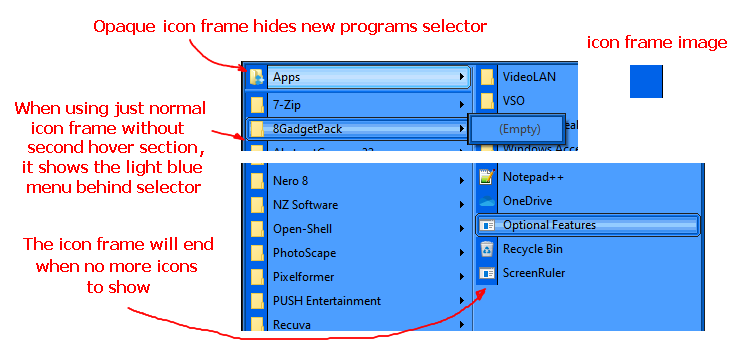
CTVCAM8
on 20 Nov 2020
I should probably explain what's happening, maybe that will give a better starting point for figuring it out.
After the 34x32 bitmap worked out for whatever reason, I imported it back into Pixelformer and filled the darker area and the black line in with the lighter blue so I could import that bitmap to provide the non-icon background bitmap for the submenus. Like this one: but transparent for the glass and transparent options:
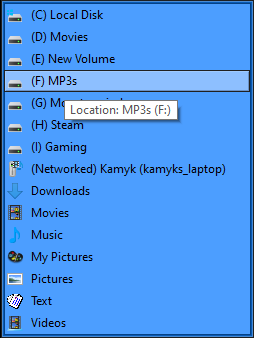
I used an already alpha functional bitmap making it. At first, Pixelformer refused to save the alpha, then when it did, Resourcehacker kept importing nothing. I'd add the new bitmap, and it would act like it did what it was supposed to, but nothing would display in the bitmap number I imported to Resourcehacker. Finally, it did show a bitmap correctly imported, so I saved the skin file to the desktop and copied it to the skins folder. This is what I get when my options are set to no icon background, and glass, or alpha menus:
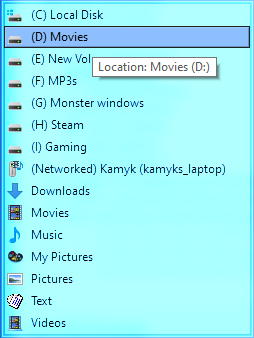
Mind you this is the exact same bitmap I uploaded last time, the one that correctly shows transparency when I have icon backgrounds on...
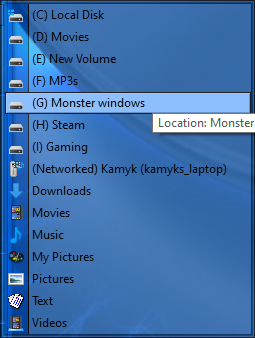
The only difference is that I filled in the dark blue and the black line with the light blue. Same dimensions, same alpha, same slice numbers... But wait, it gets better.
I tried a control test and replaced the bitmap numbers for my non-icon background alpha menus with the functioning bitmap with icon backgrounds. The skin STILL shows the weird cyan bitmap with no icon background... There are no masks involved btw. I saved, and saved, switched skins, exited open-shell, rebooted my computer, nothing changes it. I have to wonder if this is a windows 10 issue having to do with stupid permissions because I am at a complete loss to explain it. All the more so since no other section of the menu gave me issues like this.
I appreciate you both trying to help me sort all this out. I also appreciate and acknowledge the rest of the input, I just am really focused on figuring out wtf is going on before I approach any of my other ideas.
kamyk2000
on 21 Nov 2020
Very strange to have so many issues.
Win 10
Hopefully, you are the administrator to change stuff in the skins folder.
Check drive for errors.
Open_Shell
I'm using Open_Shell 4.4.157 but I doubt if there is any difference.
PixelFormer
In the past, some people saved the image as other formats 8 bit, or with premultiplied alpha turned on.
If you open up the transparent bitmap in Pixelformer properties, what does it say it is?
Resource Hacker
RH isn't perfect.
Sometimes one has to delete the bitmap in there, then add the revised bitmap for it to accept.
I like to use an old 3.6 version:
http://www.classicshell.net/forum/download/file.php?id=2723
There is a way to avoid Resource Hacker until it's all working perfectly.
That is making the "Custom skin" in the skins folder where everything is loose not a skin file yet.
Read about it in the Classic Shell tutorial. It may make it more complicated though as you are having many issues.
If you are really stumped, put the exact problem skin file in a zip and upload it again.
Sometimes, no, a lot of times we end up overlooking the obvious. Take a break. :)
If it works for a couple of us then Open-Shell or Windows could be acting up.
I did what you did. I took the small image you supplied before, and made it light blue, made 200 alpha, and saved it as 32 bit.
It works for me.
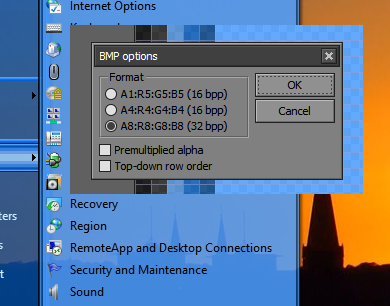
CTVCAM8
on 21 Nov 2020
To make a very long story as short as possible, I had a Windows 7 Pc (MonsterWindows) that was fried by a wrath of god power surge last December when lightning struck the power lines. It was unrepairable, although thankfully it did not affect my sata hard drives. I spent the larger part of 2020 saving up for and buying new pc components to put a new one together from scratch. I assembled it and installed Windows 10 on it at the beginning of September this year. I had no choice about windows 10, as a large part of the new components do not have drivers available on any other windows OS.
My point is that the computer is about 3 months old, and the hard drive I am working from is an m.2 nvme SSD. I am the sole user and administrator of the device, yet windows 10 stubbornly refuses to allow me to take ownership of some parts of the drive structure. Notably, it will allow me ownership of the files inside most folders, but will not allow me ownership of the folders themselves in some cases. (Also a noted oddity - note the modified date on my skin files. 10/03/2020, in spite of my saving them almost daily since then. Odd coincidence with windows 10 October update around the same time?)
I just gave it another go... I tried deleting the bitmap and replacing it fresh, no dice. I tried deleting it and adding it in as a png instead, no dice. Changing the bitmap reference to use bitmap 28 instead still does not fix the issue. No matter what I do it seems determined to thwart me, and the hair-pulling frustration is getting to me.
I created meshes and textures for Sims2, Sims3, and Sims4. I used to make Winamp skins. I made things for IMVU, and also Secondlife. I modded for Morrowind, and later - Skyrim. I have taught myself to skin Stardock Curtains, Mod Rainmeter (the light blue start menu orb on my desktop), and gotten this far with Open-shell - all since just late September of this year. I very much enjoy creating or modifying digital art, especially on the pixel level, it makes me happy, but I think you are right. I think I am going to take a bit of a break. Watch youtube for a day or so or something. This is making me frustrated past the point of enjoying my hobby (although not quite as much as meshing. God I hated Milkshape).
I will upload zipped copies of my skin as it is, so you can see if it shows the incorrect cyan bitmap on your end as well.
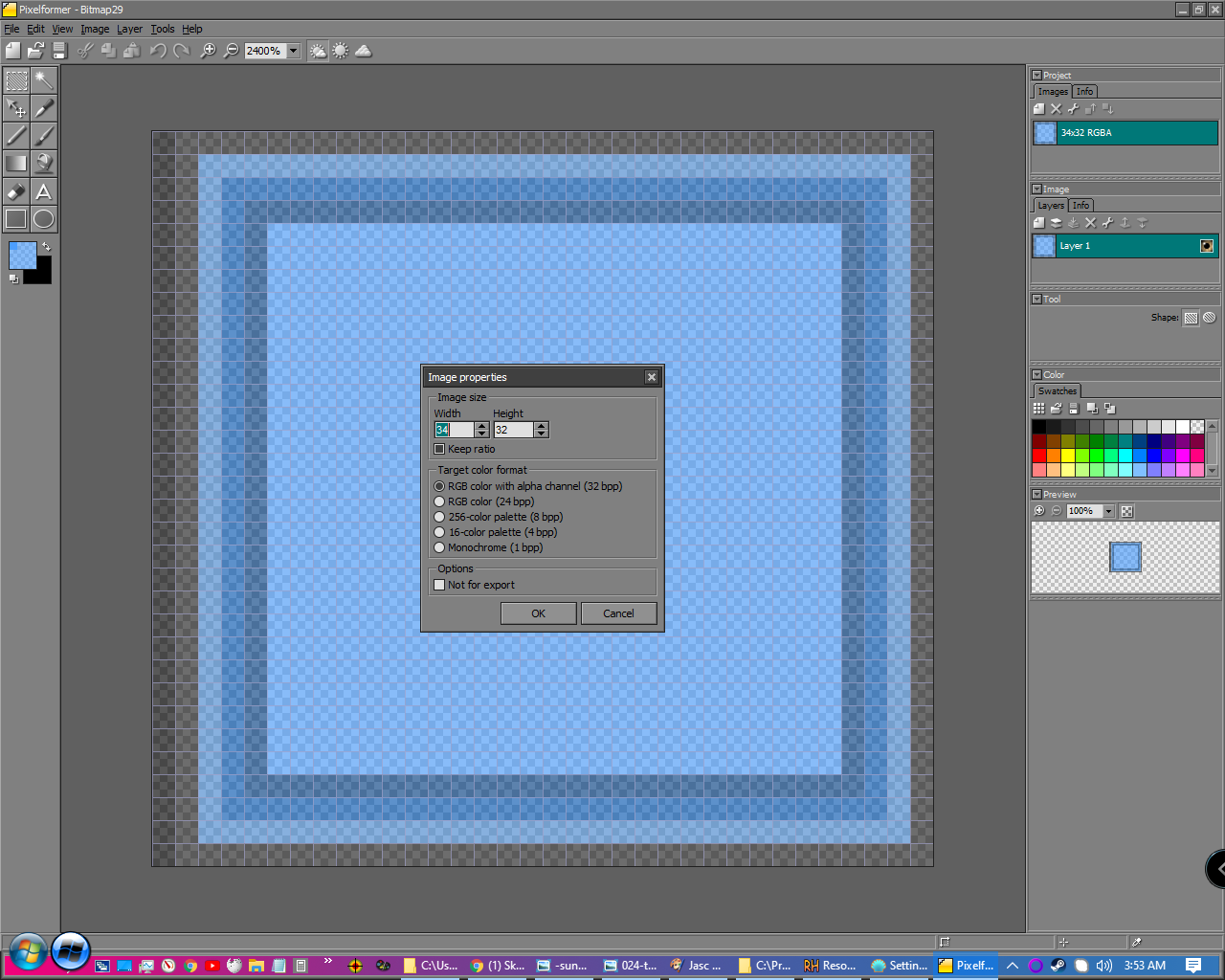
kamyk2000
on 21 Nov 2020
Hi. I'm not at my computer right now, to try stuff, but I can access your new skin file.
The bright colors of the submenu always remind me that a 24-bit image is being used where it should be a 32-bit image.
I think there are a number of text logic issues that can trip it up.
Not that it matters much, I really would not use the SubMenu_IconFrames as "ICON_FRAMES" is used to mean something different in Open-Shell.
The program might reference IconFrames in the code somewhere.
Next is the way "NOT" is used inside "(" [Alpha_Menu AND (NOT SubMenu_IconFrames)]
I would rather have like this: [Alpha_Menu AND NOT SubMenu_IconFrames]
Last thing close to end of the file, I see is a bit odd:
[NOT SubMenu_IconFrames]
; Why did I use not here ins
Submenu_padding=4,4,4,4
Submenu_bitmap=27
It is telling Open-Shell to use the 24-bit image always.
I would delete this section.
I'm going to let you try to work it out first.
In a few hours, I will get vertical and try myself. Time for more z.
CTVCAM8
on 21 Nov 2020
Ok, I'm upright now at the computer.
The bitmaps look correct with and without transparency.
So I didn't do anything with renaming "IconFrames" yet.
Did not change location of "NOT" yet.
I noticed that you have [Solid_Menu].
So what I did was cut the section near bottom of file(that uses the solid 27 bitmap)
and pasted it below the [Solid_Menu] section like this:
[Solid_Menu]
Main_opacity=Region
Main_bitmap=1
Main_bitmap_search=24
Main_bitmap_jump=1
Main_bitmap_slices_X=25,1,6,6,1,14
Main_bitmap_search_slices_X=25,3,25
Main_bitmap_jump_slices_X=25,1,6,6,1,14
Main_bitmap_slices_Y=52,10,30
Main_bitmap_search_slices_Y=52,10,30
Main_bitmap_jump_slices_Y=52,10,30
Main2_opacity=Region
Programs_background=#bbdbff
[Solid_Menu AND NOT SubMenu_IconFrames]
;line removed
Submenu_padding=4,4,4,4
Submenu_bitmap=27
Submenu_bitmap_slices_X=29,1,4
Submenu_bitmap_slices_Y=4,24,4
It seems to work :)
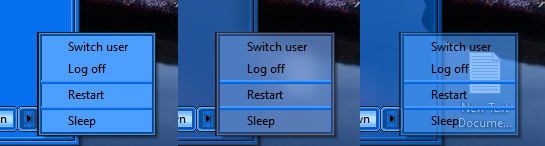
I would still do the other things I mentioned if you plan on using a new third option using real [ICON_FRAMES]
CTVCAM8
on 21 Nov 2020
That bit toward the bottom you refer to was how I was turning the icon backgrounds on and off. I want the skin to default to the icon backgrounds being on, but when I set it up the straightforward way, it refused to work.
My real question is did my skins work correctly before you edited any code? If so then that means that something IS wrong with one or more of the programs I am using. If that is the case I am going to uninstall and reinstall all three with the various build number suggestions you gave before.
kamyk2000
on 22 Nov 2020
Hi @kamyk2000
[My real question is did my skins work correctly before you edited any code?]
No.
When I saved all the submenu resources from ResouceHacker, I checked the images were made correctly, I only checked the skin without the png image.
Way back I was informed by the original developer to use "IMAGE" as the resource type when adding a png or jpg image to Resource Hacker.
Testing the skin.
On your latest version without the png image or modification by me:
When skin is reset and picked again the submenu is opaque with the dark blue icon background
Glass submenu works correctly
Transparent submenu works correctly
When the toggle icon backgrounds option is unchecked, the opaque submenu without blue icon background shows correctly
Glass submenu shows over bright look
Transparent shows over bright look
The reason is the 24-bit bitmap 27 overrides any other "NOT SubMenu_IconFrames" that came before it.
So Glass and Transparent options are forced to use the 24-bit bitmap 27 instead of the 32-bit bitmap 29.
Test mod by me.
With the bitmap 27 section cut from the end of the file and put below [Solid_Menu] section,
along with a renamed header [Solid_Menu AND NOT SubMenu_IconFrames] these are the results:
When skin is reset and picked again the submenu is opaque with the dark blue icon background
Glass submenu works correctly
Transparent submenu works correctly
When the toggle icon backgrounds option is unchecked, the opaque submenu without blue icon background shows correctly
Glass submenu works correctly
Transparent submenu works correctly
Pixelformer works fine for me. As you are a seasoned skinner, I'm sure you have used lots of other image editors that work for you.
Resource Hacker. 99% of the time it works great. The original developer recommends it as well as Visual Studio's resource editor.
If I google "resource hacker alternative program" I get:
Universal Extractor 2.
PE Explorer. ...
Resource Tuner. ...
Restorator. ...
Anolis Resourcer. ...
ResEdit. ...
XN Resource Editor. ...
InnoExtractor.
I don't know if all of them can compile back into a .dll
Windows 10. A few times Win 10 updates weren't kind to Classic Shell and Open-Shell.
I do have one problem with submenu transparency flashing every now and then.
I think it is because I never did a clean install since Windows 8 :)
If you think you have a problem with permissions,
there is a good tweaker that can unlock a number of files and folders where the user takes ownership:
If this is your first skin, it's expected there will be issues. You have done well so far.
By the way, text logic has always been difficult for me to take it all in.
Bye
CTVCAM8
on 22 Nov 2020
I do have a number of other programs for editing files or creating graphics, but this was the first time I even knew that .bmp files could have transparency. I have always used png files for that (or way back in the day, choosing a particularly noxious color in the palette to stand in for transparency). Also, my first time editing a dll. So in a sense, it is my first skin, at least one involving editing dlls and using transparent .bmps. I have Winaero tweaker, but I didn't use it for much because my understanding was that some of its options could screw with Open-shell or Curtains.
The text logic involved is a bit confusing to me too. I think I get what you are saying though with the bitmap 27. I had assumed that no particular option section would trigger without the exact conditions in it being met, and I thought that section was written in such a way that it wouldn't fire wrong. I may have not understood what was happening with it. I will look for what you are pointing out, and maybe a light bulb will go off over my head. At least I hope so. I really appreciate the advice and input you are giving me.
I suppose I should have expected issues, nothing else I've ever made has gone without hiccups along the way, it's just that for most of the first part of doing this, open-shell and resourcehacker seemed so easy to use. I also have a tendency to dive headfirst into new modding projects with grand ideas. I'm stupidly the kind of person who sometimes skips "Hello world", and just goes directly for multi-layered menus with bells and whistles. When I modded Skyrim for example, I dove headfirst into creating a Draugr crypt as my very first mod.
I apologize if my confusion and continued questions are frustrating you. I really do appreciate the input.
Edit: Omg, it's so obvious now. Wow was that derpy on my part. Thank you so much for pointing it out.
Edit: I think my previous experience is actually a bit of a liability in this case. So far I have made two completely incorrect assumptions during this process. The first being that I thought the bitmaps repeated by tiling, the second being that I assumed option sections were subroutines, that when finished under very specific circumstances, terminated, and went back to waiting for further input. Instead, it appears that the skins parse through the entire skin file every time. Oh well, trial and error, and sometimes advice from veterans of a given modding community ;)
kamyk2000
on 22 Nov 2020
@kamyk2000 that's totally fine. I'm glad it seems you have been able to work out the kinks. And you seem to have learned a lot in such a short period of time!
bonzibudd
on 25 Nov 2020
Related issues
 indyjonny
·
3Comments
indyjonny
·
3Comments
 bovirus
·
4Comments
bovirus
·
4Comments
 asianmusicguy
·
3Comments
asianmusicguy
·
3Comments
 Gittyperson
·
3Comments
Gittyperson
·
3Comments
 coddec
·
3Comments
coddec
·
3Comments
Most helpful comment
I do have a number of other programs for editing files or creating graphics, but this was the first time I even knew that .bmp files could have transparency. I have always used png files for that (or way back in the day, choosing a particularly noxious color in the palette to stand in for transparency). Also, my first time editing a dll. So in a sense, it is my first skin, at least one involving editing dlls and using transparent .bmps. I have Winaero tweaker, but I didn't use it for much because my understanding was that some of its options could screw with Open-shell or Curtains.
The text logic involved is a bit confusing to me too. I think I get what you are saying though with the bitmap 27. I had assumed that no particular option section would trigger without the exact conditions in it being met, and I thought that section was written in such a way that it wouldn't fire wrong. I may have not understood what was happening with it. I will look for what you are pointing out, and maybe a light bulb will go off over my head. At least I hope so. I really appreciate the advice and input you are giving me.
I suppose I should have expected issues, nothing else I've ever made has gone without hiccups along the way, it's just that for most of the first part of doing this, open-shell and resourcehacker seemed so easy to use. I also have a tendency to dive headfirst into new modding projects with grand ideas. I'm stupidly the kind of person who sometimes skips "Hello world", and just goes directly for multi-layered menus with bells and whistles. When I modded Skyrim for example, I dove headfirst into creating a Draugr crypt as my very first mod.
I apologize if my confusion and continued questions are frustrating you. I really do appreciate the input.
Edit: Omg, it's so obvious now. Wow was that derpy on my part. Thank you so much for pointing it out.
Edit: I think my previous experience is actually a bit of a liability in this case. So far I have made two completely incorrect assumptions during this process. The first being that I thought the bitmaps repeated by tiling, the second being that I assumed option sections were subroutines, that when finished under very specific circumstances, terminated, and went back to waiting for further input. Instead, it appears that the skins parse through the entire skin file every time. Oh well, trial and error, and sometimes advice from veterans of a given modding community ;)