Open-shell-menu: Override start menu from StartIsBack++
I've been using Classic Shell ever since Windows 7, and I really like the custom start menu. I recently switched to a fresh install of Windows 10 after Microsoft retired 7, and also switched to Open-Shell since Classic Shell is no longer under development.
Well, I was researching ways to eliminate that stupid colored bar underneath the active programs in the start menu (I don't group programs, so the colored bar is redundant), and I found this lovely program called StartIsBack++. I went ahead and gave it a try, and I absolutely adore how it customizes the open items in the taskbar and brings back that classic Windows 7 Aero look. It also seems to do a better job at replacing the start menu _icon_ that Open-Shell does.
But, it seems to override the Open-Shell start menu settings themselves, which I find very frustrating. I was hoping to request a way for Open-Shell to override the start menu settings from StartIsBack++.
I realize that this may be a tall order without a willingness to collaborate from the StartIsBack++ developer, but it would be quite nice if this were a possibility.
Open-Shell style:
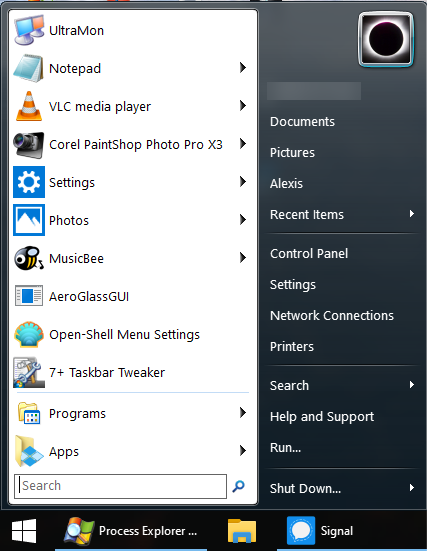
StartIsBack++ style:
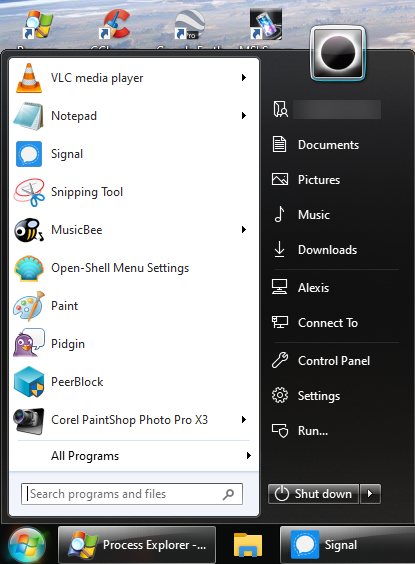
 psychonaut25
All 5 comments
I forgot to mention, I did also point this issue out to the developer of StartIsBack++ and I hope to hear back soon. Perhaps they would be able to create a feature to simply not replace the start menu at all, and only modify the taskbar and/or start menu icon.
psychonaut25
on 6 Feb 2020
I also just realized- pressing the Windows key brings up the Open-Shell start menu, but clicking on the start menu icon opens the StartIsBack++ start menu.
psychonaut25
on 6 Feb 2020
Do you really expect two Start Menu-related programs to run simultaneously and continue to operate normally? You should only use one, and uninstall the other (or at least completely disable it - uninstall would be preferable).
I am attaching two skins I found on the Classic Shell forum that are meant to replicate SiB's look, so you can try them on Open-Shell. Perhaps there are more.
 Gittyperson
on 8 Feb 2020
Gittyperson
on 8 Feb 2020
Hey, that is very kind of you, thanks! I know it was a long shot, I just figured it was worth asking. I posted this after spending several hours trying very hard to make my Windows 10 install look and behave like my old Win 7 install, and I guess I was just at the end of a long binge of working on it and being kinda perfectionist. So I realize the question was kind of out there, but I really do appreciate that. I'll give it a try out as soon as I get the chance- many thanks!
psychonaut25
on 8 Feb 2020
I'm gonna go ahead and close the issue- even if this doesn't work, I can live with it.
psychonaut25
on 8 Feb 2020
Related issues
 Icarus77
·
22Comments
Icarus77
·
22Comments
 Crazydoub
·
18Comments
Crazydoub
·
18Comments
 paraworlds2
·
28Comments
Gittyperson
·
46Comments
paraworlds2
·
28Comments
Gittyperson
·
46Comments
 Aokromes
·
34Comments
Aokromes
·
34Comments
Most helpful comment
Do you really expect two Start Menu-related programs to run simultaneously and continue to operate normally? You should only use one, and uninstall the other (or at least completely disable it - uninstall would be preferable).
I am attaching two skins I found on the Classic Shell forum that are meant to replicate SiB's look, so you can try them on Open-Shell. Perhaps there are more.
StartIsBack skins for Open-Shell.zip