Open-shell-menu: How to add custom quick menu entry: e.g. Resource Monitor?
Hi,
When I want to add windows' "Resource Monitor" to the right side of the menu with the command %windir%system32perfmon.exe /res
it does nothing.
Any ideas?
 RedSkyRoad
All 9 comments
@RedSkyRoad
Custom Menu Item -> Insert new item -> Custom -> Click on the icon on the left hand side -> Command: %windir%system32perfmon.exe /res -> Label: Resource Monitor -> OK -> OK
 coddec
on 21 Jul 2018
coddec
on 21 Jul 2018
I tried it but it does nothing when I click the new link
RedSkyRoad
on 21 Jul 2018
Weird, it works on my side...
coddec
on 22 Jul 2018
Got it working. I entered the string into "link" instead of the "command" field.
What is the difference between the two fields?
RedSkyRoad
on 24 Jul 2018
What is the difference between the two fields?
Probably for url?
coddec
on 24 Jul 2018
I suggest you change the mouse-over information of the "link" field so it says something else. It clearly states "Type a full path of a file or folder, e.g notepad.exe
RedSkyRoad
on 24 Jul 2018
Errr, @XenHat @ge0rdi
Thoughts? 😕
coddec
on 24 Jul 2018

%windir%\Notepad.exe is a valid Full Path.
I believe the code wants a "Parameter". I shall look into it.
 XenHat
on 28 Jul 2018
XenHat
on 28 Jul 2018
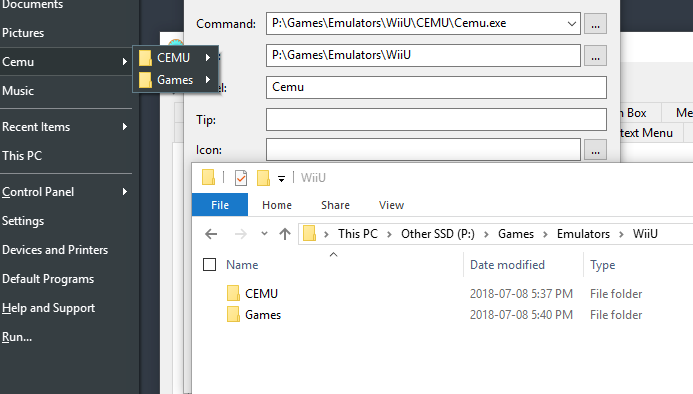
Interesting...
the "Link" entry appears to be for submenu entries.
A double-click on a root menu entry which contains links will launch the item in "Command"
Example: Control Panel menu entry would open the whole control panel if double clicked
XenHat
on 28 Jul 2018
Related issues
 buddybu
·
20Comments
buddybu
·
20Comments
 paraworlds2
·
28Comments
paraworlds2
·
28Comments
 Braxusz
·
23Comments
Braxusz
·
23Comments
 DragoCubed
·
15Comments
DragoCubed
·
15Comments
 Aokromes
·
34Comments
Aokromes
·
34Comments
Most helpful comment
Got it working. I entered the string into "link" instead of the "command" field.
What is the difference between the two fields?