Open-shell-menu: Crashes explorer (Windows 8)
When I open the menu (settings panel is fine) the thing crashes. If i need to supply a log, may you tell me how?
 ComradeCommie
All 13 comments
@ComradeCommie, just by stating that it crashes doesn't help figure out what/how it crashed...
This could be something different crashing that prevented the Classic Start from working or even causing Classic Start from working that may or may not be tied to Classic Start.
~Ibuprophen
 Ibuprophen
on 20 Jul 2018
Ibuprophen
on 20 Jul 2018
When I open the menu (settings panel is fine) the thing crashes.
What exactly does crash? Is it explorer.exe?
Could you provide at least screenshot from the _crash_?
 ge0rdi
on 20 Jul 2018
ge0rdi
on 20 Jul 2018
I'll do that, but I can't describe the crash past much just the menu opening, freezing explorer (the whole shell) and itself then eventually not responding and crashing.
ComradeCommie
on 20 Jul 2018
@ComradeCommie, try your best to duplicate the crash in question by mimicking what you had done for the original crash in question.
Here's just a little helper regarding a screenshot for certain items like this (to help prevent the need for a mouse)...
Do the following fluid like manner (press down one then press the next and then release them both):
On the keyboard, press and hold the "Windows" Key and then, right after that key is pressed, press the "Print" Key once then release them both.
The screenshot will be in the Pictures folder within your Profile User Files. You'll see a folder named Screenshots with the image in there.
Sorry for the lengthy explanation but, I just wanted to be sure that there would be no confusion.
Good Luck! 😀
~Ibuprophen
Ibuprophen
on 20 Jul 2018
@ComradeCommie
Please, get ProcDump tool and run this from command line:
procdump.exe -e explorer.exe
Then replicate the crash. It should create crash dump file (explorer.exe_*.dmp).
Attach the dump here.
ge0rdi
on 20 Jul 2018
@ibuprophen1 No screenshots needed, like what I said, explorer crashes and restarts along with classic start.
@ge0rdi GitHub doesn't support log files, so I'm going to link to dropbox and put the dumps in there. I hope that is okay. https://www.dropbox.com/s/dx79vc1lvcnwd4r/explorer.exe_180720_145948.dmp?dl=1
ComradeCommie
on 21 Jul 2018
Thanks.
Though, I've realized that we don't store symbols. So I can't see much in the dump :(
Please, replace ClassicStartMenuDLL.dll with this one ClassicStartMenuDLL.dll.zip and repeat the process. This is custom built DLL, so I have symbols for it.
ge0rdi
on 21 Jul 2018
When I replaced the DLL the start menu works but now looks like the attachment.
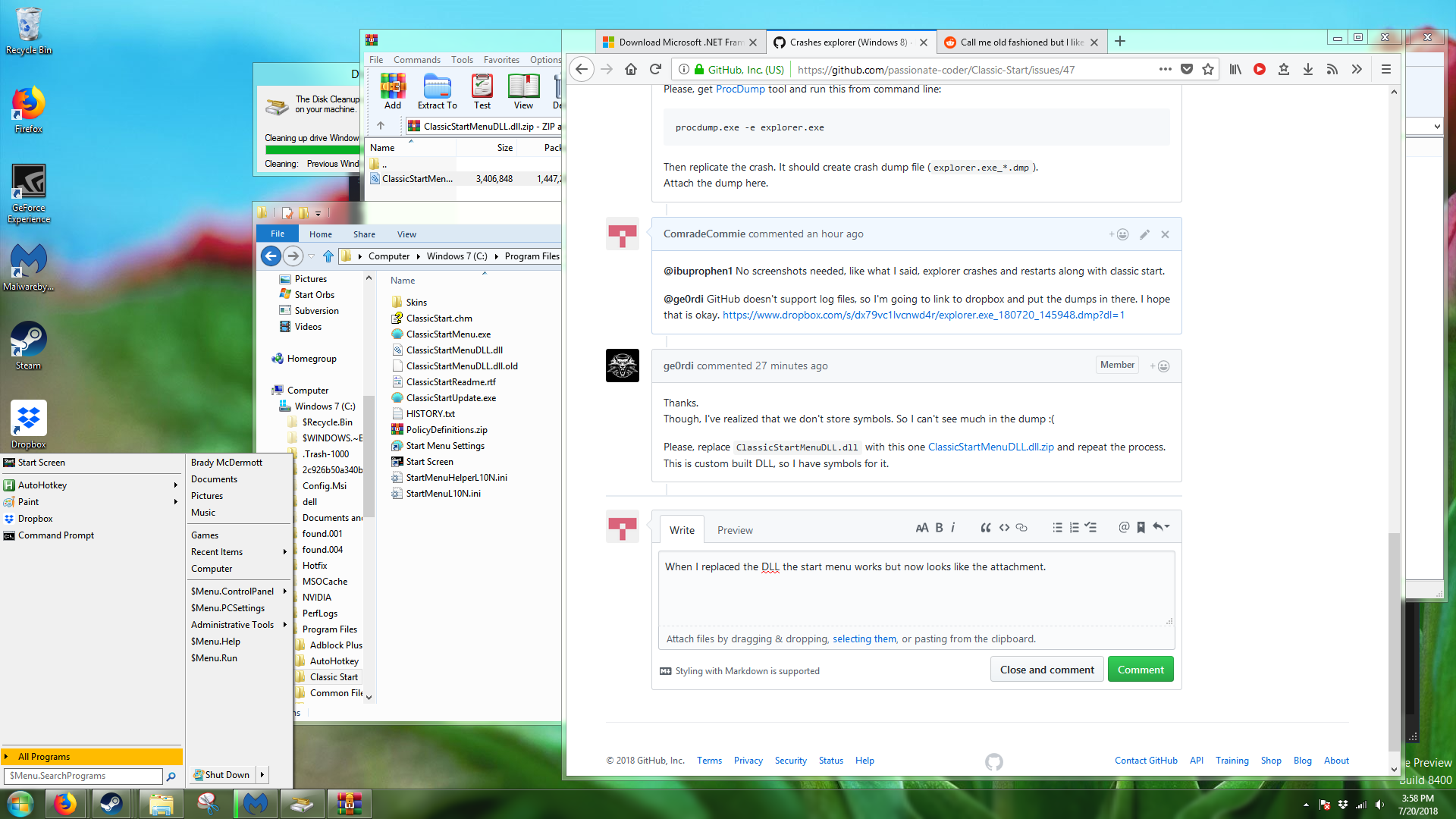
One issue: seperators and no skins and less options
ComradeCommie
on 21 Jul 2018
Hmm, that may be caused by DLL version mismatch.
Though interesting that crashes don't occur when there is no skin used.
You can try to install latest nightly build from here:
https://ci.appveyor.com/project/passionate-coder/classic-start/build/artifacts
If it will crash again, please, create dump and upload it somewhere.
We have now symbols stored for this latest buils, so it will be easier to analyze crash dumps.
Also you may try to disable skin in settings - Skin tab -> select <No Skin> in combo box.
Eventually this may stop crashing (until a fix will be available).
ge0rdi
on 21 Jul 2018
Ran it again, no skin's fine, enabled Aero skin, crash, 8 skin, crash, seems like no skin is the only working on. Dump here: https://www.dropbox.com/s/2f2vpzhyxfvtay5/explorer.exe_180720_180155.dmp?dl=1
Edit: Custom skins crash it too
ComradeCommie
on 21 Jul 2018
The problem is that you are using pre-release version of Win8 (6.2.8400.0 (winmain_win8rc.120518-1423)).
There were changes in certain COM interfaces in official Win8. And this is the source of crashing.
Classic Start does support only officially released Windows builds.
I'd suggest to install official Windows release (ideally modern Win10 that you should be able to install using legitimate Win8 key).
ge0rdi
on 21 Jul 2018
Well, that sucks. I'll try to adapt to the regular metro menu, thanks for the help. I still wonder, why does it only crash with the skin and not all the time if that is the case?
ComradeCommie
on 21 Jul 2018
I still wonder, why does it only crash with the skin and not all the time if that is the case?
Because the mentioned COM interface (IImmersiveLauncherThumbnailProvider) is used only when skin is being drawn.
ge0rdi
on 21 Jul 2018
Related issues
 sydbarrett74
·
3Comments
sydbarrett74
·
3Comments
 asianmusicguy
·
3Comments
asianmusicguy
·
3Comments
 josephpstich
·
4Comments
josephpstich
·
4Comments
 dertuxmalwieder
·
4Comments
dertuxmalwieder
·
4Comments
 bovirus
·
4Comments
bovirus
·
4Comments
Most helpful comment
Hmm, that may be caused by DLL version mismatch.
Though interesting that crashes don't occur when there is no skin used.
You can try to install latest nightly build from here:
https://ci.appveyor.com/project/passionate-coder/classic-start/build/artifacts
If it will crash again, please, create dump and upload it somewhere.
We have now symbols stored for this latest buils, so it will be easier to analyze crash dumps.
Also you may try to disable skin in settings -
Skintab -> select<No Skin>in combo box.Eventually this may stop crashing (until a fix will be available).