Open-event-frontend: Automatic scaling feature for speakers photos
Is your feature request related to a problem? Please describe.
When speakers upload their photos in the system, the photos are not automatically scaled to a define size e.g 300 x 300px. When speakers are accepted, their photos appear in different size.
Describe the solution you'd like
All uploaded photos scaled to a default size no matter what is the original size of the photo.
 edenyay
All 24 comments
@kushthedude @edenyay want to work on this .
 maze-runnar
on 12 Jan 2020
maze-runnar
on 12 Jan 2020
@edenyay is it ok to use custom-css a little, all its need ?
maze-runnar
on 12 Jan 2020
@edenyay is it ok to use custom-css a little, all its need ?
Find the bug causing it rather than using css to change px
 kushthedude
on 12 Jan 2020
kushthedude
on 12 Jan 2020
@kushthedude , i have checked from the semantic-ui git repo and found definition for ui medium image class . it is -
.ui.medium.images .image,
.ui.medium.images img,
.ui.medium.images svg,
.ui.medium.image {
  width: @mediumWidth;
  height: auto;
  font-size: @medium;
}
as you can see the height is set to auto, that's why i need to use custom css to over ride it .
maze-runnar
on 12 Jan 2020
if you want to see ui medium image definition , you can find here :https://github.com/Semantic-Org/Semantic-UI/blob/master/src/definitions/elements/image.less
maze-runnar
on 12 Jan 2020
/*--------------
     Sizes
---------------*/

.ui.mini.images .image,
.ui.mini.images img,
.ui.mini.images svg,
.ui.mini.image {
  width: @miniWidth;
  height: auto;
  font-size: @mini;
}
.ui.tiny.images .image,
.ui.tiny.images img,
.ui.tiny.images svg,
.ui.tiny.image {
  width: @tinyWidth;
  height: auto;
  font-size: @tiny;
}
.ui.small.images .image,
.ui.small.images img,
.ui.small.images svg,
.ui.small.image {
  width: @smallWidth;
  height: auto;
  font-size: @small;
}
.ui.medium.images .image,
.ui.medium.images img,
.ui.medium.images svg,
.ui.medium.image {
  width: @mediumWidth;
  height: auto;
  font-size: @medium;
}
.ui.large.images .image,
.ui.large.images img,
.ui.large.images svg,
.ui.large.image {
  width: @largeWidth;
  height: auto;
  font-size: @large;
}
.ui.big.images .image,
.ui.big.images img,
.ui.big.images svg,
.ui.big.image {
  width: @bigWidth;
  height: auto;
  font-size: @big;
}
.ui.huge.images .image,
.ui.huge.images img,
.ui.huge.images svg,
.ui.huge.image {
  width: @hugeWidth;
  height: auto;
  font-size: @huge;
}
.ui.massive.images .image,
.ui.massive.images img,
.ui.massive.images svg,
.ui.massive.image {
  width: @massiveWidth;
  height: auto;
  font-size: @massive;
}
@kushthedude please take a look here too .
maze-runnar
on 13 Jan 2020
Problem is with CSS, but try to use predefined CSS only
 iamareebjamal
on 13 Jan 2020
iamareebjamal
on 13 Jan 2020
Center Crop it - https://stackoverflow.com/questions/11552380/how-to-automatically-crop-and-center-an-image
iamareebjamal
on 16 Jan 2020
What about the cropper then?
On Thu, 16 Jan, 2020, 16:29 Areeb Jamal, notifications@github.com wrote:
Center Crop it -
https://stackoverflow.com/questions/11552380/how-to-automatically-crop-and-center-an-image—
You are receiving this because you were mentioned.
Reply to this email directly, view it on GitHub
https://github.com/fossasia/open-event-frontend/issues/3794?email_source=notifications&email_token=AKQMTLTMGUHUS42D6K3LCHTQ6A4ZJA5CNFSM4KFVKXWKYY3PNVWWK3TUL52HS4DFVREXG43VMVBW63LNMVXHJKTDN5WW2ZLOORPWSZGOEJDVAKQ#issuecomment-575098922,
or unsubscribe
https://github.com/notifications/unsubscribe-auth/AKQMTLUGHD4LNL4I5LJUXEDQ6A4ZJANCNFSM4KFVKXWA
.
kushthedude
on 16 Jan 2020
Or we use center crop for now, as release is also due with fixes for session form @iamareebjamal
kushthedude
on 16 Jan 2020
You have to do both. Change in cropper won't fix old images
iamareebjamal
on 16 Jan 2020
Actually we don't have a cropper for now in session speaker form!
On Thu, 16 Jan, 2020, 16:34 Areeb Jamal, notifications@github.com wrote:
You have to do both. Change in cropper won't fix old images
—
You are receiving this because you were mentioned.
Reply to this email directly, view it on GitHub
https://github.com/fossasia/open-event-frontend/issues/3794?email_source=notifications&email_token=AKQMTLUFE3BI27ADLWWFPOTQ6A5KZA5CNFSM4KFVKXWKYY3PNVWWK3TUL52HS4DFVREXG43VMVBW63LNMVXHJKTDN5WW2ZLOORPWSZGOEJDVOSI#issuecomment-575100745,
or unsubscribe
https://github.com/notifications/unsubscribe-auth/AKQMTLTGTEMIP5QTVHYQNH3Q6A5KZANCNFSM4KFVKXWA
.
kushthedude
on 16 Jan 2020
You have to add that as well. Both have to be done
iamareebjamal
on 16 Jan 2020
@iamareebjamal @kushthedude i have implemented the cropper for speaker form, it is working amazing :smile: and cropping the images to 300 x 300 px here is the full flow how it works - https://youtu.be/JpGALKQ0O0w
maze-runnar
on 18 Jan 2020
Nope it is center cropping what if speaker wants to select some other side
than centwr
On Sat, 18 Jan, 2020, 16:00 Sundaram Dubey, notifications@github.com
wrote:
@iamareebjamal https://github.com/iamareebjamal @kushthedude
https://github.com/kushthedude i have implemented the cropper for
speaker form, it is working amazing 😄 and cropping the images to 300 x
300 px here is the full flow how it works - https://youtu.be/JpGALKQ0O0w—
You are receiving this because you were mentioned.
Reply to this email directly, view it on GitHub
https://github.com/fossasia/open-event-frontend/issues/3794?email_source=notifications&email_token=AKQMTLUVKSMEXHHW4VW3EIDQ6LK5HA5CNFSM4KFVKXWKYY3PNVWWK3TUL52HS4DFVREXG43VMVBW63LNMVXHJKTDN5WW2ZLOORPWSZGOEJJVIDQ#issuecomment-575886350,
or unsubscribe
https://github.com/notifications/unsubscribe-auth/AKQMTLVQRW2NTC5I76DA6XDQ6LK5HANCNFSM4KFVKXWA
.
kushthedude
on 18 Jan 2020
Nope it is center cropping what if speaker wants to select some other side than centwr
…
On Sat, 18 Jan, 2020, 16:00 Sundaram Dubey, @.*> wrote: @iamareebjamal https://github.com/iamareebjamal @kushthedude https://github.com/kushthedude i have implemented the cropper for speaker form, it is working amazing and cropping the images to 300 x 300 px here is the full flow how it works - https://youtu.be/JpGALKQ0O0w — You are receiving this because you were mentioned. Reply to this email directly, view it on GitHub <#3794?email_source=notifications&email_token=AKQMTLUVKSMEXHHW4VW3EIDQ6LK5HA5CNFSM4KFVKXWKYY3PNVWWK3TUL52HS4DFVREXG43VMVBW63LNMVXHJKTDN5WW2ZLOORPWSZGOEJJVIDQ#issuecomment-575886350>, or unsubscribe https://github.com/notifications/unsubscribe-auth/AKQMTLVQRW2NTC5I76DA6XDQ6LK5HANCNFSM4KFVKXWA .
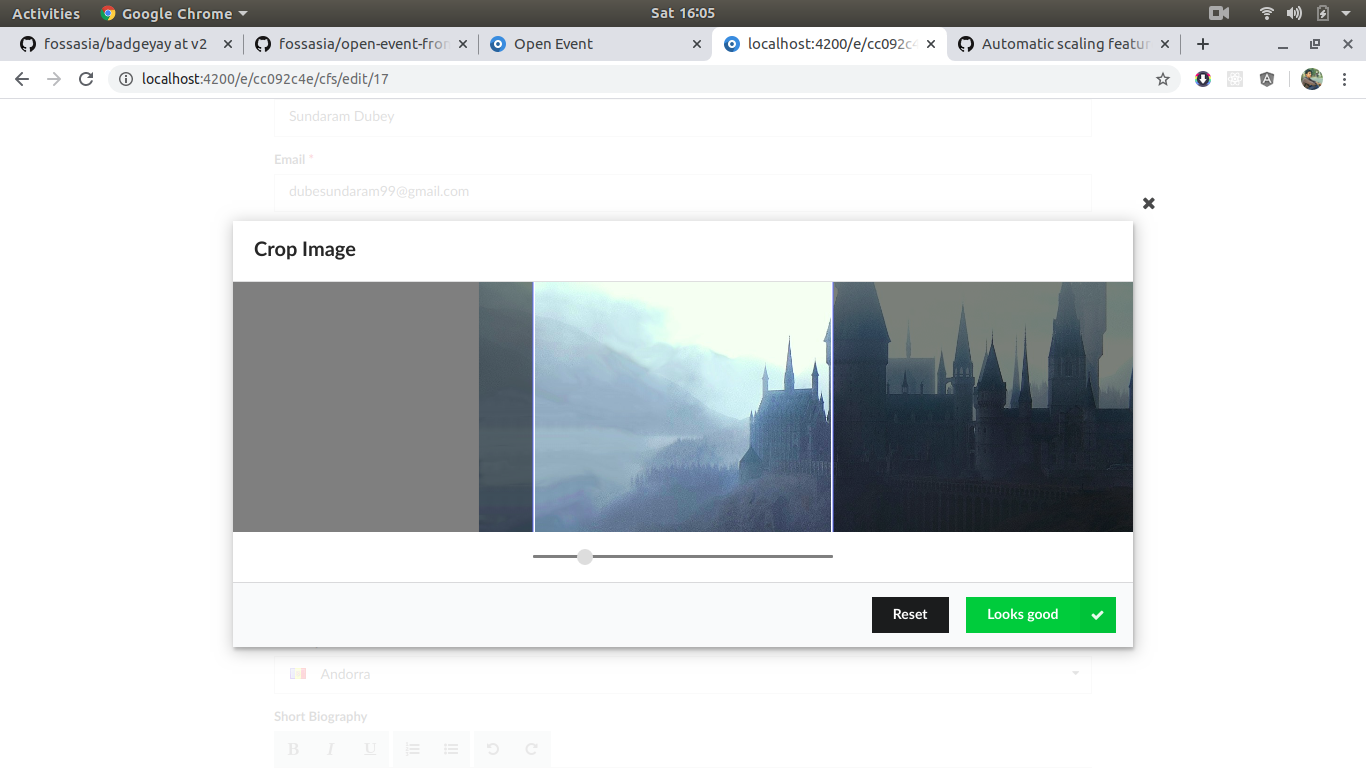
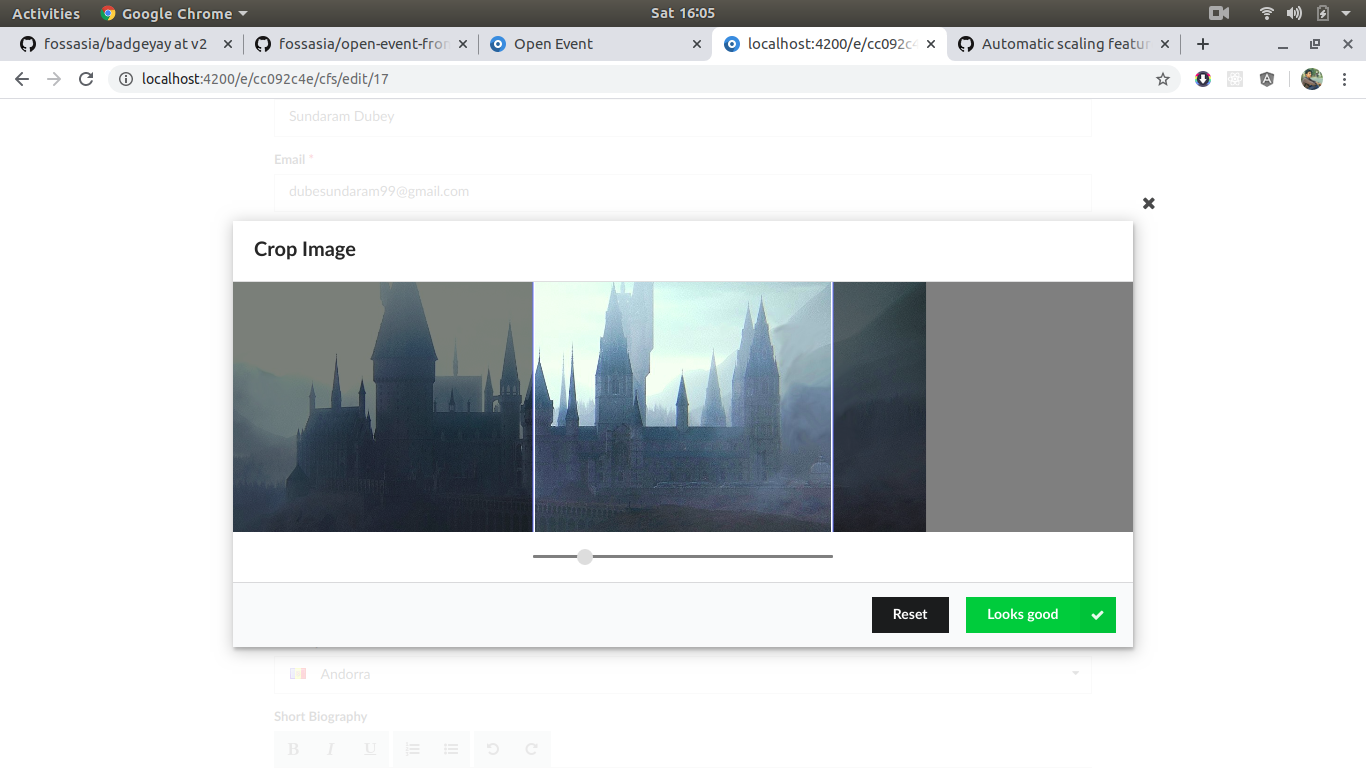
no, it's not only center cropping, selected image is like that , it is same as wizard cropper.
maze-runnar
on 18 Jan 2020
Other example?
On Sat, 18 Jan, 2020, 16:04 Sundaram Dubey, notifications@github.com
wrote:
Nope it is center cropping what if speaker wants to select some other side
than centwr
… <#m_5524081169392673120_>
On Sat, 18 Jan, 2020, 16:00 Sundaram Dubey, @.*> wrote: @iamareebjamal
https://github.com/iamareebjamal https://github.com/iamareebjamal
@kushthedude https://github.com/kushthedude
https://github.com/kushthedude i have implemented the cropper for speaker
form, it is working amazing and cropping the images to 300 x 300 px here is
the full flow how it works - https://youtu.be/JpGALKQ0O0w — You are
receiving this because you were mentioned. Reply to this email directly,
view it on GitHub <#3794
https://github.com/fossasia/open-event-frontend/issues/3794?email_source=notifications&email_token=AKQMTLUVKSMEXHHW4VW3EIDQ6LK5HA5CNFSM4KFVKXWKYY3PNVWWK3TUL52HS4DFVREXG43VMVBW63LNMVXHJKTDN5WW2ZLOORPWSZGOEJJVIDQ#issuecomment-575886350>,
or unsubscribe
https://github.com/notifications/unsubscribe-auth/AKQMTLVQRW2NTC5I76DA6XDQ6LK5HANCNFSM4KFVKXWA
.no, it's not only center cropping, selected image is like that , it is
same as wizard cropper.—
You are receiving this because you were mentioned.
Reply to this email directly, view it on GitHub
https://github.com/fossasia/open-event-frontend/issues/3794?email_source=notifications&email_token=AKQMTLV2IEEOSPZHLQQ5AVLQ6LLLNA5CNFSM4KFVKXWKYY3PNVWWK3TUL52HS4DFVREXG43VMVBW63LNMVXHJKTDN5WW2ZLOORPWSZGOEJJVJYI#issuecomment-575886561,
or unsubscribe
https://github.com/notifications/unsubscribe-auth/AKQMTLTLBTU57CLQW5HA4XDQ6LLLNANCNFSM4KFVKXWA
.
kushthedude
on 18 Jan 2020
maze-runnar
on 18 Jan 2020
@kushthedude is it ok?
maze-runnar
on 18 Jan 2020
Video with cropper moving to all corners in four direction
On Sat, 18 Jan, 2020, 16:08 Sundaram Dubey, notifications@github.com
wrote:
@kushthedude https://github.com/kushthedude is it ok?
—
You are receiving this because you were mentioned.
Reply to this email directly, view it on GitHub
https://github.com/fossasia/open-event-frontend/issues/3794?email_source=notifications&email_token=AKQMTLQAKKDDIDSACDFBB3DQ6LL3RA5CNFSM4KFVKXWKYY3PNVWWK3TUL52HS4DFVREXG43VMVBW63LNMVXHJKTDN5WW2ZLOORPWSZGOEJJVL3Y#issuecomment-575886831,
or unsubscribe
https://github.com/notifications/unsubscribe-auth/AKQMTLRUYSVZTP33YQSHOYLQ6LL3RANCNFSM4KFVKXWA
.
kushthedude
on 18 Jan 2020
Video with cropper moving to all corners in four direction
…
On Sat, 18 Jan, 2020, 16:08 Sundaram Dubey, @.*> wrote: @kushthedude https://github.com/kushthedude is it ok? — You are receiving this because you were mentioned. Reply to this email directly, view it on GitHub <#3794?email_source=notifications&email_token=AKQMTLQAKKDDIDSACDFBB3DQ6LL3RA5CNFSM4KFVKXWKYY3PNVWWK3TUL52HS4DFVREXG43VMVBW63LNMVXHJKTDN5WW2ZLOORPWSZGOEJJVL3Y#issuecomment-575886831>, or unsubscribe https://github.com/notifications/unsubscribe-auth/AKQMTLRUYSVZTP33YQSHOYLQ6LL3RANCNFSM4KFVKXWA .
@kushthedude here is updated video :https://youtu.be/dwNEKSJfba8
maze-runnar
on 18 Jan 2020
Working nice, make the PR
On Sat, 18 Jan, 2020, 16:16 Sundaram Dubey, notifications@github.com
wrote:
Video with cropper moving to all corners in four direction
… <#m_-2997685609569293617_>
On Sat, 18 Jan, 2020, 16:08 Sundaram Dubey, @.*> wrote: @kushthedude
https://github.com/kushthedude https://github.com/kushthedude is it ok?
— You are receiving this because you were mentioned. Reply to this email
directly, view it on GitHub <#3794
https://github.com/fossasia/open-event-frontend/issues/3794?email_source=notifications&email_token=AKQMTLQAKKDDIDSACDFBB3DQ6LL3RA5CNFSM4KFVKXWKYY3PNVWWK3TUL52HS4DFVREXG43VMVBW63LNMVXHJKTDN5WW2ZLOORPWSZGOEJJVL3Y#issuecomment-575886831>,
or unsubscribe
https://github.com/notifications/unsubscribe-auth/AKQMTLRUYSVZTP33YQSHOYLQ6LL3RANCNFSM4KFVKXWA
.—
You are receiving this because you were mentioned.
Reply to this email directly, view it on GitHub
https://github.com/fossasia/open-event-frontend/issues/3794?email_source=notifications&email_token=AKQMTLSFCAGEKBRPPD2G26DQ6LMXXA5CNFSM4KFVKXWKYY3PNVWWK3TUL52HS4DFVREXG43VMVBW63LNMVXHJKTDN5WW2ZLOORPWSZGOEJJVP4Q#issuecomment-575887346,
or unsubscribe
https://github.com/notifications/unsubscribe-auth/AKQMTLR5N3LZMTPP6QZ2JHTQ6LMXXANCNFSM4KFVKXWA
.
kushthedude
on 18 Jan 2020
thanks :pray:
maze-runnar
on 18 Jan 2020
Related issues
 mariobehling
·
3Comments
mariobehling
·
3Comments
 dilpreetsio
·
4Comments
dilpreetsio
·
4Comments
 codedsun
·
4Comments
iamareebjamal
·
4Comments
codedsun
·
4Comments
iamareebjamal
·
4Comments
 hpdang
·
5Comments
hpdang
·
5Comments