Online-go.com: Icons not rendering, showing empty square
Describe the bug
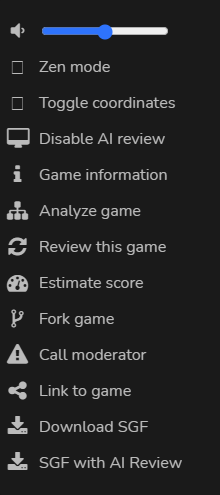
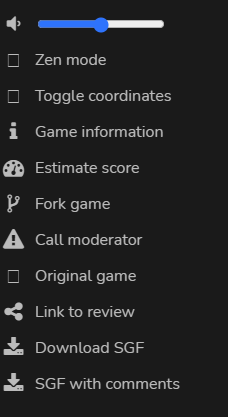
In game and review mode some icons are missing and just show an empty square. This appears to have just started today (11/21/2020). I can repro on both desktop (Windows 10 Chrome) and mobile (Android Chrome).
Game mode (see "Zen mode" and "Toggle coordinates"):
Review mode (see "Zen mode", "Toggle coordinates", and "Original game"):
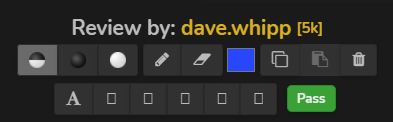
Analyze mode controls (see stone marking buttons):
 JDNdeveloper
All 4 comments
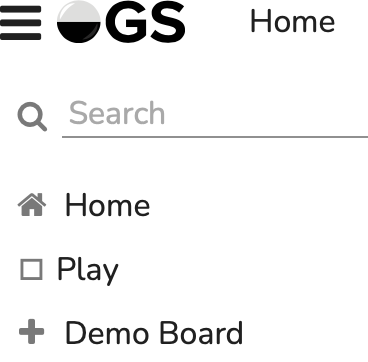
I noticed the Play icon was gone earlier today too (Android Chrome, MacOS Safari)
 benjaminpjones
on 21 Nov 2020
benjaminpjones
on 21 Nov 2020
Can confirm I too am experiencing this issue with icons for Play, Zen, and Toggle Coordinates not loading.
Windows 10
Brave Browser Version 1.17.73 Chromium: 87.0.4280.67 (Official Build) (64-bit)
 BHydden
on 22 Nov 2020
BHydden
on 22 Nov 2020
Bisecting shows this as the problem commit (upgrading to webpack 5): 00b295ef6aa676ad5264c8f49e9c57e9d365b5b2 (cc @anoek )
JDNdeveloper
on 22 Nov 2020
PR with fix is out: #1281
Took me longer than I'd like to admit to hunt down as I was convinced it was a webpack issue due to the nature of the offending commit and went down that rabbit hole.
JDNdeveloper
on 22 Nov 2020
Related issues
benjaminpjones
·
3Comments
 kobakitty
·
3Comments
kobakitty
·
3Comments
 popz73
·
4Comments
JDNdeveloper
·
3Comments
popz73
·
4Comments
JDNdeveloper
·
3Comments
 roy7
·
5Comments
roy7
·
5Comments
Most helpful comment
Bisecting shows this as the problem commit (upgrading to webpack 5): 00b295ef6aa676ad5264c8f49e9c57e9d365b5b2 (cc @anoek )