Online-go.com: Ability to see how many vacation days are to be accrued
Summary
Displaying how many days are left to be accrued/acquired.
It's just a substraction, it should be a quick-win. And besides the supporter page, I don't know an OGS page that gives us the maximum allowed.
So, if I've never been interested in visiting the supporter page, I can't know, whatever if I'm a supporter or not.
As a subsidiary point, it would be kind to display the rhythm of acquisition
Environment
any
Steps To Reproduce:
Ask if needed
Additional Information:
Ask if needed.
Arnaud
 arnaudgo
All 12 comments
I'd be interested in tackling this issue, assuming it's not being worked on already. I'd like to start helping with this project, and it seems like a good way to familiarize myself with the code.
I'm not entirely clear on what is being requested, though. Here's a quick first attempt (I'm assuming this info would go on the user profile page):
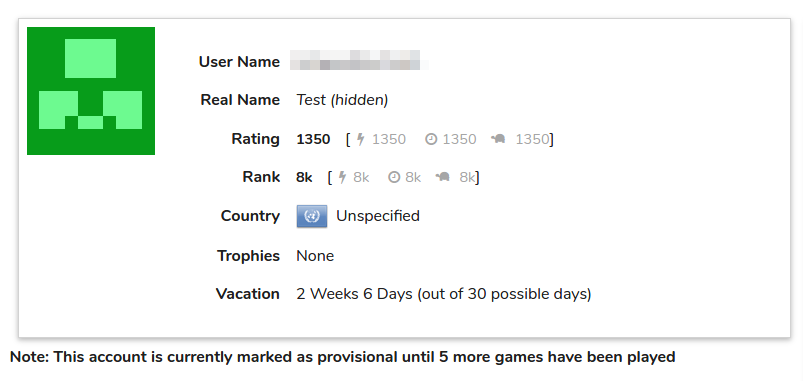
Is this the kind of thing you're looking for? Or are you literally looking for something like:
Vacation Days Left to Accrue: 5
This second variation seems a little awkward to me.
Also, how quickly do vacation days accrue? Is there a reference for that type of thing?
 beejunk
on 31 Jul 2017
beejunk
on 31 Jul 2017
Hello @beejunk :)
It's nice you want to contribute to OGS, I haven't thought of the means, only of the information I would like to see.
Answering your last question, you can check this page:
https://online-go.com/user/supporter
But, I don't know what form would be the most appropriate. I guess if you want to have fun, you could draw 2 gauges, one bar for the vacation days left to accrue and another one for the days left before acquiring a new day. If you do so, I believe you can't escape the display of some nice sentence to give a clear meaning of the representation. And once you know it, I think, it's easier and quicker to refer to those graphs.
Anyway, it's just if you want to have fun, the feature is not very essential I guess, not essential enough for sending time beautifying it.
Arnaud
arnaudgo
on 2 Aug 2017
Thanks for the feedback, @arnaudgo. I'm personally inclined to stick with text, although I'll try a variation or two with a graph and see if I can come up with something that is useful. I'd be curious if @anoek has any thoughts on the matter.
I see that the supporters page does indicate the rate at which vacation time is accrued, although I'd still need to figure out where the user is in that cycle in order to make a useful indicator (for example, if the user is on day 5 of the 8 day period). I'll look through the API docs and the code to see if that kind of data is readily available.
beejunk
on 8 Aug 2017
Since vacation time is no longer displayed on the supporter page (and thus, to my knowledge, is no longer displayed _anywhere_) I think I'll take a stab at implementing this in the near future.
 BHydden
on 16 Sep 2019
BHydden
on 16 Sep 2019
@BHydden sure, it's 30 days for non supporters, 60 days for supporters. Current vacation time information is on the settings page.
 anoek
on 16 Sep 2019
anoek
on 16 Sep 2019
Awesome, thanks for the tip!
I figure opponents might want to look this up for any player so it needs to be on the profile page. The only place that makes sense to me is on the right-hand side above ladders. Sound alright to you?
BHydden
on 16 Sep 2019
Sure I think that's a fine place
anoek
on 17 Sep 2019
Sweet I'll get onto it shortly :)
BHydden
on 17 Sep 2019
Hmmm, this only works on your own profile. Which is actually probably a fine thing, but then it should be moved to the settings page in the vacation box.
anoek
on 17 Sep 2019
What? No, I tested it... it displays the details for whoever's page you're looking at...
...at least it did on my end, does it not on yours???
BHydden
on 17 Sep 2019
I loaded 6 different profile pages and they all got 6 different values in that section that seem to match what I would expect... are you seeing your (identical) values on everyone's page?
Screenshots and matching player IDs for the 6 test cases mentioned above
Player 913 BHydden 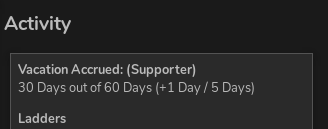 Player 968 testvac 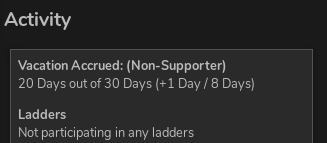 Player 1 anoek 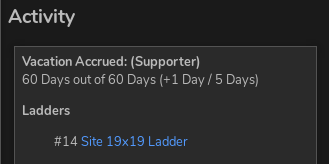 Player 794 flovo 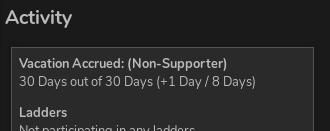 Player 950 BHtester 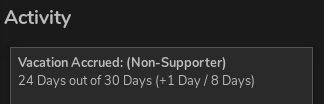 Player 168 Eugene 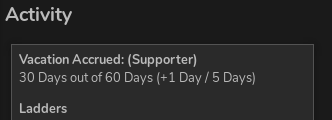
BHydden
on 17 Sep 2019
Works for me.
 GreenAsJade
on 19 Sep 2019
GreenAsJade
on 19 Sep 2019
Related issues
 alexmitrani
·
4Comments
GreenAsJade
·
3Comments
alexmitrani
·
4Comments
GreenAsJade
·
3Comments
 jmdingess
·
5Comments
jmdingess
·
5Comments
 popz73
·
4Comments
popz73
·
4Comments
popz73
·
4Comments
popz73
·
4Comments
Most helpful comment
Hello @beejunk :)
It's nice you want to contribute to OGS, I haven't thought of the means, only of the information I would like to see.
Answering your last question, you can check this page:
https://online-go.com/user/supporter
But, I don't know what form would be the most appropriate. I guess if you want to have fun, you could draw 2 gauges, one bar for the vacation days left to accrue and another one for the days left before acquiring a new day. If you do so, I believe you can't escape the display of some nice sentence to give a clear meaning of the representation. And once you know it, I think, it's easier and quicker to refer to those graphs.
Anyway, it's just if you want to have fun, the feature is not very essential I guess, not essential enough for sending time beautifying it.
Arnaud