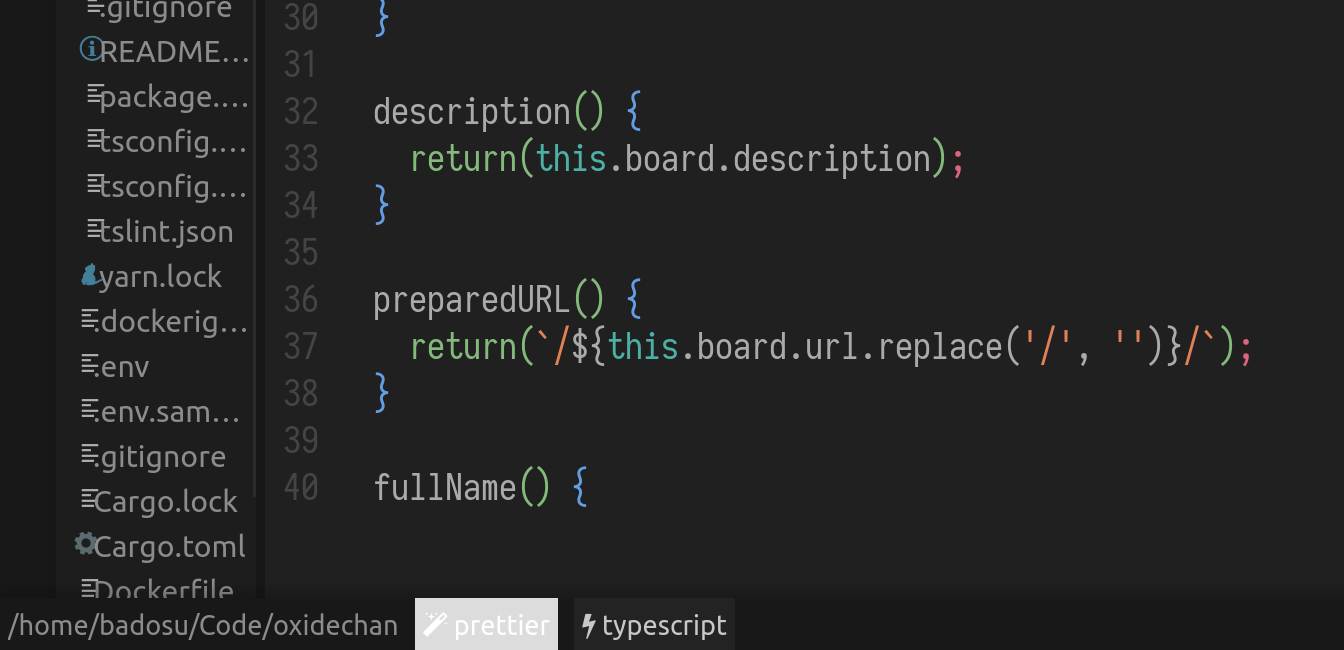
Oni: Prettier plugin statusline item highlighted weirdly
All 9 comments
I'm having the same but with a different theme (base16-nord).
 josemarluedke
on 1 May 2018
josemarluedke
on 1 May 2018
@badosu the prettier status item derives its color from the "highlight.mode.normal.background" which is set in the theme.json but if the theme being used isn't an oni theme then it uses a color that oni derives, not entirely sure how tbh (@bryphe?) but the color you get I believe is a result of that. it's a tricky issue to solve for none oni themes as the highlight color I believe should fallback to something that is somehow derived from the user's colorscheme.
 akinsho
on 4 May 2018
akinsho
on 4 May 2018
I think a good workaround would be to use the same derived theme colors that the language server status tab uses, at least that way it would be consistent.
 parkerault
on 4 May 2018
parkerault
on 4 May 2018
@parkerault @Akin909 I was taking a look at using Oni.colors.getColor("highlight.mode.normal.background") to set the background color but this does not seem like a good choice, it's a light blue similar to the mode indicator, see:

The color being used by statusbar items is hardcoded as rgb(35, 35, 35), at least for the language client ones, see here.
We have some options:
- Remove the hardcoded setting and define a new theme color or use some other that I could not find that is reused by all statusbar items
- Hardcode
rgb(35, 35, 35)for the prettier plugin to keep consistency - Use
"highlight.mode.normal.background"
 badosu
on 27 May 2018
badosu
on 27 May 2018
@badosu I think the first option is the best of the three as you point out the normal mode color is a bit distracting in multiple places as I believe it tends to be a brighter color.
I think if we defined a color for status items then future status items could use it, problem with that though is that all the color schemes will need to have a color chosen for them which would make that bit of work a bit frustrating as it'd involve picking colors for 5+ colorschemes.
Another alternative which isn't up there is, doing the same thing we have for the git plugin atm which is no color i.e. just removing the background color. Precedent wise vscode (not that we should feel obliged to copy them) don't seem to color their status bar items at all and tbh in this case its the most minimal solution and I don't think many people will notice a difference
akinsho
on 29 May 2018
Could this be closed?
 Bergiu
on 19 Oct 2018
Bergiu
on 19 Oct 2018
@Bergiu If this is fixed for you on master then yes.
badosu
on 19 Oct 2018
Its fixed for me on 0.3.7-beta3.
Bergiu
on 20 Oct 2018
Thanks for testing!
badosu
on 20 Oct 2018
Related issues
 Siilwyn
·
3Comments
Siilwyn
·
3Comments
 IvRRimum
·
3Comments
badosu
·
3Comments
akinsho
·
3Comments
IvRRimum
·
3Comments
badosu
·
3Comments
akinsho
·
3Comments
 magopian
·
3Comments
magopian
·
3Comments
Most helpful comment
I think a good workaround would be to use the same derived theme colors that the language server status tab uses, at least that way it would be consistent.