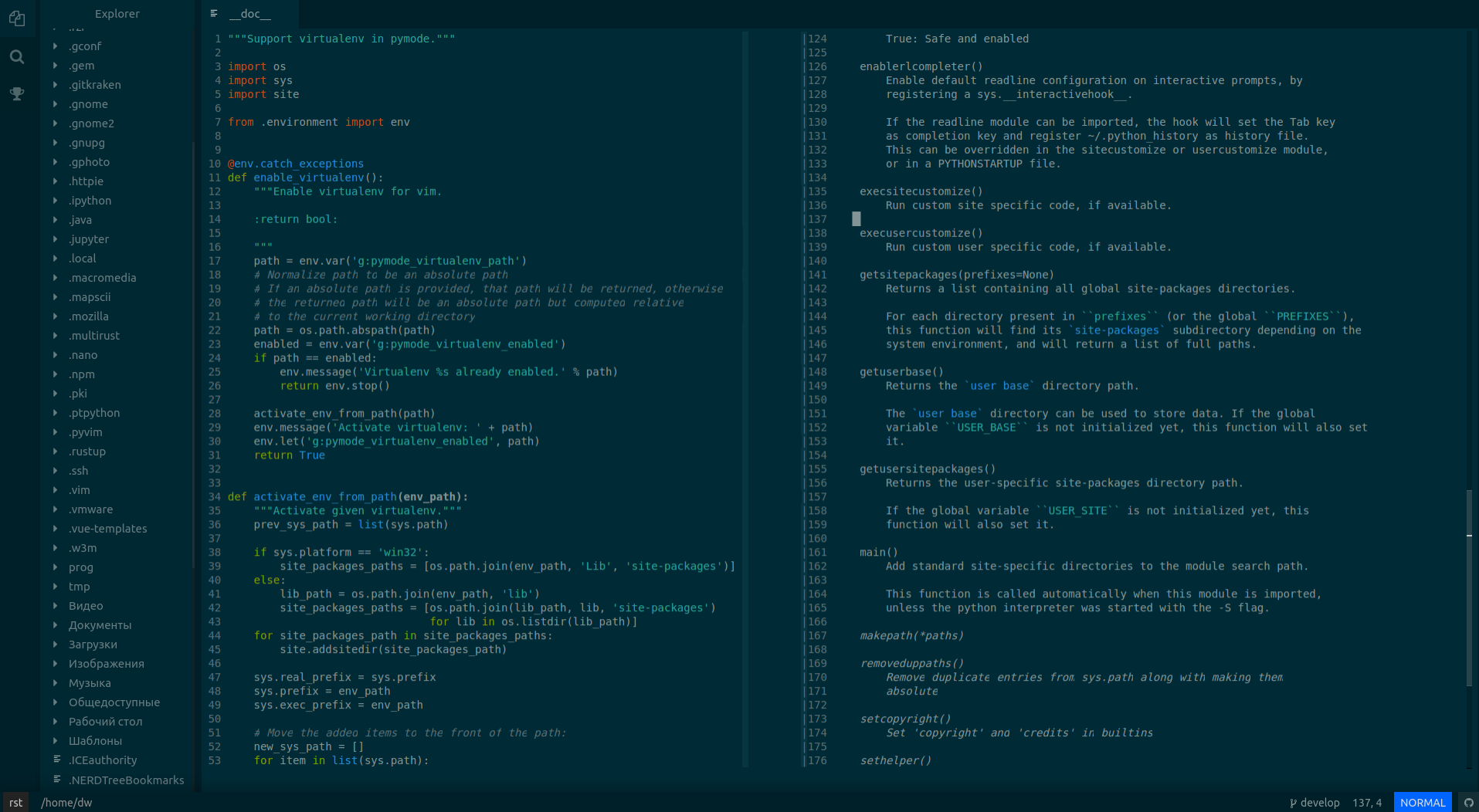
Faced such a problem.
I have no retina, my display is 1920x1080, the operating system is Linux Ubuntu 16.04.
The screen blurs in the center, but at the top and bottom is normal.
Thank you.
 dw9694
All 16 comments
Hello and welcome to the Oni repository! Thanks for opening your first issue here. To help us out, please make sure to include as much detail as possible - including screenshots and logs, if possible.
![oni-bot[bot] picture](https://avatars.githubusercontent.com/u/31161891?v=4&s=40) oni-bot[bot]
on 6 Apr 2018
oni-bot[bot]
on 6 Apr 2018
Hi.
I think I have the same problem.
I have a
- notebook with 1366x767 resolution.
- Archlinux
- SpectrWM
- Oni 0.3.1

My impression is that the left Eplorer part is ok, only the text window is mushy.
What log would you need ?
 MarcusE1W
on 6 Apr 2018
MarcusE1W
on 6 Apr 2018
I face a slightly different variation of the very problem, and frankly it makes me working in Oni not pleasurable, so to the point:
The text around the center appears crispier than anywhere else.
The situation changes as I scroll.
I can repro on various hardware, and operating systems, Ubuntu 16, Windows 10 Pro, and Centos 7.

 ArthurZ
on 11 Apr 2018
ArthurZ
on 11 Apr 2018
I think this is related to my issue of #1802. It seems the text around the cursor loses focus, for whatever reason... Not fully sure where to look into it, but I guess it could be redraws on selection of the window or moving the cursor there that causes it?
 CrossR
on 11 Apr 2018
CrossR
on 11 Apr 2018
What could possibly be causing this? Edit: Found some discussion here
 jordwalke
on 12 Apr 2018
jordwalke
on 12 Apr 2018
Hi @CrossR it is related to https://github.com/onivim/oni/issues/1252 and I was told that it is due to issues around the subpixel anti-aliasing @jordwalke
ArthurZ
on 12 Apr 2018
Yes, usually these issues are due to the canvas's behavior around subpixel anti-aliasing. Some good discussion here: https://stackoverflow.com/questions/40066166/canvas-text-rendering-blurry
It looks like in some of the screenshots that subpixel anti-aliasing is not active. You can see the difference up-close here - this is _normal_ anti-aliasing:

This is __subpixel_ anti-aliasing:

(Note the 'red' to the right of the h - that's different from the 'pure grayscale' above)
It's kind of bizarre, because intuitively adding those extra colors doesn't seem like it'd help white text... but actually it's essential to making the text clear. Great article here: Understanding Sub-Pixel Anti-Aliased Font Rendering
You can check if it's active by zooming in - if it's 'greyscale' blur (no other colors). At least some of the above screenshots did not have subpixel anti-aliasing active.
One thing to try is to force the font-rendering to use subpixel-antialiased. We have a ui.fontSmoothing configuration setting for this - but by default its set to auto, which means the browser chooses between antialiasing and subpixel antialiasing depending on the contrast. You can try setting this specifically to force subpixel antialiasing:
"ui.fontSmoothing": "subpixel-antialiased"
This configuration property simply sets the -webkit-font-smoothing CSS property, described here:
https://developer.mozilla.org/en-US/docs/Web/CSS/font-smooth
I'm lucky because on my machine, it's working - you can see by the extra color here:

So I recommend trying out that property in the meantime.
Another option for improving this is to align the text with pixel boundaries - this is fine for the vertical coordinates (we pad lines anyway, so using the Math.ceil of the font height is not noticeable). However, for the horizontal positioning it doesn't work well - if your font character width is not near a whole number, there will be very visible kerning issues. In fact, I thought that we already were aligning our rows to pixel positions, but it seems thats not the case - I'll put a PR out for that tomorrow. It doesn't solve the issue entirely, but it would improve some of the above cases.
This is why the text is blurry in _some_ spots, but not others - the clear areas are where the text is aligned with pixel boundaries, and the blurry areas are where it is a fractional offset from pixel boundaries.
Of course, I think the best long-term fix is #1252 - moving to the WebGL strategy will give us more control over this behavior and we'll be less at the mercy of the canvas implementation 😎 This and the 'cutoff' text described in #1252 (which is also an effect of anti-aliasing..) have been our biggest pain points with canvas today - looking forward to when these are gone! 👍
If anyone has other ideas too, let me know!
 bryphe
on 13 Apr 2018
bryphe
on 13 Apr 2018
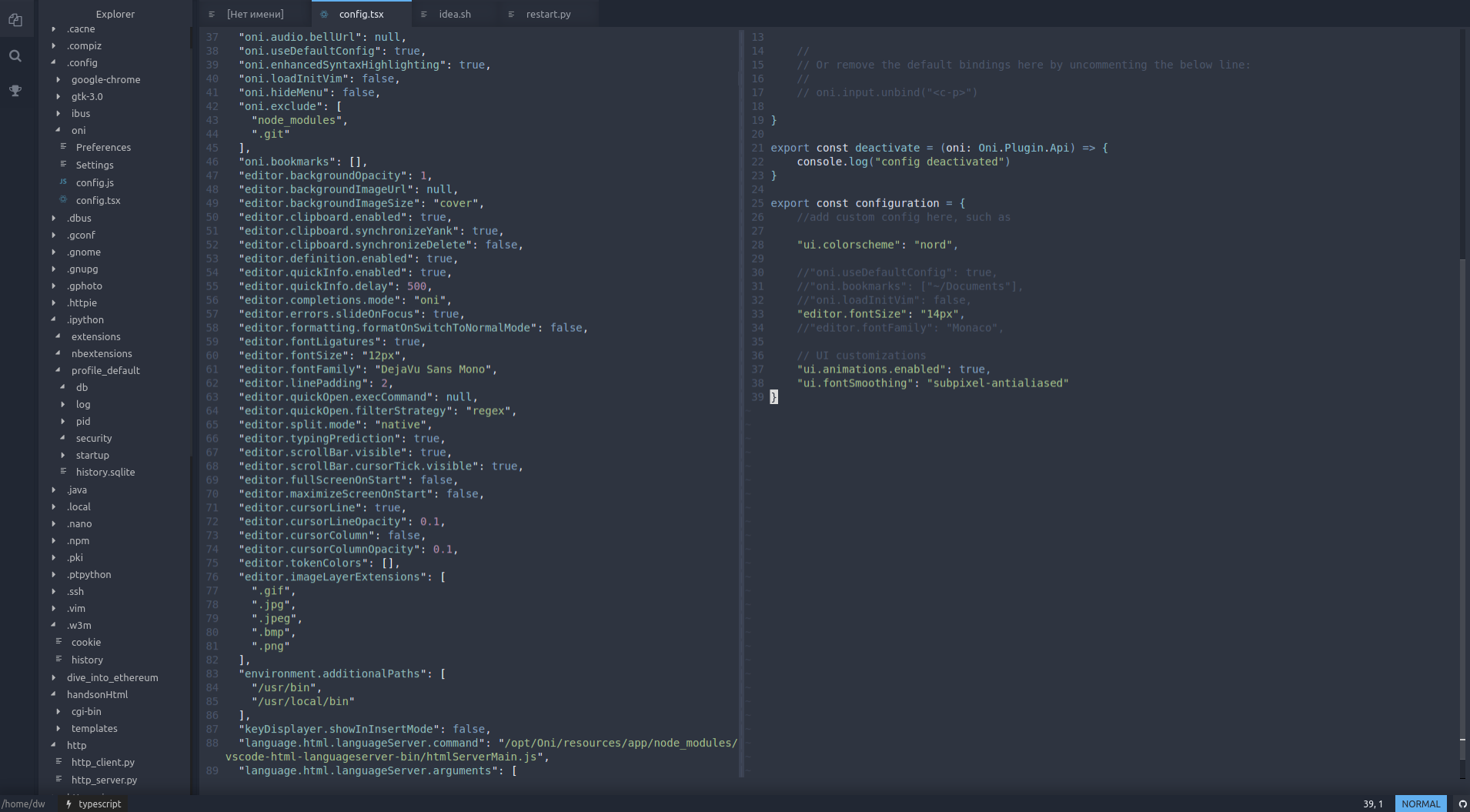
My impression is that "ui.fontSmoothing": "subpixel-antialiased" improves the font sharpness. Thanks.
MarcusE1W
on 15 Apr 2018
I do not see the difference
dw9694
on 16 Apr 2018
Thanks for the updates, @MarcusE1W and @dw9694 !
Kind of makes sense, as looking at the screenshots, @MarcusE1W 's screenshot definitely did not have subpixel anti-aliasing enabled. Unfortunately, @dw9694 , yours _does_ have subpixel anti-aliasing, so it's a different issue.
@jordwalke had some helpful pointers - looks like xterm.js had some similiar problems (and fixed them). This issue: https://github.com/xtermjs/xterm.js/issues/985 and this PR: https://github.com/xtermjs/xterm.js/issues/985 are especially relevant.
They ensured that their text are aligned with _pixel_ boundaries. This would be a good next-fix for us (#2090 ensures the text is aligned with the 'y' pixel position, but we still need to align with the 'x' pixel position - this is a bit more work because it impacts ligatures and the way we render tokens), if it turns out the WebGL strategy isn't feasible for some reason.
@dw9694 - have you tried the latest master build, with #2090 ? Would be worth seeing if that helps your case.
One other piece of diagnostic information that would be helpful is the result of running these commands in the console (Control+Shift+P -> Debug: Open Developer Tools), and then:
Oni.editors.activeEditor._neovimEditor._store.getState().fontPixelWidth
Oni.editors.activeEditor._neovimEditor._store.getState().fontPixelHeight
That can help us figure out if there is a fractional size (expecting that the width is some fractional value).
bryphe
on 17 Apr 2018
@dw9694 - have you tried the latest master build, with #2090 ?
Yes, I installed the latest version. No result.

dw9694
on 17 Apr 2018
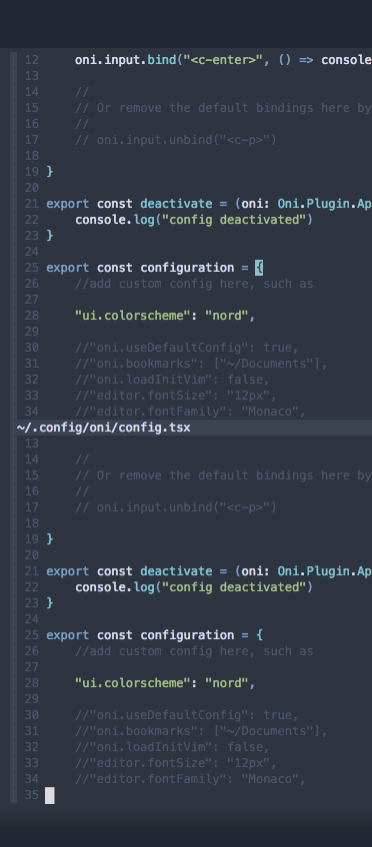
@bryphe - Same here on master / 2f80093. ui.fontSmoothing didn't make any difference. It also appears that the text at the top is sharp, but further down, gets blurry again. I think it gets sharper at the bottom. This is anchored to the whole Oni window, not one particular editor window.
 cormacrelf
on 17 Apr 2018
cormacrelf
on 17 Apr 2018
I agree that these issues are most probably caused by bad antialiasing. Due to the way modern displays arrange their subpixels, this is somewhat different between the x and the y direction.
For the vertial antialiasing that this issue is about, unfortunately subpixel antialiasing won't help us. That means we have to ensure that the characters don't need to be vertically antialiased too much in the first place.
@bryphe already added some logic to ensure that our lines always align to full pixel boundaries, which had the goal ensure that most fonts render without too much vertical antialiasing. I haven't personally investigated the current state, but maybe we might have to improve on this a bit more.
I investigated however what VSCode's regular Chrome-based HTML renderer does right here and found out that in fact it avoids vertical antialiasing completely by somehow only adding a full vertical pixel to the font height of my FiraCode setup when increasing the font-size from e.g. 13.3px to 13.4px. After that, it only makes the characters wider for each step of .1px until at 14.5px the next vertical pixel is added. So maybe setting the font to an integer height will not be enough for our canvas- and WebGL-based approach. We might need to investigate what Chrome does here internally to find a similar solution. But maybe also we just have to look at our line height calculation a bit closer because at the beginning of the buffer, everything seems to be working fine :)
For the x direction, the problem should in fact only be present if we do not have subpixel-antialiasing. By utilizing the subpixel layout of modern displays, that technique essentially increases the horizontal resolution by a theoretical factor of 3. That's why with subpixel-antialiasing enabled, the canvas-renderer normally creates nice results without having to align the characters to full pixel boundaries. In our WIP WebGL renderer, we will have to put a little more effort into the horizontal placement of letters to fully make use of the subpixel antialiasing, but it should be possible for us to create a result that is indistinguishable from the canvas renderer.
 manu-unter
on 18 Apr 2018
manu-unter
on 18 Apr 2018
Some more ideas I had:
We calculate the line height based on the measured pixel height of the character "H" in the given font by default. Since most of the issues seem to have happened on platforms different from Windows and Mac OS, I had a thoguht:
Maybe the default fonts for your platforms render that character to a non-integer height and thus create vertical antialiasing?
It would in any case be great to know the exact height that the non-canvas cursor element is rendered at, since it uses the same height. If you open the electron devtools and search for the first element in the DOM that has translateZ(0px) as an inline style, you should be able to find the cursor.
For me, it renders to 16px in height as can be seen here:
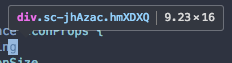
Can you please check if it is an integer value for you as well?
manu-unter
on 24 Apr 2018
I can't speak for everyone but I'm getting this somewhat on Windows 10, with Fira Code. (4K + 150% scaling so that won't help).
After chatting with Bryphe about it, he recommended calling Oni.editors.activeEditor._neovimEditor._store.getState().fontPixelHeight in the dev console, which for me across 2 devices gave 16.666666984558105.
There was also a bit of discussion about using the letter H since most of my issues (not related to fuzzy-ness but subpixel antialiasing crack though using your experimental branch seems to have fixed that) are with brackets and braces, which are seemingly taller.
CrossR
on 24 Apr 2018
@Cryza - good timing, we were just discussing it 😄 Yes, I was wondering if perhaps we should align our height measurement to pixel boundaries? I do think this is definitely a contributing factor to some of the cases where we see blurry lines of text.
We measure the text right now here:
https://github.com/onivim/oni/blob/479fd42a4912be847d69297f9ff81267804f160a/browser/src/Font.ts#L29
I believe a relatively safe change would be to change this line:
const height = rect.height
to:
const height = Math.ceil(rect.height)
In general, there is already padding between the lines by default, so it wouldn't be very noticeable - and it would help us in aligning the text to pixel boundaries. I believe this would be a relatively safe change. In addition, it seems that if editor.linePadding is not a multiple of 2, it could cause a subpixel offset due to this code:
https://github.com/onivim/oni/blob/3c13ad2038e59c8e6529c6e0ad5f26e4222a652f/browser/src/Renderer/CanvasRenderer.ts#L330
(In other words, if you set editor.linePadding to 1, we'd draw your text at 0.5 pixel offsets, which could be a contributing factor). We may want to restrict that to be an integer size as well - with those two changes, we'll always draw rows aligned to an integer pixel coordinate.
bryphe
on 25 Apr 2018
Related issues
bryphe
·
3Comments
 akinsho
·
3Comments
akinsho
·
3Comments
 Siilwyn
·
3Comments
Siilwyn
·
3Comments
 badosu
·
3Comments
bryphe
·
3Comments
badosu
·
3Comments
bryphe
·
3Comments
Most helpful comment
I agree that these issues are most probably caused by bad antialiasing. Due to the way modern displays arrange their subpixels, this is somewhat different between the x and the y direction.
For the vertial antialiasing that this issue is about, unfortunately subpixel antialiasing won't help us. That means we have to ensure that the characters don't need to be vertically antialiased too much in the first place.
@bryphe already added some logic to ensure that our lines always align to full pixel boundaries, which had the goal ensure that most fonts render without too much vertical antialiasing. I haven't personally investigated the current state, but maybe we might have to improve on this a bit more.
I investigated however what VSCode's regular Chrome-based HTML renderer does right here and found out that in fact it avoids vertical antialiasing completely by somehow only adding a full vertical pixel to the font height of my FiraCode setup when increasing the font-size from e.g.
13.3pxto13.4px. After that, it only makes the characters wider for each step of.1pxuntil at14.5pxthe next vertical pixel is added. So maybe setting the font to an integer height will not be enough for our canvas- and WebGL-based approach. We might need to investigate what Chrome does here internally to find a similar solution. But maybe also we just have to look at our line height calculation a bit closer because at the beginning of the buffer, everything seems to be working fine :)For the x direction, the problem should in fact only be present if we do not have subpixel-antialiasing. By utilizing the subpixel layout of modern displays, that technique essentially increases the horizontal resolution by a theoretical factor of 3. That's why with subpixel-antialiasing enabled, the canvas-renderer normally creates nice results without having to align the characters to full pixel boundaries. In our WIP WebGL renderer, we will have to put a little more effort into the horizontal placement of letters to fully make use of the subpixel antialiasing, but it should be possible for us to create a result that is indistinguishable from the canvas renderer.