The completion window (even on latest release) is still really flickery and jumpy.
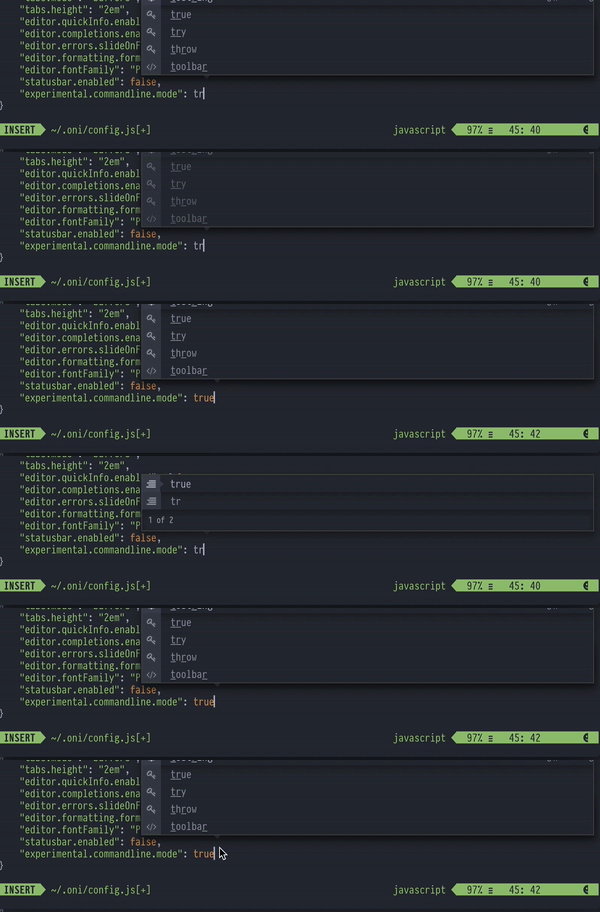
- I think that the physical geometry/layout should change at most once per keystroke. There are some obvious examples where that's not the case.
- Aside from the obvious double-overlapped/misaligned layers that are clearly visible, even when it seems it's not jumping around, a high speed replay reveals that the fade in/out is not very reliable while typing. Some times it will fade in/out twice per keystroke. In general I don't even think it should fade in/out in between key strokes. It's really hard to get the timing of that kind of interaction right, and I'd prefer a solid discrete update as opposed to a kind of unpredictable fading/animating one.
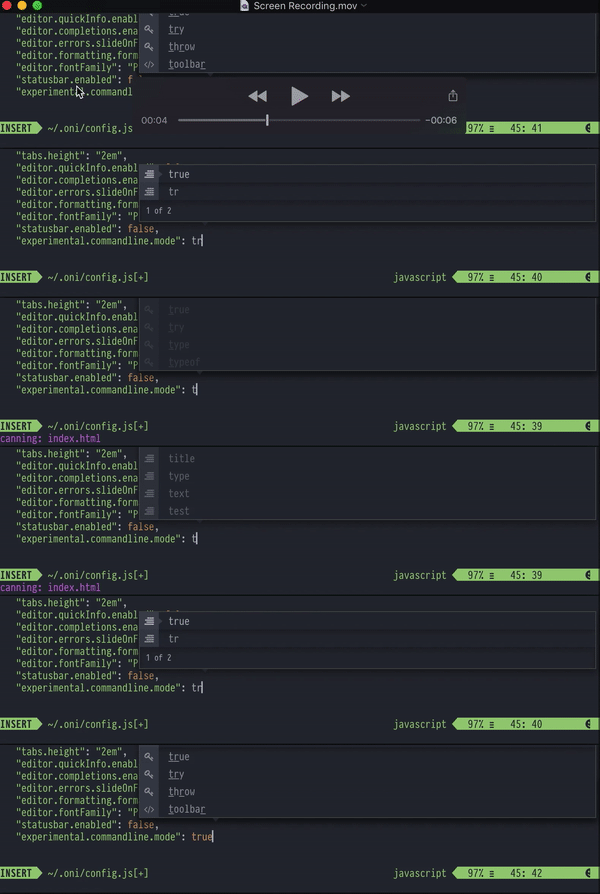
Here are some screenshots from the gif above zoomed in:
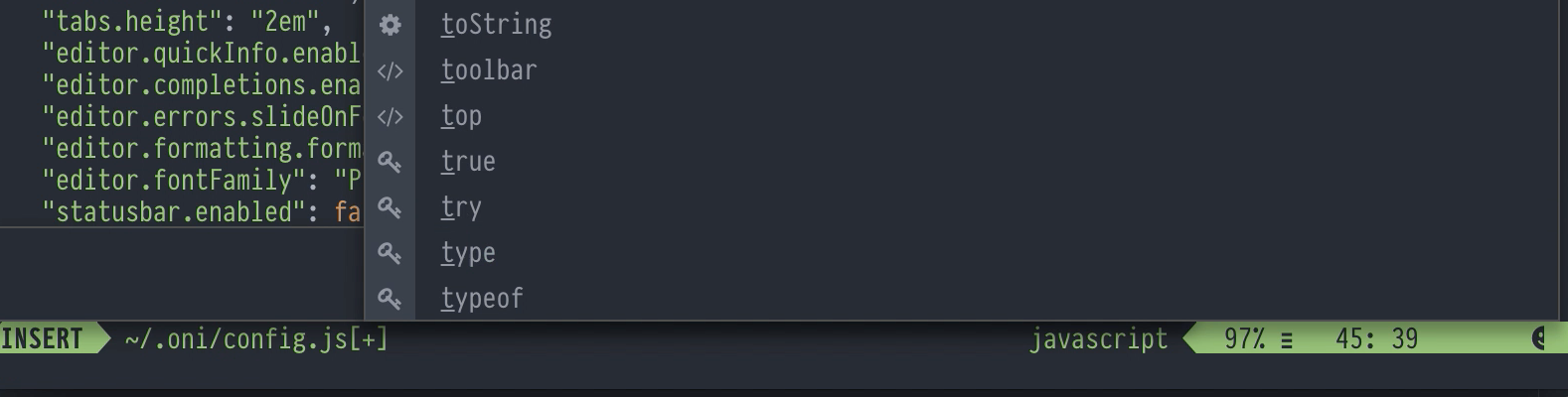
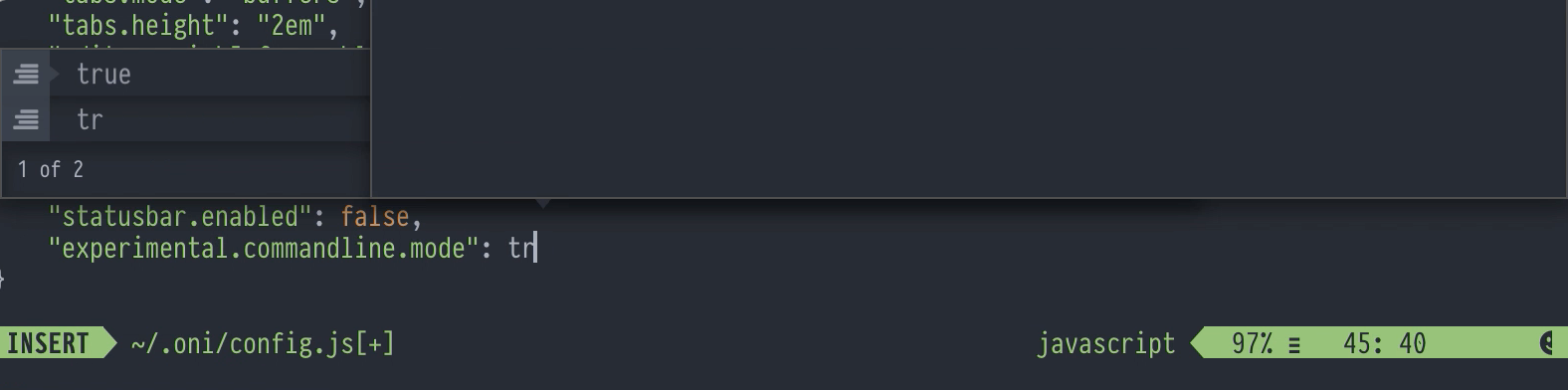
Also notice that while I'm typing, the little triangle moves unexpectedly:
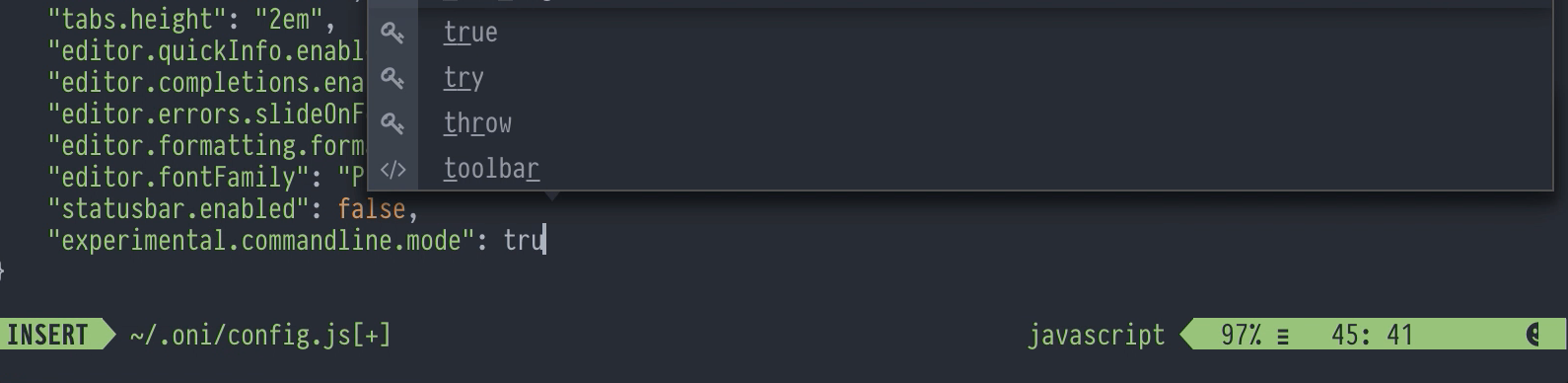
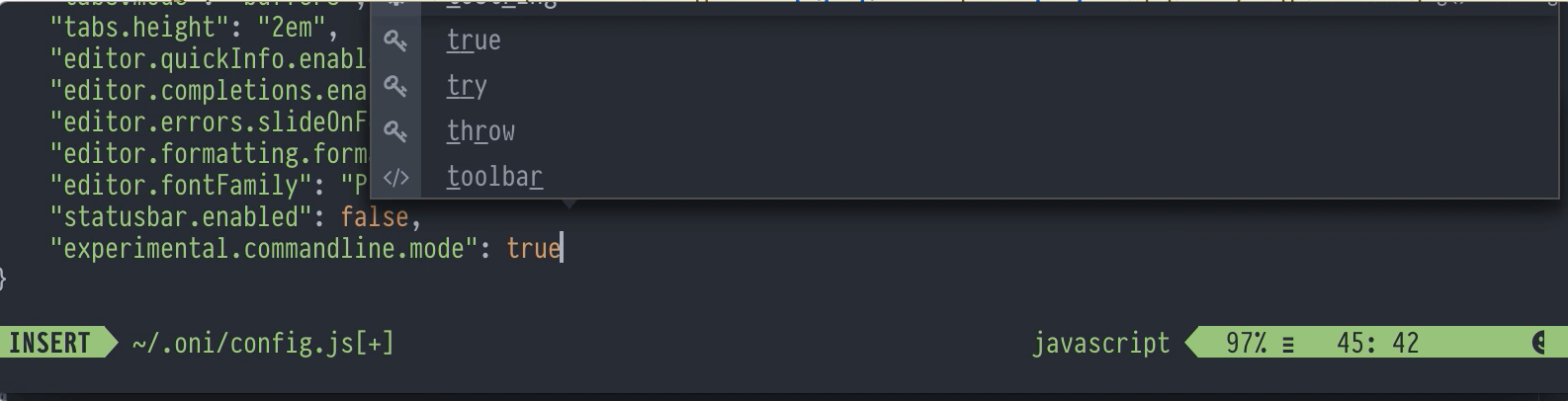
About the animations: I have a personal philosophy about animations: That a product earns animations once its discrete transitions work perfectly without animations. Just my two cents.
In summary: Here's my suggestions:
- The dialog being open for the entire time the user is completing - never disappearing in between key strokes, and never momentarily appearing empty.
- The autocomplete dialog should update once per keystroke.
- Then once that is really solid, animations should fade the dialog window in and out, but never in the middle of interaction - only at the "bookends".
 jordwalke
All 5 comments
Thanks for the detailed issue, @jordwalke ! That's definitely a poor experience. The gifs and high-speed replays are very helpful. Just curious - what tool do you use for recording the gifs?
I see a few issues here:
- The
editor.completions.enabledseems to not be respected. The double layers are a result of this - we're trying to use both theonicompletion strategy and vim's popup menu at the same time. I can see from the screenshot thateditor.completions.enabledis off, so this should not be happening. - Animations - in theory, the animation should _only_ be applied on entrance / exit (and not during keystrokes or while the menu is up). I believe this may be due to a bug with our
keyvalue for these context menus - we may be re-rendering these aggressively (and thus having animations applied at inappropriate times). Need to see if that's the case here.
I see also the case where the completion menu is being pulled to the left - I believe this is due to two potential causes:
- Errors in our resize logic for the context menu element
- Position being updated - Neovim actually pulls the cursor position down to the commandline temporarily when outputting an echo message.
Need to dig in a bit to to confirm that hypothesis though.
Thanks again for all the details, @jordwalke ! Appreciate it.
 bryphe
on 10 Jan 2018
bryphe
on 10 Jan 2018
The editor.completions.enabled seems to not be respected. The double layers are a result of this - we're trying to use both the oni completion strategy and vim's popup menu at the same time. I can see from the screenshot that editor.completions.enabled is off, so this should not be happening.
I think that will be because we made a change a release or so ago and updated it to editor.completions.mode, with oni, native, hidden being the options (for Oni/Native Vim/None). Though that doesn't fix this issue! Just thought it was worth mentioning since technically, you can fallback to the vim default experience until this is sorted.
 CrossR
on 10 Jan 2018
CrossR
on 10 Jan 2018
" The gifs and high-speed replays are very helpful. Just curious - what tool do you use for recording the gifs?"
Quicktime video player that comes with Mac. You can then do amazing things with gifs here: https://ezgif.com/video-to-gif
To get reliable high speed for the sake of seeing performance/frame drops, I'll use a high speed film setting on iPhone 6+/7, (go into settings and enable 240FPS). You can't use your host computer to record your screen reliably for the sake of analyzing performance because the measurement itself disrupts the performance greatly.
However, for things that aren't perf related (like this issue), you can still use the host computer's Quicktime to record the screencast. Then to get slow motion gifs, you can replay it back in Quicktime frame by frame by hitting the arrow keys, while recording that interaction.
jordwalke
on 11 Jan 2018
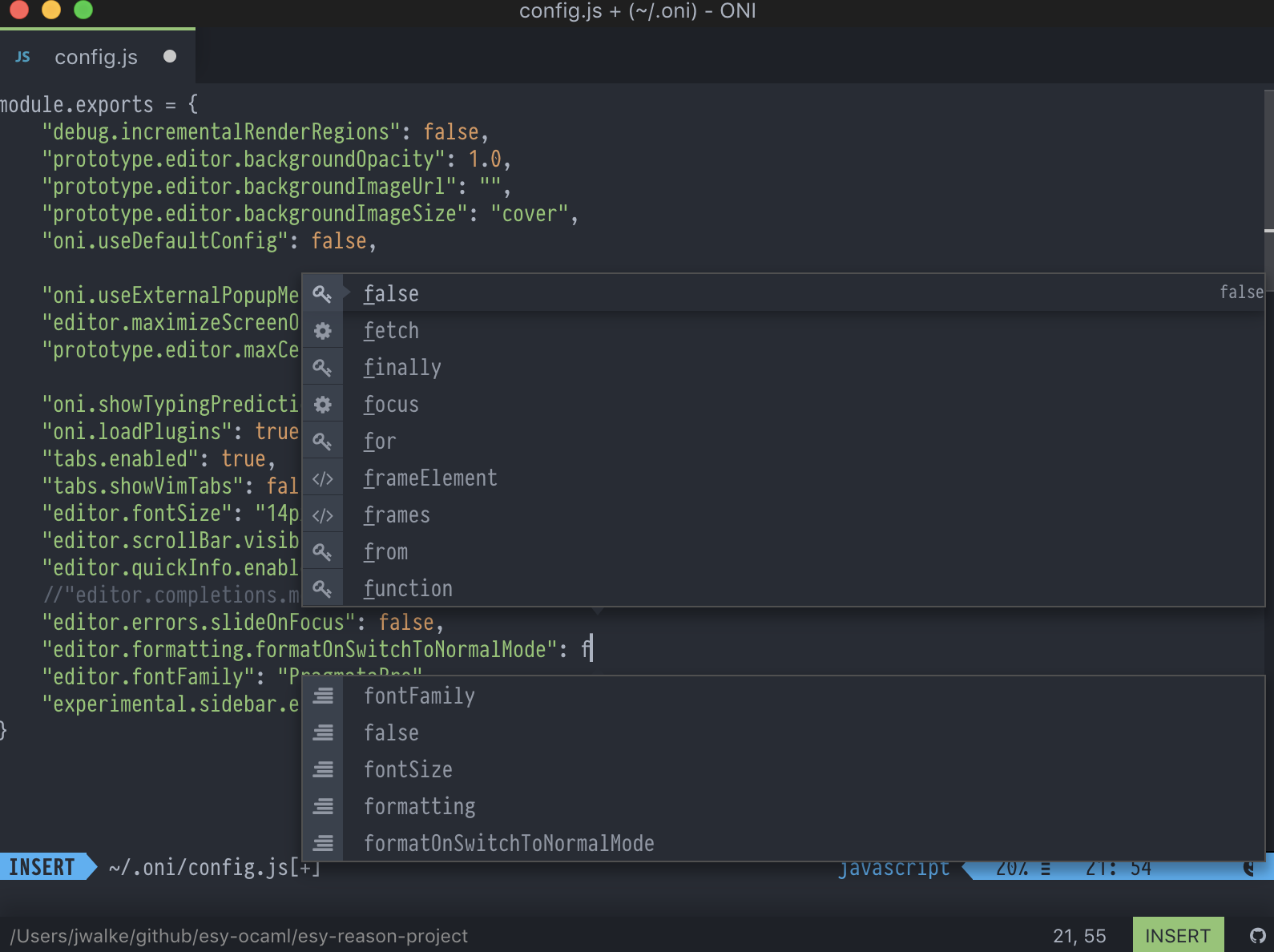
I also think this doesn't have anything to do with my completionsEnabled setting. I removed it and still got some weird flickerings and double renderings. (Yes, I restarted oni after removing any of my completion settings).
jordwalke
on 11 Jan 2018
Cool tips regarding the iOS recordings & QuickTIme! Coming from Windows, I never found QuickTime useful... but recording is pretty nice in it on Mac. Need to use that m ore.
I also think this doesn't have anything to do with my completionsEnabled setting.
Yes, the editor.completions.enabled setting is a no-op right now - it was replaced by editor.completions.mode. Would be worth trying out 'editor.completions.mode': 'hidden' as @CrossR mentioned - this disables the oni completion strategy (which is the top completion window, in the above screenshot), and uses the externalized popup exclusively (which is the bottom completion window). You can always 'eject' too with the editor.completions.mode set to native, which skips externalization altogether and falls back to the default Vim strategy. But worth trying hidden to see if it addresses the issue. At the very least, it will address the double-rendering.
Setting the editor.completions.mode setting to hidden (as opposed to using editor.completions.enabled), along with the fix in #1268 for flickering should go a long way in improving the experience here.
bryphe
on 11 Jan 2018
Related issues
 Canop
·
3Comments
Canop
·
3Comments
 LucianBuzzo
·
3Comments
LucianBuzzo
·
3Comments
 timeyyy
·
3Comments
timeyyy
·
3Comments
 grz8
·
3Comments
grz8
·
3Comments
 magopian
·
3Comments
magopian
·
3Comments
Most helpful comment
I think that will be because we made a change a release or so ago and updated it to
editor.completions.mode, withoni,native,hiddenbeing the options (for Oni/Native Vim/None). Though that doesn't fix this issue! Just thought it was worth mentioning since technically, you can fallback to the vim default experience until this is sorted.