{num}
 meijieru
All 15 comments
I can confirm that lately I have not been able to use <C-^> as well, using the latest stable version
 badosu
on 28 Dec 2017
badosu
on 28 Dec 2017
Thanks for the report, @meijieru and @badosu! This seems to be related to the keyboard layout - I'm wondering if it is being picked up as a dead key.
Would it be possible to grab the logs from the console when you execute that keystroke?
Control+Shift+P->Open DevTools- Enter
Oni.log.enableDebugLogging() - Switch back to Oni and execute the key press. You should see some [key event] logs in the console, like this:
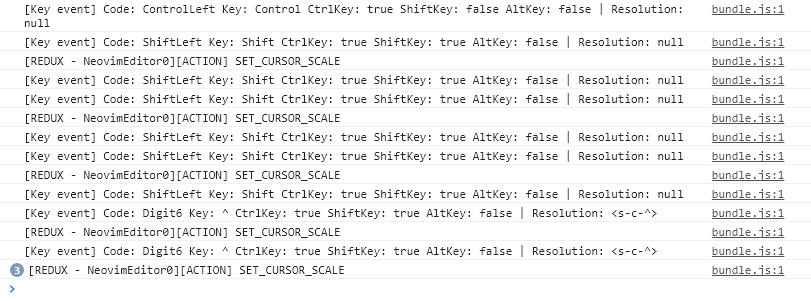
This can help narrow down how the key press is being resolved / what's going wrong.
In addition, knowing what the keyboard-layout module sees as the current language, would be helpful, too:

You can check that by running the require("keyboard-layout").getCurrentKeyboardLanguage()
Thanks the report & your help!
 bryphe
on 3 Jan 2018
bryphe
on 3 Jan 2018
@bryphe Sorry, I am not familiar with node js, so where should I enter this command Oni.log.enableDebugLogging()? I try it within console, but it says this is undefined.
meijieru
on 5 Jan 2018
Anything new?
meijieru
on 19 Mar 2018
What version of Oni are you currently using?
I'm able to use <Ctrl+^> on the latest build, so its possible its working now.
If that doesn't work, the place you'd enter Oni.log.enableDebugLogging() and require("keyboard-layout").getCurrentKeyboardLanguage() is in the Chrome dev tools. You access that with <Ctrl+Shift+P> and typing Dev tools.
 CrossR
on 19 Mar 2018
CrossR
on 19 Mar 2018
@CrossR I am using the latest stable (0.3.1) and this issue persists. This is the output on a normal Oni installation:
< require("keyboard-layout").getCurrentKeyboardLanguage()
> "us [0]"
Hm, mine works on US and UK keyboards, but I've only tested on Windows.
What is the output of the verbose log?
I get the following for 3<Ctrl+^>.
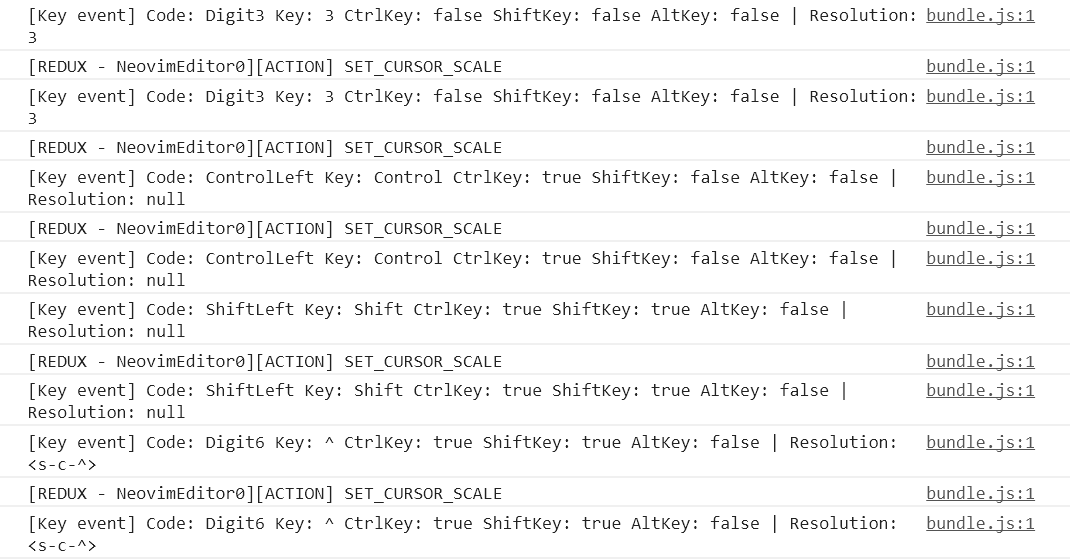
CrossR
on 19 Mar 2018
Ok, it seems that <Ctrl-^> is working, but the help text makes it seem like <Ctrl-6> should work as well (that's how I used it previously).
I am fine using <Ctrl-^> if that's not a bug.
                            *CTRL-^* *CTRL-6*
CTRL-^          Edit the alternate file.  Mostly the alternate file is
            the previously edited file.  This is a quick way to
            toggle between two files.  It is equivalent to ":e #",
            except that it also works when there is no file name.

            If the 'autowrite' or 'autowriteall' option is on and
            the buffer was changed, write it.
            Mostly the ^ character is positioned on the 6 key,
            pressing CTRL and 6 then gets you what we call CTRL-^.
            But on some non-US keyboards CTRL-^ is produced in
            another way.
This is my <Ctrl-6> output:

badosu
on 19 Mar 2018
I'm a bit of a buffers newbie, but the behaviour for me (again Windows only currently, I should probably test on my Arch box) is the same behaviour as in nvim-qt and nvim in the terminal.
For other platforms though, we could have a keyboard capture issue, but it looks as if <Ctrl-6> is being picked up correctly.
CrossR
on 20 Mar 2018
@CrossR Makes sense, I've been using Oni for a while so maybe my memory on my previous workflow is not as good (which works with <C-^> now).
The pending issue now is for @meijieru to check if it's working for him and to provide his debug details.
badosu
on 20 Mar 2018
@badosu
So is it possible to enable < c - 6 > as well?
meijieru
on 22 Mar 2018
@meijieru It is working for me at the moment without any configuration, can you confirm if you still can't use it in Oni on the last stable release (0.3.1)?
badosu
on 22 Mar 2018
@badosu Github conceal the
meijieru
on 23 Mar 2018
Looks like this might have been "sorted" over in #2002.
We could use this ticket to track adding a default keybind, if we think its needed.
Though we could just end up adding a keybind that causes people issues, so we'd have to be careful to make sure its easily disabled....May just make more sense to add documentation around it instead?
CrossR
on 31 Mar 2018
@CrossR Yes, per https://github.com/onivim/oni/issues/2002#issuecomment-377691048 it seems it's safe to assume <C-^> is the canonical keybinding.
badosu
on 21 May 2018
Related issues
badosu
·
3Comments
 LucianBuzzo
·
3Comments
bryphe
·
3Comments
LucianBuzzo
·
3Comments
bryphe
·
3Comments
 zxiest
·
3Comments
zxiest
·
3Comments
 Siilwyn
·
3Comments
Siilwyn
·
3Comments