closing tabs does not seem to work.
Tested OS: Windows 10 x64
 mzummo
All 8 comments
I also notice that hitting <C-w>q closes the whole application instead of a single tab.
 badosu
on 24 Aug 2017
badosu
on 24 Aug 2017
Can you verify that :tabs show both tabs or is it the buffer tab line?
 cyansprite
on 24 Aug 2017
cyansprite
on 24 Aug 2017
@mzummo , did you download the binary or clone from source?
@cyansprite made a great fix (#626) that improved the dirty-tracking of buffers. Unfortunately that isn't in the 0.2.8 release (it will definitely be in 0.2.9 though!). Sometimes, without that fix, we don't show the 'modified' icon in the buffer - but it actually is modified to vim, and vim won't let you close / move away from it. This can cause some problems like you describe. If you're up for building from srouce, that might be worth a shot to see if #626 fixes it!
If it is still an issue, running :tabs and :ls as @cyansprite suggested would be helpful, to see what the buffer/tab state is
 bryphe
on 24 Aug 2017
bryphe
on 24 Aug 2017
The closing tab behaviour I reported was an unrelated issue that is fixed using the unreleased (as of today) 0.2.1 vesion of neovim.
badosu
on 14 Sep 2017
I downloaded the (second) latest release from today and closing a tab with :q does not work. It leaves the tab open, although it's not in the :tabs list. Just the GUI is stale.
 jordwalke
on 15 Sep 2017
jordwalke
on 15 Sep 2017
Thanks @jordwalke ! I'm able to reproduce this now as well, by just opening Oni, and typing ":new", and then ":quit", I'm stuck with an extra '[No Name]' tab as described. Both :tabs and :ls report a single entry.
Sounds like as you mentioned, we're missing a case. With the default settings, we're showing the set of _buffers_ in the tab line, and it'd be expected we'd hit this code to update the buffer state :new and :quit case:
https://github.com/extr0py/oni/blob/7b36b144cdfe7d8ecb54c999d1424674354fa656/browser/src/Editor/NeovimEditor.tsx#L334
Next step would be to see if this is getting hit in that case, an if the value of ids is correct.
bryphe
on 15 Sep 2017
@bryphe Is this still an issue? I cannot seem to reproduce it with the current version, both tabs and buffers are correctly listed with :ls and :tabs and I can close them as expected.
I tried both config settings tabs.mode: "tabs" and tabs.mode: "buffers" and did not notice any functional bugs.
However I am only testing on linux and not on windows as @mzummo.
I did however see printing bugs as the messages produced by :ls and :tabs bleed into each other when running after one another while switching tabs/buffers.
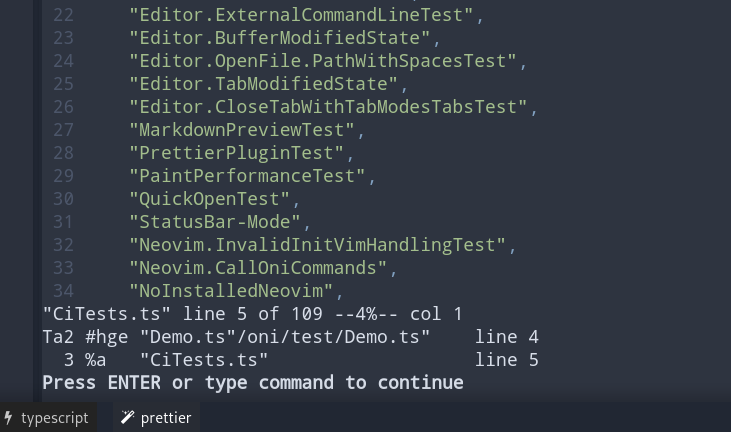
But that should probably go in a seperate issue.
 texhnolyze
on 10 May 2018
texhnolyze
on 10 May 2018
@texhnolyze I agree, a lot of work has been done with tab management and identification and for a so important bug no issues have appeared for the last 6 months.
Unless someone can reproduce this issue, let's close it.
badosu
on 21 May 2018
Related issues
 TalAmuyal
·
3Comments
TalAmuyal
·
3Comments
 dlee
·
3Comments
dlee
·
3Comments
 timeyyy
·
3Comments
timeyyy
·
3Comments
 nwaywood
·
3Comments
nwaywood
·
3Comments
 tcoopman
·
3Comments
tcoopman
·
3Comments
Most helpful comment
I also notice that hitting
<C-w>qcloses the whole application instead of a single tab.