When building from Source is it possible to get the proper Oni icon?
 esparkman
All 8 comments
What OS are you building from? I had this problem awhile back but it went away.
 keforbes
on 7 Jun 2017
keforbes
on 7 Jun 2017
macOS Sierra. I'd love to get the Binary package so that I can call it from command line. That is crucial for me in my current workflow.
esparkman
on 8 Jun 2017
Cool, you can actually build the Oni.app package from the command line.
You'd do the following:
npm run installnpm run build
and then:
npm run pack
to build the binary package. Once that's done, you'll have the dmg and zip in the dist folder - but you can also just run the app directly by calling open dist/mac/Oni.app from the root directory. You could also install Oni using the dmg, or copy to your /Applications folder - any of those should get you the proper icon.
Hope that helps!
 bryphe
on 8 Jun 2017
bryphe
on 8 Jun 2017
Excellent information. Do you have a suggestion executing from the command line by calling just oni? I tried symlinking but that gave me some unwanted results.
esparkman
on 8 Jun 2017
Awesome! @keforbes had some useful information in this issue: #346
We'd like to make adding to to the command line easier/more automated in the future 😄
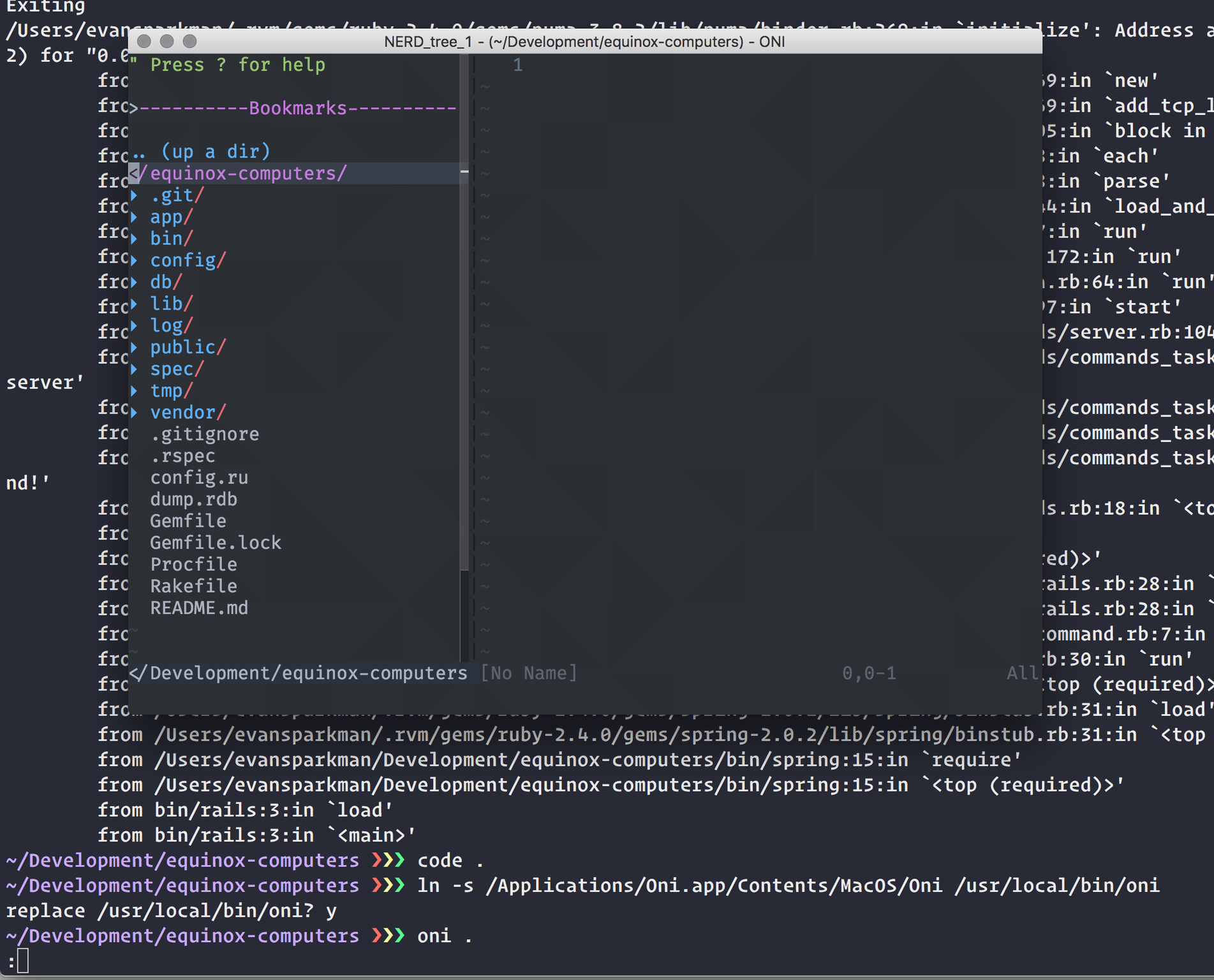
It looks like you could potentially symlink Oni.app/Contents/MacOS/Oni to /usr/local/bin/oni - does that work for you? This is basically the step we'd like to automate with #346
bryphe
on 8 Jun 2017
The issue I have when symlinking in that manner is Oni pipes all commands into the terminal. As in the screenshot below.
esparkman
on 8 Jun 2017
Ah, I see. I was looking at how Atom handles this, and they have a special atom.sh file that they symlink: https://github.com/atom/atom/blob/master/atom.sh
I think this might be a bit more reliable - we'd add an oni.sh that launches oni and exits the terminal process, and then symlink to that. Then, when we automate the symlink in #346, we'd symlink to oni.sh instead of the actual binary.
bryphe
on 8 Jun 2017
Since we've got an oni.sh file, and a symlink action added in the Ctrl+Shift+P menu, I'll close this issue out, but if the issue is still around feel free to re-open or make a new issue!
I'm also not sure if it was around at the time of this comment, but there is a npm run copy-icons which fixes this on Windows when building from source to ensure an icon is available in the installer and such, if anyone else stumbles across this.
 CrossR
on 11 Feb 2018
CrossR
on 11 Feb 2018
Related issues
 akinsho
·
3Comments
akinsho
·
3Comments
 IvRRimum
·
3Comments
IvRRimum
·
3Comments
 dlee
·
3Comments
dlee
·
3Comments
 Siilwyn
·
3Comments
Siilwyn
·
3Comments
 zxiest
·
3Comments
zxiest
·
3Comments