Onesignal-ios-sdk: How to not clear the badge count when the app is opened ?
The question is in the title. I'm trying to find a way to not clear the badge value when the app is opened. I would like to be able to manually clear it once the user goes to the notifications screen in my app. How can I do that ?
Thanks,
Axel
 fraxool
All 14 comments
You can use this line of code to manually clean the app icon badge:
[UIApplication sharedApplication].applicationIconBadgeNumber = 0
 psy2k
on 18 Feb 2016
psy2k
on 18 Feb 2016
Thanks but that's not what I am looking for. For now, the badge is always set to 0 when the app icon is tapped. I need this badge to stay with the notifications count until I decide to manually reset it to 0 in my code.
fraxool
on 19 Feb 2016
The unread count of notifications must be kept server side. And the server should uses the badge count key in the notification payload to send the app the number that should be displayed in the badge. There is no easy way to do this client-side. Server side is the way to go.
psy2k
on 19 Feb 2016
I think I'm about to get it working! I have created a function in the file "OneSignal.m" to update the notification count on the server side but I have a EXC_BAD_ACCESS :
- (void)updateNotificationBadgeCount:(OneSignalResultSuccessBlock)successBlock onFailure:(OneSignalFailureBlock)failureBlock {
    NSMutableURLRequest* request;
    request = [self.httpClient requestWithMethod:@"GET" path:[NSString stringWithFormat:@"players/%@", mUserId]];

    [self enqueueRequest:request onSuccess:^(NSDictionary* results) {

        if ([results objectForKey:@"badge_count"] != nil) {

            NSLog(@"GET BADGE COUNTS");

            NSInteger badgeCount = [[results objectForKey:@"badge_count"] integerValue]+1;

            NSMutableURLRequest* requestPut = [self.httpClient requestWithMethod:@"PUT" path:[NSString stringWithFormat:@"players/%@", mUserId]];

            NSDictionary* dataDic = [NSDictionary dictionaryWithObjectsAndKeys:
                                     self.app_id, @"app_id",
                                     badgeCount, @"badge_count",
                                     nil];

            NSData* postData = [NSJSONSerialization dataWithJSONObject:dataDic options:0 error:nil];
            [requestPut setHTTPBody:postData];

            [self enqueueRequest:requestPut onSuccess:nil onFailure:nil];

        }
    } onFailure:failureBlock];
}
So in this function, I retrieve the notification badge count from the current user, and then, I just increment it... But when I execute it, I get this EXC_BAD_ACCESS error.
- This is my first steps in Objective-C, so some things may be wrong. I'm more used to the Swift language.
Can someone help ?
fraxool
on 19 Feb 2016
You can simplify the code by updating the player's badge count on the OneSignal server by just reading the device's current applicationIconBadgeNumber value. No need to retrieve it from the OneSignal server first.
If you're still getting the EXC_BAD_ACCESS check the device logs for a stack trace with line numbers to pinpoint the issue.
 jkasten2
on 19 Feb 2016
jkasten2
on 19 Feb 2016
Is it possible to manage the badgeCount by ourselves? I like to clear the count on a specific place inside my app, and not automatically after opening the app.
 williamrijksen
on 2 Mar 2016
williamrijksen
on 2 Mar 2016
Added a OneSignal_disable_badge_clearing plist option to disable this the setting should only need to be set at build time. See the 1.13.0 release notes for the full details.
https://github.com/one-signal/OneSignal-iOS-SDK/releases/tag/1.13.0
Feel free to reopen this thread if there are future issues with it.
jkasten2
on 2 Apr 2016
I added OneSignal_disable_badge_clearing set to YES, but still reset the badge when I open the app through notifications. The pod version is 2.4.3. any thoughts?
 Arash-sad
on 27 Mar 2017
Arash-sad
on 27 Mar 2017
I have also added OneSignal_disable_badge_clearing and set it to yes in my .plist, but it's still getting reset. I have version 2.5.2 installed.
 AndyIbanez
on 4 May 2017
AndyIbanez
on 4 May 2017
@Arash-sad @AndyIbanez Can you ensure this is set to a Boolean type? Attach your .plist source snipit or a screenshot of the editor to confirm.
jkasten2
on 4 May 2017
My apologies, turns out I set the key to the wrong plist.
AndyIbanez
on 4 May 2017
I'm currently having the same issue described above, my badgeCount gets reset every time I open my app.
Here's a screenshot of my .plist:
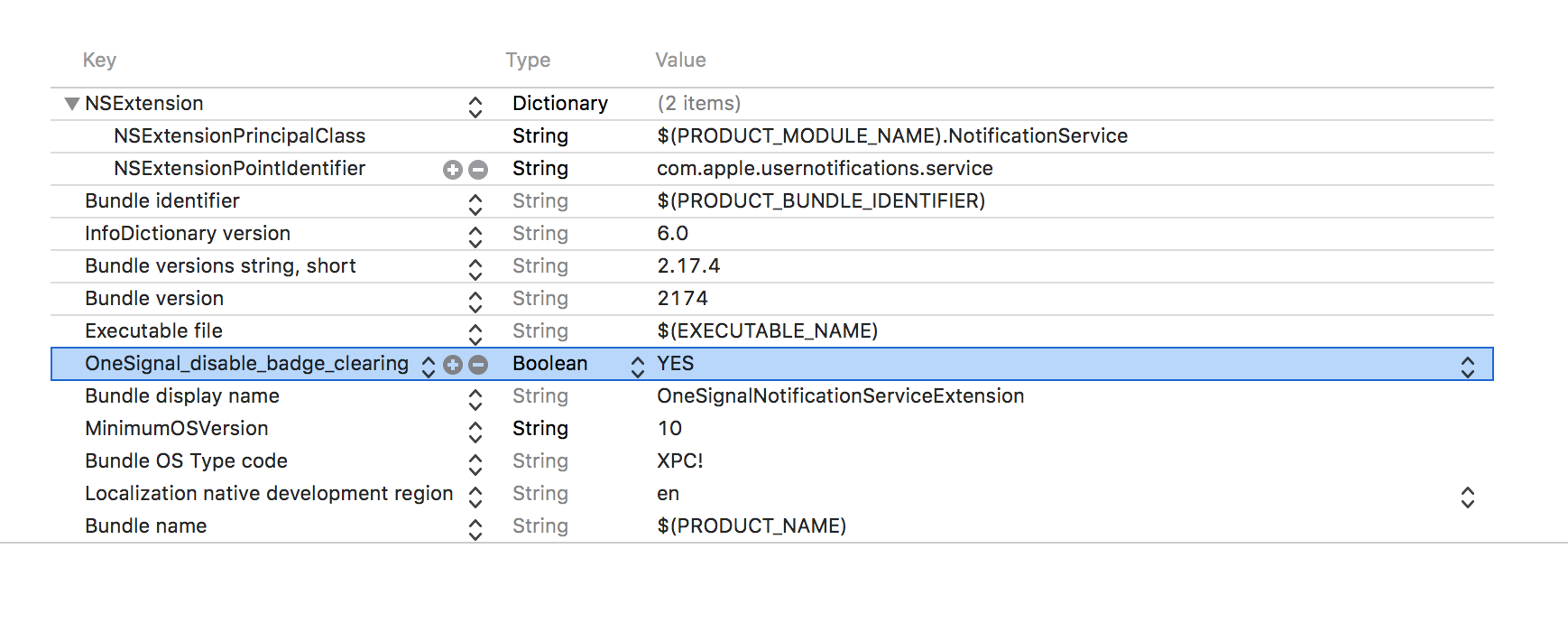
I'm currently using the newest version of one signal (cocoapod version 2.8.2).
To verify that one signal causes this behaviour, I also removed one signal temporary from my project (removed the cocoa pod entry and performed pod install) and the badgeCount doesn't got reset.
Any help is appreciated 😄
 2h4u
on 16 May 2018
2h4u
on 16 May 2018
@2h4u The OneSignal_disable_badge_clearing .plist key must go in your main app target. In your screenshot I see you added it to the NotificationServiceExtension instead.
jkasten2
on 17 May 2018
@jkasten2 Okay thats really weird, I tried it first at the .plist of the app itself but than I got some strange "Unknown error during the installation of the app"-error from xcode. Now everything works as expected. Sorry for wasting your time 😅 and thanks for your help
2h4u
on 18 May 2018
Related issues
 luai-kalkatawi
·
4Comments
luai-kalkatawi
·
4Comments
 halilyuce
·
3Comments
halilyuce
·
3Comments
 dirkoswanepoel
·
5Comments
dirkoswanepoel
·
5Comments
 brunodelgado
·
3Comments
brunodelgado
·
3Comments
 pvcary
·
5Comments
pvcary
·
5Comments
Most helpful comment
Added a
OneSignal_disable_badge_clearingplist option to disable this the setting should only need to be set at build time. See the 1.13.0 release notes for the full details.https://github.com/one-signal/OneSignal-iOS-SDK/releases/tag/1.13.0
Feel free to reopen this thread if there are future issues with it.