Onedrive-api-docs: CompactToken parsing failed with error code: 80049217
Hi guys
Currently, I try to use you graph API. I'm not using you ADD authentication library (I try to implement it by using oAuth 2). Here is my issue :
- I request my authorization code and received it well
- I request my token with a post on
https://login.microsoftonline.com/common/oauth2/v2.0/token. Huuuum. Got an error:
```
Failed to load https://login.microsoftonline.com/common/oauth2/v2.0/token: No 'Access-Control-Allow-Origin' header is present on the requested resource. Origin 'http://localhost:8080' is therefore not allowed access. If an opaque response serves your needs, set the request's mode to 'no-cors' to fetch the resource with CORS disabled
Fun fact, the request trigger an error but I still received my token.
3. I send a request to `https://graph.microsoft.com/v1.0/me/drive` and adding my token to the headers :
headers: {
'Authorization': 'Bearer
}
Weeeeeelll. The response sends me a 401 Unauthorized and a message :
{
"error": {
"code": "InvalidAuthenticationToken",
"message": "CompactToken parsing failed with error code: 80049217",
"innerError": {
"request-id": "5f98f27a-50ba-4ace-963b-60905bf4207c",
"date": "2018-01-29T16:59:44"
}
}
}
Hum. I check the authorization in the header request :
Authorization:Bearer
```
Weeeeeell. Actually. I'm lost. Can you help me?
Thanks,
SLedunois
 SLedunois
All 59 comments
Did you manage to solve this? I'm getting the same thing.
 grebulon
on 19 Feb 2018
grebulon
on 19 Feb 2018
Hello @grebulon
No. I still got the issue
SLedunois
on 21 Feb 2018
Can one of you provide an example token? To be safe, please wait an hour after generating it before providing it here.
 ificator
on 23 Feb 2018
ificator
on 23 Feb 2018
I got this error code when sending the <token> part of the above as bytes rather than a utf-8 decoded string, so maybe check that?
 lilfolr
on 8 Mar 2018
lilfolr
on 8 Mar 2018
I'm seeing the same error (albeit not in context of the OneDrive API, but rather the subscription API). The token I'm getting is 1,282 bytes and appears to be constrained to the basic ASCII character set -- alphanumeric plus a couple dashes and underscores. Does that sound like a proper / well-formed token?
 MrJoy
on 6 Jun 2018
MrJoy
on 6 Jun 2018
(To clarify: I'm using the /adminconsent endpoint to get the token, and am seeing the same error as the original poster, including the error code 80049217.)
MrJoy
on 6 Jun 2018
Hi,
any update on this issue
Im getting "CompactToken parsing failed with error code: 80049217"
 rdorrani
on 5 Jul 2018
rdorrani
on 5 Jul 2018
Any Update on this i am facing the same issue
 austinwebdeveloper
on 6 Jul 2018
austinwebdeveloper
on 6 Jul 2018
Maybe it sounds stupid but double check:
When requesting the token you get an JSON object in response.
This object contains properties like expires_in, token_type and access_token.
When adding the Authorization: Bearer
 eezorp
on 24 Jul 2018
eezorp
on 24 Jul 2018
How do we workaround this?
 SuperJMN
on 27 Jul 2018
SuperJMN
on 27 Jul 2018
I experienced this error when keeping the token in a small variable. Make sure to use the complete token (mine finished with '...').
 Klervix
on 27 Jul 2018
Klervix
on 27 Jul 2018
I'm getting the same error:
I'm using this url: https://login.microsoftonline.com/Tenant/oauth2/token?api-version=1.0
 capaul
on 30 Aug 2018
capaul
on 30 Aug 2018
Same error ..
 jozeflambrecht
on 11 Sep 2018
jozeflambrecht
on 11 Sep 2018
Try setting "resource" param when requesting the access token for the API.
You can find it "subtle" in the documentation (only within the example code):
https://developer.microsoft.com/en-us/graph/docs/concepts/rest
````
POST https://login.microsoftonline.com/common/oauth2/v2.0/token
Content-Type: application/x-www-form-urlencoded
{
grant_type=authorization_code
&code=AwABAAAA...cZZ6IgAA
&redirect_uri=http%3A%2F%2Flocalhost%2Fmyapp%2F
&resource=https%3A%2F%2Fgraph.microsoft.com%2F
&scope=mail.read
&client_id=
&client_secret=
}
````
-> &resource=https%3A%2F%2Fgraph.microsoft.com%2F
 phroggar
on 11 Sep 2018
phroggar
on 11 Sep 2018
@phroggar even this is not working for me.. getting the error below:
error: 'invalid_request',
error_description: 'AADSTS90100: The \'resource\' request parameter is not supported.\r\n
error_codes: [ 90100 ],
timestamp: '2018-10-17 12:49:21Z',}
@SLedunois did you manage to figure this out? If not, can you please reopen the issue?
 suparnavg
on 17 Oct 2018
suparnavg
on 17 Oct 2018
@suparnavg Are you trying to connect with Office OneDrive business?
jozeflambrecht
on 18 Oct 2018
I'm facing the same issue, like this response:
{
    "error": {
        "code": "InvalidAuthenticationToken",
        "message": "CompactToken parsing failed with error code: 80049217",
        "innerError": {
            "request-id": "8d1bff80-e66a-4827-bf0b-40cf4dfbf8dc",
            "date": "2018-10-18T10:37:59"
        }
    }
}
Can this issue be reopened please? Otherwise I'll open another one (not the smartest choice, but...).
 paolostefan
on 18 Oct 2018
paolostefan
on 18 Oct 2018
@jozeflambrecht it is a paid Office 365 account (I assume that is Onedrive business but can never be sure about the all the terminology!). This issue should be reopened..
suparnavg
on 18 Oct 2018
@suparnavg I'm reopening the issue.
SLedunois
on 18 Oct 2018
Thumbs up on this one. My issue might be related, but does not involve OneDrive specifically.
The past 24 hours I've been facing the same issue using the MS Graph API for a chatbot project (Bot Framework 4 _Authentication Bot_ in NodeJS sample).
{"statusCode":401,"code":"InvalidAuthenticationToken","message":"CompactToken parsing failed with error code: 80049217","requestId":"e2628396-8c54-40bb-867c-d5a7640f296a","date":"2018-10-19T08:45:54.000Z","body":{"code":"InvalidAuthenticationToken","message":"CompactToken parsing failed with error code: 80049217","innerError":{"request-id":"e2628396-8c54-40bb-867c-d5a7640f296a","date":"2018-10-19T10:45:54"}}}
I'll be following along...
 nrishoj
on 19 Oct 2018
nrishoj
on 19 Oct 2018
I solved my issue by:
- following the instructions here: https://developer.microsoft.com/en-us/graph/docs/concepts/auth_v2_user#1-register-your-app - this included re-creating my app
- adding the "resource" parameter to the token request as suggested by this comment: https://github.com/OneDrive/onedrive-api-docs/issues/785#issuecomment-420274451
- clearing cookies
paolostefan
on 19 Oct 2018
@paolostefan this did not work for me unfortunately 😞 I get an "invalid_request" error when trying to call with the "resource" parameter.
The link you shared in point 1 says in the "Azure AD endpoint considerations" section that the resource parameter is to be set in calls made to the Azure AD endpoint. Whereas all the other steps in the article, including registration are for the Azure AD v2.0 API (which does not need the resource parameter, according to the article). Therefore, following the steps enlisted there, the resource parameter should indeed not be required in API calls..
Really confused about what's up!
suparnavg
on 20 Oct 2018
@suparnavg Can you please post the exact response? Below I'll clarify my scenario as much as I can, pardon me for the loooong answer.
My scenario is as follows: I want to authenticate users with Azure AD and read the profile of the authenticated user (only that user).
First of all, I authenticate users using the Azure AD oauth2 endpoint.
I'm using the openid strategy, and I'm asking for _both_ the id_token and the authorization code at once, by visiting the following URL:
_Note_: all the UPPERCASE words must be replaced with actual values.
This URL pops up the Microsoft login prompt and, upon success, it redirects to the
- code: authorization code, see below
- id_token: identity token in JWT format
- state: the same value I passed in the previous step,
- session_state: a value of no particular interest
At this point, if the id_token passes JWT validation, the user is authenticated-so if all you need is the id_token, you're done.
But, I want to access the MS Graph API too, and to do so I need an _access token_ which I can obtain by POSTing the following parameters to the token URL ( https://login.microsoftonline.com/MY_TENANT_ID/oauth2/token )
- client_id: the value used in MY_AZURE_APP_ID
- scope: 'user.read mail.read', literally, or any other scope you need
- code: the authorization code I received in the previous step
- grant_type: 'authorization_code', literally
- client_secret: an app secret created for MY_AZURE_APP_ID in the Azure portal;
- redirect_uri: the value used above in MY_APP_REDIRECT_URI, or any other redirect URI I configured in the Azure portal;
- resource: 'https://graph.microsoft.com/', literally (this is what I meant in my previous coment)
The reply should be a JSON object containing the keys:
- "token_type": "Bearer"
- "scope": "User.Read"
- "expires_in": "3599"
- "ext_expires_in": "0"
- "expires_on": "..."
- "not_before": "..."
- "resource": "https://graph.microsoft.com/"
- "access_token": "eyJ0..." this is what should be used in the next request.
- "refresh_token": "AQABAAAAAA..."
- "id_token": "eyJ0..."
Now I can access the Graph API, to get more information about the logged in user, by taking the returned access_token and making the following HTTP request:
- URL: https://graph.microsoft.com/v1.0/me
- Method: GET
- Header: "Authorization: Bearer VALUE_OF_ACCESS_TOKEN"
paolostefan
on 22 Oct 2018
@paolostefan Are you building the app for users in your organization? If you use your own TENANT_ID the user has to already be in the Azure directory, correct?
Since I am building the app for users not in my organization I used _common_ instead of a TENANT_ID. So the URL would look something like this,
And when I do that it does not accept _resource_ parameter.
 sshresthareach
on 24 Oct 2018
sshresthareach
on 24 Oct 2018
OK I feel really stupid right now. But my issue was the same as @Klervix . I had my token in database and it was getting truncated because JWT is a lot longer than your usual access token that you get from other services like Google or Facebook.
I kept on thinking why is everyone talking about JWT when I have a very short token in database.
sshresthareach
on 24 Oct 2018
@paolostefan thanks for the detailed answer
I am following the exact same steps as you, and my API calls are working fine (Calendar, Contacts, etc. all good) - except for OneDrive calls. I have included the Files.ReadWrite.All scope while registering the app, so invalid scopes should not be causing the problem.
While making the OneDrive API call, I use my existing refresh token to generate a new access token, then send a GET to this uri: "'https://graph.microsoft.com/v1.0/me/drive/root/children'" - which returns the error
  "error": {
    "code": "InvalidAuthenticationToken",
    "message": "CompactToken parsing failed with error code: 80049217",
    "innerError": {
      "request-id": "e4470a84-2674-4ee5-8ab4-d9b68786eb27",
      "date": "2018-10-25T04:10:11"
    }
  }
I also get the same error, and we are using Graph API to connect to Office 365 for Business accounts.
Our OneDrive Graph API has been working for a long time without any issues, so I don't know why this happens now.
Please advice.
 thomasthejn
on 28 Oct 2018
thomasthejn
on 28 Oct 2018
@ificator - there seem to be multiple issues here related to parsing the access token. Could you help resolve this? Is holding up deployment on a couple of features for me (and similar stories for others in this thread I imagine). Thank you in advance!
suparnavg
on 28 Oct 2018
I just noticed that at least one of the drives that causes this issue just changed to Multi Factor Authentication. Can that be cause this error?
thomasthejn
on 28 Oct 2018
I am facing same issue
{
"error": {
"code": "InvalidAuthenticationToken",
"message": "CompactToken parsing failed with error code: 80049217",
"innerError": {
"request-id": "3786bbd7-5672-42b0-8257-e5e1e8b5fa8b",
"date": "2018-11-04T00:04:46"
}
}
}
Any solution, please ?
 ashu16815
on 4 Nov 2018
ashu16815
on 4 Nov 2018
I have seen this error occur sporadically within the last few days without being able to consistently reproduce it.
I am using a personal OneDrive account for running tests, and when I repeat the same test with exactly the same stored refresh token and the exact same client id, the problem disappears again.
As far as I recall, I have only seen the problem occur when accessing the Files.ReadWrite.AppFolder scope. Another test accessing Files.ReadWrite.All for the same account, I have not seen fail.
 Dbquity
on 14 Nov 2018
Dbquity
on 14 Nov 2018
{
"error": {
"code": "InvalidAuthenticationToken",
"message": "CompactToken parsing failed with error code: 80049217",
"innerError": {
"request-id": "f42e2f5e-0fd4-4a58-8d9e-2852084b900e",
"date": "2018-11-16T23:33:18"
}
}
}
 Jcalan8907
on 17 Nov 2018
Jcalan8907
on 17 Nov 2018
Hello guys, I was banging my head against the wall with the same issue, but managed to solve it (at least for me!). The issue was with the Authorization header, if the header looks like this:
"Bearer: {token}", I got the error, but if I changed the header to "Bearer {token}" (removed the ':'), it works.
 miolfo
on 28 Nov 2018
miolfo
on 28 Nov 2018
@miolfo already using Bearer {token} (without the :).. and this does work for other API calls (such as fetching events on a calendar)... would be fantastic if someone from the onedrive team could help resolve this once and for all..
suparnavg
on 28 Nov 2018
Guys, I was able to fix this problem by changing Azure AD permissions.
 math-jam
on 4 Dec 2018
math-jam
on 4 Dec 2018
I had the same issue. I'm working with python 2.7 and for me when I received first time token I stored in database using json.dums(access_token), but when I was trying to use that raw token from database it gave me an error 80049217. I have solved it by giving proper data for request as e.g. json.loads(access_token), in this case the token didn't got shrunken or etc, works as a charm.
 simkusr
on 17 Jan 2019
simkusr
on 17 Jan 2019
Double check the ID and secret you are using are correct as invalid ones will cause this error.
 danielwhatmuff
on 5 Feb 2019
danielwhatmuff
on 5 Feb 2019
Im getting this error when i tried to access using graph client
var rootItem = await graphServiceClient.Drive.Root.Request().GetAsync();
Server Error in '/' Application.
Code: InvalidAuthenticationToken
Message: CompactToken parsing failed with error code: 8004920A
Inner error
Description: An unhandled exception occurred during the execution of the current web request. Please review the stack trace for more information about the error and where it originated in the code.
Exception Details: Microsoft.Graph.ServiceException: Code: InvalidAuthenticationToken
Message: CompactToken parsing failed with error code: 8004920A
 Wajeehkhan123
on 28 Feb 2019
Wajeehkhan123
on 28 Feb 2019
You cannot interchange tokens.
If you get a token using Azure 2.0, (your get token endpoint contains v2.0) then your get, post, patch, delete, etc methods have to be of the same type. You can't mix and match. I fixed my issue by changing my endpoint uri. Please refer to this for more information on how to change your uri endpoint:
https://docs.microsoft.com/en-us/previous-versions/office/office-365-api/api/version-2.0/calendar-rest-operations#create-events
 zkass
on 18 Mar 2019
zkass
on 18 Mar 2019
I am facing this error while using Graph APIs. And the worse part is the APIs work just fine most of the times, but intermittently return this error.
Has anyone really found a solution for random/intermittent error returned by Graph APIs?
 urjitgokhale
on 21 Mar 2019
urjitgokhale
on 21 Mar 2019
Hi, can you help me more or guide me so that i could do it because i didnt
know how to change my endpoint uri
On Mon, Mar 18, 2019 at 11:08 PM zkass notifications@github.com wrote:
You cannot interchange tokens.
If you get a token using Azure 2.0, (your get token endpoint contains
v2.0) then your get, post, patch, delete, etc methods have to be of the
same type. You can't mix and match. I fixed my issue by changing my
endpoint uri. Please refer to this for more information on how to change
your uri endpoint:—
You are receiving this because you commented.
Reply to this email directly, view it on GitHub
https://github.com/OneDrive/onedrive-api-docs/issues/785#issuecomment-474036930,
or mute the thread
https://github.com/notifications/unsubscribe-auth/AqvJdWLx0bdy50u-DRQpBGNF9xNSCLcjks5vX9YrgaJpZM4RxCE0
.
Wajeehkhan123
on 2 Apr 2019
Hi, Urjit i am also facing this error using Graph Api and i have not find a
solution yet ..
Please let me know or guide me if you have done it
On Thu, Mar 21, 2019 at 7:02 PM urjitgokhale notifications@github.com
wrote:
I am facing this error while using Graph APIs. And the worse part is the
APIs work just fine most of the times, but intermittently return this error.Has anyone really found a solution for random/intermittent error returned
by Graph APIs?—
You are receiving this because you commented.
Reply to this email directly, view it on GitHub
https://github.com/OneDrive/onedrive-api-docs/issues/785#issuecomment-475240413,
or mute the thread
https://github.com/notifications/unsubscribe-auth/AqvJdd_OzE-Gl82tY5_J2a1Un2JFKeTDks5vY5DmgaJpZM4RxCE0
.
Wajeehkhan123
on 2 Apr 2019
Unfortunately no. For now we retry the operation after some delay. But we really need a fix from MS, Or a formal documentation that tells how the application should react on receiving this error.
urjitgokhale
on 4 Apr 2019
Hi there!
I've been working with access tokens for couple of weeks now. I'm kinda new to this but I've found this link that helped me solve the issue with error "message": "CompactToken parsing failed with error code: 80049217"
https://contentanalytics.digital.accenture.com/pages/viewpage.action?pageId=685015085
The problem was in syntax when calling the service..it requires "space" between "Bearer" and the token you're using. You can do it like "Bearer " + token or as its shown on the link.
Might be late but I hope this helps!
 informatiq97
on 7 May 2019
informatiq97
on 7 May 2019
Hi,
I also had the same problem, in my case I tried to authenticate against microsoft graph api from prowershell using oauth2 and in the headers it indicated this:
$response = Invoke-RestMethod -Method Post -Uri $tokenUrl -Headers @{"Content-Type" = "application/x-www-form-urlencoded"} -Body $body
So it indicated to the destination that the URL was encoded (it had to decode it to read it), but this was not true,
I was not coding anything and the client secret had special characters that disappeared when they were decoded. I tried to manually code the client secret through this page and it worked!
Another option is to generate secrets until it does not contain special characters
 Velaa98
on 15 May 2019
Velaa98
on 15 May 2019
If anyone is still seeing this here was my issue. In my Graph service I originally had this:
export default class GraphService {
  constructor() {
    this.graphUrl = 'https://graph.microsoft.com/v1.0'
  }

  getUserInfo(token) {
    const headers = new Headers({
      Authorization: `Bearer ${token}`
    })
    const options = {
      headers
    }
    return fetch(`${this.graphUrl}/me`, options)
      .then(response => response.json())
      .catch(response => {
        throw new Error(response.text())
      })
  }
}
I changed this line:
Authorization:Bearer ${token}
to:
`Authorization: `Bearer ${token.accessToken}
Because the token object has other items in it besides the token itself.
 kbraiden
on 8 Aug 2019
kbraiden
on 8 Aug 2019
@informatiq97 thanks sir, its work
 aacassandra
on 15 Aug 2019
aacassandra
on 15 Aug 2019
Obviously this error is occurring when the token is malformed.
In my case it was malformed, because i was using postman. In the authentication tab just enter the token not the string "Bearer " in front of it.
 techtimo
on 15 Oct 2019
techtimo
on 15 Oct 2019
I have got the same error.
I passed it by adding user.read to both requests get authorization code and get the token.
For example: scope = "user.read file.readwrite offline_access"
 TruongDuyIT
on 21 Oct 2019
TruongDuyIT
on 21 Oct 2019
Like _TruongDuyIT_ hinted, the request (acquireToken() / get https://graph.microsoft.com/v1.0/me/drive...) must include the scope(s) (permissions) for the token to be accepted. For example, if I wanted the drive files (as in the request above), I must send the scope (https://graph.microsoft.com/)Files.Read (or related). But if a request is made without the permission(s), _that error_ will be returned.
 matt-matt1
on 12 Dec 2019
matt-matt1
on 12 Dec 2019
Like _TruongDuyIT_ hinted, the request (acquireToken() / get https://graph.microsoft.com/v1.0/me/drive...) must include the scopes (permissions) for the token to be accepted. For example, if I wanted the drive files (as in the request above), I must send the scope (https://graph.microsoft.com/)Files.Read (or related). But if a request is made without the appropriate permission(s), _that error_ will be returned.
matt-matt1
on 12 Dec 2019
To add on to @matt-matt1 and @TruongDuyIT,
I was facing the same error but I've managed to fix it by requesting the correct scope permissions when getting the Authorization Code.
For my case, I was using (erroneously) onedrive.appfolder as written in section 2 of this documentation: Using an App Folder to store user content without access to all files. As a result, I got "CompactToken parsing failed with error code: 80049217".
However, I found out in this docs page: Permissions that the permissions I needed was: Files.ReadWrite.AppFolder.
Does anyone knows the difference between these 2 sets of authentication and authorization endpoints?
- For _OneDrive Personal_: OneDrive authentication and sign-in
- For _Microsoft Graph_: Authorization and sign-in for OneDrive in Microsoft Graph. This link is also missing
Files.ReadWrite.AppFolderin the Authentication Scopes section too (which led me to use the other scope).
Although both links have the same "published dates", it seems that the 2nd link is the more updated way of requesting an access token. However, I was able to pass in onedrive.appfolder scope to the auth endpoints in the 2nd auth link, Microsoft Graph (i.e. https://login.microsoftonline.com/common/oauth2/v2.0/authorize?client_id={client_id}&scope={scope}&response_type=token&redirect_uri={redirect_uri}) and retrieved an access token too but I would get the abovementioned error when I tried to access Graph API. Was this intended?
 1thz
on 30 Dec 2019
1thz
on 30 Dec 2019
@1terahertz
Does anyone knows the difference between these 2 sets of authentication and authorization endpoints?
OneDrive authentication and sign-in: That's endpoint is authorizing an application to use a Microsoft account for personal OneDrive. I tried to use it with my Onedrive Business account, it didn't work.
You should follow the authorization process in Authorization and sign-in for OneDrive in Microsoft Graph, it's supports both personal and business accounts.
I was able to pass in onedrive.appfolder scope to the auth endpoints in the 2nd auth link, Microsoft Graph (i.e. https://login.microsoftonline.com/common/oauth2/v2.0/authorize?client_id={client_id}&scope={scope}&response_type=token&redirect_uri={redirect_uri}) and retrieved an access token too but I would get the abovementioned error when I tried to access Graph API. Was this intended?
The onedrive.appfolder or onedrive.readwrite permission scope when getting an access token is necessary.
You also need to activate the Files.ReadWrite.AppFolder permission on the menu API permissions (Delegated permissions) in your portal Azure app.
Note: If a request is made without the permission(s) (user.read or openid permission scope is important), that error will be returned.
TruongDuyIT
on 30 Dec 2019
@1terahertz
Does anyone knows the difference between these 2 sets of authentication and authorization endpoints?
OneDrive authentication and sign-in: That's endpoint is authorizing an application to use a Microsoft account for personal OneDrive. I tried to use it with my Onedrive Business account, it didn't work.
You should follow the authorization process in Authorization and sign-in for OneDrive in Microsoft Graph, it's supports both personal and business accounts.I was able to pass in onedrive.appfolder scope to the auth endpoints in the 2nd auth link, Microsoft Graph (i.e. https://login.microsoftonline.com/common/oauth2/v2.0/authorize?client_id={client_id}&scope={scope}&response_type=token&redirect_uri={redirect_uri}) and retrieved an access token too but I would get the abovementioned error when I tried to access Graph API. Was this intended?
The
onedrive.appfolderoronedrive.readwritepermission scope when getting an access token is necessary.You also need to activate the
Files.ReadWrite.AppFolderpermission on the menuAPI permissions(Delegated permissions) in your portal Azure app.Note: If a request is made without the permission(s) (
user.readoropenidpermission scope is important), that error will be returned.
Is it still possible to add onedrive.appfolder permission? Is that added in portal.azure or is that just through the scope url?
 yosun
on 22 Feb 2020
yosun
on 22 Feb 2020
Same issue here
 geroale
on 12 Jul 2020
geroale
on 12 Jul 2020
My fix to the error 'CompactToken parsing failed with error code: 80049217' within Postman app: give a space after 'Bearer' in Headrer Prefix :).
 nikusworld
on 30 Jul 2020
nikusworld
on 30 Jul 2020
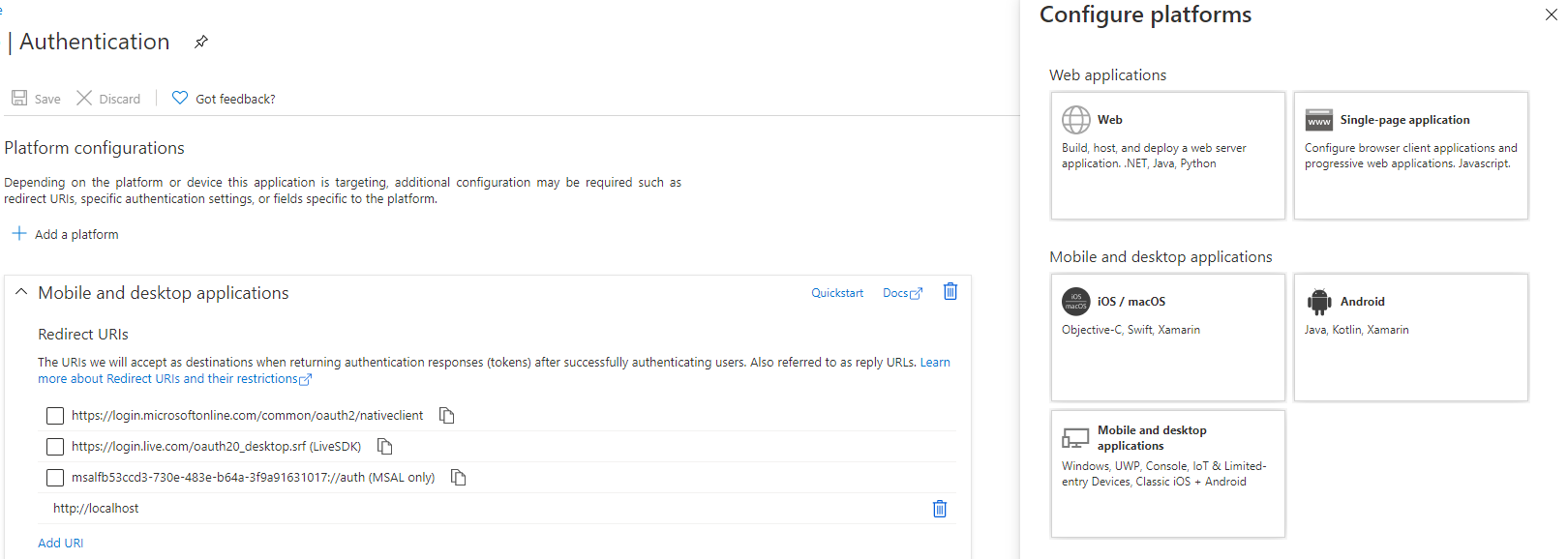
In my case it was the redirect URI of my app registration which was causing issues - in my scenario I'm using device code flow using microsoft graph.
I had set it up a web, however it should be "mobile & desktop application" as per screenshot below.
You can also inspect the access token by pasting it into https://jwt.io/, and you'll see the scopes, and other details to ensure your config is correct.
 alpinedelight
on 6 Oct 2020
alpinedelight
on 6 Oct 2020
I fixed this issue by updating the settings file,
More details here https://razgaou.wordpress.com/2020/12/28/call-graph-api-with-the-cached-oauth-token-in-azure-function/
 RachidAZ
on 5 Jan 2021
RachidAZ
on 5 Jan 2021
My issue was the resource key was with an upper character, just change it to lowercase "&resource=https://..."
 Toumash
on 11 Feb 2021
Toumash
on 11 Feb 2021
Related issues
 StewartRyanSony
·
9Comments
StewartRyanSony
·
9Comments
 Tekki
·
5Comments
Tekki
·
5Comments
 atkinchris
·
6Comments
atkinchris
·
6Comments
 upxact
·
9Comments
upxact
·
9Comments
 rloehr
·
8Comments
rloehr
·
8Comments
Most helpful comment
@suparnavg I'm reopening the issue.