Onedrive-api-docs: Plus signs in file and folder names
The behavior of plus signs (+) in file and folder names is unpredictable. We read in the documentation (https://github.com/OneDrive/onedrive-api-docs/blob/master/misc/addressing.md):
- according to 'OneDrive reserved characters', the plus sign is not reserved
- 'URI path characters' lists the plus sign under the characters that don't have to be encoded
This happens when we try to create a file 'One+Two.txt':
- request
...root:/Documents/One+Two.txt:/contentcreates a file named 'One Two.txt' ...root:/Documents/One%2BTwo.txt:/contentcreates the same 'One Two.txt'...root:/Documents/One%252BTwo.txt:/contentcreates 'One%2BTwo.txt'
Any attempt to access a folder with trailing + results in an 'invalidRequest' error with message 'Path (...) contains invalid trailing character.'
 Tekki
Tekki
All 5 comments
Comparing with the OneDrive API (api.onedrive.com/v1.0): On both, the OneDrive API and the Graph API it is possible to create a folder with a trailing '+'. Using the OneDrive API a file file can be added to this folder if the plus in the path is percent encoded ( _(this is not correct, sorry)_ The Graph API answers with the error message mentioned above. On the OneDrive API too it is impossible to create a file with a '+' in the name....root:/Documents/Folder%2B/Testfile.txt:/content).
Tekki
on 20 Mar 2017
My apologies for the delay, I didn't spot this issue getting assigned to me :).
I want to make sure I have this correct, as unfortunately there are numerous endpoints that could be factoring in to URL issues. Here's what I see:
OneDrive Business
PUT ...root:/Documents/One+Two.txt:/content creates a file named One+Two.txt
PUT ...root:/Documents/One%2BTwo.txt:/content creates a file named One+Two.txt
OneDrive Consumer
PUT ...root:/Documents/One+Two.txt:/content creates a file named One Two.txt
^ We actually have a fix for this rolling out soon
PUT ...root:/Documents/One%2BTwo.txt:/content creates a file named One+Two.txt
Graph targeting OneDrive Business
PUT ...root:/Documents/One+Two.txt:/content creates a file named One+Two.txt
PUT ...root:/Documents/One%2BTwo.txt:/content creates a file named One+Two.txt
Graph targeting OneDrive Consumer
PUT ...root:/Documents/One+Two.txt:/content creates a file named One Two.txt
PUT ...root:/Documents/One%2BTwo.txt:/content creates a file named One Two.txt
^ Both of these are the result of the OneDrive Consumer issue that I mentioned we fixed above - graph appears to translate the %2B to + when it sends the request to us which is why it behaves differently
I'm going to take note to update this issue when that fix gets resolved, and then we can take another look and see if there's any other strange behavior.
 ificator
on 24 Mar 2017
ificator
on 24 Mar 2017
This fix has rolled out, hasn't it? From my point of view everything works as expected now.
Tekki
on 29 Mar 2017
Yup, it looks like the deployment finished this morning :)
ificator
on 29 Mar 2017
Hi
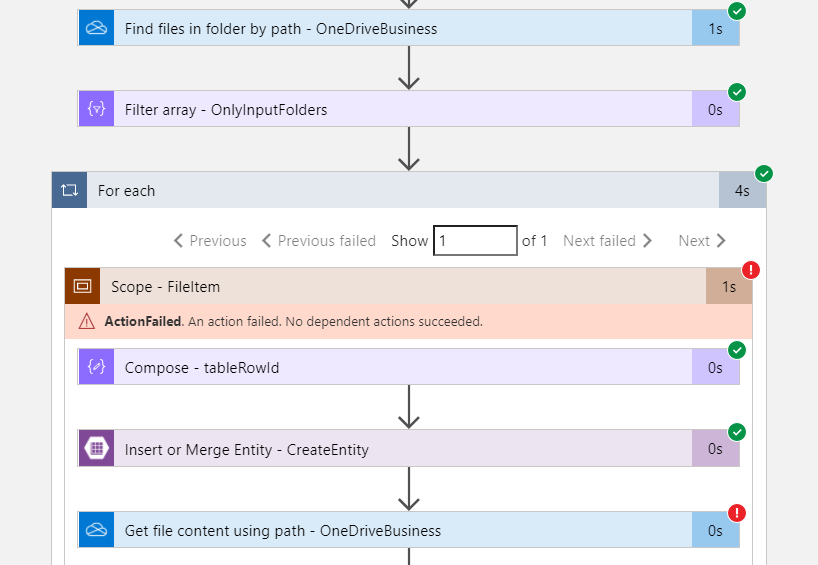
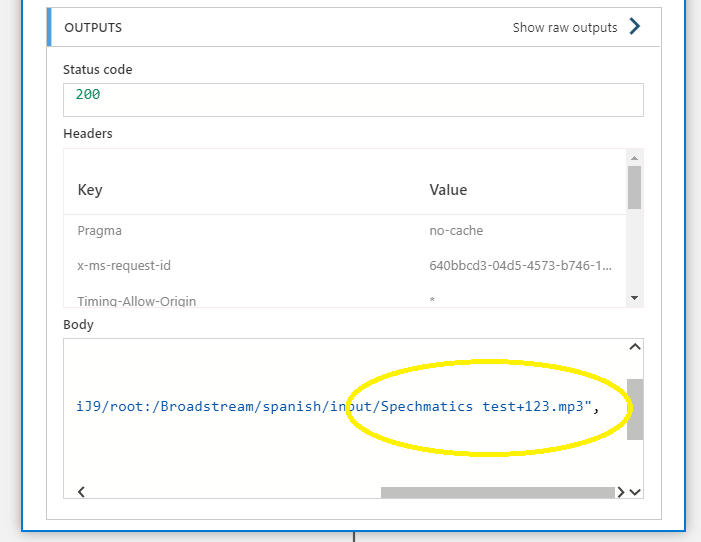
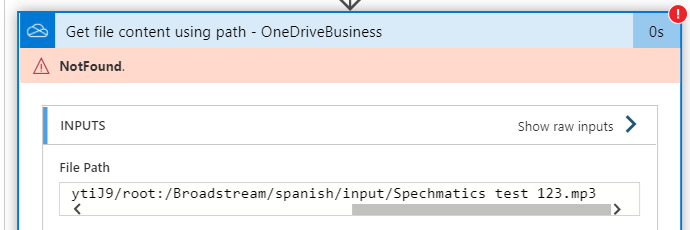
I'm using OneDrive connector in a Logic App and found the same issue, as of Oct. 2020. The + sign in a filename is replaced by a single space when trying to get the content. However, the filenames are well picked up when listing the folder content. See pictures attached.
logic app overview:
list files actions output (correct):
get content action (incorrect path):
Thank you
Fernando
 screen-saksrepo
on 9 Oct 2020
screen-saksrepo
on 9 Oct 2020
Related issues
 indigane
·
9Comments
indigane
·
9Comments
 marcreicher
·
3Comments
marcreicher
·
3Comments
 brownbl1
·
10Comments
brownbl1
·
10Comments
 arsnyder16
·
11Comments
arsnyder16
·
11Comments
 ClaroJack
·
9Comments
ClaroJack
·
9Comments
Most helpful comment
My apologies for the delay, I didn't spot this issue getting assigned to me :).
I want to make sure I have this correct, as unfortunately there are numerous endpoints that could be factoring in to URL issues. Here's what I see:
OneDrive Business
PUT ...root:/Documents/One+Two.txt:/contentcreates a file namedOne+Two.txtPUT ...root:/Documents/One%2BTwo.txt:/contentcreates a file namedOne+Two.txtOneDrive Consumer
PUT ...root:/Documents/One+Two.txt:/contentcreates a file namedOne Two.txt^ We actually have a fix for this rolling out soon
PUT ...root:/Documents/One%2BTwo.txt:/contentcreates a file namedOne+Two.txtGraph targeting OneDrive Business
PUT ...root:/Documents/One+Two.txt:/contentcreates a file namedOne+Two.txtPUT ...root:/Documents/One%2BTwo.txt:/contentcreates a file namedOne+Two.txtGraph targeting OneDrive Consumer
PUT ...root:/Documents/One+Two.txt:/contentcreates a file namedOne Two.txtPUT ...root:/Documents/One%2BTwo.txt:/contentcreates a file namedOne Two.txt^ Both of these are the result of the OneDrive Consumer issue that I mentioned we fixed above - graph appears to translate the %2B to + when it sends the request to us which is why it behaves differently
I'm going to take note to update this issue when that fix gets resolved, and then we can take another look and see if there's any other strange behavior.