Onedrive-api-docs: OneDrive OAuth with Graph scopes are inconsistent
According to the docs, the files.read scope should grant read-only permission to all of a user's OneDrive files, while the files.read.all scope should grant read-only permission to all of a user's OneDrive files, including files shared with the user.
When testing the authentication flow with the files.read scope, the Microsoft permissions screen shows my app will be able to open OneDrive files, including files shared with you, which matches the description of the files.read.all scope.
When testing the authentication flow with the files.read.all scope, the Microsoft permissions screen shows my app will be able to read, create, update and delete all files that you can access, which matches the description of the files.readwrite scope.
edit: In the remarks here I see that the files.read scope allows apps connected to personal accounts view shared files, which is probably what I was seeing. However, the files.read.all scope shouldn't allow write access.
 rwatari
All 13 comments
Hi @rwatari,
I wasn't able to reproduce this. Can you tell me what type of account (consumer or work/school) you were using with the permission scopes when you saw the erroneous string?
There's also a confusing thing that can happen if you're using the same application-id/client-id, which is that the permission scopes "stack" -- the consent screen shows you the sum of all permissions that the user has previously consented to + the permissions the app is requesting in the current flow, not just the permissions in the current request. This can lead to issues where despite requesting files.read permission, since previously the user had granted files.readwrite access to the app, the readwrite screen is shown instead. Is it possible this is what you were encountering?
 rgregg
on 21 Nov 2017
rgregg
on 21 Nov 2017
@rgregg
I have a consumer account I've been using for testing, which is the same account I used for registering my app. I've tested this with other accounts as well, and I get the same thing.
What do you mean by "same application-id/client-id"? On the application registration portal I only see one unique ID for my app, which I pass into the authorization URL as stated in the docs.
I don't see how permission "stacking" could cause what I'm seeing. I've wiped my account clean of any connected applications. When I request authorization with the files.read scope in the URL, the confirmation page doesn't have any information about my app having write access to files. Without approving that first request, when I switch the scope to files.read.all, the confirmation page then states my app is requesting write access.
Is there any other information I can provide that will help? Screenshots? Application settings? The authentication URL?
rwatari
on 21 Nov 2017
Does the token actually allow writes when you see the misleading message on the consent screen?
 ificator
on 13 Jan 2018
ificator
on 13 Jan 2018
I have the same issue.
"Have full access to all files you have access to"
"apply_dev will be able to read, create, update and delete all files that you can access."
Here's an example of the the final URL to show that screen .. I have omitted the client_id and return URL.
https://account.live.com/Consent/Update?ru=https://login.live.com/oauth20_authorize.srf%3flc%3d1033%26client_id%XXXXXXXXXXXXXXXX%26scope%3dprofile%2bopenid%2bhttps%253a%252f%252fgraph.microsoft.com%252fUser.Read%2bhttps%253a%252f%252fgraph.microsoft.com%252fFiles.Read.All%26redirect_uri%3dhttps%253a%252f%252fapply.talemetry.dev%252fsession%252fcloud_drive%252fone_drive%253fstate%253dddf359ce-aef0-4ca1-aed9-7e5446981cf4%26response_type%3dtoken%2bid_token%26state%3dhttps%253a%252f%XXX.XXX.dev_jdGET%26response_mode%3dfragment%26nonce%3dJicwl%26display%3dpopup%26uaid%3da31aab8bd52f4e88bf252cca4c21727e%26msproxy%3d1%26issuer%3dmso%26tenant%3dcommon%26ui_locales%3den-US%26mkt%3dEN-US%26scft%3dDZnfXADXVfNr8R8JN7iMDAUWkFC91djZjtBoIrz8hlZ6ikegxERksNxUXR2N!ewEHhOtqFZrTrRl3HFXyaTuf4IDEkJWxJujHKe74Wg8IzlX!MatZRcyT!O5BD4mqhh39F6xB2AFh32GVQjSGbQXvqRs4eXt*gt3sg4SqNrMBBmcTaom9kePQ85Qty0lBoCP8cUUhQvQHjBxu5CpW68og%2524%26contextid%3d5AF9B2431F02C7FC&mkt=EN-US&uiflavor=web&id=293577&uaid=a31aab8bd52f4e88bf252cca4c21727e
as you can see I'm only requesting to READ the file/s
To clarify the way I'm launching the code is via
'https://js.live.net/v7.2/OneDrive.js'
var odOptions = {
clientId: "XXXXXXX",
action: "query",
openInNewWindow: true,
multiSelect: false,
advanced: {
redirectUri: "https://xx.xxx.dev/onedrive/popup",
},
success: function(files) { alert('files'); console.log(files) /* success handler / },
cancel: function() { alert('cancel') / cancel handler / },
error: function(e) { alert('error'); console.log(e)/ error handler */ }
}
OneDrive.open(odOptions);
my https://xx.xxx.dev/onedrive/popup includes the 'https://js.live.net/v7.2/OneDrive.js' again which launches the consent screen
 adin-ttc
on 18 Jan 2018
adin-ttc
on 18 Jan 2018
I have also tried bypassing the javascript and implementing the REST authentication based on https://developer.microsoft.com/en-us/graph/docs/concepts/rest
Here is my authentication REST URL: I have replaced the client id and my redirect_uri with the x's for illustration
When I pass Files.Read.Selected This works correctly
Read selected files
apply_dev will be able to read files that you select. After you select a file, the app has access to the file for several hours.
When the parameter is Files.Read.All the message is asking for write create and delete permissions as well
Have full access to all files you have access to
apply_dev will be able to read, create, update and delete all files that you can access.
Is there a way to pass parameters to the open to not use the Files.Read.All and, instead, replace it with Files.Read.Selected?
adin-ttc
on 18 Jan 2018
Same issue for me. My app is requesting files.read.all, and yet the message shown to the user says that my app has requested full read/write access.
Here is my auth request:
https://login.microsoftonline.com/common/oauth2/v2.0/authorize?client_id=...&response_type=code&scope=files.read.all&redirect_uri=...
Here is the message that is shown to the user:
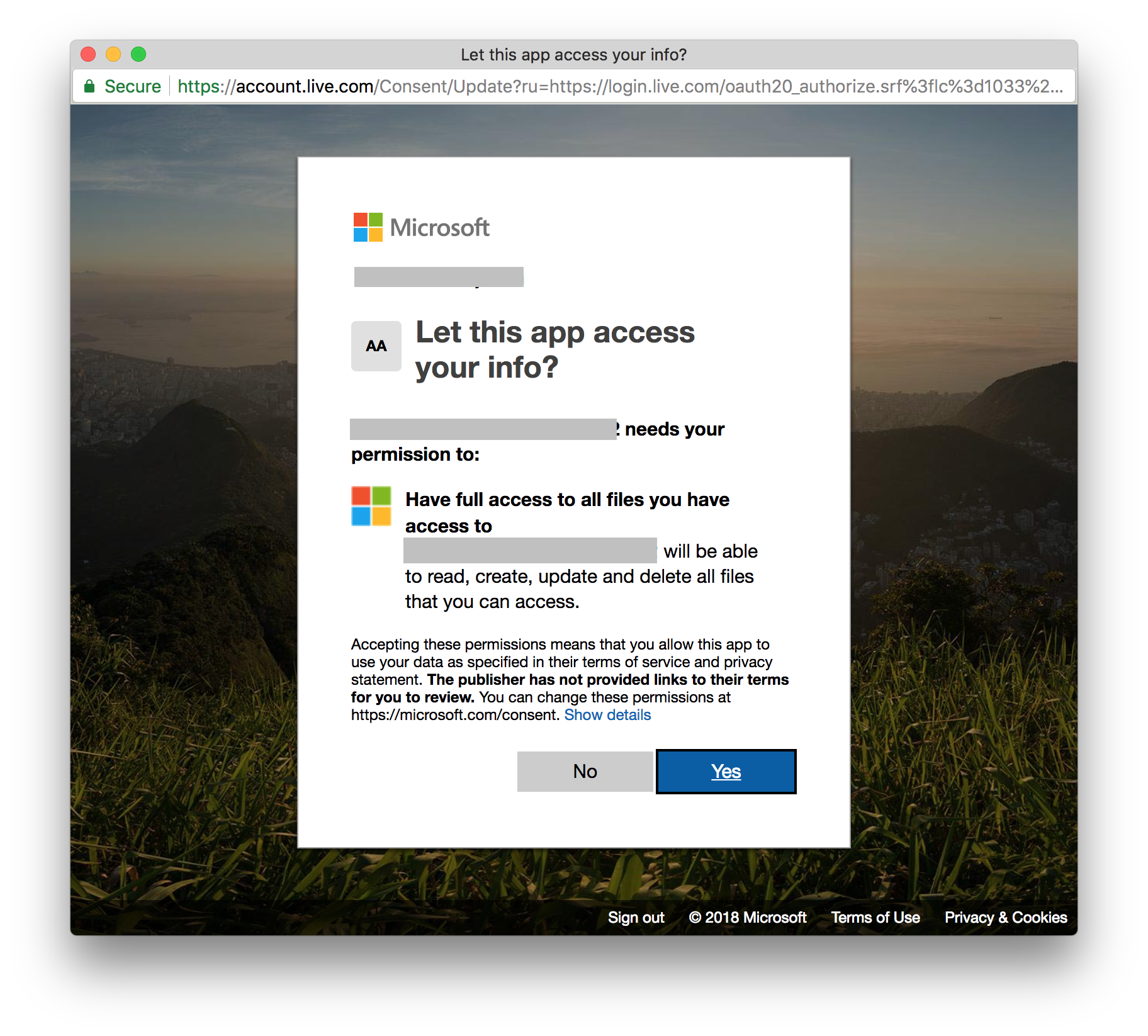
Here is the response after access was granted:
{
  token_type: "Bearer",
  scope: "Files.Read.All",
  expires_in: 3600,
  ext_expires_in: 0,
  access_token: "...",
  refresh_token: "..."
}
 mmorearty
on 16 Jul 2018
mmorearty
on 16 Jul 2018
We're also having this scope issue. All we want is files.read.all (supposedly the default) but the consent screen implies full read/write access.
 elidupuis
on 13 Feb 2019
elidupuis
on 13 Feb 2019
I am running into the same issue, which is unfortunate as it makes it less likely for users to give the permissions. The message will be able to read, create, update and delete all files that you can access is misleading and unexpected when the app only needs permission to read files.
 kiejo
on 8 Nov 2019
kiejo
on 8 Nov 2019
Same problem here. Any update on this?
 cguZZman
on 21 Jan 2020
cguZZman
on 21 Jan 2020
Does this issue wrongly allow create update and delete, or is it simply that the message is wrong?
 lloyda
on 22 Jan 2020
lloyda
on 22 Jan 2020
Just confirmed on my side that it's only the message. Getting this message when trying to delete a file:
{
  "error": {
    "code": "accessDenied",
    "message": "Access Denied",
    "innerError": {
      "request-id": "76296e9c-cffc-4426-8295-b8dff2386c3b",
      "date": "2020-01-22T20:56:41"
    }
  }
}
@cguZZman thanks for checking. Reassuring to know.
lloyda
on 23 Jan 2020
is the scope supposed to be case sensitive or lowercase?
keep getting this error AADSTS9002313: Invalid request. Request is malformed or invalid.
 yosun
on 19 Feb 2020
yosun
on 19 Feb 2020
Related issues
 mlafleur
·
5Comments
mlafleur
·
5Comments
 Sanjeev143
·
9Comments
Sanjeev143
·
9Comments
 Tekki
·
5Comments
Tekki
·
5Comments
 rkulow
·
7Comments
rkulow
·
7Comments
 marcreicher
·
3Comments
marcreicher
·
3Comments
Most helpful comment
I am running into the same issue, which is unfortunate as it makes it less likely for users to give the permissions. The message
will be able to read, create, update and delete all files that you can accessis misleading and unexpected when the app only needs permission to read files.