Omnisharp-vscode: Cannot download OmniSharp behind proxy/firewall
_From @TheBlueSky on July 18, 2016 4:37_
Hello everyone,
I'm not sure if this is a VS Code or OmniSharp issue, so feel free to move it to the right repository if necessary.
When I open a .Net project, I get the following in Output window:
[INFO] Starting OmniSharp at 'c:\Users\xyz\Documents\My Web Sites\SomeProject'...
[INFO] Installing to C:\Users\xyz\.vscode\extensions\ms-vscode.csharp-1.2.2\.omnisharp
[INFO] Attempting to download omnisharp-1.9-beta11-win-x64-net451.zip...
And it gets stuck there. Nothing is downloaded and my project doesn't have any kind of Intellisense (obviously).
Maybe this is relevant, and maybe not, but at work, we are behind a firewall and a proxy server (from Fortinet) that does strange stuff. One of which is using its own certificate for all HTTPS requests, which I faced an issue with when using an application that require a valid certificate signed by trusted CA, or an application that uses certificate pinning technique.
- VSCode Version: Code 1.3.1 (e6b4afa53e9c0f54edef1673de9001e9f0f547ae, 2016-07-12T13:35:06.227Z)
- OS Version: Windows_NT ia32 6.3.9600
Steps to Reproduce:
- Go behind our proxy.
- Open a .Net project :)
_Copied from original issue: Microsoft/vscode#9427_
 weinand
All 22 comments
Hi @TheBlueSky, have specified your proxy settings within VS Code?
 DustinCampbell
on 19 Jul 2016
DustinCampbell
on 19 Jul 2016
No. The kind of firewall/proxy that we have in the company does not require specifying proxy settings. You come in the morning, login to the firewall/proxy, and that's all.
I started to face this issue only after v1.0 of .Net Core/ASP.Net Core (not sure what the corresponding OmniSharp or VS Code versions were). Haven't faced this issue during DNX days.
My memory isn't clear whether I tested it with ASP.Net Core RC2 or not; I just know it never worked after v1.0.
 TheBlueSky
on 19 Jul 2016
TheBlueSky
on 19 Jul 2016
The extension just uses your default proxy settings unless you specified something different. I assume other operations work? For example, dotnet restore on a new .NET Core project at the command line?
DustinCampbell
on 19 Jul 2016
Yes, dotnet restore works from command line, whether using Command Prompt or VS Code terminal. From the VS Code Command Palette however, it doesn't; I'm getting "OmniSharp server is not running."
TheBlueSky
on 21 Jul 2016
Yes, the VS Code command palette uses OmniSharp to determine which projects to run dotnet restore on. I'd like to dig into the proxy issue deeper, but I think there's an additional problem that will keep this from working in the meantime. It appears that you're on 32-bit Windows, correct? Unfortunately, at the moment, the OmniSharp language server only supports 64-bit Windows.
DustinCampbell
on 21 Jul 2016
At work, I'm using Windows 8.1 Pro 64-bit... at least this is what Windows reports :)
TheBlueSky
on 21 Jul 2016
Great! In that case, try the following workaround to get things working:
- Download and unzip "omnisharp-win-x64-net451.zip" from the latest OmniSharp release.
- In Visual Studio Code, select File->Preferences-> User Settings.
- In user.settings, add the following:
"csharp.omnisharp": "C:/Path/To/The/OmniSharp/You/Unzipped/OmniSharp.exe"
- Restart Visual Studio Code.
Now, try opening a .NET Core project and ensure that things are working.
DustinCampbell
on 21 Jul 2016
Thanks @DustinCampbell.
So, this worked, as a workaround. Do we know the root cause of the issue? If not, what can I help with?
TheBlueSky
on 21 Jul 2016
Nope, I don't know the root cause, but it smells like a proxy issue. I'm glad you're up and running for now though.
DustinCampbell
on 21 Jul 2016
We've done a lot of work to improve this in the latest release to respect http.proxy and http.proxyStrictSSL values. With https://github.com/OmniSharp/omnisharp-vscode/pull/958, I'm hopefully that our last issues with this should be addressed. Let me know if you experience this problem with the latest release (1.5.2).
DustinCampbell
on 16 Nov 2016
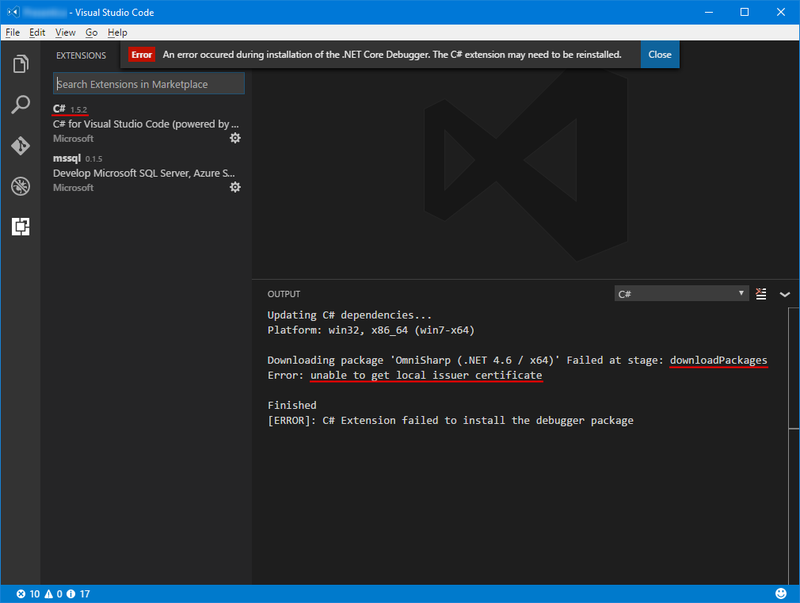
@DustinCampbell, unfortunately, this didn't address the issue and OmniSharp is still unable to get the required dependencies/packages... it's the only thing that doesn't work in VS Code behind our firewall, I mean from the options I tried; e.g.; updating VS Code itself, updating its extensions, dotnet restore, and maybe couple of others.
TheBlueSky
on 20 Nov 2016
Do you set the http.proxyStrictSSL setting in VS Code? We recently addressed another issue where we were properly passing the value of this setting if http.proxy wasn't set as well. This addressed a similar-looking issue: https://github.com/OmniSharp/omnisharp-vscode/issues/957. Would you willing to give a build of the extension with that fix a try?
- Open Visual Studio Code and select View->Extensions to display the Extensions Pane.
- In the Extensions pane, clear the little gear icon for the C# extension and select "Uninstall". Confirm Visual Studio Code's prompts and allow it to reload.
- Download the latest beta .vsix here.
- In the Extensions pane, click the [...] in the top-right corner and select "Install from VSIX...". Locate the .vsix you just download and click "Open".
- Allow Visual Studio Code to reload and open your project.
Let me know if the downloads work for you now.
DustinCampbell
on 20 Nov 2016
If that still doesn't address it, I wonder if we need a way to add additional root certs like in https://github.com/nodejs/node/issues/3742
 gregg-miskelly
on 20 Nov 2016
gregg-miskelly
on 20 Nov 2016
If that doesn't address it, we should push hard for this: https://github.com/Microsoft/vscode/issues/6929. :smile:
DustinCampbell
on 21 Nov 2016
@DustinCampbell, happy to announce that 1.5.3 fixed it. I updated the extension this morning and finally saw the long-awaited message Finished 😄
And by the way, I am supporting Microsoft/vscode#6929 as well :)
TheBlueSky
on 22 Nov 2016
Glad to hear it! Fantastic!
DustinCampbell
on 22 Nov 2016
i can confirm this problem still exists:
Updating C# dependencies...
Platform: win32, x86_64
Downloading package 'OmniSharp (.NET 4.6 / x64)' failed (error code '407')
Failed at stage: downloadPackages
407
Finished
my settings.json:
// Platzieren Sie Ihre Einstellungen in dieser Datei, um die Standardeinstellungen zu überschreiben.
{
"http.proxyStrictSSL": false,
"http.proxy": "http://companydomain%5Cusername:[email protected]:8080/",
"https.proxy": "http://companydomain%5Cusername:[email protected]:8080/",
"csharp.omnisharp": "D:/omnisharp/omnisharp-win-x64-net46/OmniSharp.exe"
}
i have also tried installing manually via vsix files (even different versions to see if the problem still consists...)
i am unsure if it works or not, as its still giving the error as shown above...
could someone tell me how id find out if omnisharp net 4.6.x integration works?
should there be a debugger showing up for .net 4.x in the list of debuggers if it works?
im a bit confused...
thanks for any kind of help with this...
 OliverLeitner
on 29 May 2017
OliverLeitner
on 29 May 2017
This worked for me (in VS Code settings file):
{
    "http.proxyStrictSSL": false,
    "http.proxy": "http://username:[email protected]:8080/"
}
 fizxmike
on 2 Jun 2018
fizxmike
on 2 Jun 2018
This worked for me (in VS Code settings file):
{
    "http.proxyStrictSSL": false,
    "http.proxy": "http://username:[email protected]:8080/"
}
Unfortunately this doesn't work for me. Our proxy doesn't need username password so it's just:
    "http.proxyStrictSSL": false,
    "http.proxy": "https://proxy._companydomain_.com:9090",
And as said above, this is the ONLY thing I can't access or download from within Visual Studio behind our corporate firewall.
 DaBozUK
on 7 May 2019
DaBozUK
on 7 May 2019
Yep this is still an issue.
The environment variables used by vs code and everything else, seem to be ignored by this particular extension
 TheBeardedLlama
on 17 Sep 2019
TheBeardedLlama
on 17 Sep 2019
Can you suggest a workaround?
I got archives listed in package.json for windows and unzipped them to their respective directories, but when I open folder with a .Net project the ms-vscode.csharp extension still wants to download the Omnisharp archive.
How can I signal to this extension that Omnisharp has been installed manually?
 gkalnytskyi
on 8 Oct 2019
gkalnytskyi
on 8 Oct 2019
omnisharp should respect
"http.proxyAuthorization": "Basic base64encoded(user:password)"
in settings.json
 bryan5989
on 10 Feb 2020
bryan5989
on 10 Feb 2020
Related issues
 Alumniminium
·
3Comments
Alumniminium
·
3Comments
 IdeoG
·
3Comments
IdeoG
·
3Comments
 mattwoberts
·
3Comments
mattwoberts
·
3Comments
 hamhub7
·
3Comments
hamhub7
·
3Comments
 slevengood
·
3Comments
slevengood
·
3Comments
Most helpful comment
This worked for me (in VS Code settings file):