Omnisharp-vscode: Is <PathMap> attribute in C# projects supported?
Issue Description
VS Code cannot open proper C# file when debugging a C# project with <PathMap> (see gist, MSDN or the motivation for determistic builds here) specified in .csproj file. Note that Visual Studio 2019 Community edition does not suffer from this issue.
I'm not exactly sure if it is an issue of this C# extension, any feedback is appreaciated. Thank you!
Steps to Reproduce
- Clone https://github.com/zkSNACKs/WalletWasabi.git
- Set a breakpoint in
WalletWasabi.Gui\Global.csconstructor. - Start debugger.
- You should see:
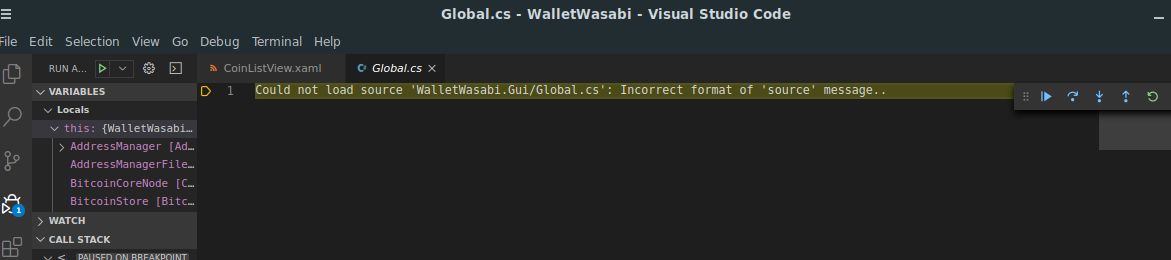
PS: Original issue is here: https://github.com/zkSNACKs/WalletWasabi/issues/4118 and a workaround is here: https://github.com/zkSNACKs/WalletWasabi/pull/4119.
Expected Behavior
I would expect that WalletWasabi.Gui\Global.cs content should be displayed.
Actual Behavior
An error message that WalletWasabi.Gui\Global.cs file cannot be found is displayed.
Logs
OmniSharp log
Starting OmniSharp server at 07/08/2020, 12:58:37
Target: c:\work\csharp\Wasabi\WalletWasabi\WalletWasabi.sln
OmniSharp server started.
Path: c:\Users\kiminuo.vscode\extensions\ms-dotnettools.csharp-1.22.1.omnisharp\1.35.3\OmniSharp.exe
PID: 20056
    Starting OmniSharp on Windows 6.2.9200.0 (x64)
    DotNetPath set to dotnet
    Located 2 MSBuild instance(s)
        1: Visual Studio Community 2019 16.7.30330.147 - "C:\Program Files (x86)\Microsoft Visual Studio\2019\Community\MSBuild\Current\Bin"
        2: StandAlone 16.4 - "c:\Users\kiminuo\.vscode\extensions\ms-dotnettools.csharp-1.22.1\.omnisharp\1.35.3\.msbuild\Current\Bin"
    Registered MSBuild instance: Visual Studio Community 2019 16.7.30330.147 - "C:\Program Files (x86)\Microsoft Visual Studio\2019\Community\MSBuild\Current\Bin"
    Detecting Cake files in 'c:\work\csharp\Wasabi\WalletWasabi'.
    Could not find any Cake files
    Detecting projects in 'c:\work\csharp\Wasabi\WalletWasabi\WalletWasabi.sln'.
    Queue project update for 'c:\work\csharp\Wasabi\WalletWasabi\WalletWasabi.Backend\WalletWasabi.Backend.csproj'
    Queue project update for 'c:\work\csharp\Wasabi\WalletWasabi\WalletWasabi.Tests\WalletWasabi.Tests.csproj'
    Queue project update for 'c:\work\csharp\Wasabi\WalletWasabi\WalletWasabi\WalletWasabi.csproj'
    Queue project update for 'c:\work\csharp\Wasabi\WalletWasabi\WalletWasabi.Gui\WalletWasabi.Gui.csproj'
    Queue project update for 'c:\work\csharp\Wasabi\WalletWasabi\WalletWasabi.Packager\WalletWasabi.Packager.csproj'
    Detecting CSX files in 'c:\work\csharp\Wasabi\WalletWasabi'.
    Could not find any CSX files
    Invoking Workspace Options Provider: OmniSharp.Roslyn.CSharp.Services.CSharpFormattingWorkspaceOptionsProvider, Order: 0
    Loading project: c:\work\csharp\Wasabi\WalletWasabi\WalletWasabi.Backend\WalletWasabi.Backend.csproj
    Invoking Workspace Options Provider: OmniSharp.Roslyn.CSharp.Services.RenameWorkspaceOptionsProvider, Order: 100
    Invoking Workspace Options Provider: OmniSharp.Roslyn.CSharp.Services.ImplementTypeWorkspaceOptionsProvider, Order: 110
    Invoking Workspace Options Provider: OmniSharp.Roslyn.CSharp.Services.BlockStructureWorkspaceOptionsProvider, Order: 140
    Configuration finished.
    Omnisharp server running using Stdio at location 'c:\work\csharp\Wasabi\WalletWasabi' on host 7432.
    Successfully loaded project file 'c:\work\csharp\Wasabi\WalletWasabi\WalletWasabi.Backend\WalletWasabi.Backend.csproj'.
    Adding project 'c:\work\csharp\Wasabi\WalletWasabi\WalletWasabi.Backend\WalletWasabi.Backend.csproj'
    Loading project: c:\work\csharp\Wasabi\WalletWasabi\WalletWasabi.Tests\WalletWasabi.Tests.csproj
    Successfully loaded project file 'c:\work\csharp\Wasabi\WalletWasabi\WalletWasabi.Tests\WalletWasabi.Tests.csproj'.
    Adding project 'c:\work\csharp\Wasabi\WalletWasabi\WalletWasabi.Tests\WalletWasabi.Tests.csproj'
    Loading project: c:\work\csharp\Wasabi\WalletWasabi\WalletWasabi\WalletWasabi.csproj
    Successfully loaded project file 'c:\work\csharp\Wasabi\WalletWasabi\WalletWasabi\WalletWasabi.csproj'.
    Adding project 'c:\work\csharp\Wasabi\WalletWasabi\WalletWasabi\WalletWasabi.csproj'
    Loading project: c:\work\csharp\Wasabi\WalletWasabi\WalletWasabi.Gui\WalletWasabi.Gui.csproj
    Successfully loaded project file 'c:\work\csharp\Wasabi\WalletWasabi\WalletWasabi.Gui\WalletWasabi.Gui.csproj'.
    Adding project 'c:\work\csharp\Wasabi\WalletWasabi\WalletWasabi.Gui\WalletWasabi.Gui.csproj'
    Loading project: c:\work\csharp\Wasabi\WalletWasabi\WalletWasabi.Packager\WalletWasabi.Packager.csproj
    Successfully loaded project file 'c:\work\csharp\Wasabi\WalletWasabi\WalletWasabi.Packager\WalletWasabi.Packager.csproj'.
    Adding project 'c:\work\csharp\Wasabi\WalletWasabi\WalletWasabi.Packager\WalletWasabi.Packager.csproj'
    Update project: WalletWasabi.Backend
    Update project: WalletWasabi.Tests
    Update project: WalletWasabi
    Update project: WalletWasabi.Gui
    Update project: WalletWasabi.Packager
C# log
I don't see any.
Environment information
VSCode version: 1.47.3
C# Extension: 1.22.1
Dotnet Information
.NET Core SDK (reflecting any global.json):
Version: 3.1.400
Commit: 035fb2aa2f
Runtime Environment:
OS Name: Windows
OS Version: 10.0.18363
OS Platform: Windows
RID: win10-x64
Base Path: C:\Program Files\dotnet\sdk\3.1.400\
Host (useful for support):
Version: 3.1.6
Commit: 3acd9b0cd1
.NET Core SDKs installed:
3.1.400 [C:\Program Files\dotnet\sdk]
.NET Core runtimes installed:
Microsoft.AspNetCore.All 2.1.20 [C:\Program Files\dotnet\shared\Microsoft.AspNetCore.All]
Microsoft.AspNetCore.App 2.1.20 [C:\Program Files\dotnet\shared\Microsoft.AspNetCore.App]
Microsoft.AspNetCore.App 3.1.6 [C:\Program Files\dotnet\shared\Microsoft.AspNetCore.App]
Microsoft.NETCore.App 2.1.20 [C:\Program Files\dotnet\shared\Microsoft.NETCore.App]
Microsoft.NETCore.App 3.1.6 [C:\Program Files\dotnet\shared\Microsoft.NETCore.App]
Microsoft.WindowsDesktop.App 3.1.6 [C:\Program Files\dotnet\shared\Microsoft.WindowsDesktop.App]
To install additional .NET Core runtimes or SDKs:
https://aka.ms/dotnet-download
Visual Studio Code Extensions
|Extension|Author|Version|
|---|---|---|
|autoconf|maelvalais|0.1.0|
|character-position|kyrcha|1.0.0|
|code-gnu-global|austin|0.2.2|
|cpptools|ms-vscode|0.30.0-insiders|
|csharp|ms-dotnettools|1.22.1|
|EditorConfig|EditorConfig|0.15.1|
|gitlens|eamodio|10.2.2|
|go|golang|0.16.1|
|java|redhat|0.65.0|
|markdown-pdf|yzane|1.4.4|
|powershell|ms-vscode|2020.6.0|
|python|ms-python|2020.7.96456|
|QML|bbenoist|1.0.0|
|remote-containers|ms-vscode-remote|0.128.0|
|remote-ssh|ms-vscode-remote|0.51.0|
|remote-ssh-edit|ms-vscode-remote|0.51.0|
|remote-wsl|ms-vscode-remote|0.44.4|
|rust-analyzer|matklad|0.2.266|
|solidity|JuanBlanco|0.0.75|
|vscode-css-formatter|aeschli|1.0.1|
|vscode-intelephense-client|bmewburn|1.5.3|
|vscode-java-debug|vscjava|0.27.1|
|vscode-java-pack|vscjava|0.9.1|
|vscode-lldb|vadimcn|1.5.3|
|vscode-maven|vscjava|0.23.0|
|vscode-opencl|galarius|0.6.6|
|vscode-proto3|zxh404|0.4.2|
|vscode-remote-extensionpack|ms-vscode-remote|0.20.0|
|vscodeintellicode|VisualStudioExptTeam|1.2.9|;
 kiminuo
All 3 comments
In order to debug code compiled with path map's, you need to use sourceFileMap (see documentation) to point VS Code to where the source file exists on disk.
 gregg-miskelly
on 10 Aug 2020
gregg-miskelly
on 10 Aug 2020
@gregg-miskelly Yeah, we have figured it out. Thank you for the confirmation that this is needed!
Just to make it clear: Is it because path maps are not properly supported by the OmniSharp extension or how come that Microsoft Visual Studio handles that without any sourceFileMap?
kiminuo
on 10 Aug 2020
This is because the VS Code IDE doesn't support debugger backends that cannot fully resolve source files to an on-disk path. VS Code started its life as a JavaScript IDE (where source code is always accessible) while full VS started its life as a C++/C#/VB IDE (where source code may not be) and the two IDEs show their roots on this one...
gregg-miskelly
on 10 Aug 2020
Related issues
 Alumniminium
·
3Comments
Alumniminium
·
3Comments
 jwbay
·
3Comments
jwbay
·
3Comments
 olfek
·
3Comments
olfek
·
3Comments
 matthamil
·
4Comments
matthamil
·
4Comments
 tstivers1990
·
3Comments
tstivers1990
·
3Comments
Most helpful comment
This is because the VS Code IDE doesn't support debugger backends that cannot fully resolve source files to an on-disk path. VS Code started its life as a JavaScript IDE (where source code is always accessible) while full VS started its life as a C++/C#/VB IDE (where source code may not be) and the two IDEs show their roots on this one...