Olive: [UI] Node Editor toolbar (proposal)
Commit Hash
2d2d6d2a
Platform
All
Summary
In order to improve the user experience I would like to suggest adding a toolbar to the Node Editor, something like the following mockup:
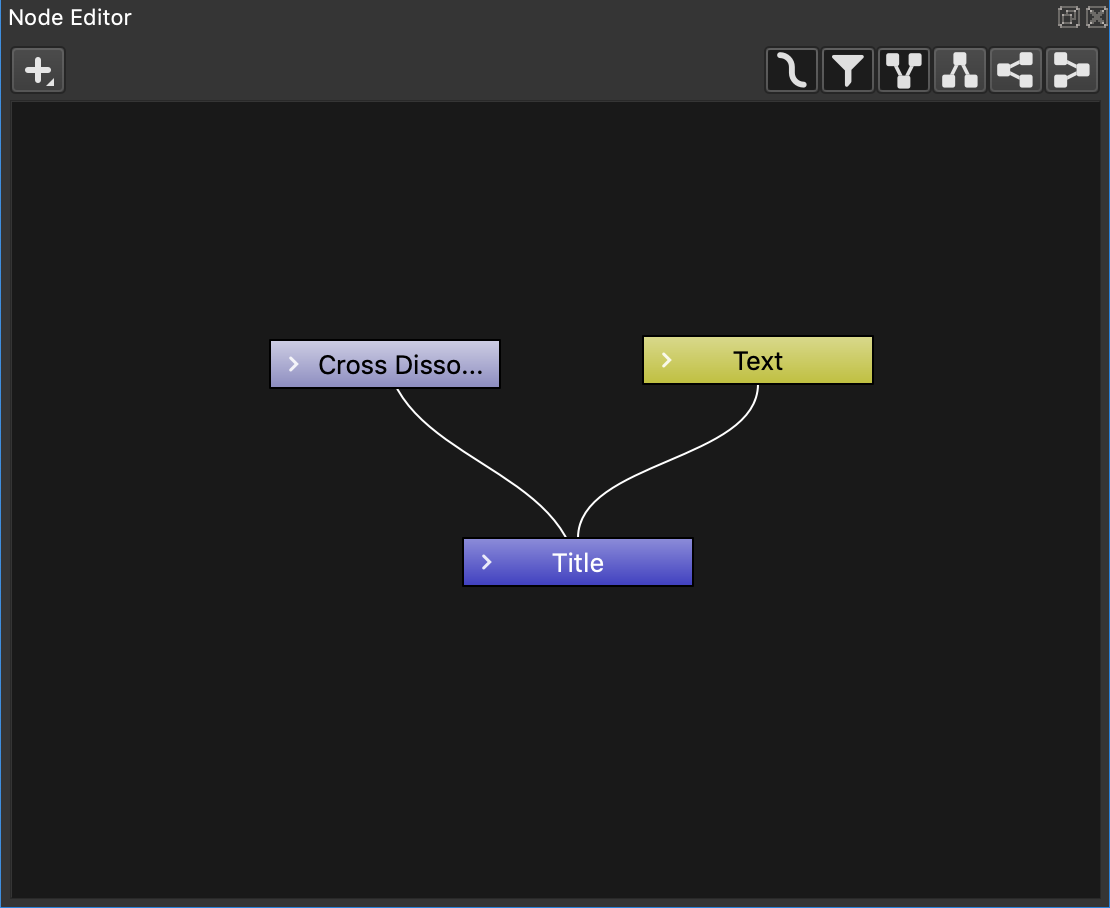
- the "add" icon would be aligned to the left as it is a real node tool
- the other icons are aligned to the right as they all are just visibility options
- "smooth edges" has 2 states: activated, deactivated
- "filter" has 2 states: activated, deactivated
- ony 1 of the 4 "direction" icon activates at a time
I have already designed the icons in SVG so, if you like the idea, I would straightforward PR them all.
Additional Information / Output
 pgilfernandez
All 18 comments
Hi Matt, While I appreciate that your top priority is getting version 2 stable, could I request you eventually consider a copy/save feature in Fernandez proposed tool bar to store and recover useful node configurations and make them available to other projects?
 GUY-BBS
on 17 Nov 2020
GUY-BBS
on 17 Nov 2020
@GUY-BBS would you like an import/export set of icons or a copy/paste ones?
I can design both if needed ;)
pgilfernandez
on 18 Nov 2020
@pgilfernandez Ideally both. Initially, it takes some time to impliment something like an animated name strap using nodes in Olive. It would be useful to copy and paste it within the same project and it would be great to save to a library of similar effects for use in other projects.
GUY-BBS
on 18 Nov 2020
Node bundling is a large design task. If rushed, it will bring pain.
 sobotka
on 18 Nov 2020
sobotka
on 18 Nov 2020
On my side it's no problem to design and PR those 4 icons, but I guess the implementation would need much more effort...
Anyway, the proposed toolbar just uses already working features so it may be easy to code... it would be a start point.
pgilfernandez
on 18 Nov 2020
Here is a new mockup with the icons already designed in SVG:
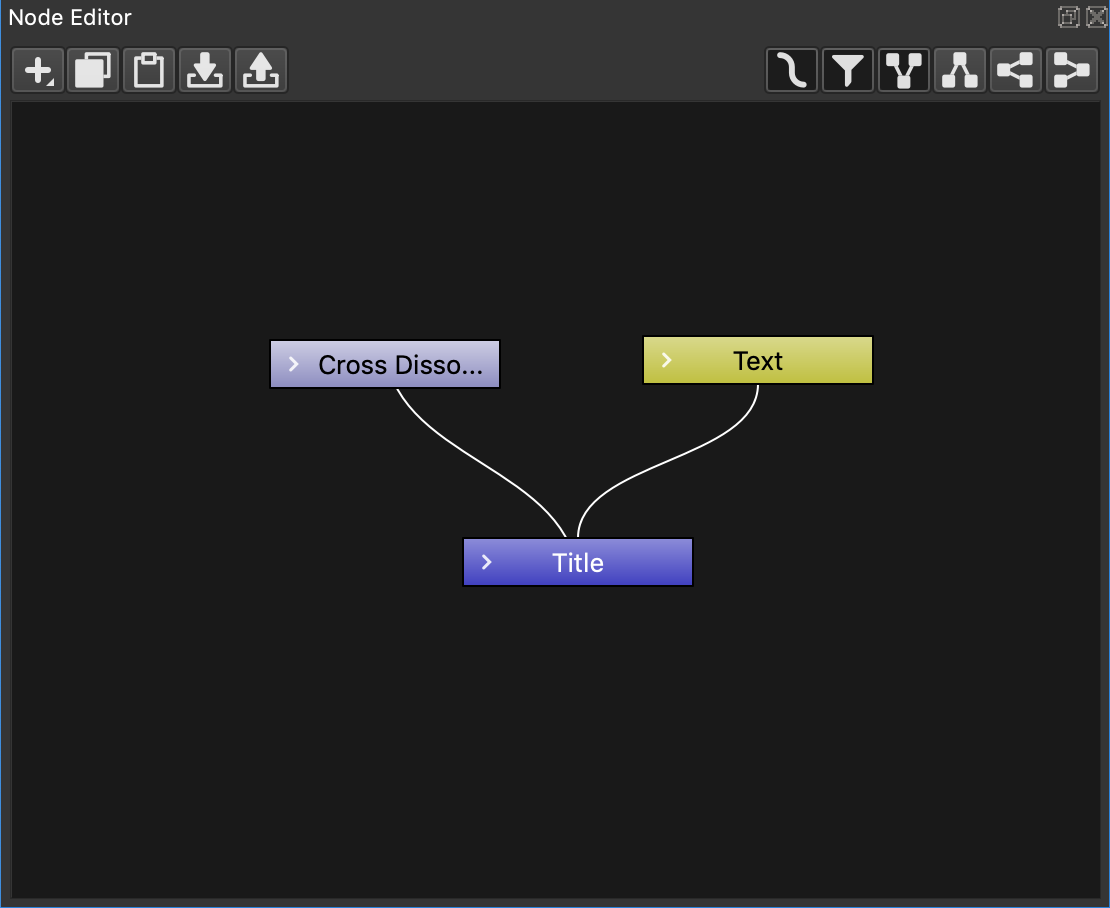
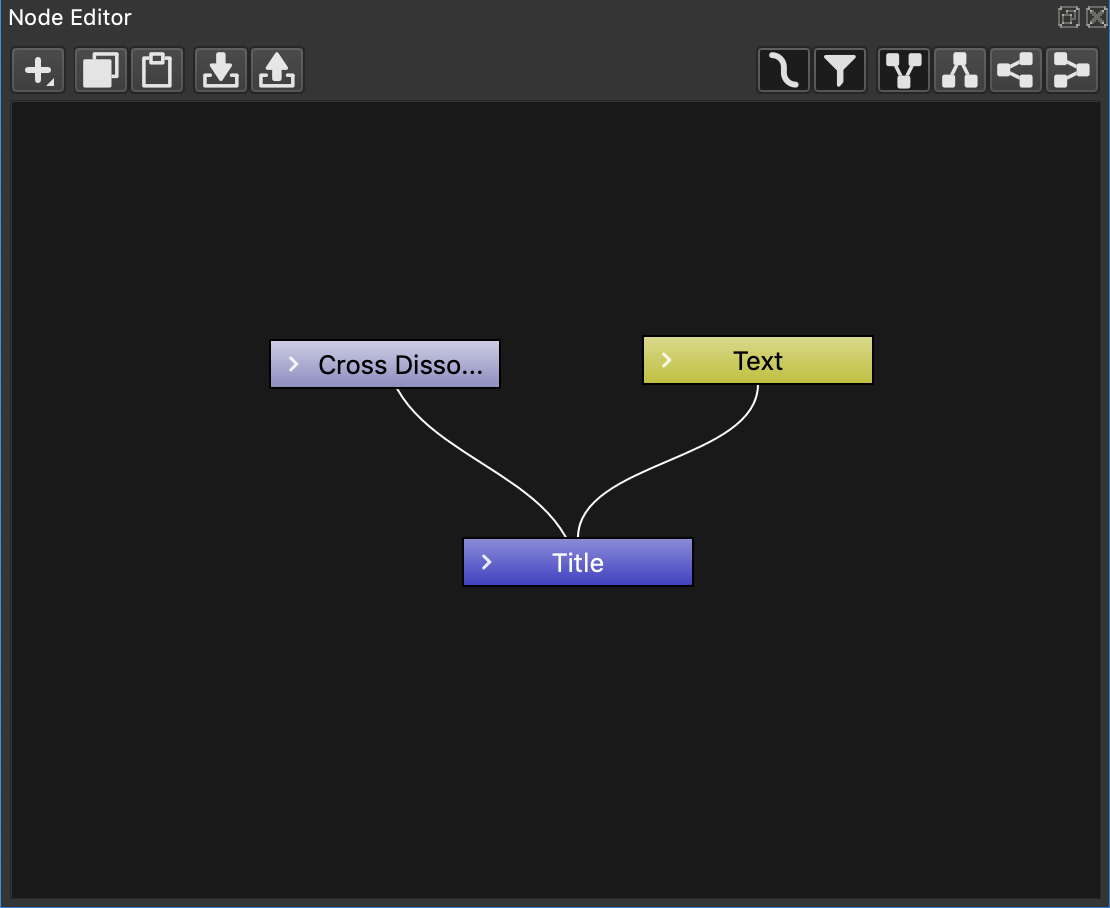
I would suggest to add some spacing between groups of icons, but I don't know if a "separator" is already available in the project, something like the following:
pgilfernandez
on 20 Nov 2020
Nice work Pablo, however, I guess it will be a long time before this
feature could be added to the project.
On Fri, Nov 20, 2020 at 5:04 PM Pablo Gil notifications@github.com wrote:
Here is a new mockup with the icons already designed in SVG:
[image: nodes_icons_v02]
https://user-images.githubusercontent.com/5942369/99827503-0112ea80-2b5a-11eb-9e46-668f119a26aa.pngI would suggest to add some spacing between groups of icons, but I don't
know if a "separator" is already available in the project, something like
the following:[image: nodes_icons_v03]
https://user-images.githubusercontent.com/5942369/99828030-b47bdf00-2b5a-11eb-8056-4b21890e179c.png—
You are receiving this because you were mentioned.
Reply to this email directly, view it on GitHub
https://github.com/olive-editor/olive/issues/1331#issuecomment-731288273,
or unsubscribe
https://github.com/notifications/unsubscribe-auth/AL3AGNYPQRI34PYVV6YI563SQ2ORJANCNFSM4TW6U2QA
.
GUY-BBS
on 21 Nov 2020
I agree @GUY-BBS, but I guess you are talking about "phase 2" where the copy/paste and import/export features are added.
My actual proposal is go for "phase 1", just create the toolbar with the features that are already implemented via secondary mouse button. The toolbar is friendlier and quicker for users...
pgilfernandez
on 21 Nov 2020
I finally made a PR #1399 in order to make the icons available when needed.
pgilfernandez
on 22 Nov 2020
Hi Matt, While I appreciate that your top priority is getting version 2 stable, could I request you eventually consider a copy/save feature in Fernandez proposed tool bar to store and recover useful node configurations and make them available to other projects?
You can already copy and paste nodes. They copy to plain text so you can easily transfer them across projects and even send them over forums/IM.
 itsmattkc
on 25 Nov 2020
itsmattkc
on 25 Nov 2020
Awesome!
I have just tried and it works... very smart approach.
That means the "copy/paste" feature is already implemented and could be accessible too if a set of copy/paste buttons are added to the proposed Node toolbar as they only need to be linked to global Edit/Copy and Edit/Paste menu commands, am I right?
Then, it may have sense to add "Duplicate" and "Delete" buttons to the toolbar to let users work with the UI instead of shortcuts or menus... which leads to a better user experience
pgilfernandez
on 26 Nov 2020
I think a toolbar is a good idea (I believe we tossed around the idea a while ago), but I think it's important to have a discussion about what needs to be in it.
I disagree that toolbar buttons are a better user experience than shortcuts. In my opinion: shortcuts > toolbar buttons > menus. Therefore I think the toolbar should primarily contain things that don't necessarily make sense to have a shortcut for but may be accessed frequently enough to warrant something faster than the menus.
itsmattkc
on 27 Nov 2020
Let's discuss then =)
I think you are not thinking like a new user or beginner but as a pro user: for them it will probably be "toolbar buttons (what they easily can see) > menus > shortcuts". I do agree with you about shortcuts > toolbar buttons > menus but as a pro user...
The toolbar itself would not take too much space and it helps to make an idea about what can be done. Furthermore, the node panel is a place with lot of mouse work, not shortcuts, so the user is expected to use either buttons or menus (definitely mouse) and so that the user would be more predisposed to use the mouse (buttons and menus) than shortcuts... but well, this is just theory and trying to make a positive discussion. =)
I'm not sure about copy/paste buttons but my initial bet would go like the ones I proposed in the first post:
- add
- filter
- smooth edges (maybe this one is not necessary as it's not something you want to change while in a project)
- directions
pgilfernandez
on 27 Nov 2020
Let’s not worry about a ridiculous “new user”. It isn’t designed for new users, and that audience demographic brings nothing to the table.
sobotka
on 28 Nov 2020
On that note, it's worth to watch https://youtu.be/6aIA2LaB2Iw
 Simran-B
on 28 Nov 2020
Simran-B
on 28 Nov 2020
@sobotka designing a software for professional users doesn't mean the UI/UX has to be hard to use or based just in what they usually use (probably shortcuts). There is room for beginners, actually I think that all of us have been beginners when opening Olive for the first time. Toolbars are a nice start point for all of us.
But, well, it's just an honest opinion,I don't want to insist too much, it's up to you to make it happen if you feel it's right... =)
pgilfernandez
on 28 Nov 2020
Crack open Houdini, Nuke, or Baselight.
Let me know how it goes for your logic.
At any rate, Olive is very much in the “get it working” stage of life; there’s so much in flux that worrying about toolbars seems like worrying about the colour of the foundation concrete as a building is being constructed.
It’s terrific having folks around with university degrees in art and design. Hopefully more folks with more actual degrees will stick around, instead of just random people making random assertions with absolutely zero credibility!
sobotka
on 28 Nov 2020
I think the point being made here is that toolbars generally improve discoverability. There's a lot of evidence to that, starting with the outcome of what our friends over at Blender Foundation did in 2.8x :) And then you could look at what DaVinci Resolve folks did with e.g. project bin toolbar or nodes toolbar. So it _kinda_ makes sense to have a toolbar. I'm saying that as a shortcuts junkie btw.
Now, what you do put there is something one could answer with instrumentation. Unfortunately, that means someone would need to implement a whole infrastructure for that, and that seems unlikely. Instead, one could gather references of tentative designs. And that's a much smaller effort, by order of a shitton of magnitudes :)
 prokoudine
on 28 Nov 2020
prokoudine
on 28 Nov 2020
Related issues
 libalis
·
39Comments
libalis
·
39Comments
 Reaper10
·
31Comments
Reaper10
·
31Comments
 Symbian9
·
23Comments
itsmattkc
·
18Comments
Symbian9
·
23Comments
itsmattkc
·
18Comments
 malnaanah
·
17Comments
malnaanah
·
17Comments
Most helpful comment
Let’s not worry about a ridiculous “new user”. It isn’t designed for new users, and that audience demographic brings nothing to the table.