Olive: [EDIT] Select Everything In Front/Behind Playhead Option
The title is pretty self-explanatory, but I'll try to give a detailed description.
With this feature after right-clicking the red cursor
you'll see the options:
- Select all clips after (selects every clip in front of red cursor)
- Select all clips before (selects every clip in behind red cursor)
This saves a ton of time for me.
 emma-15
All 7 comments
Do you want to move everything on one side of the cursor? Or do something else with the selection?
If it is only about moving, then a tool for that purpose might be another option.
Should it select/move clips which are under the cursor but on the "wrong" side as well?
 Simran-B
on 21 Apr 2019
Simran-B
on 21 Apr 2019
All I want is an option that will select all clips in front of the red line, "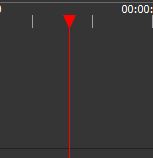 "
"
and an option that will select all
clips in behind the red line.
I am gitting tired of shift clicking.
emma-15
on 22 Apr 2019
This clip is partially before and partially after the cursor:
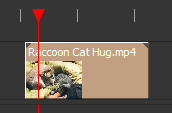
Should "select all clips in front of red line" only select clips which are fully in front (start and end), or should it also select clips which have the starting point before the cursor, but may or may not end after the cursor?
Simran-B
on 22 Apr 2019
Probably the, "only select clips which are fully in front (start and end)" one.
emma-15
on 23 Apr 2019
You should be able to box select by clicking and dragging in the timeline, as long as you don't start over a clip. Obviously not as fast as your request, but better than shift clicking every clip.
 NathanSalapat
on 23 Apr 2019
NathanSalapat
on 23 Apr 2019
Box select is a little hard when you have 10+ tracks stacked on top of each other.
emma-15
on 23 Apr 2019
The tracks can be made smaller, but that's kinda annoying too. An action to reduce the track size vertically to a minimum would be useful for such a scenario... Anyway, I still see a use for the requested selection actions.
Simran-B
on 23 Apr 2019
Related issues
 Symbian9
·
23Comments
Symbian9
·
23Comments
 LeandroStanger
·
25Comments
LeandroStanger
·
25Comments
 elsandosgrande
·
21Comments
elsandosgrande
·
21Comments
 naj59
·
33Comments
naj59
·
33Comments
 libalis
·
39Comments
libalis
·
39Comments
Most helpful comment
You should be able to box select by clicking and dragging in the timeline, as long as you don't start over a clip. Obviously not as fast as your request, but better than shift clicking every clip.