Olive: "Project" frame not updated after changing view units
In my workflow, it's more important adjust project duration than frames, so in my case I need to know the video lenght in time, not frames, after drag them to Project.
Could be possible to add a column showing time length or optionally let user change Duration from frames to time?
Thank you
 RafaelLinux
All 7 comments
I'm not sure what you're saying, your Project panel doesn't show duration as a timecode?
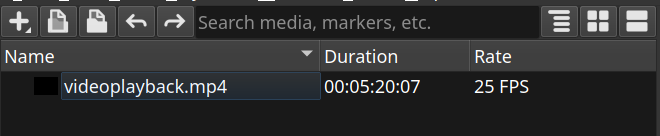
Check the View menu for timecode display options. Perhaps yours is set to "Frames".
 itsmattkc
on 17 Apr 2019
itsmattkc
on 17 Apr 2019
Well, I only use the AppImage version, out of the box, without touching Olive configuration at all. But curiously, in one PC, Olive show frames duration, and in other PC, the time is displayed (as in your screenshot). I didn't find any way to change the duration units in "Project" frame. Where is the option?
Thank you
RafaelLinux
on 18 Apr 2019
The View menu at the very top
itsmattkc
on 19 Apr 2019
Thank you, I don't find that option in the menu bar under "View", but anyway it's working fine now.
RafaelLinux
on 19 Apr 2019

These ones for reference, but I'm glad it's working now.
itsmattkc
on 19 Apr 2019
Well, thank you for your clarification. I did that selection before writing my previous reply. The only thing that changed it that occasion was the "Timeline" rule units. But after your screenshot, I tried it again. Same result, but ... surprise, I discovered where is the problem. The "Project" frame is not updated till user resizes "Projects" frame or Olive main window. That's why I didn't understand why you talked about changing it on "View" menu, cause my selection does nothing in "Project" frame.
RafaelLinux
on 19 Apr 2019
I add my config here, if it can help to solve the issue:
Olive version: Olive (March 2019 | Alpha | 35e0cb4)
Source: AppImage
Operating system: OpenSUSE 15 - 64 bits
CPU: Intel Core i5-6600K @ 3.50GHz
RAM: 16 GiB
GPU: NVIDIA Geforce GTX 1050 Ti 4GB (Driver ver 418.56)
RafaelLinux
on 19 Apr 2019
Related issues
 zakaria-chahboun
·
21Comments
zakaria-chahboun
·
21Comments
 Reaper10
·
31Comments
Reaper10
·
31Comments
 sobotka
·
35Comments
sobotka
·
35Comments
 Symbian9
·
23Comments
Symbian9
·
23Comments
 LeandroStanger
·
25Comments
LeandroStanger
·
25Comments
Most helpful comment
I'm not sure what you're saying, your Project panel doesn't show duration as a timecode?

Check the View menu for timecode display options. Perhaps yours is set to "Frames".