Ohara: [Manager] pipeline setting up connector using Mysql jdbc cannot proceed, giving "No suitable driver found for URL" warning
As title,
I created a broker, zookeeper, and a connect cluster with a "mysql-connector-java-8.0.12.jar".
Then I created a pipeline and added a jdbc source connector, after I filled in informations and tried to get tables from this button
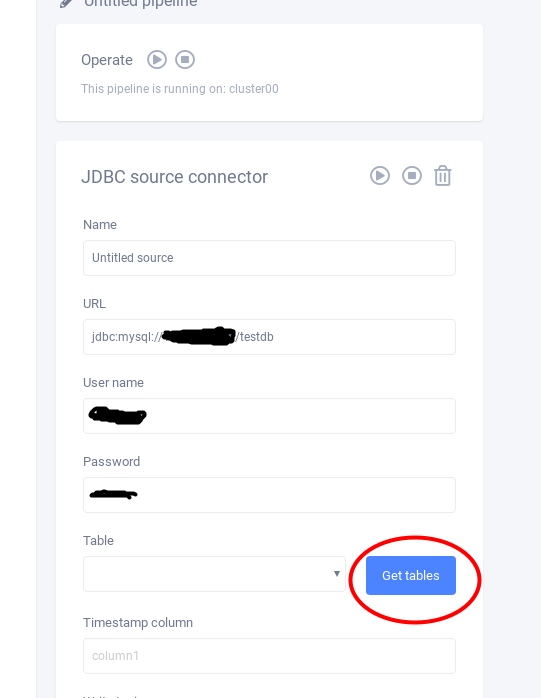
and it will pass this message: "No suitable driver found for URL" but the test will pass.
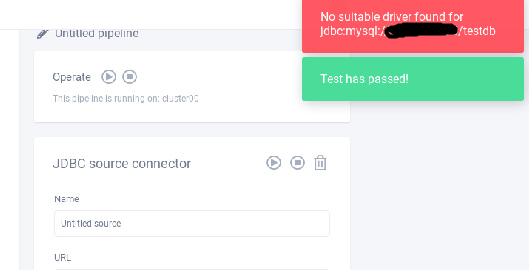
then I cannot proceed because of cannot get table names.
Using CentOS
~ # cat /etc/redhat-release
CentOS Linux release 7.5.1804 (Core)
------------------------------------------------------------
Chrome
版本 70.0.3538.77 (正式版本) (64 位元)
 alan791205
All 12 comments
Oh... we forgot to fix this for 0.4.
In the future, all connector pages are generated by connector’s setting(see docs/custom_connector.md) and the helper functions, such as getTable, are removed.
There are two solutions.
- remove the button from UI, and requires user to enter the table name manually
- Enable user to put driver when starting configurator so it works for MySQL
I prefer first solution since it should be a small patch.
@konekoya @eechih @wu87988622 any suggestions?
 chia7712
on 9 May 2019
chia7712
on 9 May 2019
目前我也傾向第 1 個解法。長遠之計,需要討論如何讓 metadata 可以描述更多的 UI。
 eechih
on 10 May 2019
eechih
on 10 May 2019
- remove the button from UI, and requires user to enter the table name manually
This does solve the problem. But the current UI which provides a dropdown for users to choose from is generally a better UI and easier to use for users. Is there any other ways that we can achieve same UI with metadata API...
 konekoya
on 10 May 2019
konekoya
on 10 May 2019
目前我也傾向第 1 個解法。長遠之計,需要討論如何讓 metadata 可以描述更多的 UI。
+1 as a temp fix
konekoya
on 10 May 2019
But the current UI which provides a dropdown for users to choose from is generally a better UI and easier to use for users. Is there any other ways that we can achieve same UI with metadata API...
As I mentioned before, this solution requires user to deploy the driver to Configurator for database. And it introduces many extra “know how” to user and it makes unfriendly use.
To resolve the gap, the backend needs to address many tasks.
- Introduce jdbc.Table type
- A official helper connector used to fetch the table information
- Establish connection between configurator and worker cluster
The side-effect is a huge latency but user don’t worry about the jar deployment to configurator.
chia7712
on 10 May 2019
Thanks for the detailed elaboration on this topic. This does sound like a lot of work need to be done before we can have the same UI with the new metadata API. I'll go with the solution one, so users can at least use jdbc connector for now :)
@eechih @wu87988622 thoughts before I file another issue to address this
konekoya
on 10 May 2019
I'll go with the solution one, so users can at least use jdbc connector for now :)
+1
BTW, #1107 is follow-up of resolving this issue totally.
chia7712
on 10 May 2019
I'll go with the solution one, so users can at least use jdbc connector for now :)
+1
eechih
on 10 May 2019
A temp UI fix will be tracked in #1109
@chia7712 Can we close this issue and in favor of #1107 and #1109
konekoya
on 10 May 2019
Can we close this issue and in favor of #1107 and #1109
Please attach the conclusion to the description and then close this issue. Thanks!
chia7712
on 10 May 2019
Please attach the conclusion to the description and then close this issue. Thanks!
Added :)
konekoya
on 10 May 2019
Thanks for raising this issue, @alan791205. Please follow #1107 and #1109 for updates :)
konekoya
on 10 May 2019
Related issues
konekoya
·
3Comments
eechih
·
5Comments
chia7712
·
3Comments
 HarryChiang143
·
5Comments
konekoya
·
5Comments
HarryChiang143
·
5Comments
konekoya
·
5Comments