Office-js: Windows Outlook localStorage events not firing
We are building a Vue.js powered add-in that makes use of various APIs in Office.js, one critical part of functionality for us is to sync the client state of the application between the taskpane and any child dialogs that it spawns, this also includes dialogs we spawn when processing the send event.
We started using localStorage to act as a 'cache' and then the client application would register a storage event listener, inspecting the key and then updating itself accordingly, but it seems that on Windows, whilst we do have access to localStorage the WebBrowser control that the iFrame runs in does not respect, or implement, the storage events.
After a bit of looking around on StackOverflow, there seems to be a suggestion this is infact 'by design' for the implementation of the control itself.
Expected Behavior
Storage event listeners will be executed when running on Windows Outlook.
Current Behavior
Storage event listeners are successfully registered, in so much that no errors are thrown when registering, but when local storage does actually change, these handlers are not fired.
Steps to Reproduce, or Live Example
- Link to live example: https://gist.github.com/jak-hammond/1497fc79a5b8eac50ae5a02c0759d9f7
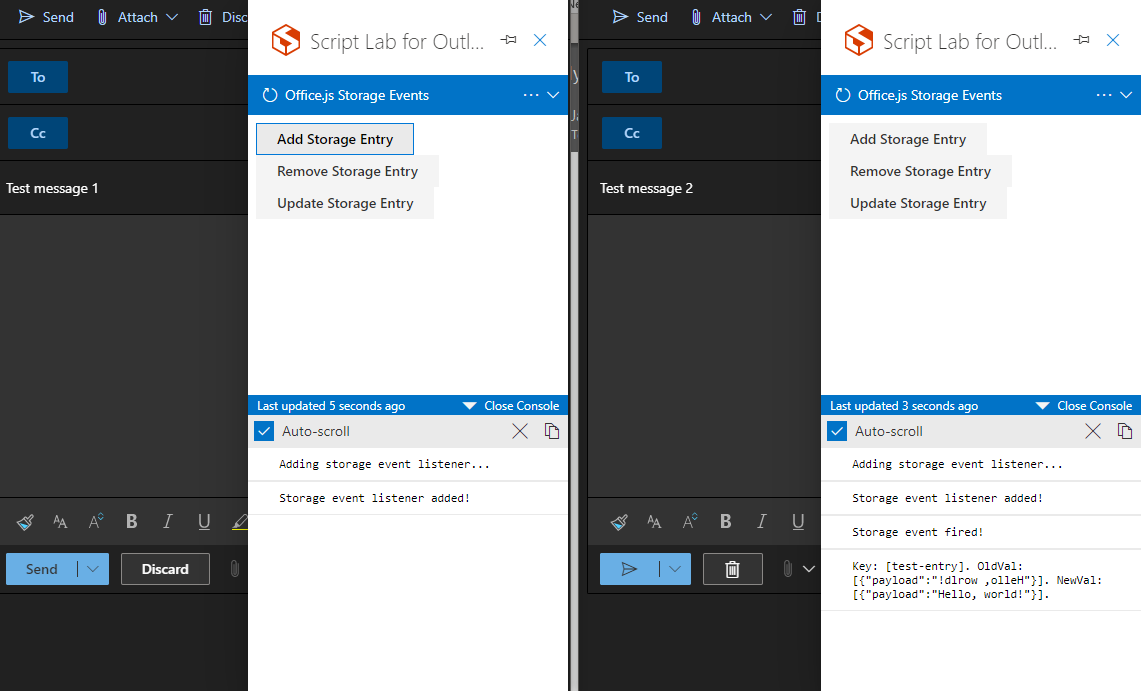
1) Create a new message and open the taskpane
2) Create a second new message and open the taskpane
3) You'll see the messages saying that the storage event listeners have been successfully registered
4) Click the add or update storage button, the console will not update
- If running the same test on Chrome and OWA, or Mac Outlook, you will see the storage event properties logged out
Context
We are trying to sync client app state between the various instances of the Office.js application; taskpane, dialog and on-send function file. Whilst we can pass information to the parent of the dialog, there is no way for the parent to pass new state to the child.
We cannot use the Broadcast API due to the lacking IE11 support and all the polyfills I could find seem to suggest falling back to storage events, which will not work, Likewise, we cannot use SharedWorkers or ServiceWorkers due the current limitations of the IE11 based WebBrowser Control, I believe there is a Chromium Edge based version coming early 2021 but we have no guarantee there won't be changes to how certain technology is implemented there as we are seeing now with these events.
As a result, we have had to fallback to polling localStorage ever second and timestamping the payloads we write there to figure out if the state of the various instances needs updating which is a break from the original event driven approach we were trying to keep. Whilst we could use a dedicated websockets, implemented via SignalR, this seems overkill for simple state syncing :(
Your Environment
- Platform [PC desktop, Mac, iOS, Office on the web]: PC Desktop
- Host [Excel, Word, PowerPoint, etc.]: Outlook
- Office version number: 2008 (Build 13127.20408 Click-to-Run) Current Channel
- Operating System: Windows 10
- Browser (if using Office on the web): Successful test of events firing can be seen in Chrome
Useful logs
- [ ] Console errors
- [x] Screenshots
- [ ] Test file (if only happens on a particular file)

 jak-hammond
All 10 comments
Can you try this out using WebView2. You can check that you have a recent enough build here.
Depending on your scenario, you can also try using roamingSettings.
 exextoc
on 21 Sep 2020
exextoc
on 21 Sep 2020
@exextoc I've moved over to the Beta Channel and currently have version 2010 (Build 13318.20000) installed which I think, according to the documentation you linked, should be everything that is required for WebView2 to be used as the embedded browser control. Unfortunately the behavior is still the same, no storage events are being fired, even with Edge Dev Tools open, I can see that the value in localStorage is being modified, removed and added based on the button I click but the storage event handler is not being fired.
The suggestion of roamingSettings is also sadly not a fit for what we are trying to do, the information we are storing is relating to a message that the user is composing at that point in time, it does not need to travel beyond their current composition session and there is still no event driven approach offered by them, so we would still be polling them every second to see if something had changed. I also assume there is a network call involved in getting/setting them which could potentially add more latency to the syncing of state which isn't really ideal either.
jak-hammond
on 22 Sep 2020
@jak-hammond - you're probably still running with the legacy WebView. Could you take a look at this post and make sure you have everything that is required for the new WebView control to be used by Office?
https://developer.microsoft.com/en-us/office/blogs/announcing-webview2-for-office-add-ins-platform/
 jargil
on 22 Sep 2020
jargil
on 22 Sep 2020
Okay, so after following the steps in the link you provided @jargil I can now confirm that using WebView2, I am able to get storage events firing between instances of the add-in.
I would however say that there is a deficiency in the documentation at; https://docs.microsoft.com/en-us/office/dev/add-ins/concepts/browsers-used-by-office-web-add-ins since it doesn't highlight the third point in the link that you provided, namely that I need to install the Preview of the control, the original documentation suggests that simply having a compatible version of Outlook and the new Chromium Edge installed is all that is needed to utilize WebView2 in Outlook when it seems, thanks to your additional advice, this is not the case.
Am I also right in assuming there is no intention from Microsoft to fix this issue in the existing WebView control and we will simply have to wait for WebView2 to hit Current Channel release, if so, is there an ETA that can be shared with us?

jak-hammond
on 23 Sep 2020
@jak-hammond - thank you for confirming this is working with WebView2. I'll pass your feedback to our documentation folks.
Your assumption is correct, there's no current plan to change this localStorage behavior in the current WebView control and we'll have to wait for WebView2 to rollout to all users. At this point there's no date I can share for when that will happen, this is going to be entirely be quality driven. We'll definitely post an update as soon as we have more details to share.
@exextoc - feel free to close this issue if there's nothing else you want to add.
jargil
on 23 Sep 2020
Okay, whilst not ideal, that clarification on the fix and backporting not being possible does help a lot, thanks @jargil :)
If the docs can be updated, I am sure it would save a lot of people headaches as trying to get WebView2 running, before your additional advice was far from simple, but we at least have it now, thanks for you assistance in this!
jak-hammond
on 23 Sep 2020
I will clarify in the docs that the WebView2 control is still a separate download from the installation of Edge. But more importantly, there now is a "way for the parent to pass new state to the child". We recently released a messageChild API that does this. Please see this article: Pass information to the dialog box.
 Rick-Kirkham
on 23 Sep 2020
Rick-Kirkham
on 23 Sep 2020
@Rick-Kirkham that's good to hear about the messageChild method, we knew it was coming but we weren't sure of an actual date. A question around that, in the link you put, it said support for Outlook is currently underdevelopment, is this still the case or is it now available for us to use?
Also, I know we can query if the client we are currently running on supports a specific requirement or function, seeing that that Dialog API is treated separately, does this mean that it is decoupled from the requirement sets, so as long as the users client is running the correct version of Office, it'll have this new Dialog API functionality?
jak-hammond
on 23 Sep 2020
I don't have anything else to add, so I've removed myself from the assignees. Let me know if you have questions regarding what I said above.
jargil
on 29 Sep 2020
Nope, I think we've solved at least got an answer to the initial issue so I'll close this now.
jak-hammond
on 29 Sep 2020
Related issues
 mattblackdev
·
4Comments
mattblackdev
·
4Comments
 rvanlaak
·
4Comments
rvanlaak
·
4Comments
 Jarch09
·
3Comments
Jarch09
·
3Comments
 ndeeH
·
5Comments
ndeeH
·
5Comments
 binarykitchen
·
5Comments
binarykitchen
·
5Comments