Office-js: Office.context.mailbox.item.recurrence.getAsync throws error
When making a call to Office.context.mailbox.item.recurrence.getAsync on an existing recurring appointment it throws the following error:
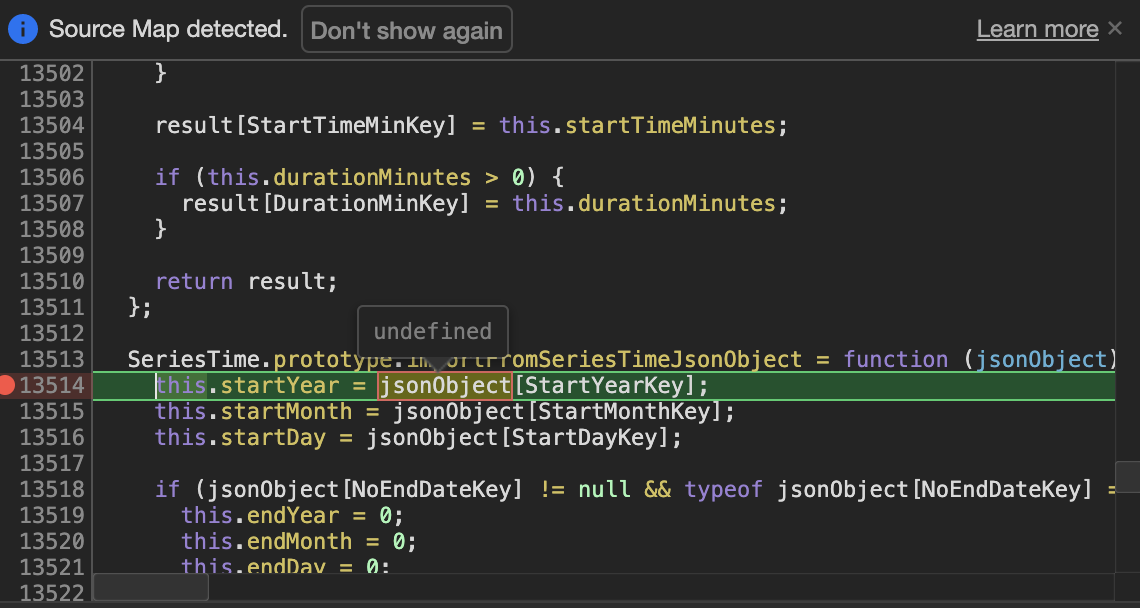
Uncaught TypeError: Cannot read property 'startYear' of undefined
    at SeriesTime.importFromSeriesTimeJsonObject (outlook-web-16.01.debug.js:13514)
    at seriesTimeJsonConverter (outlook-web-16.01.debug.js:14879)
    at outlook-web-16.01.debug.js:9783
    at Object.invokeResponseCallback [as callback] (outlook-web-16.01.debug.js:9819)
    at _receive (outlook-web-16.01.debug.js:4650)
Expected Behavior
Returns the entire Recurrence object for the appointment series.
Current Behavior
The above error is thrown. If I debug SeriesTime.prototype.importFromSeriesTimeJsonObject it looks like the jsonObject parameter being passed is occasionally undefined causing the aforementioned error.
Steps to Reproduce, or Live Example
- Access the outlook web application
- Create a recurring appointment (in my case I've been trying a daily recurrence for 4 days).
- Open the recurrence for editing (single occurrence "this" edit, "this and followng" edit, or entire series edit)
- Attempt to make the
Office.context.mailbox.item.recurrence.getAsynccall.
Context
I need the recurrence information to properly display information to the users of our outlook add-in.
Your Environment
- Platform [PC desktop, Mac, iOS, Office on the web]: Office on the web
- Host [Excel, Word, PowerPoint, etc.]: Outlook
- Office version number: latest of office on the web on August 4th 2020
- Operating System: MacOS
- Browser (if using Office on the web): Chrome
Useful logs
- [x] Console errors
- [x] Screenshots
- [ ] Test file (if only happens on a particular file)
Uncaught TypeError: Cannot read property 'startYear' of undefined
at SeriesTime.importFromSeriesTimeJsonObject (VM14 outlook-web-16.01.debug.js:13514)
at seriesTimeJsonConverter (VM14 outlook-web-16.01.debug.js:14879)
at VM14 outlook-web-16.01.debug.js:9783
at Object.invokeResponseCallback [as callback] (VM14 outlook-web-16.01.debug.js:9819)
at _receive (VM14 outlook-web-16.01.debug.js:4650)

 gguiceaccru
All 37 comments
Thanks for following our template when opening this issue! It will help our team triage faster. I assigned this to the Mac Outlook team. Cheers, lindalu
 lindalu-MSFT
on 5 Aug 2020
lindalu-MSFT
on 5 Aug 2020
We are able to reproduce this from our side. Thanks for reporting this issue. It has been put on our backlog. We unfortunately have no timelines to share at this point
 exextoc
on 5 Aug 2020
exextoc
on 5 Aug 2020
I am also experiencing this error when just generally attempting to retrieve recurrence using .getAsync. Whether the appointment is new or existing is not a factor. The call fails to resolve or reject consistently on every single occasion, with the error shown above logged in the console.
 lstableford-mb
on 5 Aug 2020
lstableford-mb
on 5 Aug 2020
We are able to reproduce this from our side. Thanks for reporting this issue. It has been put on our backlog. We unfortunately have no timelines to share at this point
This is a significant issue as this is happening for all recurrence patterns. Please provide us with an ETA of a fix.
 chathumdavton
on 6 Aug 2020
chathumdavton
on 6 Aug 2020
I also met this problem on both safari and chrome. Hope this will be fix soon.
 SWei1234
on 11 Aug 2020
SWei1234
on 11 Aug 2020
Apologies for the delay. We are working on fixing this. Fix will be out soon.
exextoc
on 12 Aug 2020
@exextoc Cool! : )
SWei1234
on 12 Aug 2020
Hi @exextoc
Can we have an ETA about this?
Or which month will Microsoft release this?
Thanks
SWei1234
on 18 Aug 2020
I am also facing the same issue with an Outlook add-in.
 t-soares
on 18 Aug 2020
t-soares
on 18 Aug 2020
@exextoc any update on release timeline? We have in production customers impacted by this.
 simon-kavanagh
on 24 Aug 2020
simon-kavanagh
on 24 Aug 2020
The fix is ready and is being deployed, it should be available globally by 31/08
exextoc
on 25 Aug 2020
Hi, it looks like it’s still not upgraded. When can we expect to see the fix in production?
 ghivert
on 31 Aug 2020
ghivert
on 31 Aug 2020
Hi @exextoc
It looks still not fixed yet. Is the deploy delay?
Thanks
SWei1234
on 1 Sep 2020
Apologies, the deployment got delayed. Fix should now be available early next week.
exextoc
on 2 Sep 2020
@exextoc
Got it. Will check it after Microsoft's deploy.
SWei1234
on 2 Sep 2020
Hi @exextoc
Hi, I'm glad to see this morning that this problem doesn't recur.
But a new problem arose.
After I schedule a new recurring meeting with zoom add-in, Then I choose 'Discard' and the meeting still saved.
Is hte logic changed? Before this deploy, the meeting will not be saved When I click 'Discard'.
Any idea?
Thanks
SWei1234
on 4 Sep 2020
@SWei1234 There is no logic change here. We are not able to repro this at our end. Can you please share repro video?
exextoc
on 4 Sep 2020
Hi @exextoc, @SWei1234
Same here.
I have an Add-In in development and need to save the recurring appointment during the creation.
If I choose 'Discard', the appointment is still saved in the calendar.
This only affects recurring appointments, for normal single appointments it works as expected.
 Texaner
on 4 Sep 2020
Texaner
on 4 Sep 2020
@Texaner Can you please share OWA build number?
exextoc
on 4 Sep 2020
Hi,
This is the error when clicking Discard on a recurring meeting.
"Cannot read property 'isMeeting' of null''

 MrAshRhodes
on 4 Sep 2020
MrAshRhodes
on 4 Sep 2020
@Texaner Can you please share OWA build number?
@exextoc
Where can I find the build number?
In the source code I found the following:
    <meta name="scriptVer" content="20200831001.08" />
    <meta name="physicalRing" content="WW" />
    <meta name="environment" content="Prod" />
    <meta name="preload" content="true" />
    <meta name="baseUrl" content="//outlook-1.cdn.office.net/owamail/20200831001.08/" />
    <meta name="backupUrl" content="//outlook-2.cdn.office.net/owamail/20200831001.08/" />
Is that enough for you?
Texaner
on 4 Sep 2020
If this is any help, in the http response headers i found the following.
x-owa-owsversion: V2018_01_18
x-owa-version: 15.20.3348.16
MrAshRhodes
on 4 Sep 2020
@exextoc
nx-owa-owsversion: V2018_01_18 x-owa-version: 15.20.3348.16
Texaner
on 4 Sep 2020
Hi @exextoc
Sure.
Access Passcode: diMHH#R0
SWei1234
on 4 Sep 2020
Here is the exact error. Maybe this is helpful

Texaner
on 4 Sep 2020
@SWei1234 @Texaner @MrAshRhodes Thank you for sharing details on issue. This will be helpful. We are investigating this issue.
exextoc
on 4 Sep 2020
Quick update, the error is still persistent. although if you click on the "Try Again" the meeting will get cancelled.
I'm guessing the fact that the meeting exists on the second time the 'isMeeting' value is _true_ and can remove the meeting from the calendar.
Hi,
This is the error when clicking Discard on a recurring meeting."Cannot read property 'isMeeting' of null''
MrAshRhodes
on 7 Sep 2020
This issue has been automatically marked as stale because it is marked as needing author feedback but has not had any activity for 4 days. It will be closed if no further activity occurs within 3 days of this comment. Thank you for your interest in Office Add-ins!
![msftbot[bot] picture](https://avatars.githubusercontent.com/in/26612?v=4&s=40) msftbot[bot]
on 11 Sep 2020
msftbot[bot]
on 11 Sep 2020
Hi @exextoc
Is there any ETA about this?
Thanks
SWei1234
on 11 Sep 2020
This issue has been automatically marked as stale because it is marked as needing author feedback but has not had any activity for 4 days. It will be closed if no further activity occurs within 3 days of this comment. Thank you for your interest in Office Add-ins!
msftbot[bot]
on 15 Sep 2020
Hi @exextoc
Is the repair time of the problem derived from the repair of the problem available?
Thanks
SWei1234
on 15 Sep 2020
Hi @exextoc we are having the same problem here with our Outlook add-:in: no Recurrence object is returned for the appointment series.
Can you please update us on on your investigation ?
It sounded like a solution was about to be released and then no news, and then a bot message that the issue will be closed !
 jbaptistehuguenin
on 16 Sep 2020
jbaptistehuguenin
on 16 Sep 2020
Hey all,
Unfortunately, we are still investigating this issue. Please do use the Graph API as a workaround for getting the recurrence of the meeting till this is resolved: https://docs.microsoft.com/en-us/graph/outlook-schedule-recurring-events
exextoc
on 19 Sep 2020
Hi, looks like there are multiple issues being talked about here, causing confusion.
- recurrence.getAsync throws error / returns null - This issue has been fixed from our end on OWA. recurrence.getAsync() shouldn't be returning null anymore. We aren't able to reproduce this bug from our end any more. If you're in organizer mode, make sure you call recurrence.getAsync() and not item.recurrence.
Please verify this on your end and let us know if you're still able to reproduce it.
- Discarding a meeting still saves it - This is not related to the original issue, so please create a new issue for it.
exextoc
on 23 Sep 2020
Hi @exextoc @jbaptistehuguenin @Texaner @MrAshRhodes
I created an new ticket for this issue:
https://github.com/OfficeDev/office-js/issues/1405
Thanks
SWei1234
on 24 Sep 2020
This issue has been automatically marked as stale because it is marked as needing author feedback but has not had any activity for 4 days. It will be closed if no further activity occurs within 3 days of this comment. Thank you for your interest in Office Add-ins!
msftbot[bot]
on 28 Sep 2020
This issue has been closed due to inactivity. Please comment if you still need assistance and we'll re-open the issue.
msftbot[bot]
on 1 Oct 2020
Related issues
 gordonmleigh
·
3Comments
gordonmleigh
·
3Comments
 barisbikmaz
·
4Comments
barisbikmaz
·
4Comments
 sshukurov
·
4Comments
sshukurov
·
4Comments
 kushwahav
·
3Comments
kushwahav
·
3Comments
 Alturos
·
4Comments
Alturos
·
4Comments
Most helpful comment
@SWei1234 @Texaner @MrAshRhodes Thank you for sharing details on issue. This will be helpful. We are investigating this issue.