Office-js: Office.context.mailbox.item does not return current selected item
I am using Outlook Office 365 OWA and our client use our add-in (taskpane addin). We found out that users that have the 'preview pane' (in Dutch: 'leesvenster') on the left of the screen, our client have issues with our add-in. The add-in does not 'refresh' itself after selecting another e-mail.
This does work in the Outlook 2016 desktop client and also does work when the preview pane was turned off.
Expected Behavior
De add-in should reload itself when another mail was selected. The add-in supports 'pinning' but somehow in this scenario the add-in stays visible, also without pinning.
Current Behavior
The add-in is not reloading of picking changes that the current selected item is changed.
Steps to Reproduce, or Live Example
I'm using the following code to read out for example the current selected item subject.
    Office.onReady(function(info) {

            var item = Office.cast.item.toItemRead(Office.context.mailbox.item)
            console.log(item.subject);

    });
We also see that whenever the 'pinning' option is enabled, the on change handler does not pick up the change either.
            Office.context.mailbox.addHandlerAsync(Office.EventType.ItemChanged, function(){

                console.log("item is changed!");

            });
When our add-in is invoked (and already visible) we see a javascript error. Maybe this is preventing the reload of the add-in.

Context
Most of our clients use Outlook 2016 desktop but some clients use the web version and have to manually reload the page every time.
Your Environment
- Platform [PC desktop, Mac, iOS, Office Online]: Outlook 365 Web (platform does not matter)
- Host [Excel, Word, PowerPoint, etc.]: Outlook 365
- Browser (if using Office Online): Chrome (latest)
 fkranenburg
All 30 comments
@fkranenburg Do you have conversation view enabled?
What do you mean by when preview pan is in left ? Can you share a screen shot?
Does this happen for other pinnable Add-ins as well?
 exextoc
on 3 May 2020
exextoc
on 3 May 2020
Yes I have the conversation view enabled. I just tried to reproduce with the add-in demo and it works correct. Then I tried to reproduce again in our add-in and it works. Somehow it is fixed. The javascript error 'openTaskPane' is gone. I wonder what happened but this issue can be closed.
fkranenburg
on 4 May 2020
@exextoc The issue is not solved. But I know how to reproduce now. I made a screen recording to show how to reproduce. See the screen recording here. I have installed an add-in from the store by the name of 'Attachments' so you can reproduce as well. The same problem also happens with our add-in.
De problem is when I turn off the conversation view the problem is visible en reproducable.
fkranenburg
on 13 May 2020
We are able to reproduce the issue. Thanks for reporting this issue regarding pinned add-ins. It has been put on our backlog. We unfortunately have no timelines to share at this point
exextoc
on 14 May 2020
@exextoc I have the same issue with outlook web. At first Add-in-opening (via context menu at the current email), Office.context.mailbox.item returns the correct current email.
At second, third, ... Add-in-opening at the particular email the Office.context.mailbox.item returns the item from first opening.
If email is opened via double click (new browser window), it works, but this is no solution for us. We have hundreds of users who use this AddIn
 wuarmin
on 26 May 2020
wuarmin
on 26 May 2020
@exextoc
Outlook live free account:
Also seeing this issue where the data from the 1st email opened always returned.
In other cases I see Office.context.mailbox.item is returning undefined for some emails.
To @wuarmin's point opening via double click does return the item data.
To @fkranenburg's point turning conversation off reproduces this. With it on the issue goes away.
Outlook 365 account both pinned or unpinned with conversation view off is not updating the item data.
 cbishop-fv
on 26 May 2020
cbishop-fv
on 26 May 2020
We also experience the same problem with Outlook Web. The strange thing is that it doesn't fail for all users. My coworker/developer runs exactly the same code in his browser and Office.context.mailbox.item changes correctly when he changes the current mail.
It would be great if someone can shed some light on this.
Is there a way to reset/clear the Office.context ?
 wilcotroost
on 27 May 2020
wilcotroost
on 27 May 2020
We recently fix this problem and now fix should be available to all users. Can you please check if issue is resolved for your users? Thanks.
exextoc
on 28 May 2020
I am very happy with your prompt response but the issue is not resolved for me...
wilcotroost
on 28 May 2020
@exextoc I can confirm that the issue is not resolved for me.
The way it reacts is changed. The add-in is closed when switching to another mail. But after switching e-mail and activating the add-in again, the first mail selected is returned in Office.context.mailbox.item, not the current selected e-mail.
fkranenburg
on 28 May 2020
@exextoc The bug unfortunately is not solved for me either.
wuarmin
on 28 May 2020
@exextoc from what I can see the url in the browser's address bar doesn't change upon selecting different email from the list when "Reading pane" mode is turned on.
 sagarpilkhwal
on 29 May 2020
sagarpilkhwal
on 29 May 2020
I can also confirm I'm seeing the same thing. It only happens when conversation view is turned OFF. If conversation view is on, navigating between messages changes the item to the correct item.
 sirtwist
on 2 Jun 2020
sirtwist
on 2 Jun 2020
We have added this to our backlog. Unfortunately, we have no timelines to share at this point.
exextoc
on 3 Jun 2020
We are also having a lot of customer complaints about this issue.
It's over 1000 affected users.
 swatCap
on 5 Jun 2020
swatCap
on 5 Jun 2020
As I described here: [https://github.com/OfficeDev/office-js/issues/1052#issuecomment-639443706]
we have the same problem, but only for shared mailboxes: ItemChange fires, but does not change content of context.mailbox.item. The content is 'stuck' on the first selected.
It the e-mail is opened in a new window, the content of mailbox.item is updated for this particular item/e-mail and everything works as expected, while returning to the main window nothing has changed. It has no effect re-opening the addin unless you visit an item in your main inbox in between.
 oyvindo
on 8 Jun 2020
oyvindo
on 8 Jun 2020
The above just spread to inbox as well. Basically the addin app is usless, in best case complicated to use, for us in owa until this issue is resolved.
oyvindo
on 8 Jun 2020
@oyvindo Was already happening in standard inboxes but strangely not for all users. I agree with your conclusion regarding the use of the AddIn interface. Let's keep our fingers crossed that microsoft finds so time to fix this soon...
wilcotroost
on 8 Jun 2020
@exextoc a lot of our users are starting complaining about this issue. Can you please update this issue with a timeline? Is there somebody working on it?
We are telling our users to use the desktop client for now, but this is really not acceptable for most users...
fkranenburg
on 10 Jun 2020
Thanks for your patience here, we have a fix for the issue. Depending on the release channel the customer is on, getting an updated build can take up to 8 weeks.
exextoc
on 10 Jun 2020
Now context is the Outlook app. (as owa is pending ...)
The following may be of consideration for you working with reading messages in an outlook addin. It is some what related to the original issue. Any way I believe you are the appropriate audience.
I'we noticed that appointment messages delays initialization of Office.context.mailbox.item in the itemChangeHandler if args.initialData is not accessed:
const handleItemChanged = args => {
  console.log('item pre access initialData', Office.context.mailbox.item);
  const isEmail = args.initialData.itemType === 1;
  console.log('item post access initialData', Office.context.mailbox.item);
  if (isEmail) {
    console.log('It is an e-mail');
  } else {
    console.log('It is NOT an e-mail');
  }
};
In our case, we only handle regular e-mails.
Scenario is:
- Select a regular e-mail => Office.context.mailbox.item has value in the first and second console.log
- Select an appointment message => Office.context.mailbox.item is null in the first console.log but has value in the second
For some reason the second console.log comes two times (I cannot figure out why) - Select a regular e-mail => Office.context.mailbox.item is still null in the first console.log but in the seccond, it has got value and initialData.itemType is 1.
The second console.log comes two times - Select an appointment message.
The second console.log comes only once
My point is that if you only rely on Office.context.mailbox.item in the eventhandler, item won't have a value while selecting, if you just selected an appointment. Unless you access initialData first.
Office.context.mailbox.item has a value, item.message is always "message" which may make sense while itemClass i different. Still, I would find it more likely to have Office.context.mailbox.item.itemType aligned with the enum value in initialData.itemType.
oyvindo
on 11 Jun 2020
@oyvindo Can you fork this into a separate issue? also share the platform (Windows / Mac)
exextoc
on 12 Jun 2020
I have seen this issue in a pinned outlook add-in. We have seen this primarily on Windows 10 Professional version, on the outlook web application.
I have had more difficulty reproducing this issue in Windows 10 Home version, in addition have not seen this issue in Mac, OWA.
Maybe some issue with caching? Did a lot of debugging on this issue and the ItemChanged handler is being called -- however the Office.context.mailbox.item is not actually updating and the same object exists when selecting a new email.
 derekmurph
on 12 Jun 2020
derekmurph
on 12 Jun 2020
@fkranenburg We have fixed this issue of "Office.context.mailbox.item does not return current selected item" and its 100% rolled out also for OWA. Close the issue, once you verify the fix on your end.
exextoc
on 16 Jun 2020
Now context is the Outlook app. (as owa is pending ...)
The following may be of consideration for you working with reading messages in an outlook addin. It is some what related to the original issue. Any way I believe you are the appropriate audience.
I'we noticed that appointment messages delays initialization of Office.context.mailbox.item in the itemChangeHandler if args.initialData is not accessed:
const handleItemChanged = args => {
  console.log('item pre access initialData', Office.context.mailbox.item);
  const isEmail = args.initialData.itemType === 1;
  console.log('item post access initialData', Office.context.mailbox.item);
  if (isEmail) {
    console.log('It is an e-mail');
  } else {
    console.log('It is NOT an e-mail');
  }
};
In our case, we only handle regular e-mails.
Scenario is:
- Select a regular e-mail => Office.context.mailbox.item has value in the first and second console.log
- Select an appointment message => Office.context.mailbox.item is null in the first console.log but has value in the second
For some reason the second console.log comes two times (I cannot figure out why)- Select a regular e-mail => Office.context.mailbox.item is still null in the first console.log but in the seccond, it has got value and initialData.itemType is 1.
The second console.log comes two times- Select an appointment message.
The second console.log comes only onceMy point is that if you only rely on Office.context.mailbox.item in the eventhandler, item won't have a value while selecting, if you just selected an appointment. Unless you access initialData first.
Office.context.mailbox.item has a value, item.message is always "message" which may make sense while itemClass i different. Still, I would find it more likely to have Office.context.mailbox.item.itemType aligned with the enum value in initialData.itemType.
Can you fork this into separate issue?
exextoc
on 16 Jun 2020
@exextoc Just tested but I still have the same problems in OWA. Turning ON the conversation display option still works as a workaround. I'll retry tomorrow.
fkranenburg
on 16 Jun 2020
@exextoc Same here... no fix yet
wilcotroost
on 16 Jun 2020
I can verify that this is still not working in OWA.
I turned off conversation view. First image is me selecting the first message. Second image is me selecting the second image. You can see in the console that the subject has not changed. When conversation view is turned on, the subject (i.e. the item) changes as you select a new message.
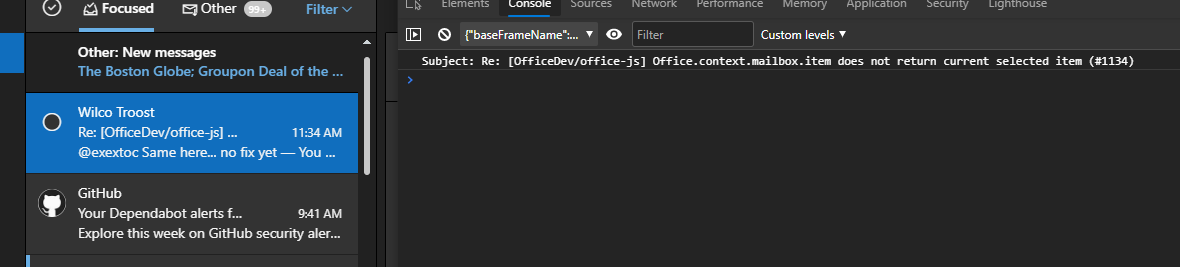
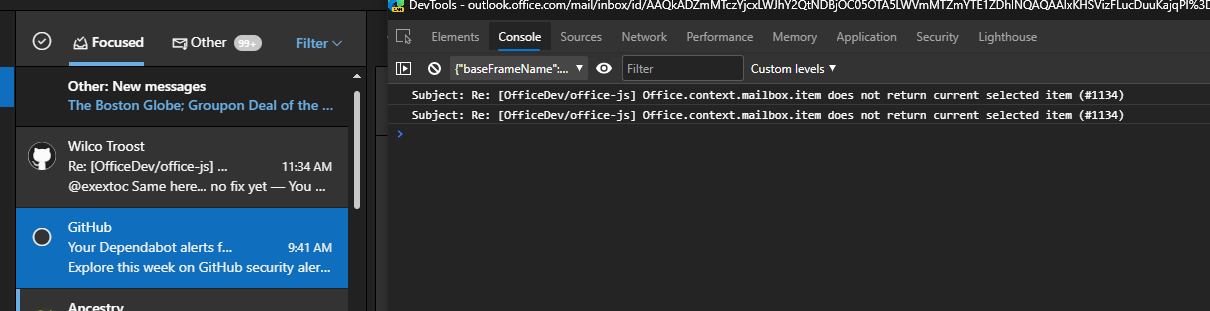
sirtwist
on 16 Jun 2020
We checked again. It is fixed but it's not 100% deployed in WW ring. Sorry for the confusion. Please wait till the end of this week.
exextoc
on 17 Jun 2020
Just did some tests and it looks like this issue is finally fixed! Thanks, I will close this issue now.
fkranenburg
on 22 Jun 2020
Related issues
 jacobx1
·
4Comments
jacobx1
·
4Comments
 cawise
·
4Comments
cawise
·
4Comments
 dimitri-bourreau
·
4Comments
dimitri-bourreau
·
4Comments
 tido-ms
·
3Comments
tido-ms
·
3Comments
 dgrudenic
·
3Comments
dgrudenic
·
3Comments
Most helpful comment
Thanks for your patience here, we have a fix for the issue. Depending on the release channel the customer is on, getting an updated build can take up to 8 weeks.