Office-js: Content Pane Sizing Error and Critical Limitation
There is a bug, inconsistencies and a critical-limitation imposed on the Content Pane in the JavaScript API and Excel Desktop.
Inconsistencies: There is a limitation to the width and height of a Content Pane at 1000 x 1000px. This limit is imposed when resizing via mouse in Excel Desktop and the JavaScript API. This (via mouse) is not true in Excel Online where the size can be set and saved to any size via mouse. (_NB. We are using this anomaly in our app as a key workaround so do not want it resolved unless Item 3 below is implemented_).
Bug: In Excel Desktop, if the columns or rows underneath the Content Pane have their size increased, the Content Pane follows this adjustment (when Format Shape > Properties are set to Move and size with cells) and will become wider or higher than the 1000px limitation and can be saved and re-opened on either the Desktop or Online at the saved size. However, if the Content Pane is again resized via the mouse the size limitation kicks in again and the pane size snaps back.
Critical Limitation: It would make the Content Pane consistent and open up a huge number of innovation opportunities to remove the current 1000 x 1000px limitation in the JavaScript API and Desktop Content Panes in Excel.
Positioning & Resize: The ability to position and resize the Content Pane via the JavaScript API and Command Add-in would offer powerful opportunities for new applications and extending Excel functionality. See User Voice request
 david-ps
All 38 comments
@david-ps thanks for raising this issue (and for logging the User Voice request as well). Just a heads-up that I'm going to transfer this issue to the OfficeDev/office-js repository, which members of the product team monitor for issues about Office Add-ins platform and JavaScript APIs.
 kbrandl
on 16 Feb 2019
kbrandl
on 16 Feb 2019
@JuaneloJuanelo can you provide any input on this issue, or if not, do you know who can?
kbrandl
on 16 Feb 2019
@lumine2008 Here's the documentation link related to the proposed fix https://bit.ly/2T13aHk
david-ps
on 19 Feb 2019
Thanks @david-ps , this is by design, due to performance, if we remove this limitation, the impact on the foodprint is significant.
as we support typically supports up to 400% zoom. With 1000x1000 restriction, the snapshot could be upto 4000x4000 in 400% zoom. if beyond this limitatio, it has a significant impact on the memory footprint, hence we decided to limit the size to 1000x1000.
 lumine2008
on 20 Feb 2019
lumine2008
on 20 Feb 2019
Thanks for the advice @lumine2008
What is the "snapshot" and zoom?
This limit is not imposed on Content pane size in Excel Online and does not appear to have any performance issues that we have seen. Is it different?
This limit is not imposed on Content Pane size in PowerPoint. Is there no performance issue there?
Could the size limit be increased 2000x2000 ?
david-ps
on 20 Feb 2019
I understand what the zoom is but not the snapshot?
david-ps
on 20 Feb 2019
it's memory snapshot.
As you know limited to 1000x1000 is the performance consideration. could you please share us your scenario, why you need it beyond that limitation?
lumine2008
on 20 Feb 2019
We are seeking to use the Content Pane for a typical gantt and other tasks related views of combined Excel and external data sources. The limitation of 1000x1000 is too small to be used as an effective UI for this and other potential applications we are considering for OfficeJS. It seems that the limitation of 1000 selected for performance considerations may be somewhat arbitrary hence our request to extend (at least the width) to 2000+
PS. We also considered using the Custom Dialog but it has no messageChild (see UserVoice)
david-ps
on 21 Feb 2019
Also please comment on the implications of multiple Content Panes on the same worksheet (or workbook) eg. 2x 1000x1000 Content Panes. It is possible there are many Content Panes from different vendors in the same workbook. Are the same performance considerations at play?
david-ps
on 22 Feb 2019
Thanks @david-ps , we understand your scenario, i will add my colleague to provide more insights about your question. Thanks.
lumine2008
on 22 Feb 2019
@david-ps, We can certainly add multiple content add-in one sheet/book. But, please note that we do not have a mechanism for direct communication between two different content add-ins. One workaround for this is to use databinding and bindingchanged event.
lumine2008
on 23 Feb 2019
@lumine2008 Thanks for confirming a user can add multiple content add-ins in one sheet/book.
My question was "Are the same performance considerations at play?" By same I mean, you are restricting Content Pane size to 1000x1000 because of stated performance considerations. Does having multiple Content Panes (either different apps or instances) affect performance in the same way?
david-ps
on 23 Feb 2019
@david-ps - Hey David! I work on the Office Platform team with Raymond. To build on the "snapshot" feature that Raymond mentioned, this is the ability to save a content image as a "saved image" (see attached screenshot). In the event that we have content add-ins exceeding 1000px, we run into issues with the memory footprint during the save. This is why the current restriction exists. Is this a feature that you foresee your users using?
To answer your other question: yes, having multiple content add-ins will affect performance, but not in the same way (it is not a memory issue)
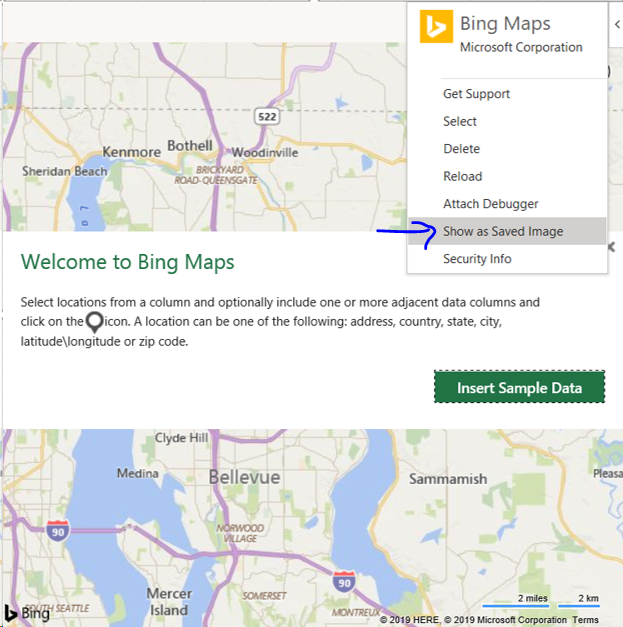
 lliu113
on 25 Feb 2019
lliu113
on 25 Feb 2019
@lliu113 Hi Lillian, thanks for the details about why this constraint has been imposed. Yes, this critical restriction prohibits multiple apps and use cases for Excel that users are seeking and is a deal breaker for some of our planned development.
I do not understand why this restriction is not imposed in PowerPoint where the same OfficeJS Content Panes can "Show as Saved Image" so I assume inconsistency with PowerPoint and Excel Online is unique to Excel Desktop? I have raised the User Voice request and would encourage your team to resolve this major flaw asap. Are their plans or a timeline to impose this restriction on PowerPoint and Excel Online?
If nothing more can be done and there is no workaround then this ticket can be closed.
david-ps
on 26 Feb 2019
@lliu113 Hi Lillian, We are urgently seeking an answer to the questions I asked above that are key to how we proceed on a project. Are there any plans to impose the 1000x1000 restriction for Content Panes on PowerPoint and Excel Online?
david-ps
on 1 Mar 2019
Could I please get an answer to this question... Are there any plans to impose the 1000x1000 restriction for Content Panes on PowerPoint and Excel Online? @lliu113 @lumine2008 @kbrandl
david-ps
on 4 Mar 2019
Hey @david-ps , appreciate the reping, sorry for the late response! You've brought up some great points on the inconsistencies, I will make sure we follow-up internally. Does your team rely on the lack of restriction in P/XL online? We have not seen this bug reported elsewhere, so if they are not blocking you, we have no plans to impose the restrictions.
lliu113
on 4 Mar 2019
@lliu113 Hi Lillian, thanks for getting back to me. Yes we do rely completely on there being no restriction on Content Pane size in PowerPoint and Excel Online, so great to hear you confirm there are no plans to impose those restrictions. We do not believe it to be a bug, rather a critical feature. Please let me know if you have any plans to remove this restriction in the Excel Desktop.
david-ps
on 4 Mar 2019
Hi @david-ps , I’ve re-opened this issue because we’re looking into what can be done about it. This restriction was originally added due to performance concerns related to the snapshot images that the Office clients take, but your scenario is an interesting one, and we feel it’s worth looking into what can be done. We’ll update the thread in a few weeks when we know more, and thanks for your patience on this!
 dmahugh
on 28 Jun 2019
dmahugh
on 28 Jun 2019
Hi @dmahugh, @keyur32 Thanks for reconsidering this issue especially in light of opportunities arriving with the new Fluid Framework.
@lumine2008 commented the reason this limitation has been imposed…“is by design, due to performance, if we remove this limitation, the impact on the footprint is significant as we support typically supports up to 400% zoom. With 1000x1000 restriction, the snapshot could be up to 4000x4000 in 400% zoom. if beyond this limitation, it has a significant impact on the memory footprint, hence we decided to limit the size to 1000x1000”
It seems to me that if the memory footprint limitations cannot be resolved, then you may be able to bring a workaround closer to the driving reason/issue, eg. by limiting the use/scope of “Show as saved image”. Here’s an idea… When user tries to select the “Show as saved image” option, the Content Pane size (including zoom) is considered and if it exceeds 4000x4000, then a dialog is generated explaining the limitation so the user can resize it to fit.
david-ps
on 29 Jun 2019
@david-ps - great minds think alike! That's one of the options we are evaluating internally. Was popping on here to ask whether your scenario required the "Show as saved image" feature, but it sounds like it does not?
lliu113
on 1 Jul 2019
@lliu113 Great to hear you have few options! Yes, "Show as saved image" is an important feature for us and I believe a 4000x4000 limit is viable.
david-ps
on 2 Jul 2019
@david-ps - Ah, got you! So, just to clarify - your scenario DOES require the "show as saved image" feature, but imposing a limitation of 4000 x 4000 is acceptable?
lliu113
on 8 Jul 2019
@lliu113 Yes, in our scenario "show as saved image" is required and a 4000x4000 limitation is acceptable.
david-ps
on 9 Jul 2019
I would like to contribute our use case to this conversation.
Our add-in is a dashboard builder content pane extension for Excel. We display a number of data visualization widgets including charts, maps, gauges and more. Specifically, we include a number of data visualization widgets all contained within the same add-in, as opposed to having multiple add-ins each displaying a single visualization. The reason for this is that we have interactive data selection and drill down capabilities between the visualizations. As there is currently no mechanism to communicate between separate instances of the same add-in, we require all visualizations to be contained within the same add-in.
We are specifically restricted by the 1000x1000 limitation, it's our number one pain point. Additionally, we are restricted by the fact that a content pane can exceed the 1000x1000 limitation if the cells behind the content pane are resized, the net results is that the content pane will get stretched. However, any resize operations on the content pane after it has been supersized result in the content pane snapping back to the 1000x1000 limitation. This occurs whether various objects/options the worksheet has been locked/protected or not. This snapping/reduction confuses and irritates our users and is a source of a healthy percentage of our support inquiries.
Our add-in requires significant screen real estate to provide a quality user experience. We currently offer a full screen option to show the dashboard in a separate window using the dialog API. In addition, we recommend to customers that they use Office 365 Excel to resize content panes easily as no such 1000x1000 limitation exists, and/or they resize the rows/columns in desktop Excel and then be very careful about not resizing the content pane accidentally. This advice we offer to clients is not regarded very highly and we are clear to point out that it's not a limitation of our add-in, but rather a limitation of Excel.
While we support the idea of increasing the size limit to 4000x4000, our recommendation is that there not be any limit to the size of the content pane itself, but rather that any static image that is generated be limited by whatever memory management criteria is required, and that when the image is shown it is clear cropped/centered/stretched/bordered/annotated or somehow adorned to reflect that it does not reflect the current running state of the content pane add-in. As screen sizes and resolutions continue to increase, we'll just be having this same discussion in another couple of years.
 chartnado-brian-haas
on 11 Jul 2019
chartnado-brian-haas
on 11 Jul 2019
@chartnado @david-ps - thank you both for all the great feedback! It's really helpful understanding your user scenarios, and I can see why the restriction is such a pain for them.
Quick update - we are actively investigating this internally now. It turns out we save content add-ins as snapshots not only via "show as saved image", but also as part of the user experience (e.g. during print preview, in multiple views). This means that limiting the "show as saved image" action alone is not enough. However, we are exploring limiting the snapshot when the add-in exceeds max size. This means that bigger snapshots will be blurry, but will remove the restriction for the content add-in (similar to what @chartnado recommended).
Will revert back when we finalize on a fix!
lliu113
on 11 Jul 2019
@lliu113 I agree with @chartnado that there should not be any limit to the Content Pane and any snapshot limitations (eg 4000x4000) are undesirable, but understand there is a memory footprint barrier that has to be managed. Separately, any possible future API control of the Content Pane size (highly desirable) may be worth keeping in mind at this point, while considering a proposed fix.
david-ps
on 12 Jul 2019
@lliu113 @dmahugh are you able to provide a best guess at the timing around this fix and whether it's deployment will be related to a new Requirement Set or Excel build or both?
david-ps
on 18 Jul 2019
@david-ps @chartnado - quick update, we're still investigating this issue. The fix will be part of a new Excel build, we will update with the build number once we have a fix checked in.
lliu113
on 23 Jul 2019
@lliu113 @lumine2008 - any update on the proposed fix and the new build ETA?
david-ps
on 26 Aug 2019
This issue has been automatically marked as stale because it is marked as needing author feedback but has not had any activity for 4 days. It will be closed if no further activity occurs within 3 days of this comment. Thank you for your interest in Office Add-ins!
![msftbot[bot] picture](https://avatars.githubusercontent.com/in/26612?v=4&s=40) msftbot[bot]
on 30 Aug 2019
msftbot[bot]
on 30 Aug 2019
Please disregard the recent comment from @msftbot; this issue was mistakenly labeled as "Needs: author feedback". I've updated the labels to accurately reflect the status of this issue, so it is no longer marked as stale (and not at risk of being automatically closed).
kbrandl
on 30 Aug 2019
@lumine2008 @lliu113 A new comment about this issue has been added to UserVoice. Can you please provide an progress/eta update asap?
david-ps
on 5 Sep 2019
@david-ps Hey David, sorry for the late response. We investigated relaxing the size restrictions entirely, but there were significant performance issues at larger sizes. For now, we've gone ahead and doubled the size restriction of content add-in size from 1000px -> 2000px. The snapshot we take of the add-in will remain capped at 1000px, so be aware that at larger sizes screenshots of your add-in may appear blurry.
This fix should be available from build 16.0.12119+.
Let us know if this helps unblock you.
Thanks!
Lillian
lliu113
on 15 Oct 2019
@lliu113 Hi Lillian, this is great news for us and a big step forward, thanks to all for working it through.
Obviously it is not a complete solution and the blurry 1000px snapshot is still a problem.
I won't close the issue because @chartnado may not see this as so great given their apps possibly critical reliance on the snapshot.
Thanks again! :)
david-ps
on 15 Oct 2019
I have updated User Voice
david-ps
on 15 Oct 2019
Thanks! This is very good news for us and we look forward to seeing it.
chartnado-brian-haas
on 15 Oct 2019
@david-ps @chartnado Thanks for your feedback and patience on this! I'll go ahead and close this issue (thanks for updating uservoice btw, david). Feel free to reopen if you have any other questions.
lliu113
on 17 Oct 2019
Related issues
 alx-andru
·
5Comments
alx-andru
·
5Comments
 dgrudenic
·
3Comments
dgrudenic
·
3Comments
 mattblackdev
·
4Comments
mattblackdev
·
4Comments
 cawise
·
4Comments
cawise
·
4Comments
 Jarch09
·
3Comments
Jarch09
·
3Comments