Office-js: Setting range data when filter is applied doesn't work
I am not sure whether I am misusing the API but it seems that trying to refresh/update/add/remove from filtered range data doesn't work as expected:
- Set some data with column names in a sheet (can be done manually, doesn't matter)
- Filter on one of the columns
- Use the Excel.Range API to refresh the values. For simplicity, lets say the same values are set again.
Expected Behavior
- One would expect that the filtering is respected.
Current Behavior
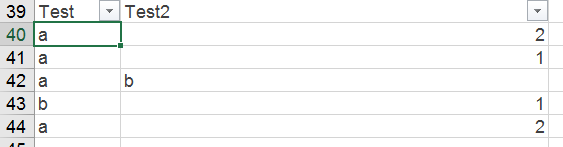
- Filtering breaks, rows that should be filtered are shown, rows that should be shown are filtered and data seems to be misplaced (i.e. not appearing in the correct cells). Inspecting the range that I get by calling getVisibleRange it seems that it does indeed have the corrupted data as shown on the sheet.
Steps to Reproduce, or Live Example
See repro steps above. It's easy to repro.
Context
This is quite critical as we cannot know if the user will filter the data or not, therefore causing the behavior of our add-in to appear broken.
Your Environment
- Platform: PC desktop
- Host: Excel
- Office version number: 16.0.10228.20080
- Operating System: Win 7/10
Screenshot that demonstrate the issue:
- Unfiltered range
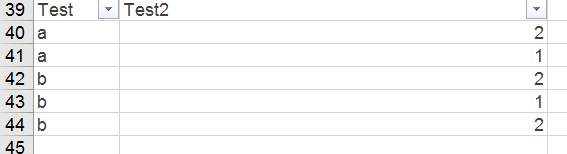
- Filter range

- Set exact same data on range
Excel.run(async (context) => {
  var range = context.workbook.worksheets
            .getItem("Sheet1")
            .getRange("A40");
  var resizedRange = range.getResizedRange(4, 1)
  resizedRange.values = [['a', 2], ['a', 1], ['b', 2], ['b', 1], ['b', 2]];
  await context.sync();
});
Result with filter:

Result after removing the filter:
 georgechr
All 9 comments
Thanks for reporting this issue. I can repro it.
Tracked with internal bug 2500244
 XiangGaoMSFT
on 16 Aug 2018
XiangGaoMSFT
on 16 Aug 2018
@georgechr we've identified the root cause but it seems it still needs some time to fix this regression.
So we want to provide a workaround to unblock you.
The key of the workaround is, setting values cell by cell.
Please try the code below.
await Excel.run(async (context) => {
    var range = context.workbook.worksheets
        .getItem("Sheet1")
        .getRange("A40");
    var resizedRange = range.getResizedRange(4, 1)
    var values = [['a', 2], ['a', 1], ['b', 2], ['b', 1], ['b', 2]];
    for (var i = 0; i < values.length; ++i) {
        for (var j = 0; j < values[i].length; ++j) {
            // old solution
            // resizedRange.getCell(i, j).values = [[values[i][j]]];

            // updated solution
            // in this way, we don't keep all ranges active at any given moment, but only keep a small constant number of ranges.
            // this solution makes it less slow (though still slow) than previous code
            var cell = resizedRange.getCell(i, j);
            cell.values = [[values[i][j]]];
            cell.untrack();
        }
    }

    await context.sync();
});
@XiangGaoMSFT Sorry for taking some time to reply. I just got time to apply the workaround.
The workaround's logic works but it is VERY slow for average sized sets of data (hundreds of rows) and crashes the add-in for large sets of data (thousands of rows). We cannot deploy this to our clients.
We will wait for a proper fix for this. Do you have an ETA for the resolution?
georgechr
on 17 Sep 2018
@XiangGaoMSFT Will a proper fix be implemented for this or should we put a warning that is a known Office issue?
georgechr
on 20 Nov 2018
@georgechr , sorry for the late response. We were looking into this issue. But it's quite complicated so it took longer time than we expected.
For the above workaround, my coworker provided a suggestion. I've updated it and please have a try.
XiangGaoMSFT
on 21 Nov 2018
This issue has been automatically marked as stale because it is marked as needing author feedback but has not had any activity for 4 days. It will be closed if no further activity occurs within 3 days of this comment. Thank you for your interest in Office Add-ins!
![msftbot[bot] picture](https://avatars.githubusercontent.com/in/26612?v=4&s=40) msftbot[bot]
on 28 Aug 2019
msftbot[bot]
on 28 Aug 2019
Please ignore the previous message from msftbot. The Needs: author feedback label was incorrectly applied to this issue; I've removed that label and this issue is no longer marked as stale.
 kbrandl
on 28 Aug 2019
kbrandl
on 28 Aug 2019
Any Update on this?
This bug confused me a bit as it repeatedly writes only the first value onto just the filtered range, but I'm glad there's a workaround.
With the workaround, I'm writing 9 columns of just over 20k rows in about 60.71 seconds vs 17.078 without it.
In office.js, is there a property you can view/read to determine if there's currently a range filtered in Excel? For example something you could use to toggle this workaround on/off?
 misaunde
on 1 Oct 2019
misaunde
on 1 Oct 2019
@misaunde This issue should have been fixed in 16.0.11929.x builds.
I would assume you don't need this workaround anymore.
But just for your reference, we do have solutions to determine if there's currently a range filtered in Excel.
You can use Range.getTables() to get tables that include the given range. Then you can use Table.autoFilter to get the auto filter and check whether it is filtered. You may need to check Worksheet.autoFilter as well.
XiangGaoMSFT
on 2 Oct 2019
Related issues
 wsoccorsi-yw
·
4Comments
wsoccorsi-yw
·
4Comments
 Jarch09
·
3Comments
Jarch09
·
3Comments
 sshukurov
·
4Comments
sshukurov
·
4Comments
 dgrudenic
·
4Comments
dgrudenic
·
4Comments
 gordonmleigh
·
3Comments
gordonmleigh
·
3Comments